当前位置:网站首页>Opencv learning notes 1
Opencv learning notes 1
2022-06-09 03:20:00 【Cloudy_ to_ sunny】
Basic operation of image
Environment configuration address :
Anaconda:https://www.anaconda.com/download/
Python_whl:https://www.lfd.uci.edu/~gohlke/pythonlibs/#opencv
eclipse: As you like , Choose one that can debug Just fine

data fetch - Images
- cv2.IMREAD_COLOR: Color images
- cv2.IMREAD_GRAYSCALE: Grayscale image
import cv2 #opencv The reading format is BGR
import matplotlib.pyplot as plt
import numpy as np
%matplotlib inline

img=cv2.imread('cat.jpg')
img
array([[[142, 151, 160],
        [146, 155, 164],
        [151, 160, 169],
        ...,
        [156, 172, 185],
        [155, 171, 184],
        [154, 170, 183]],

       [[107, 118, 126],
        [112, 123, 131],
        [117, 128, 136],
        ...,
        [155, 171, 184],
        [154, 170, 183],
        [153, 169, 182]],

       [[108, 119, 127],
        [112, 123, 131],
        [118, 129, 137],
        ...,
        [154, 170, 183],
        [153, 169, 182],
        [152, 168, 181]],

       ...,

       [[162, 186, 198],
        [157, 181, 193],
        [142, 166, 178],
        ...,
        [181, 204, 206],
        [170, 193, 195],
        [149, 172, 174]],

       [[140, 164, 176],
        [147, 171, 183],
        [139, 163, 175],
        ...,
        [167, 187, 188],
        [123, 143, 144],
        [104, 124, 125]],

       [[154, 178, 190],
        [154, 178, 190],
        [121, 145, 157],
        ...,
        [185, 198, 200],
        [130, 143, 145],
        [129, 142, 144]]], dtype=uint8)
# Image display , You can also create multiple windows
cv2.imshow('image',img)
#  Waiting time , millisecond ,0 Any key termination
cv2.waitKey(0)
cv2.destroyAllWindows()
def cv_show(name,img):
    cv2.imshow(name,img)
    cv2.waitKey(0)
    cv2.destroyAllWindows()
img.shape
(414, 500, 3)
img=cv2.imread('cat.jpg',cv2.IMREAD_GRAYSCALE)
img
array([[153, 157, 162, ..., 174, 173, 172],
       [119, 124, 129, ..., 173, 172, 171],
       [120, 124, 130, ..., 172, 171, 170],
       ...,
       [187, 182, 167, ..., 202, 191, 170],
       [165, 172, 164, ..., 185, 141, 122],
       [179, 179, 146, ..., 197, 142, 141]], dtype=uint8)
img.shape
(414, 500)
# Image display , You can also create multiple windows
cv2.imshow('image',img)
#  Waiting time , millisecond ,0 Any key termination
cv2.waitKey(10000)
cv2.destroyAllWindows()  # Destroy the image window just displayed
# preservation
cv2.imwrite('mycat.png',img)
True
type(img)
numpy.ndarray
img.size
207000
img.dtype
dtype('uint8')
data fetch - video
- cv2.VideoCapture The camera can capture , Use numbers to control different devices , for example 0,1.
- If it's a video file , You can directly specify a good path .
vc = cv2.VideoCapture('test.mp4')
#  Check that it is opened correctly
if vc.isOpened():
    oepn, frame = vc.read() # The first parameter is bool Verify that the return is correct , The second parameter is the image
else:
    open = False
while open:
    ret, frame = vc.read()
    if frame is None:
        break
    if ret == True:
        gray = cv2.cvtColor(frame,  cv2.COLOR_BGR2GRAY)
        cv2.imshow('result', gray)
        if cv2.waitKey(100) & 0xFF == 27:
            break
vc.release()
cv2.destroyAllWindows()
Capture part of the image data
img=cv2.imread('cat.jpg')
cat=img[0:50,0:200]
cv_show('cat',cat)
Color channel extraction
b,g,r=cv2.split(img)
r
array([[160, 164, 169, ..., 185, 184, 183],
       [126, 131, 136, ..., 184, 183, 182],
       [127, 131, 137, ..., 183, 182, 181],
       ...,
       [198, 193, 178, ..., 206, 195, 174],
       [176, 183, 175, ..., 188, 144, 125],
       [190, 190, 157, ..., 200, 145, 144]], dtype=uint8)
r.shape
(414, 500)
img=cv2.merge((b,g,r))
img.shape
(414, 500, 3)
#  Only keep R
cur_img = img.copy()
cur_img[:,:,0] = 0
cur_img[:,:,1] = 0
cv_show('R',cur_img)
cur_img.shape
(414, 500, 3)
#  Only keep G
cur_img = img.copy()
cur_img[:,:,0] = 0
cur_img[:,:,2] = 0
cv_show('G',cur_img)
#  Only keep B
cur_img = img.copy()
cur_img[:,:,1] = 0
cur_img[:,:,2] = 0
cv_show('B',cur_img)
Border filling
top_size,bottom_size,left_size,right_size = (50,50,50,50)

replicate = cv2.copyMakeBorder(img, top_size, bottom_size, left_size, right_size, borderType=cv2.BORDER_REPLICATE)
reflect = cv2.copyMakeBorder(img, top_size, bottom_size, left_size, right_size,cv2.BORDER_REFLECT)
reflect101 = cv2.copyMakeBorder(img, top_size, bottom_size, left_size, right_size, cv2.BORDER_REFLECT_101)
wrap = cv2.copyMakeBorder(img, top_size, bottom_size, left_size, right_size, cv2.BORDER_WRAP)
constant = cv2.copyMakeBorder(img, top_size, bottom_size, left_size, right_size,cv2.BORDER_CONSTANT, value=0)
import matplotlib.pyplot as plt
plt.subplot(231), plt.imshow(img, 'gray'), plt.title('ORIGINAL')
plt.subplot(232), plt.imshow(replicate, 'gray'), plt.title('REPLICATE')
plt.subplot(233), plt.imshow(reflect, 'gray'), plt.title('REFLECT')
plt.subplot(234), plt.imshow(reflect101, 'gray'), plt.title('REFLECT_101')
plt.subplot(235), plt.imshow(wrap, 'gray'), plt.title('WRAP')
plt.subplot(236), plt.imshow(constant, 'gray'), plt.title('CONSTANT')

plt.show()
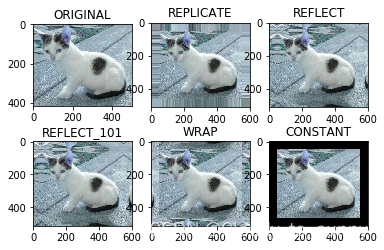
- BORDER_REPLICATE: Replication , That is to copy the edge pixels .
- BORDER_REFLECT: Reflection , Copy the pixels in the image of interest on both sides, for example :fedcba|abcdefgh|hgfedcb
- BORDER_REFLECT_101: Reflection , That is, take the most edge pixel as the axis , symmetry ,gfedcb|abcdefgh|gfedcba
- BORDER_WRAP: The outer packing method cdefgh|abcdefgh|abcdefg
- BORDER_CONSTANT: Constant method , Constant value filling .
Numerical calculation
img_cat=cv2.imread('cat.jpg')
img_dog=cv2.imread('dog.jpg')
img_cat2= img_cat +10 # Every pixel is added 10
img_cat[:5,:,0]
array([[142, 146, 151, ..., 156, 155, 154],
       [107, 112, 117, ..., 155, 154, 153],
       [108, 112, 118, ..., 154, 153, 152],
       [139, 143, 148, ..., 156, 155, 154],
       [153, 158, 163, ..., 160, 159, 158]], dtype=uint8)
img_cat2[:5,:,0]
array([[152, 156, 161, ..., 166, 165, 164],
       [117, 122, 127, ..., 165, 164, 163],
       [118, 122, 128, ..., 164, 163, 162],
       [149, 153, 158, ..., 166, 165, 164],
       [163, 168, 173, ..., 170, 169, 168]], dtype=uint8)
# amount to % 256
(img_cat + img_cat2)[:5,:,0]
array([[ 38,  46,  56, ...,  66,  64,  62],
       [224, 234, 244, ...,  64,  62,  60],
       [226, 234, 246, ...,  62,  60,  58],
       [ 32,  40,  50, ...,  66,  64,  62],
       [ 60,  70,  80, ...,  74,  72,  70]], dtype=uint8)
cv2.add(img_cat,img_cat2)[:5,:,0]
array([[255, 255, 255, ..., 255, 255, 255],
       [224, 234, 244, ..., 255, 255, 255],
       [226, 234, 246, ..., 255, 255, 255],
       [255, 255, 255, ..., 255, 255, 255],
       [255, 255, 255, ..., 255, 255, 255]], dtype=uint8)
Image fusion
img_cat + img_dog # Because the length and width are different, you can't directly add
---------------------------------------------------------------------------

ValueError                                Traceback (most recent call last)

<ipython-input-111-ffa3cdc5d6b8> in <module>()
----> 1 img_cat + img_dog


ValueError: operands could not be broadcast together with shapes (414,500,3) (429,499,3)
img_cat.shape
(414, 500, 3)
img_dog = cv2.resize(img_dog, (500, 414))
img_dog.shape
(414, 500, 3)
res = cv2.addWeighted(img_cat, 0.4, img_dog, 0.6, 0)
plt.imshow(res)
<matplotlib.image.AxesImage at 0x20a6b5f39e8>

res = cv2.resize(img, (0, 0), fx=4, fy=4)
plt.imshow(res)
<matplotlib.image.AxesImage at 0x20a6b58b908>

res = cv2.resize(img, (0, 0), fx=1, fy=3)
plt.imshow(res)
<matplotlib.image.AxesImage at 0x20a6b7bcb00>

Reference resources
边栏推荐
- Under what circumstances do you need to find a third-party testing agency to do software testing?
- Container internal mysql5.7 configuration mode sqlmode + timeout wait_ timeout
- Ccf-csp 202012-5 Star Trek 80 points
- Ccf-csp 201803-5 quadratic summation 30 points
- Oracle connecting to PLSQL
- How to apply for compulsory redemption of closed financial products?
- What taxes do Tami dogs need to pay for equity transfer? What are the possible tax risks?
- Which securities firm should be selected for stock account opening? Is it safe to open an account
- What does this SQL question mean
- TypeScript 基础类型 —— 类型断言
猜你喜欢

The easynvr hardware of the video edge computing gateway always reports an error when it is started in the service mode. How to troubleshoot and solve it?

Ccf-csp 202112-5 extreme path violence 12 points

Multi scale aligned distillation for low resolution detection

Reflection principle and application in C #
![[detailed explanation of kubernetes 13] - dashboard deployment](/img/81/d4567d0ff0e4509ace3d62cb16bdcc.png)
[detailed explanation of kubernetes 13] - dashboard deployment

What does this SQL question mean

Now VB6.0 has been connected to SQL, but when using the query function, you can't query with any conditions. The situation on the Internet is not consistent with mine. How can you implement it?

Ccf-csp 201903-4 messaging interface

Ccf-csp 201803-4 chess game evaluation +dfs
现在VB6.0已经和SQL连接了,但是使用查询功能时无法做到任意条件查询,网上的情况和我的也不太相符,请问该如何实现呢?
随机推荐
What taxes do Tami dogs need to pay for equity transfer? What are the possible tax risks?
Leetcode 560. And is the prefix and of the subarray of K
[detailed explanation of kubernetes 11] - detailed explanation of storage
Leetcode 801. Minimum number of exchanges DP to increment the sequence
Leetcode 1185. Day of the week
SAS batting lab demonstrates the value of data and analysis to teenagers
Leetcode 1248. Count "graceful subarray" prefix and
RTSP/Onvif协议视频平台EasyNVR如何配置用户的视频流播放时长?
Common Android program functions clear cache
Period, duration calculation interval
Ranking list of short-term financial products in 2022
oracle 连接PLSQL
Neural network learning (V) -- comparison of common network structures
关于JS console.log() 是同步 or 异步引发的问题
Android 程序常用功能《清除缓存》
2003 -can t connect to MySQL server on localhost (10061 "unknown error")
Oracle connecting to PLSQL
Ccp-csp 201912-5 magic number violence 25
Generation of random numbers in C language [detailed explanation]
What does the seven layer network structure do?