当前位置:网站首页>Build mtk6765 compilation environment
Build mtk6765 compilation environment
2022-07-27 13:19:00 【Joe * twelve】
MTK6765 Build the compilation environment
Development software
It is recommended to build virtual machines , Reinstallation is frequent during my development
1.VMware-workstation-full-16.1.0-17198959
Use VMware15 It's fine too , But pay attention to your computer windows edition , the latest version windows10 Can install VMware15, But the blue screen will crash when running the virtual machine system .
2.ubuntu-16.04.7-desktop-amd64
Need to use ubuntu16 And above , There seems to be a problem below this version
3. System file development kit
I use the **.tar package , Not for the time being , Documents on the official website can be used
Environment building
VMware Set up
1. menu bar – virtual machine – install vmwaretools, If not updated, update
ubuntu Set up
installed Ubuntu Then set it as shown in the following figure
1. Memory , The proposal USES 16g Or bigger , Because the memory required for compilation is large , If the computer configuration is not enough, it is recommended to increase the memory , At present, the test of reducing memory has not been compiled successfully , And it takes a long time
2. processor , Install the computer configuration and make appropriate choices
3. Hard disk , It is suggested to reserve 400g, At present, I have used 300+g
4. network adapter , It is recommended to choose the bridge mode , It can be shared with external networks ip, It's convenient for other ssh Connect for debugging .
5. Enter the options bar , Open shared folder , This folder is located in windows Next , stay windows You also need to open the sharing option , Please find the solution online for details 

Recommended tools to install
0. Get into root
[email protected]:~$ sudo passwd lq
[sudo] password for lq:
Enter new UNIX password:
Retype new UNIX password:
passwd: password updated successfully
[email protected]:~$ su
Password:
[email protected]:/home/lq#
1.ssh service
[email protected]:/#sudo ps -e |grep ssh
[email protected]:/#                             // No information means it is not installed
[email protected]:/#sudo apt-get update  // Update the list first
[email protected]:/#sudo apt-get install openssh-server // Then install the service
[email protected]:/#sudo ps -e |grep ssh  // Check for installation
					3933    00:00:00  sshd  // Indicates successful installation
2.MobaXterm Tools –windows
stay windows Install the tool under , Can pass ssh Connect to linux, And it is convenient to linux Modify the following file , Do not install or use other software , Handle according to personal preferences
3.mingw32 service
[email protected]:/#sudo apt-get install mingw32
Unable to locate package mingw32   // Report errors
[email protected]:/#sudo gedit /etc/apt/sources.list
// stay sources.list Add... At the end , preservation
deb http://us.archive.ubuntu.com/ubuntu trusty main universe
[email protected]:/#sudo apt-get update
[email protected]ntu:/#sudo apt-get install mingw32
Compilation steps
1. The file path of the new project , And release the project package to this folder
[email protected]:/home/lq#mkdir Project
...
[email protected]:/home/lq/Project#mkdirMTK6765
...
// stay /mnt/hgfs/vmLinuxstore/6765.tar  Find the file under the shared folder
// If you cannot find the file and connect hgfs There are no folders
//1. Check whether the shared folder settings ok
//2. see window Whether to share the shared folder
//3. newly build hgfs and vmLinuxstore Folder , Generally, shared files will be visible after refreshing
[email protected]:/home/lq/Project#cd ..
...
[email protected]:/#tar zxvf /mnt/hgfs/vmLinuxstore/6765.tar -C /home/lq/Project/MTK6765
2. Download the compilation tool
[email protected]:/#sudo apt-get update
[email protected]:/#sudo apt-get install -y git gcc lib32stdc++6 gnupg flex bison gperf build-essential zip
[email protected]:/#sudo apt-get install -y curl libc6-dev libncurses5-dev:i386 x11proto-core-dev libx11-dev:i386 libreadline6-dev:i386 g++-multilib mingw32 tofrodos libgl1-mesa-dev python-markdown libxml2-utils xsltproc zlib1g-dev:i386
[email protected]:/#sudo apt-get install libswitch-perl libssl-dev libncurses5 libncurses5-dev
[email protected]:/#sudo apt-get install libxml-sax-expat-incremental-perl
[email protected]:/#sudo cpan install XML::Simple
[email protected]:/#sudo add-apt-repository ppa:openjdk-r/ppa
[email protected]:/#sudo apt-get update
[email protected]:/#sudo apt-get install openjdk-8-jdk
3. Start compilation
// Enter into MTK6765 Under the folder
[email protected]:/home/lq/Project/MTK6765# source build/envsetup.sh
..
[email protected]:/home/lq/Project/MTK6765# lunch
// There are many types of hardware , I use full_k65v1_64_bsp-userdebug
// So choose 105 Number
[email protected]:/home/lq/Project/MTK6765# make -j12 2>&1 | tee build.log
//j12 Representatives execute at the same time 12 Thread thread , After enlargement, the compilation speed can be improved , But the requirements for computers are high , General choice 24
// Initial compilation may require 1-12 Hours , Even longer
4. Compiler error
1.build/core/ninja.mk:148: recipe for target ‘ninja_wrapper’ failed
 stay build/envsetup.sh Add... At the end of the script
export LC_ALL=C
2.Communication error with Jack server (35)
sudo vi /etc/java-8-openjdk/security/java.security
 lookup ”jdk.tls.disabledAlgorithms=“ Delete TLSv1, TLSv1.1, as follows :
jdk.tls.disabledAlgorithms=SSLv3, RC4, DES, MD5withRSA,

./jack-admin kill-server
./jack-admin start-server
3. The compiler cannot find the corresponding hardware information
//  Basic hardware information needs to be updated
/home/lq/Project/MTK6765/vendor/mediatek/proprietary/bootable/bootloader/preloader/tools/emigen/MT6765/MemoryDeviceList_MT6765.xls
4.ninja failed with: signal: killed
//  The problem arises , Basically, there is insufficient memory , According to online suggestions , It is better to increase the size of swap space
free -m   // see swap Partition size
sudo dd if=/dev/zero of=/var/swap bs=1024 count=2000000 // Set the memory to 2g
sudo mkswap /home/swap
sudo swapon /home/swap
free -m   // Check the modified partition size

// If it is expanded again on the original basis , Will report a mistake :
sudo dd if=/dev/zero of=/home/swap bs=1024 count=2048000
dd: failed to open '/home/swap': Text file busy // Error message
// resolvent : Need to close first swap, Redistribute , The perform
sudo swapoff -a

// actually , My compilation requires a large memory , only 2g Not enough use , Set to 4g Can be compiled through , It is speculated that the memory of subsequent devices may have to be expanded
边栏推荐
- 文本样式
- heap
- multi-table query
- 图标字体
- Initializing database error after reinstalling MySQL
- Article reproduction: srcnn
- JS single thread understanding notes - Original
- Overview of famous inner classes and anonymous inner classes
- Interviewer: how to deal with the data loss of redis master-slave cluster switching?
- Multi activity disaster recovery construction after 713 failure of station B | takintalks share
猜你喜欢
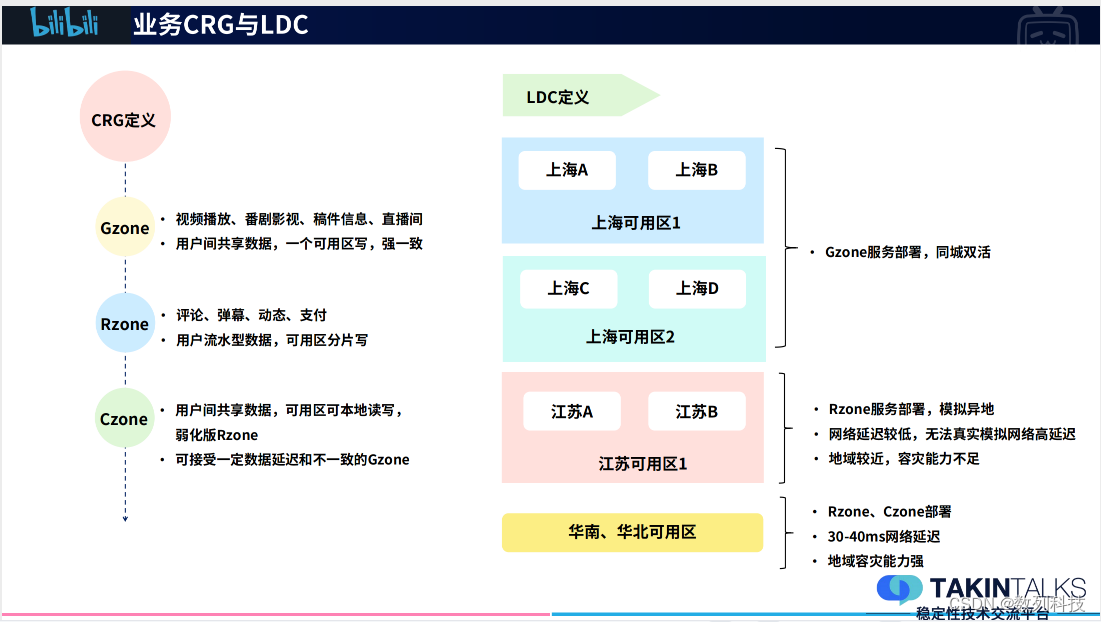
Multi activity disaster recovery construction after 713 failure of station B | takintalks share

Is it easy to find a job after programmer training and learning

Isolation level

JNI程序如何进行参数传递

Article reproduction: srcnn

Mixin\ plug in \scoped style
B站713故障后的多活容灾建设|TakinTalks大咖分享
初学者入门:使用WordPress搭建一个专属自己的博客

multi-table query

18. Text processing tool -grep
随机推荐
2022 global Vocational Education Industry Development Report
Xposed+fdex2 app shelling (black cat complains about app shelling)
Why does the class annotated with @configuration generate cglib proxy?
分布式系统架构理论与组件
What should I do if I can't see any tiles on SAP Fiori launchpad?
Reptile
Amd adrenalin 22.7.1 driver update: double the performance of OpenGL and support Microsoft win11 22h2 system
【表达式计算】双栈 : 表达式计算问题的通用解法
Xshell7 can log in to MySQL virtual machine, but not mysql
Aike AI frontier promotion (7.27)
Plus SBOM: assembly line BOM pbom
Map interface
写出一个程序,接受一个有字母和数字以及空格组成的字符串,和一个字符,然后输出输入字符串中含有该字符的个数。不区分大小写。
Eccv2022 | Ru & Google proposed to use clip for zero shot target detection!
Pyside6/pyqt development experience summary (2) - set shortcut keys
PG synchronizes multiple data tables to MySQL. Is there a way to simplify the configuration?
xshell7可以登录mysql虚拟机不能登陆mysql
POJ2594 Treasure Exploration【二分图最小路径覆盖】【Floyd】
Xianghe meat cake in memory
程序员培训学习后好找工作吗