当前位置:网站首页>[Server installation Redis] Centos7 offline installation of redis
[Server installation Redis] Centos7 offline installation of redis
2022-08-11 04:25:00 【A rookie is a great god】
1.1 下载、上传、解压redis4.0.11
下载地址:http://download.redis.io/releases/redis-4.0.11.tar.gz
下载后上传到服务器上,并解压:
备注:Here is to upload the compressed package to/opt/redis目录下.
[[email protected] redis]# tar -zxvf redis-4.0.11.tar.gz
redis-4.0.11/
redis-4.0.11/.gitignore
......
redis-4.0.11/utils/whatisdoing.sh
[[email protected] redis]# ls
redis-4.0.11 redis-4.0.11.tar.gz
[[email protected] redis]# cd redis-4.0.11/
[[email protected] redis-4.0.11]# ls
00-RELEASENOTES CONTRIBUTING deps Makefile README.md runtest runtest-sentinel src utils
BUGS COPYING INSTALL MANIFESTO redis.conf runtest-cluster sentinel.conf tests
1.2 安装gcc
1)如果执行gcc –version出现以下信息,表示已经安装过gcc,可以跳过该步骤:
[[email protected] spark_job_monitor]$ gcc --version
gcc (GCC) 4.8.5 20150623 (Red Hat 4.8.5-4)
Copyright (C) 2015 Free Software Foundation, Inc.
This is free software; see the source for copying conditions. There is NO
warranty; not even for MERCHANTABILITY or FITNESS FOR A PARTICULAR PURPOSE.
[[email protected] redis]#
2)否则,如果执行makeThe command reported the following error,Indicates that it is not installed on the systemC语言环境,需要安装,在linux系统上的C环境是gcc,因此需要安装gcc.
make[3]: gcc: Command not found
make[3]: *** [net.o] Error 127
make[3]: Leaving directory `/home/work/redis/deps/hiredis'
make[2]: *** [hiredis] Error 2
make[2]: Leaving directory `/home/work/redis/deps'
make[1]: [persist-settings] Error 2 (ignored)
CC adlist.o
/bin/sh: cc: command not found
make[1]: *** [adlist.o] Error 127
make[1]: Leaving directory `/home/work/redis/src'
make: *** [all] Error 2
安装gcc,
方式1:从centos7extracted from the system installation image:解压镜像文件,进入"Packages"目录,Take it out as shown belowrpm包
方式2:Visit the mirror website to get it:centos-7-os-x86_64-Packages安装包下载_开源镜像站-阿里云 ,然后将其上传
从里面packages找出来,These are compiled from the Internet(15Do not miss a file!!)
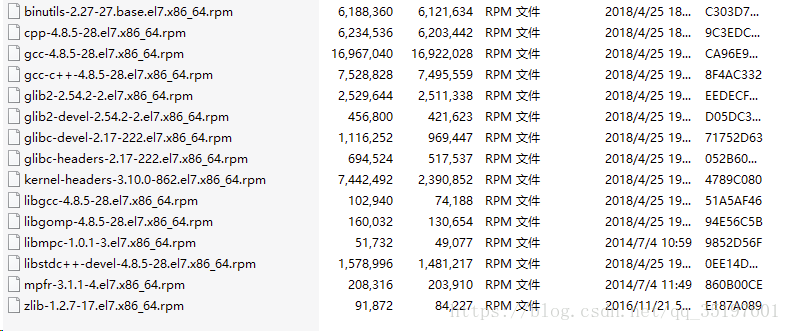
解压gcc.zip,编译安装
[[email protected] soft]# unzip gcc.zip
[[email protected] soft]# cd gcc
[[email protected] soft]# rpm -Uvh *.rpm --nodeps --force
查看gcc版本,出现以下信息,表示安装成功
[[email protected] spark_job_monitor]$ gcc --version
gcc (GCC) 4.8.5 20150623 (Red Hat 4.8.5-4)
Copyright (C) 2015 Free Software Foundation, Inc.
This is free software; see the source for copying conditions. There is NO
warranty; not even for MERCHANTABILITY or FITNESS FOR A PARTICULAR PURPOSE.
[[email protected] redis]#
1.3 编译安装redis
[[email protected] redis-4.0.11]# make MALLOC=libc
cd src && make all
........
CC rax.o
LINK redis-server
INSTALL redis-sentinel
CC redis-cli.o
LINK redis-cli
CC redis-benchmark.o
LINK redis-benchmark
INSTALL redis-check-rdb
INSTALL redis-check-aof
Hint: It's a good idea to run 'make test' ;)
make[1]: Leaving directory `/opt/redis/redis-4.0.11/src'
[[email protected] redis-4.0.11]#
[[email protected] redis-4.0.11]# cd src && make install
CC Makefile.dep

Hint: It's a good idea to run 'make test' ;)
INSTALL install
INSTALL install
INSTALL install
INSTALL install
INSTALL install
编译安装成功.
1.4 启动redis
[[email protected] src]# ./redis-server
24496:C 11 Mar 13:49:56.298 # oO0OoO0OoO0Oo Redis is starting oO0OoO0OoO0Oo
24496:C 11 Mar 13:49:56.298 # Redis version=4.0.11, bits=64, commit=00000000, modified=0, pid=24496, just started
24496:C 11 Mar 13:49:56.298 # Warning: no config file specified, using the default config. In order to specify a config file use ./redis-server /path/to/redis.conf
                _._
           _.-``__ ''-._
      _.-``    `.  `_.  ''-._           Redis 4.0.11 (00000000/0) 64 bit
  .-`` .-```.  ```\/    _.,_ ''-._
 (    '      ,       .-`  | `,    )     Running in standalone mode
 |`-._`-...-` __...-.``-._|'` _.-'|     Port: 6379
 |    `-._   `._    /     _.-'    |     PID: 18685
  `-._    `-._  `-./  _.-'    _.-'
 |`-._`-._    `-.__.-'    _.-'_.-'|
 |    `-._`-._        _.-'_.-'    |           http://redis.io
  `-._    `-._`-.__.-'_.-'    _.-'
 |`-._`-._    `-.__.-'    _.-'_.-'|
 |    `-._`-._        _.-'_.-'    |
  `-._    `-._`-.__.-'_.-'    _.-'
      `-._    `-.__.-'    _.-'
          `-._        _.-'
              `-.__.-'
24496:M 11 Mar 13:49:56.302 # Server initialized 24496:M 11 Mar 13:49:56.303 # WARNING overcommit_memory is set to 0! Background save may fail under low memory condition. To fix this issue add 'vm.overcommit_memory = 1' to /etc/sysctl.conf and then reboot or run the command 'sysctl vm.overcommit_memory=1' for this to take effect. 24496:M 11 Mar 13:49:56.303 # WARNING you have Transparent Huge Pages (THP) support enabled in your kernel. This will create latency and memory usage issues with Redis. To fix this issue run the command 'echo never > /sys/kernel/mm/transparent_hugepage/enabled' as root, and add it to your /etc/rc.local in order to retain the setting after a reboot. Redis must be restarted after THP is disabled. 24496:M 11 Mar 13:49:56.303 * Ready to accept connections
启动成功.
以下为设置redis开机自启,and added to system services
1.4.1 复制redis配置文件
[[email protected] src]# mkdir /etc/redis
[[email protected] src]# cd ..
[[email protected] redis-4.0.11]# ls
00-RELEASENOTES CONTRIBUTING deps Makefile README.md runtest runtest-sentinel src utils
BUGS COPYING INSTALL MANIFESTO redis.conf runtest-cluster sentinel.conf tests
[[email protected] redis-4.0.11]# cp redis.conf /etc/redis/6379.conf
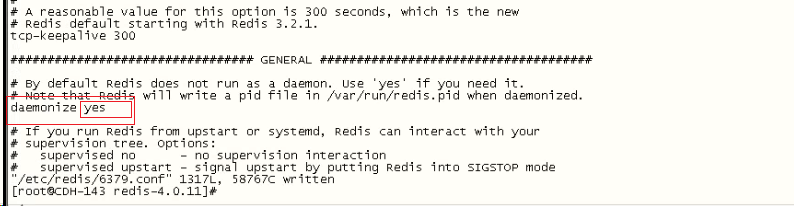
修改redisStart as a background start:
[[email protected] redis-4.0.11]# vi /etc/redis/6379.conf
1.4.2 将启动文件拷贝到init.d中
[[email protected] redis-4.0.11]# cp utils/redis_init_script /etc/init.d/redisd
1.4.3 修改启动脚本参数
[[email protected] redis-4.0.11]# vi /etc/init.d/redisd
添加以下代码,:wq保存退出
添加
# chkconfig: 2345 10 90
# description: Start and Stop redisd
修改:
EXEC=/opt/redis/redis-4.0.11/src/redis-server
CLIEXEC=/opt/redis/redis-4.0.11/src/redis-cli
PIDFILE=/opt/redis/redis-4.0.11/redis_${REDISPORT}.pid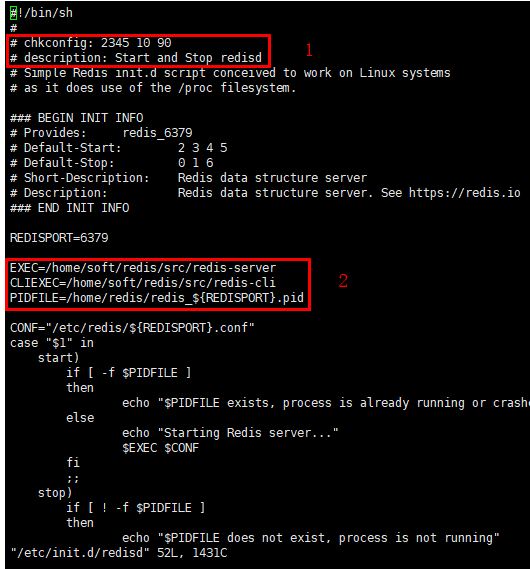
1.4.4 增加脚本执行权限
[[email protected] redis-4.0.11]# chmod +x /etc/init.d/redisd
1.4.5 Add system services
[[email protected] redis-4.0.11]# chkconfig --add redisd
[[email protected] redis-4.0.11]# chkconfig --list redisd

Note: This output shows SysV services only and does not include native
systemd services. SysV configuration data might be overridden by native
systemd configuration.

If you want to list systemd services use 'systemctl list-unit-files'.
To see services enabled on particular target use
'systemctl list-dependencies [target]'.

redisd 0:off 1:off 2:on 3:on 4:on 5:on 6:off
[[email protected] redis-4.0.11]#
1.4.6 启动redis服务测试
[[email protected] redis-4.0.11]# service redisd start
Starting Redis server...
9084:C 11 Mar 15:23:36.469 # oO0OoO0OoO0Oo Redis is starting oO0OoO0OoO0Oo
9084:C 11 Mar 15:23:36.469 # Redis version=4.0.11, bits=64, commit=00000000, modified=0, pid=9084, just started
9084:C 11 Mar 15:23:36.469 # Configuration loaded
[[email protected] redis-4.0.11]#
[[email protected] redis-4.0.11]# ps -aux | grep redis
root 3575 0.0 0.0 38260 2140 ? Ssl 15:09 0:00 /opt/redis/redis-4.0.11/src/redis-server 127.0.0.1:6379
root 8870 0.0 0.0 112660 956 pts/2 S+ 15:22 0:00 grep --color=auto redis
配置完毕,重启服务器,测试是否成功
边栏推荐
- What is Machine Reinforcement Learning?What is the principle?
- 【C语言】入门
- Element's BFC attribute
- 洛谷P6586 蒟蒻火锅的盛宴
- Interchangeability Measurements and Techniques - Calculation of Deviations and Tolerances, Drawing of Tolerance Charts, Selection of Fits and Tolerance Classes
- Audio codec, using FAAC to implement AAC encoding
- Common layout effect realization scheme
- 什么是机器强化学习?原理是什么?
- Provincial level of Echart maps, as well as all prefecture-level download and use
- What is ensemble learning in machine learning?
猜你喜欢

Multi-serial port RS485 industrial gateway BL110

破解事务性工作瓶颈,君子签电子合同释放HR“源动力”!

Read the article, high-performance and predictable data center network

【C语言】入门

移动端地图开发选择哪家?

【FPGA】SDRAM

"104 Maximum Depth of Binary Trees" in LeetCode's Day 12 Binary Tree Series

Get Qt installation information: including installation directory and various macro addresses

"98 BST and Its Verification" of the 13th day of leetcode brushing series of binary tree series

Echart地图的省级,以及所有地市级下载与使用
随机推荐
对象的创建以及显示转换
【yolov7系列三】实战从0构建训练自己的数据集
set_new_handler(0)是什么意思?有什么用?
常见布局效果实现方案
洛谷P2245 星际导航
send_sig: 内核执行流程
如何给网页添加icon图标?
Map中的getOrDefualt方法
(转)JVM中那些区域会发生OOM?
What is machine learning?Explain machine learning concepts in detail
洛谷P4061 大吉大利,晚上吃鸡
shell monitors gpu usage
Leetcode 669. 修剪二叉搜索树
《卫星界》刊评“星辰大海”计划:孙宇晨为太空旅游带来新的机遇
Interchangeability Measurements and Techniques - Calculation of Deviations and Tolerances, Drawing of Tolerance Charts, Selection of Fits and Tolerance Classes
洛谷P4560 Wall 砖墙
交换机--- 生成树--三层架构总结
破解事务性工作瓶颈,君子签电子合同释放HR“源动力”!
Mysql:设置主键自动增长起始值
rub the heat - do not open