当前位置:网站首页>Elastic APM安装和使用
Elastic APM安装和使用
2022-07-26 08:55:00 【还是转转】
在上文分布式跟踪系统选型和实践中,简单介绍过APM系统,这里记录一下Elastic APM的安装和使用过程。
搭建elk
按照es官网说明分别部署(见参考资料)。
部署elasticsearch
通过命令行下载elasticsearch:curl -L -O https://artifacts.elastic.co/downloads/elasticsearch/elasticsearch-7.0.1-linux-x86_64.tar.gz
解压到指定目录,如/usr/local目录。
进入elasticsearch的bin目录,运行elasticsearch脚本:./elasticsearch
即可启动elasticsearch。向本地9200端口发送一个http请求,得到返回如下:
部署logstash
下载logstash:https://www.elastic.co/cn/downloads/logstash(7.9版本)
解压到指定目录,如/usr/local。
进入logstash目录,运行logstash脚本:./bin/logstash -f config/logstash-sample.conf
可以看到当前输出:
如果elasticsearch未运行,则会报错:无法连接es实例。
部署kibana
通过命令行下载kibana:wget https://artifacts.elastic.co/downloads/kibana/kibana-7.0.1-linux-x86_64.tar.gz
解压到指定目录,进入bin目录执行脚本:./kibana
访问127.0.0.1:5601,可以看到界面kibana界面:
Elk使用
上面在启动logstash的时候是通过样例配置文件来启动的,现在创建一个新的配置文件logstash.conf: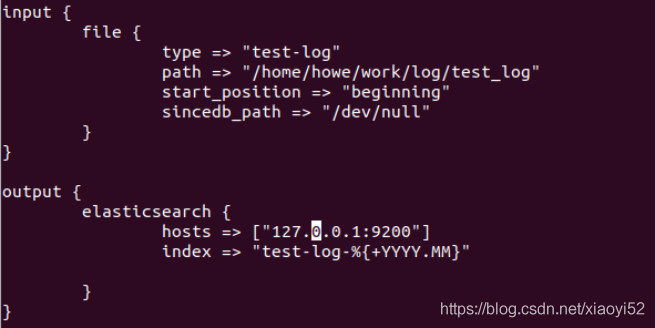
然后重新启动logstash,指定配置文件为新创建的文件:
./bin/logstash -f config/logstash.conf
该配置文件表示从文件读取数据,然后存储到elasticsearch中,索引名为test-log-[年月]。
在kibana的manager页面查看索引,会发现新增了一个名为test-log-2020.11的索引。
创建Index pattern,输入索引正则表达式,会自动匹配上索引文件: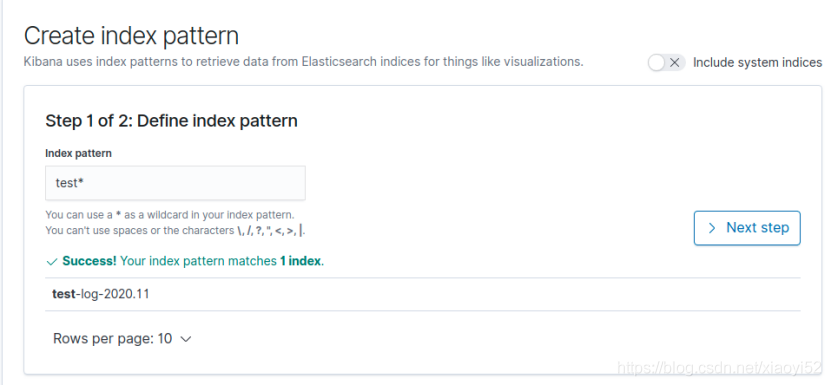
创建完索引的正则表达式后,在discover页面就能可以选择索引了。在搜索框输入查询条件就能搜索数据了。
Elastic APM
启动apm server
下载(https://www.elastic.co/guide/en/apm/server/7.0/installing.html
)并解压apm server到指定目录,进入bin目录导入kibana apm仪表盘并启动apm server:
./apm-server setup
./apm-server -e
启动agent
不同语言的agent的使用方式是不同的。下面以python的agent为例进行说明。
支持的web框架和版本参考官网说明:https://www.elastic.co/guide/en/apm/agent/python/5.x/supported-technologies.html。
Python中的agent是以库的方式提供的,在代码中集成即可,如下所示:
from flask import Flask
from elasticapm.contrib.flask import ElasticAPM
from elasticapm.handlers.logging import LoggingHandler
app = Flask(__name__)
app.config['ELASTIC_APM'] = {
    'SERVER_URL': 'http://127.0.0.1:8200',
    'DEBUG': True
}
apm = ElasticAPM(app, service_name='python-test', logging=True)
port = 5000

@app.route('/')
def hello_world():
    try:
        1 / 0
    except ZeroDivisionError:
        apm.client.capture_exception()
    return 'Hello World! I am running on port ' + str(port)

if __name__ == '__main__':
    handler = LoggingHandler(client=apm.client)
    app.logger.addHandler(handler)
    app.run(host='0.0.0.0', port=port)
访问http://127.0.0.1:5000/接口,输出:Hello World! I am running on port 5000。
官网上说支持6.0+版本的tornado,但使用agent之后服务无法启动,why??
APM界面
进入kibana的apm菜单,按照指引创建apm界面。完成后可以看到如下界面:
点击server进入:

进入discover菜单,选择apm-*索引,可以查看apm索引数据。
下一篇将继续介绍cat的安装使用。
参考资料
[1].https://www.elastic.co/guide/en/apm/get-started/7.9/install-and-run.html
边栏推荐
- Recurrence of SQL injection vulnerability in the foreground of a 60 terminal security management system
- pycharm 打开多个项目的两种小技巧
- day06 作业--技能题6
- [untitled]
- Nuxt - 项目打包部署及上线到服务器流程(SSR 服务端渲染)
- PAT 甲级 A1076 Forwards on Weibo
- The largest number of statistical absolute values --- assembly language
- Introduction to AWD attack and defense competition
- JDBC database connection pool (Druid Technology)
- Set of pl/sql -2
猜你喜欢


随机推荐
Typescript snowflake primary key generator
Nuxt - 项目打包部署及上线到服务器流程(SSR 服务端渲染)
Which of count (*), count (primary key ID), count (field) and count (1) in MySQL is more efficient? "Suggested collection"
Study notes of automatic control principle -- correction and synthesis of automatic control system
第6天总结&数据库作业
[recommended collection] MySQL 30000 word essence summary index (II) [easy to understand]
Introduction to excellent verilog/fpga open source project (30) - brute force MD5
Web概述和B/S架构
General file upload vulnerability getshell of a digital campus system (penetration test -0day)
Cadence(十)走线技巧与注意事项
Babbitt | metauniverse daily must read: does the future of metauniverse belong to large technology companies or to the decentralized Web3 world
pl/sql之集合-2
JS file import of node
[recommended collection] MySQL 30000 word essence summary - query and transaction (III)
NPM add source and switch source
Web3 Games: current situation and future
sklearn 机器学习基础(线性回归、欠拟合、过拟合、岭回归、模型加载保存)
js闭包:函数和其词法环境的绑定
Cadence (x) wiring skills and precautions
2022年上海市安全员C证考试试题及模拟考试