当前位置:网站首页>DRF learning notes (II): Data deserialization
DRF learning notes (II): Data deserialization
2022-07-27 16:18:00 【fresh_ nam】
List of articles
Preface
This blog is written after the last blog , Sure Click here see
One 、 Data deserialization use
1、 Basic use
When deserializing with a serializer , You need to verify the data , To obtain the data that has been successfully verified or save it as a model class object .
Before getting the deserialized data , Must call is_valid() Method validation , Verification successful return True, Otherwise return to False.
Use :
>>> from demo.serializer import ClassInfoSerializer
>>> data = {
    'number': ' One ', 'grade': ' Third grade '}
>>> serializer = ClassInfoSerializer(data=data)
>>> serializer.is_valid()
False
>>> serializer.errors
{
    'number': [ErrorDetail(string='A valid integer is required.', code='invalid')]}
2、 Custom validation
If you feel that the provided verification method is not enough , You can also customize the validation , There are three ways :
(1)validators
Add... To the field validators Option parameters , You can also supplement the verification behavior , Modify the code :
#  Validation function
def about_grade(value):
    if not (value == ' In grade one ' or value == ' second grade ' or value == ' Third grade '):
        raise serializers.ValidationError(" Grade input error !")

class ClassInfoSerializer(serializers.Serializer):
    """ Class data serializer """
    id = serializers.IntegerField(label='ID', read_only=True)
    number = serializers.IntegerField(label=' Class number ', required=False)
    grade = serializers.CharField(label=' grade ', max_length=3, required=False, validators=[about_grade])
    studentinfo_set = serializers.PrimaryKeyRelatedField(read_only=True, many=True)  #  add to
Use :
>>> from demo.serializers import ClassInfoSerializer
>>> data = {
    'grade': ' Fourth grade '}
>>> serializer = ClassInfoSerializer(data=data)
result 
(2)validate_<field_name>
Right <field_name> Field , You can also modify the code as follows :
class ClassInfoSerializer(serializers.Serializer):
    """ Class data serializer """
    id = serializers.IntegerField(label='ID', read_only=True)
    number = serializers.IntegerField(label=' Class number ', required=False)
    grade = serializers.CharField(label=' grade ', max_length=3, required=False)
    studentinfo_set = serializers.PrimaryKeyRelatedField(read_only=True, many=True)  #  add to
    def validate_grade(self, value):
        if not (value == ' In grade one ' or value == ' second grade ' or value == ' Third grade '):
            raise serializers.ValidationError(" Grade input error !")
Use :
>>> from demo.serializers import ClassInfoSerializer
>>> data = {
    'grade': ' Fourth grade '}
>>> serializer = ClassInfoSerializer(data=data)
result :
(3)validate
If you need to compare and verify multiple fields at the same time , Can define validate Method to verify , The code is modified as follows :
class ClassInfoSerializer(serializers.Serializer):
    """ Class data serializer """
    id = serializers.IntegerField(label='ID', read_only=True)
    number = serializers.IntegerField(label=' Class number ', required=False)
    grade = serializers.CharField(label=' grade ', max_length=3, required=False)
    studentinfo_set = serializers.PrimaryKeyRelatedField(read_only=True, many=True)  #  add to
    def validate(self, attrs):
        number =attrs['number']
        grade = attrs['grade']
        if number > 10:
            raise serializers.ValidationError("number Not greater than 10")
        if not (grade == ' In grade one ' or grade == ' second grade ' or grade == ' Third grade '):
            raise serializers.ValidationError(" Grade input error !")
Use :
(InteractiveConsole)
>>> from demo.serializers import ClassInfoSerializer
>>> data = {
    'number': 11, 'grade': ' Fourth grade '}
>>> serializer = ClassInfoSerializer(data=data)
>>> serializer.is_valid()
False
>>> serializer.errors
{
    'non_field_errors': [ErrorDetail(string='number Not greater than 10', code='invalid')]}
>>> data = {
    'number': 5, 'grade': ' Fourth grade '}
>>> serializer = ClassInfoSerializer(data=data)
>>> serializer.is_valid()
False
>>> serializer.errors
{
    'non_field_errors': [ErrorDetail(string=' Grade input error !', code='invalid')]}
Two 、 preservation
If after successful verification , Want to be based on validated_data Finish creating data object , By implementing create() and update() Two ways to achieve ( Add ). Add the following code :
    def create(self, validated_data):
        """ newly build """
        return ClassInfo.objects.create(**validated_data)
    def update(self, instance, validated_data):
        """ to update ,instance For the object instance to be updated """
        instance.number = validated_data.get('number', instance.number)
        instance.grade = validated_data.get('grade', instance.grade)
        instance.save()
        return instance
After implementing the above two methods , When deserializing data , You can go through save() Method returns a data object instance .
If you create a serializer object , Pass on data Data time , Call save() Method time ,create() Called , contrary , If it's delivered instance example , Call save() Method time ,update() Called .
Use :
add to :
>>> from demo.serializers import ClassInfoSerializer
>>> data = {
    'number': 2, 'grade': ' Third grade '}
>>> serializer = ClassInfoSerializer(data=data)
>>> serializer.is_valid()
True
>>> serializer.save()
<ClassInfo: ClassInfo object (4)>
result :
stay navicat Data has indeed been added to view 
to update :
>>> from demo.models import ClassInfo
>>> Class_data = ClassInfo.objects.get(id=2)
>>> data = {
    'number': 3, 'grade': ' Third grade '}
>>> serializer = ClassInfoSerializer(Class_data, data=data)
>>> serializer.is_valid()
True
>>> serializer.save()
<ClassInfo: ClassInfo object (2)>
result :
stay navicat The data has indeed been updated 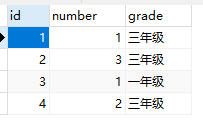
Next chapter :DRF Learning notes ( 3、 ... and ): Model class serializer ModelSerializer
边栏推荐
- Short video mall system, system prompt box, confirmation box, click blank to close the pop-up box
- 单机高并发模型设计
- 微信小程序个人号开通流量主
- These questions~~
- Common tool classes under JUC package
- profileapi.h header
- 减小程序rom ram,gcc -ffunction-sections -fdata-sections -Wl,–gc-sections 参数详解
- Coding technique - Global log switch
- For enterprise operation and maintenance security, use the cloud housekeeper fortress machine!
- Nacos
猜你喜欢

Flask connects to existing tables in MySQL database

Keil implements compilation with makefile

For enterprise operation and maintenance security, use the cloud housekeeper fortress machine!

Openwrt adds support for SD card

Mapreduce实例(三):数据去重

DRF学习笔记(一):数据序列化

Single machine high concurrency model design

2.2 basic elements of JMeter

新版jmeter函数助手不在选项菜单下-在工具栏中

Excel extract duplicates
随机推荐
ARIMA model selection and residuals
Firefox old version
[sword finger offer] interview question 53-i: find the number 1 in the sorted array -- three templates for binary search
Understand │ what is cross domain? How to solve cross domain problems?
编码技巧——全局异常捕获&统一的返回体&业务异常
Test novice learning classic (with ideas)
MapReduce instance (III): data De duplication
JSP Foundation
C language programming (Third Edition)
突发!海康/大华/商汤/旷视/依图/科大讯飞等28家中国实体被美列入黑名单
Pychart import existing project
Servlet basic knowledge points
无线网络分析有关的安全软件(aircrack-ng)
A powerful web vulnerability scanning and verification tool (vulmap)
4位数的随机数据
Axure 安装图标字体元件库
2.2 basic elements of JMeter
[sword finger offer] interview question 52: the first common node of two linked lists - stack, hash table, double pointer
可载100人!马斯克发布史上最强“星际飞船” !最早明年上火星!
Leetcode 226 flip binary tree (recursive)