当前位置:网站首页>Installation and operation instructions of SVN client (TortoiseSVN)
Installation and operation instructions of SVN client (TortoiseSVN)
2022-07-25 17:50:00 【Suddenly】
Catalog
In order to make the code management operation more convenient , Through installation
TortoiseSVN Realize visual operation , TortoiseSVN It's based on SVN The server Graphical user interface tools . 1、 download
Download address :https://tortoisesvn.net/downloads.html, And download 1.14.2 Version of the installation file :TortoiseSVN-1.14.2.29370-x64-svn-1.14.1.msi
2、 install
Double click to download the good TortoiseSVN-1.14.2.29370-x64-svn-1.14.1.msi file , And then all the time next step that will do ;
Note the following pages , Need to open command line client toos Tools :
When the installation is complete, click the mouse Right click Any blank folder , There will be TortoiseSVN Option indicates that the installation was successful :
3、 Instructions
1、 Inspection items :
After successfully checking out items , There will be a at the bottom left of the file green + White hook :
2、 File import :
For already exists in svn service Project , If you want to download it locally, you need to CheckOut; If the file exists in advance Local And want to publish to svn The server , Then we need to use Import function :
3、 The new file :
After the project has been CheckOut after , Create a new file or folder , Want to join in SVN service in , Need to carry out Add operation :
4、 Cancel new file :
stay The new file after , If it doesn't work Submit And want to Cancel adding , Need to carry out Undo Add operation :
5、 To submit documents :
It's going on Add after , The file did not enter SVN service in , Need to carry out Commit operation , To complete the final submission , When submitting, only those that have been submitted will be submitted Add The file of :
6、 Update file :
After other developers submit the corresponding documents , The project needs to be Update To get the latest files :
7、 Delete file :
Delete SVN service Files that already exist in , There are two ways :
Mode one : First perform the normal deletion operation and then use SVN Commit operation 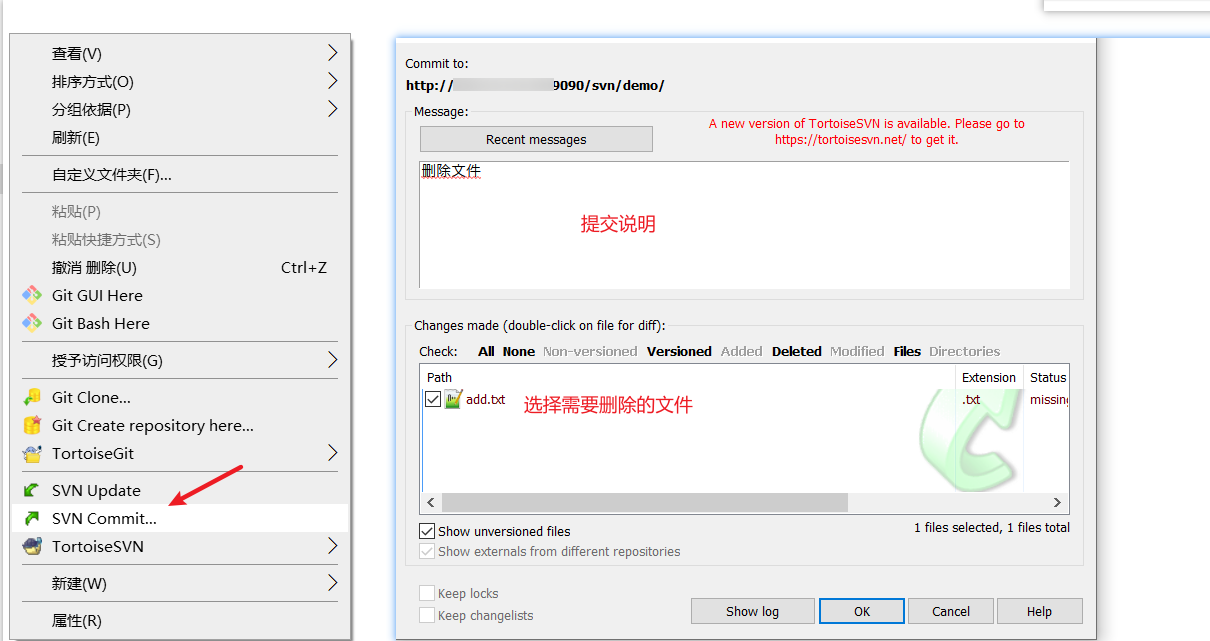
Mode two : Use it directly SVN Of Delete operation :
8、 Roll back files :
The latest version of the file has been modified , However, for some reasons, it is no longer necessary to modify the file , Then you need to restore the file to the state when the latest version has not been modified , Use Revert operation :
9、 Ignore files :
Usually, a folder will contain multiple files , In order to improve efficiency, the whole folder is submitted , However, there may be a very small number of files in the folder that do not need to be submitted , Then you can set Ignore files , Automatic filtering will be performed when submitting , Ignore that there are two situations , Ignore... Before submitting 、 Ignore... After submission :
Ignore... Before submitting :
Ignore... After submission :
recursvely: Indicates downward recursion , All related files of the current and lower level will be ignored
10、 browse files :
adopt TortoiseSVN Of Repo-browser operation , You can see the project in SVN service All files in :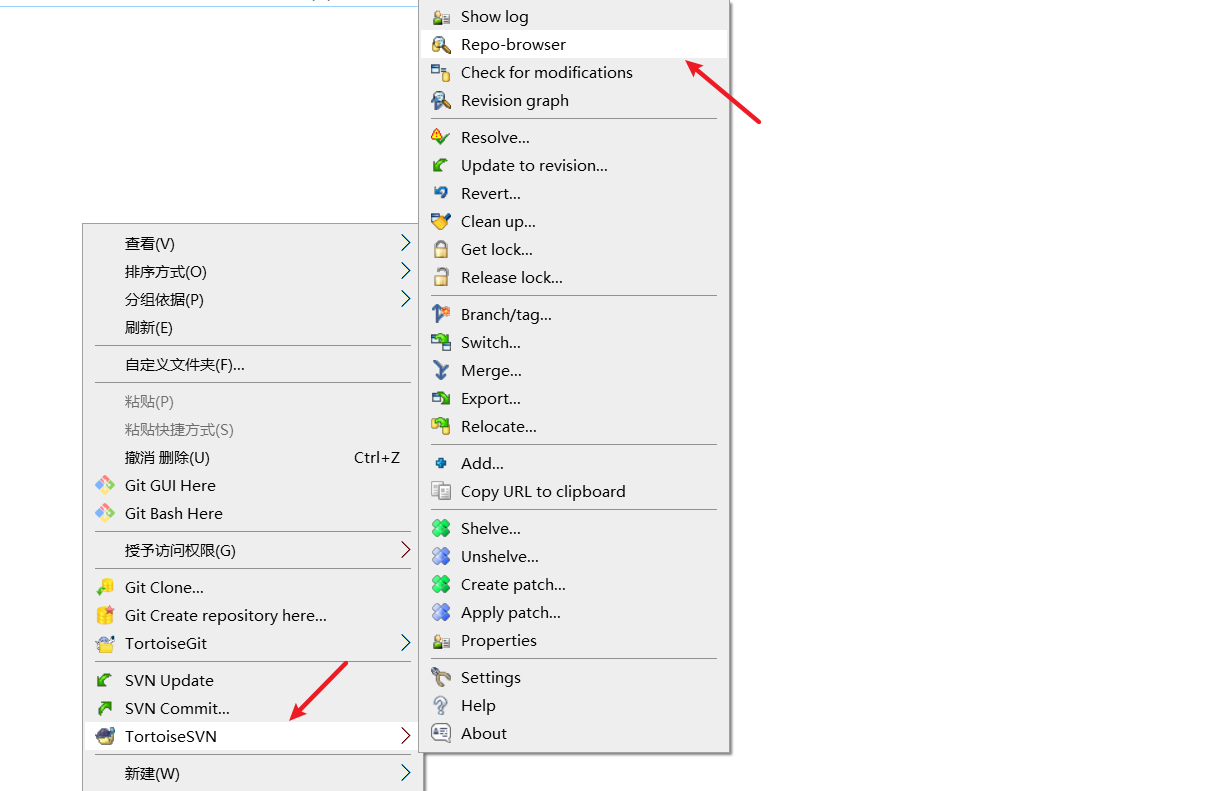
Browse the results :
11、 Check the log :
adopt Show log You can see the submitted version number of the project 、 submitter 、 Submission date, etc , It can be well used to view the submission , And you can choose a version number to do it directly Revert operation , Roll back the project to the specified version ;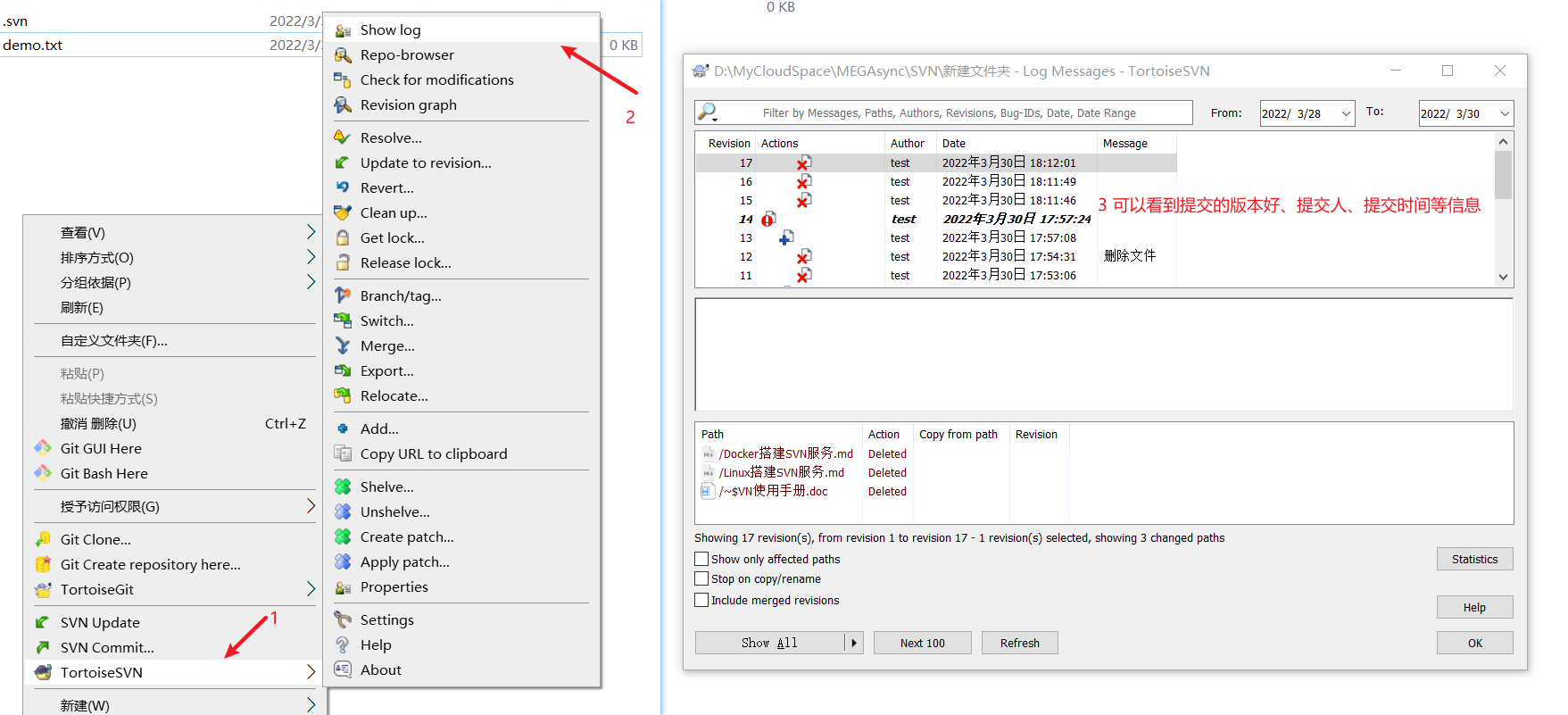
边栏推荐
- UFT(QTP)-总结点与自动化测试框架
- I'm also drunk. Eureka delayed registration and this pit!
- PageHelper还能结合Lambda表达式实现简洁的分页封装
- 咨询下flink sql-client怎么处理DDL后,fink sql里面映射表加字段以及JOb?
- Redis源码与设计剖析 -- 18.Redis网络连接库分析
- 我也是醉了,Eureka 延迟注册还有这个坑!
- Mock服务moco系列(三)- 重定向、正则表达式、延迟、模板、事件、分模块设计
- 电子产品“使用”和“放置”哪个寿命更长??
- Brief introduction of bubble sort and quick sort
- NPDP多少分通过?如何高分通过?
猜你喜欢



随机推荐
Mock服务moco系列(一)- 简介、第一个Demo、Get请求、Post请求
电子产品“使用”和“放置”哪个寿命更长??
I'm also drunk. Eureka delayed registration and this pit!
Redis源码与设计剖析 -- 17.Redis事件处理
哈夫曼树的构建
I2C通信——时序图
How to rectify the unqualified EMC of electronic products?
走马卒
Product life cycle to be considered in making intelligent hardware
栈的顺序存储结构,链式存储结构及实现
我也是醉了,Eureka 延迟注册还有这个坑!
[vscode] support argparser/ accept command line parameters
吴恩达机器学习编程作业无法暂停pause问题解决
一篇文章了解超声波加湿器
With 8 years of product experience, I have summarized these practical experience of continuous and efficient research and development
2022/7/23
C# Linq 去重&去重求和
Summary of knowledge points for final review of server-side architecture design
Function name pointer and function pointer
Mongodb cluster and sharding