当前位置:网站首页>Requirement analysis of personal blog system
Requirement analysis of personal blog system
2022-06-26 06:19:00 【Oh no, less hair】
visitor :
• You can view all the articles
• You can view the whole content of each article
• You can view a specific category of articles according to the classification column
• You can search articles by fuzzy query
• No writing
• The content of the article cannot be modified
• Article cannot be deleted
• You can't add articles to the category column
• You can view all comments
• Neither comment nor reply
• Comments and replies to comments cannot be deleted
• You can view the classification column of the front desk
• You cannot delete the category column
• You can register , After successful registration, you will be the blogger
Blogger
• You can log in as a blogger
• You can view your personal information
• You can modify your personal information
• You can log out and browse as a tourist
• We can use Markdown Or a rich text editor
• You can save the written articles to the draft box
• You can publish the newly written article , You can also publish articles in the draft box
• You can add articles to the category column
• You can also not add any category Columns
• At most one category column can be added to an article
• You can delete articles ( Including drafts and published articles , Delete a published article and delete all comments and replies of the article )
• You can transfer published articles to the draft box
• You can publish articles in the draft box
• You can modify the content of articles in the draft box
• You can modify the content of the published articles ( After modification, it will be transferred to the draft box by default
• You can view all the articles on the front desk
• You can view all articles of a certain category according to the categories in the category column
• You can search articles by fuzzy query
• You can view all your articles in the background
• You can view it according to the publication date of the article
• You can view it according to the classification column
• You can search by keyword
• Bloggers can comment on their own and others' articles
• You can reply to your own or others' comments
• Bloggers can delete other people's comments in their own blog
• Bloggers can delete all their comments and replies
• You can create a new category column
• You can add your blog to the existing category column
• You can add your blog to your new category column
• The number of articles in the newly created category column exceeds 6 Articles will appear in the category navigation bar on the home page , You can let other bloggers add their own articles to this column
• You can delete the category column ( Deleting a category column does not delete your blog , Will only let their own blog not in any category column
• If there are other bloggers' articles added to their own category Columns , Then the classified column cannot be deleted
• Bloggers can view a certain kind of articles through the classification column on the front desk 、
• You can also view your own category column in the background , How many articles are there in each category column 、 And how many articles you have and how many pieces of other people's articles
边栏推荐
- NPM private server problem of peanut shell intranet penetration mapping
- TCP connection and disconnection, detailed explanation of state transition diagram
- 低代码实时数仓构建系统的设计与实践
- The difference between abstract and interface interface
- SQL server functions
- 温度报警器
- Lamda expression
- 消息队列-功能、性能、运维对比
- TCP連接與斷開,狀態遷移圖詳解
- 事务与消息语义
猜你喜欢

University Information Management System

Logstash -- send an alert message to the nail using the throttle filter

MySQL-08
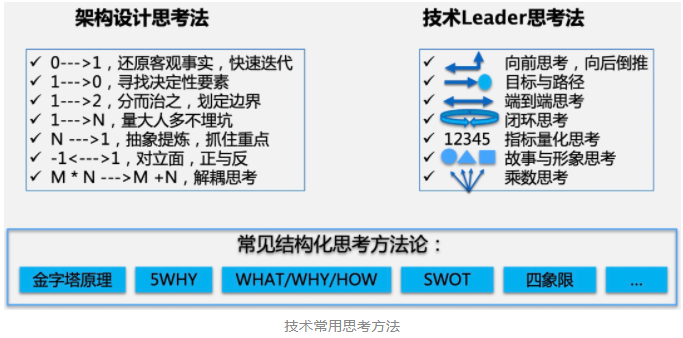
架构设计方法
Alarm operation and Maintenance Center | build an efficient and accurate alarm collaborative processing system

100 cases of go language

canal部署、原理和使用介绍
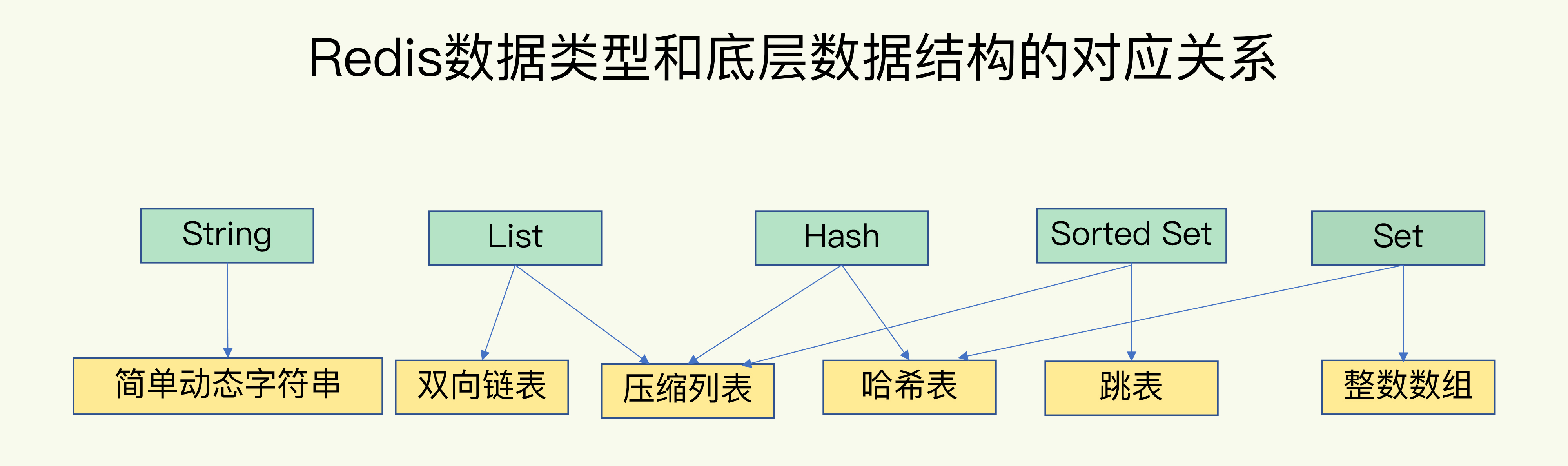
Redis底层数据结构
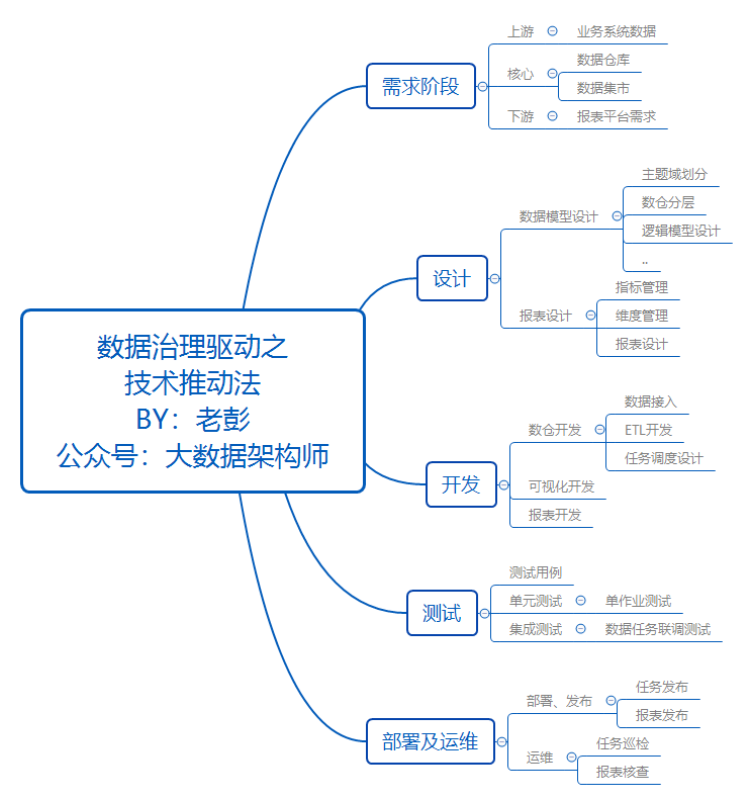
Several promotion routines of data governance

Install pyinstaller

随机推荐
ts中枚举类型(enum)简单使用
Message queue - message transaction management comparison
Web components series (10) -- realize the basic layout of mycard
Work accumulation - problems encountered in using ThreadLocal in web requests
Typora activation method
Getting started with Python
工作积累——Web请求中使用ThreadLocal遇见的问题
去哪儿网BI平台建设演进史
China micro cultivator market trend report, technical dynamic innovation and market forecast
GoF23—原型模式
05. basic data type - Dict
The interviewer with ByteDance threw me an interview question and said that if I could answer it, other companies would have an 80% chance of passing the technical level
zip(*arg)的用法
New generation engineers teach you how to play with alluxio + ml (Part 1)
[alluxio & Dachang] the original boss direct employment was applied in this way
Logstash——Logstash向Email发送告警邮件
Use the fast proxy to build your own proxy pool (mom doesn't have to worry about IP being blocked anymore)
Introduction to canal deployment, principle and use
Pytorch mixing accuracy principle and how to start this method
Installing rainbow in various kubernetes with Helm