当前位置:网站首页>Websocket (simple experience version)
Websocket (simple experience version)
2022-06-28 03:28:00 【Red blue purple】
WebSocket( Simple experience version )
brief introduction
Web Socket( Socket ): It is through A long-term connection Implementation and server full duplex 、 two-way Communication for .
Web Socket It's not that HTTP The protocol is customized Web Socket agreement , So if we use Web Socket When ,URL No more http:// or https://, It is ws:// or wss://( however , Actually, I just want to play after reading the Red Treasure book , I haven't tried to use this in development )
The main features : The server can actively push information to the client , The client can also send information to the server .
Use
Instantiation
To create a new Web Socket, First you need to instantiate a WebSocket object .
We instantiate WebSocket Object time , The parameter passed should be an absolute URL, The homology strategy does not apply to WebSocket
const socket = new WebSocket("ws://localhost:8088/mysocket");
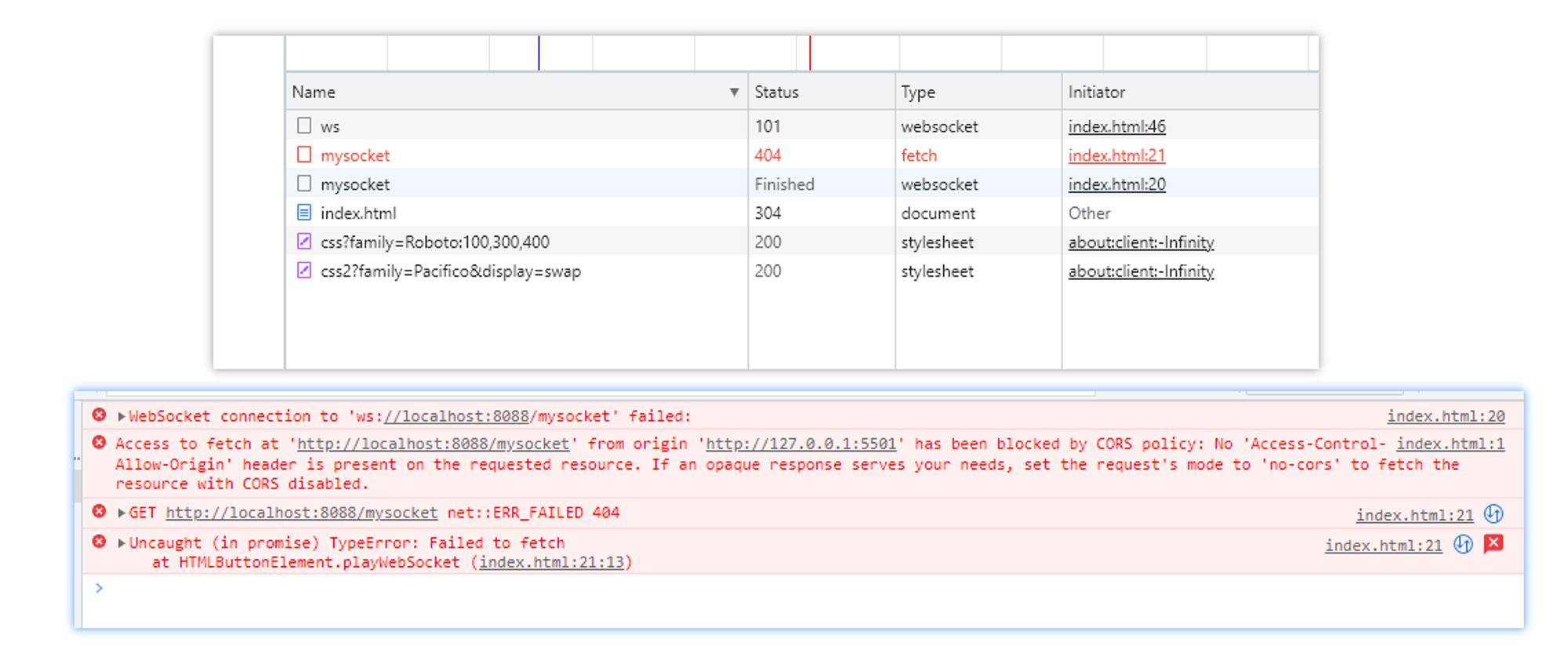
http The request will have cross domain , however WebSocket No cross domain
Back end express
The main parts are annotated ( Need to install express-ws)
const express = require('express')
const expressWs = require('express-ws')

const app = express()

//  take WebSocket Services added to app in , To put it simply, let app Added ws Method
expressWs(app)

//  establish WebSocket service
app.ws('/mysocket', function (ws) {
  // ws: establish WebSocket Example

  //  Send messages to clients
  ws.send(' You are connected successfully ')
})

app.listen(8088, () => {
  console.log('ws://localhost:8088')
})

If it's connected , that http The status code will be 101, Because I want to switch to ws agreement
The binding event
If we , Start sending messages after instantiation , That will cause the message not to be sent out , Because it's not connected yet . At this time, we have to find out when we can send , Then we have to understand WebSocket Related events .
open: Triggered when the connection is successfully establishederror: Triggered when a connection error occurs ( You can no longer send messages )close: Trigger... When the connection is closed ( You can no longer send messages )message: Trigger when you receive a message ( The received message is in the event objectdatain )
const socket = new WebSocket("ws://localhost:8088/mysocket");
socket.onopen = function () {
    console.log(" Connection is established ");
    socket.send('hello');
    // socket.close()
};
socket.onerror = function () {
    console.log(" Connection error ");
};
socket.onclose = function () {
    console.log(" Connection is closed ");
};

socket.onmessage = function (e) {
    console.log(e)
}
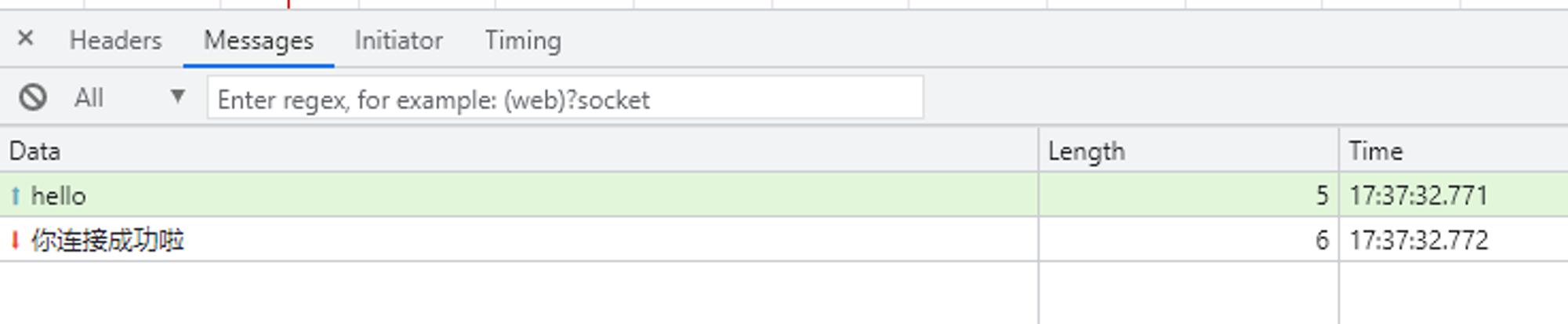

Simulate a conversation between two people
It's already said , Receiving a message triggers message event , So we can message In the event, the corresponding information is sent according to the received information .
client :
const socket = new WebSocket("ws://localhost:8088/mysocket");
socket.onopen = function () {
    console.log(" Connection is established ");
    socket.send('hello');
    // socket.close()
};
socket.onerror = function () {
    console.log(" Connection error ");
};
socket.onclose = function () {
    console.log(" Connection is closed ");
};

socket.onmessage = function ({ data }) {
    if (data.includes(' Hello ')) {
        socket.send(' bye , Server side ddd')
    } else if (data.includes(' bye ')) {
        //  call close() Method shut down WebSocket Connect
        socket.close()
    } else {
        socket.send(' Hello , I'm the client ccc')
    }
}
The server :
const express = require('express')
const expressWs = require('express-ws')

const app = express()

//  take WebSocket Services added to app in , To put it simply, let app Added ws Method
expressWs(app)

//  establish WebSocket service
app.ws('/mysocket', function (ws) {
  // ws: establish WebSocket Example
  ws.send(' You are connected successfully ')

  ws.onmessage = function ({ data }) {
    if (data.includes(' Hello ')) {
      ws.send(' Hello , I'm the server ddd')
    } else if (data.includes(' bye ')) {
      ws.send(' bye , client ccc')
    }
  }
})

app.listen(8088, () => {
  console.log('ws://localhost:8088')
})

Be careful : If the receiving and sending part processes , You need to pay attention to , If it's not handled properly , There may be a circulation jam .
such as , Server and client message Event callbacks are :
socket.onmessage = function ({ data }) {
    socket.send('hello')
}

边栏推荐
- idea自动生成代码
- TypeScript 联合类型
- Why is the service implementation class always red
- ARM Development Studio build编译报错
- Yes, it's about water
- How to write concise code? (upper)
- Etcd database source code analysis -- network layer server rafthandler between clusters
- 2022年R1快開門式壓力容器操作特種作業證考試題庫及答案
- A16z:元宇宙解锁游戏基础设施中的新机遇
- Object类,以及__new__,__init__,__setattr__,__dict__
猜你喜欢

Tardigrade:Trino 解决 ETL 场景的方案

Relative path writing of files

基于 LNMP 搭建个人网站的填坑之旅

s32ds跳转到DefaultISR

2022安全员-C证考试题库模拟考试平台操作
爱普生L3153打印机如何清洗喷头
文件的相对路径写法

Brief history and future trend of codeless software

Tencent games released more than 40 products and projects, including 12 new games

Question bank and answers of special operation certificate for R1 quick opening pressure vessel operation in 2022
随机推荐
Solution to not displaying logcat logs during debugging of glory V8 real machine
文档问题
SSH框架的搭建(上)
Agileplm exception resolution session
SSH框架的搭建(下)
Win10 如何删除系统盘大文件hiberfil.sys
service实现类里面为何一直报红
新手开哪家的证券账户是比较好?炒股开户安全吗
启牛商学院赠送证券账户是真的吗?开户到底安不安全呢
网上股票投资交流群安全吗?进群免费开户靠谱嘛?
学习---有用的资源
What are the technologies to be mastered in the test? Database design for software testing
collections. Use of defaultdict()
[522. longest special sequence II]
17 `bs对象.节点名h3.parent` parents 获取父节点 祖先节点
在excel文件上设置下拉选项
MySQL 数据库的自动备份操作
自用工具 猴子都会用的unity视频播放器
Ten years' experience of Software Engineer
xml 文件的读写