当前位置:网站首页>微信小程序搜索关键字高亮和ctrl+f搜索定位实现
微信小程序搜索关键字高亮和ctrl+f搜索定位实现
2022-06-29 08:26:00 【swag_特约男演员】
原理
高亮关键字
- 将文本存入数组,以
text标签循环渲染,当有关键字keyword时,将文本的关键字替换成%%keyword%%再分割split成数组去渲染。 - 当前节点文本等于关键字
class="{ { item == searchValue ? 'searchHigh' : ''}}"时,添加highLight样式。
———————————————————————————————————————————
到这里高亮关键字就实现了。
类似于ctrl+f搜索定位
- 小程序没有办法操作
dom元素不会返回像web端一样的dom节点。 - 给所有循环渲染的
text标签加上id。 - 利用
wx.createSelectorQuery().selectAll('.searchHigh').boundingClientRect获取所有添加了highLight样式的节点id数组 - 数组的
length就是找到关键字的总数,创建一个activeNodeIndex控制上一条和下一条。 - 当
text标签的id和数组中取出的选中id相同时,添加选中selected样式。 - 可以利用
scrollview的scrollIntoView(selector)滚动到选中的节点,前提是scrollview的enhanced属性要为true。 - 也可以用
wx.pageScrollTo。具体看你使用的场景。
效果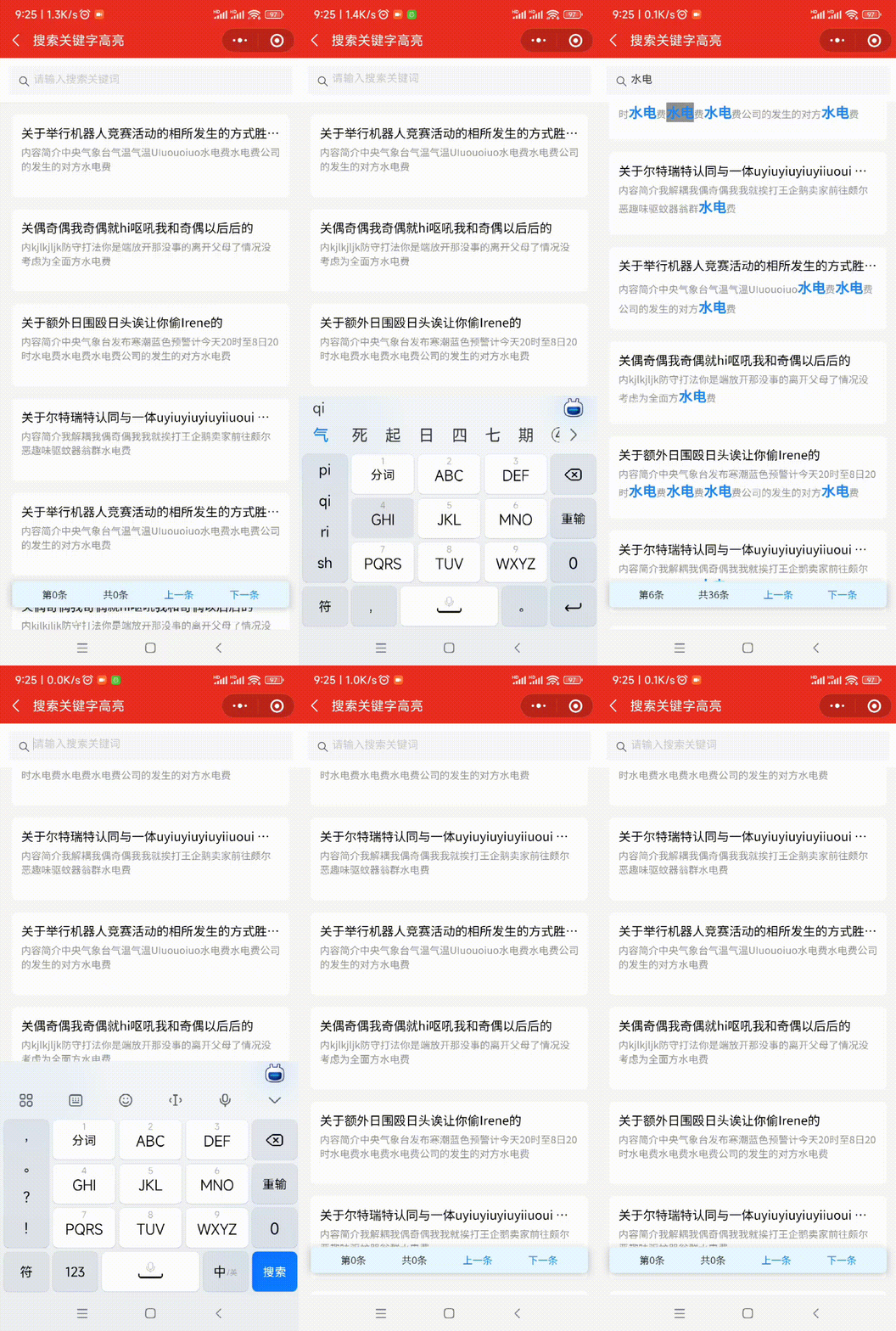
源码(mpx)
<template>
  <view class="container">
    <van-search id="searchPanel" value="{
     { searchValue }}" placeholder="请输入搜索关键词" bind:change="inpChange" />

    <view class="statistic-bar">
      <text>第{
   { current }}条</text>
      <text>共{
   { totalKeywordNodes }}条</text>
      <text style="color: #1d84f6" bindtap="handleScroll('pre')">上一条</text>
      <text style="color: #1d84f6" bindtap="handleScroll('next')">下一条</text>
    </view>

    <scroll-view scroll-y enhanced style="height: {
        {
        listHeight}}px" class="listPanel">
      <view class="news_item" wx:for="{
     {newList}}" wx:key="index">
        <view class="descBox">
          <view class="news_title textoverflow">{
   { item.title }}</view>
          <view class="news_text">
            <text wx:for="{
     { item.jj }}" wx:for-index="secondIndex" wx:key="secondIndex" id="text_{
     {index + '_'+ secondIndex}}" class="{
     { item == searchValue ? 'searchHigh' : ''}}" wx:class="{
     { {selected: 'text_'+index + '_'+ secondIndex === keywordNodes[activeNodeIndex]} }}" >{
   { item }}</text >
          </view>
        </view>
      </view>
    </scroll-view>
  </view>
</template>
<script> import {
       createPage } from '@mpxjs/core' createPage({
       data: {
       mainHeight: 0, seachPanelHeight: 0, searchValue: '', scrollView: null, // 滚动容器节点 newList: [ {
       title: '关于举行机器人竞赛活动的相所发生的方式胜多负少的', jj: '内容简介中央气象台气温气温UIuouoiuo水电费水电费公司的发生的对方水电费' }, {
       title: '关偶奇偶我奇偶就hi呕吼我和奇偶以后后的', jj: '内kjlkjljk防守打法你是端放开那没事的离开父母了情况没考虑为全面方水电费' }, {
       title: '关于额外日围殴日头诶让你偷Irene的', jj: '内容简介中央气象台发布寒潮蓝色预警计今天20时至8日20时水电费水电费水电费公司的发生的对方水电费' }, {
       title: '关于尔特瑞特认同与一体uyiuyiuyiuyiiuoui 胜多负少的', jj: '内容简介我解耦我偶奇偶我我就挨打王企鹅卖家前往颇尔恶趣味驱蚊器翁群水电费' } ], keywordNodes: [], // 存放的关键字节点ID数组 activeNodeIndex: 0 // 当前激活的节点索引 }, computed: {
       listHeight () {
       return this.mainHeight - this.seachPanelHeight }, totalKeywordNodes () {
       return this.keywordNodes.length }, current () {
       if (this.keywordNodes.length === 0) {
       return 0 } else {
       return this.activeNodeIndex + 1 } } }, onReady () {
       this.getWindowHeight() this.getFields() this.mockData() }, methods: {
       mockData () {
       let temp = [] for (let i = 0; i < 4; i++) {
       temp = temp.concat(this.newList) } this.setData({
       newList: temp }) }, getWindowHeight () {
       const that = this wx.getSystemInfo({
       success (res) {
       that.setData({
       mainHeight: res.windowHeight }) } }) }, getFields () {
       const that = this const query = wx.createSelectorQuery() query.select('#searchPanel').fields({
       dataset: true, size: true }, res => {
       // console.log(res) that.setData({
       seachPanelHeight: res.height }) }).exec() }, // 替换关键字并分割成数组 getInf (str, key) {
       return str .replace(new RegExp(`${
        key}`, 'g'), `%%${
        key}%%`) .split('%%') .filter(item => {
       if (item) {
       return true } return false }) }, // 输入改变时触发 inpChange (e) {
       let key = e.detail this.setData({
       activeNodeIndex: 0, keywordNodes: [], searchValue: e.detail }) // 如果关键字有值遍历新闻列表 if (key) {
       this.newList.forEach(element => {
       // 如果该字段已经是数组则重新变为字符串 if (element.jj instanceof Array) {
       element.jj = element.jj.join('') } let newContent2 = this.getInf(element.jj, key) // 把分割的数组赋值给每一项的title element.jj = newContent2 }) // console.log(this.newList) this.$nextTick(() => {
       wx.createSelectorQuery() .selectAll('.searchHigh') .boundingClientRect(res => {
       let keywordNodes = res.map(item => item.id) this.setData({
       keywordNodes: keywordNodes }) }) .select('.listPanel') .node(res => {
       this.setData({
       scrollView: res.node }) this.scrollToView(0) }) .exec() }) } }, /** * @method 将节点滚动至可视窗口 * @param {number} index */ scrollToView (index) {
       // console.log("#" + this.keywordNodes[index]); this.$nextTick(() => {
       this.scrollView.scrollIntoView("#" + this.keywordNodes[index]) }) }, /** * @method 控制上一条和下一条 * @param {string} type */ handleScroll (type) {
       switch (type) {
       case 'pre': if (this.activeNodeIndex === 0) {
       this.activeNodeIndex = this.keywordNodes.length - 1 } else {
       this.activeNodeIndex-- } break; default: if (this.activeNodeIndex === this.keywordNodes.length - 1) {
       this.activeNodeIndex = 0 } else {
       this.activeNodeIndex++ } break; } this.scrollToView(this.activeNodeIndex) } } }) </script>
<style scoped> .container {
       width: 100%; overflow: scroll; --webkit-overflow-scrolling: touch-action; } .statistic-bar {
       position: fixed; left: 16px; bottom: 30px; right: 16px; border-radius: 12rpx; background-color: #e6f7ff; z-index: 999; display: flex; justify-content: space-around; width: calc(100% - 16px -16px); padding: 16rpx 32rpx; box-sizing: border-box; font-size: 26rpx; box-shadow: 6rpx 6rpx 15rpx rgba(0, 0, 0, 0.125), -6rpx 0rpx 15rpx rgba(0, 0, 0, 0.125); color: #323233; } .listPanel {
       box-sizing: border-box; background-color: #f5f5f5; } .news_item {
       width: 100%; height: 208rpx; padding: 0 32rpx; margin: 32rpx 0; box-sizing: border-box; } .descBox {
       width: 100%; height: 100%; background: #fff; border-radius: 12rpx; padding: 24rpx; box-sizing: border-box; } .news_title {
       width: 100%; font-size: 32rpx; font-weight: 500; text-align: left; color: black; margin-bottom: 10rpx; } .news_text {
       font-size: 26rpx; font-weight: 400; color: #909090; text-align: left; margin-bottom: 7rpx; display: -webkit-box; -webkit-line-clamp: 2; overflow: hidden; text-overflow: ellipsis; -webkit-box-orient: vertical; word-break: break-all; } .textoverflow {
       display: -webkit-box; -webkit-line-clamp: 1; overflow: hidden; text-overflow: ellipsis; -webkit-box-orient: vertical; word-break: break-all; } .searchHigh {
       font-size: 36rpx; color: #1d84f6; font-weight: bold; } .selected {
       background: #909090; } </style>
<script type="application/json"> {
       "navigationBarTitleText": "搜索关键字高亮", "usingComponents": {
       "van-search": "@vant/weapp/dist/search/index" } } </script>
边栏推荐
- Self attention mechanism
- Compare homekit, MI family, and zhiting family cloud edition for what scene based experiences
- 乘法器设计(流水线)verilog code
- Open3D 最远点采样(FPS)
- First electric shock, so you are such a dragon lizard community | dragon lizard developer said that issue 8
- “国防七校”之一西工大遭境外网络攻击
- (III) encoder self attention mask
- How to recover data loss of USB flash disk memory card
- Wallpaper applet source code double ended wechat Tiktok applet
- 闭关修炼(二十二)session和cookie原理
猜你喜欢

Self attention mechanism

Unity C # e-learning (12) -- protobuf generation protocol

Leetcode (142) - circular linked list II

Product manager certification enrollment brochure (NPDP) in July 2022

The @dynamicmemberlookup and callasfunction features in swift implement the object transparent proxy function
Chengtong network disk imitation blue playing network disk source code with video tutorial

TypeScript 变量声明 —— 类型断言

ThreadLocal thread variable

mongoDB 持久化

工厂模式和策略模式的区别
随机推荐
Leetcode(142)——环形链表 II
Verilog 拼接操作符号
Scenario analysis of deadlock during MySQL insert
C# 语音端点检测(VAD)实现过程分析
Activemq消息组件发布订阅ReDelivery消息重新投递
Compare homekit, MI family, and zhiting family cloud edition for what scene based experiences
ThreadLocal thread variable
15 things to learn in a year of internship in famous enterprises, so you can avoid detours.
The return values of hostname -f and uname -n may be different
2022年7月系统集成项目管理工程师认证招生简章
搭建开源物联网平台教程
uni-app获取当前页面路由url
MT yolov6 training and testing
批量处理实验接触角数据-MATLAB分析
首次触电,原来你是这样的龙蜥社区 | 龙蜥开发者说第8期
js for in循环 for of循环的区别以及用法
闭关修炼(二十一)Servlet生命周期、service方法源码分析、线程安全问题
Mysql使用union all统计多张表组合总数,并分别统计各表数量
闭关修炼(二十五)基础web安全
Typescript variable declaration - type assertion