当前位置:网站首页>Server installation jupyterab and remote login configuration
Server installation jupyterab and remote login configuration
2022-06-13 01:40:00 【Under the starry sky 0516】
The first thing to be clear is jupyterlab Need to rely on jupyter-notebook, And the two were originally dependent on Anaconda, So it's best to use anaconda Environmental Science .( Do not want to use Anaconda Environmental , You can search the installation method by yourself )
Sign in Linux The server :
ssh [email protected]
install Anaconda( already installed , Skippable )
About Anaconda The version and python Version correspondence , You can refer to my notes :
anaconda Historical version download address and Anaconda Version and Python3 Version correspondence
Pay attention to the naming rules in the text .
This is installed by default jupyter, If not installed , Execute the following command :
conda install -c anaconda jupyter
install jupyterlab
conda install -c conda-forge jupyterlab
Generate configuration files :
jupyter notebook --generate-config# The generated file is located at :~/.jupyter/jupyter_notebook_config.py # The configuration file
Set the password :
$ipython
In [1]: from notebook.auth import passwd
In [2]: passwd()
Enter password: ******
Verify password: ******
Out[2]: '************************************************'  # This is the key , Keep in mind
Copy the key generated above , Configuration will use ,password Is the password you need to enter when logging in remotely , Also need to remember .
To configure jupyterlab Environmental Science :
#vim ~/.jupyter/jupyter_notebook_config.py
c.NotebookApp.ip = '*' #  Of your server IP Address , Usually static address
c.NotebookApp.password = u'*****************************************' #  This is the secret key just to be saved
c.NotebookApp.open_browser = False
c.NotebookApp.port = 8888    # port , You can specify
c.NotebookApp.allow_remote_access = True
install Node.js
First download node.js, Address :Node.js download
Download on demand , Download the corresponding schema , It's usually x64 Architecturally , As shown in the figure below :
Decompress after downloading , It is best to put it in the directory where the program is installed , Then configure the environment (windows Open the environment variable and add it ):
$vim ~/.bashrc
export PATH=/node path/bin:$PATH #  The extracted location
source ~/.bashrc
$node -v #  Check node Environment configured successfully
#  Output node Corresponding version 】
v16.13.1
start-up jupyter-lab
General startup jupyter It will keep running after , So you can put it in the background , May adopt screen To achieve , First create a file named jupyterlab The background of :
$screen -S jupyterlab
Then start jupyterlab:
$jupyter-lab
Finally according to the Ctrl+A+D Press the key combination to exit the background , and jupyter-lab Keep running 
notes : Here to install Node.js It's to make jupyter Display more friendly , Recommended installation .
Be careful : If it's opening jupyter There are such errors in the service : attributeerror: ‘extensionmanager’ object has no attribute ‘_extensions’, This is because nbclassic The version of is wrong , Execute the following command :
pip install nbclassic=0.2.8
Then open the service to log in remotely .
边栏推荐
- Logical operation bit operation
- 谷歌加大型文字广告是什么?怎么用?
- Service creation and operation example of ROS
- Explanation and application of prefix sum (one-dimensional, two-dimensional)
- 详细受众特征详细解释
- Stack and queue practice (C language): Demon King's language
- About tkinter Canvas does not display pictures
- Startup, connection and stop of MySQL service
- ES6解构赋值
- Wsl2 + vcxsrv + opengl3.3 configuration
猜你喜欢
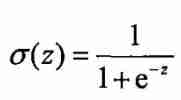
Introduction to common activation functions

STM32 3*3矩阵按键(寄存器版本)

Happy string

Sonarqube local installation

Simple operation of MySQL database

Temporary objects and compilation optimization

leetcode743. Network latency (medium, Dijkstra)

Run Presto under docker to access redis and Bi presentation

MySQL performance optimization

Quickly set the computer to turn off automatically
随机推荐
【软考】软件设计师知识点整理(待更新)
MySQL ---- where后使用字段别名
ES6解构赋值
Should the audience choose observation mode or positioning mode?
30: Kakfa simulates JSON data generation and transmission
Minimum score of one question per day
Torch. Distributions. Normal
[wsl2]wsl2 migrate virtual disk file ext4 vhdx
How does Apple add QQ email?
#pragma comment(lib,“urlmon.lib“)
【斯坦福計網CS144項目】Lab1: StreamReassembler
Uuid/guid introduction, generation rules and generation codes
Traversal of binary tree - first order traversal, middle order traversal, and second order traversal
Detailed explanation of Joseph problem
Lecture on Compilation Principles
Simple operation of MySQL database
Differences among bio, NiO and AIO
Golang context (context summary)
Anims of phaser3
[pytorch FAQ] numpy:dll load failed while importing_ multiarray_ Umath: the specified module could not be found.