当前位置:网站首页>Fiori applications are shared through the enhancement of adaptation project
Fiori applications are shared through the enhancement of adaptation project
2022-07-01 22:47:00 【Wang Zixi】
The writer has been SAP Chengdu Research Institute CRM Fiori When the development team works , As a customer of a famous lamp manufacturer in Germany CRM Fiori Project dev angel. At that time, the customer proposed several pairs CRM Fiori Enhanced requirements for standard applications , Generally speaking, it is divided into front desk Fiori UI Interface enhancement ( For example, add new custom fields ) And the enhancement of background logic .
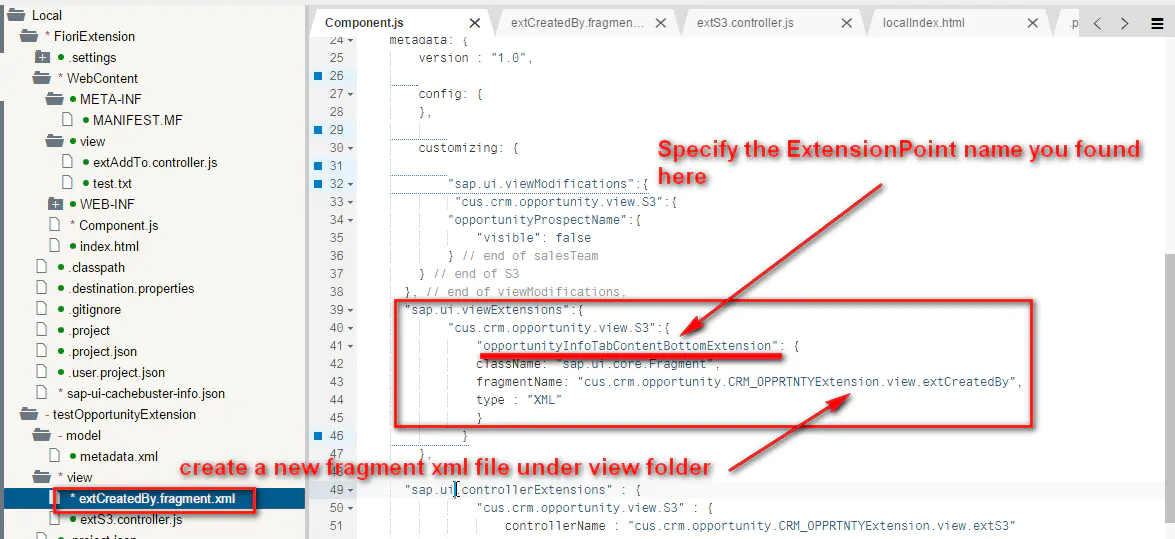
It was still in Fiori 1.0 Time , It has not been used directly on the browser S/4HANA Of Key User tool How to create new fields , Therefore, for the enhancement of the foreground interface , The solution I give customers is to use UI5 XML Reserved in the view Extension point, And the enhancement of background logic , Through UI5 JavaScript controller Medium extension hook as well as ABAP Backstage BAdI Realization .
I have had a very pleasant four month cooperation with my clients , Finally, the project goes online smoothly , I also received a thank-you letter from the German customer via email , The customer also sent all the enhancement codes they made for this project to me in compressed packages , hope SAP Can analyze these logic well , Assess whether some requirements are universal , Can we do it in the future SAP standard Fiori In the application , So that more customers can benefit . This German customer's professionalism and meticulous attitude in project implementation , It made a deep impression on me .
At that time, one of the actual needs of customers was , Create a new custom field , And enable this field in the end-to-end business process ( Support addition, deletion, modification and query ). Although this requirement now seems more common , But five years ago Fiori 1.0 Time , It takes a lot of effort to realize , Because the front and back stages have to be enhanced .
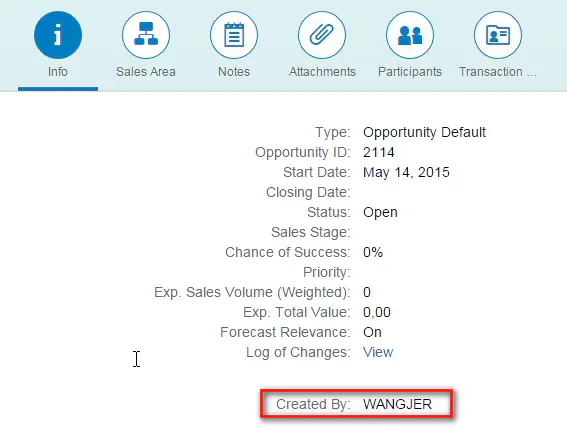
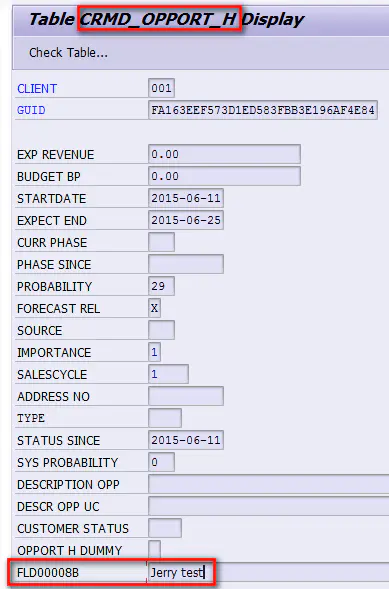
I wrote the complete implementation steps of enhancement as a blog and posted them on SAP In the community , Because there are many steps , A total of four articles were written before the introduction was clear .
lately Jerry stay SAP WebIDE I came across a new menu named Adaptation Project The menu item of , Provides another way to enhance without programming Fiori Ways to apply certain behaviors .

This new enhancement method is through Fiori Adaptation Project Accomplished , Introduce through a practical requirement .
We said SAP application , The most typical way to use it is to use the search interface as an entry , Click a record in the tabular control of the search results to enter the details page and start the operation .
For a variety of reasons , Not all table controls provide the ability to export data into excel Format function .

If the search results form is through SAP Fiori Elements Drawn by technology , Can be in WebIDE Use in Fiori Adaption Project take excel The export function is enabled .
stay WebIDE I'll build a new one Fiori Adaptation Project:
When we create an adaptation project , It's actually creating a new variant of an existing application (variant).
Application variants refer to the original application , But it contains independent change sets created in the adaptation project . Besides , An application is also defined for this variant ID, Need to be in Fiori Launchpad Register separately in .
Use SAP UI5 Visual Editor establish variant.
Adaptation Project The functions supported are :
Semantic changes can be made to the application ( for example , Hide fields according to specific conditions )
Control properties and bindings can be changed ( For example, enable or disable Excel Export smart table )
You can add custom XML Fragment to expand the view ( for example , Click the button to open the customization dialog )
You can add custom business logic (JavaScript)( for example , Click the button to call odata service )
Expand I18n Text ( For example, translate the labels of custom buttons )
Mobile control / part ( for example , Place a custom field between the two standard fields of the object page )
Adaptation Project Same as Fiori Breakout The difference between :
stay Fiori Elements In the application , Created for adding customizations to smart templates UI (XML) And business logic (JavaScript) Of breakout.
Breakout Is part of the actual application . therefore , If the application development team creates a Fiori Element Applications , And the customer hopes to pass breakout Add custom logic , Then this will be a modification .
Breakout It is an extension of intelligent template , Is part of the original application , And adaptation project is the extension of application .
Next, you need to choose which one to enhance SAP Which one of the system Fiori application . If you want to enhance Fiori The application is located in On-Premises System , Pre configuration required SAP Cloud Connector and SAP On the cloud platform Destination, Otherwise, at this stage , stay SAP UI5 ABAP Repository The system will not be visible in the drop-down list of .
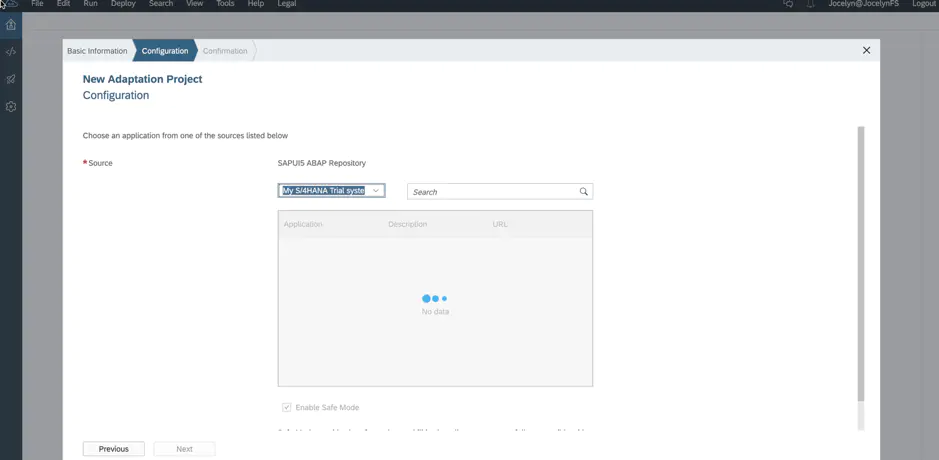
On-Premises After the system is determined , Find the system to be enhanced Fiori application , By entering the technology of the application ID To locate . Click on Next complete Fiori Adaptation Project Create wizard for , Here we give this project The name s4demo.

stay WebIDE In the mail project, choice SAPUI5 Visual Editor, Open the WYSIWYG view editor ,
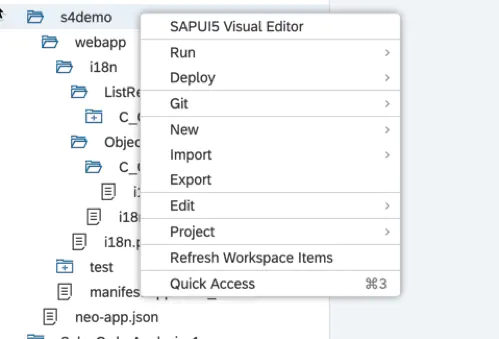
The default is Preview Mode on , Click on the Edit Button to enter edit mode :

In edit mode , Select the table control on the view , Ready to start modifying properties .
We noticed the hint of this safe mode , The intention of introducing this mode is Android System and Windows The security mode of the operating system is similar .SAP UI5 Visual Editor In safe mode , Developers can only modify restricted properties for controls .
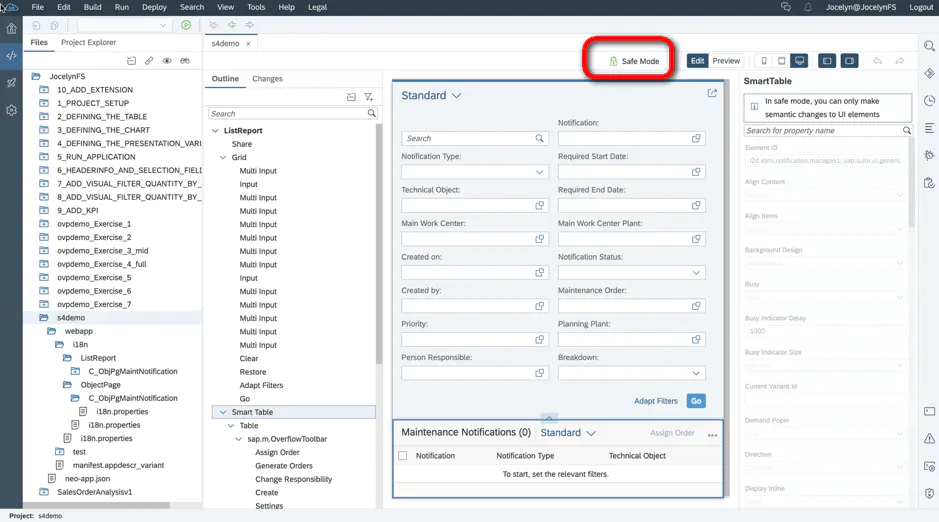
If you give, you will be rewarded , Although modifications are limited , However, modifications made in safe mode are upgrade safe , Coming soon S/4HANA After system upgrade , These changes are still preserved .

In order to enable the excel Export function , We have to turn off safe mode :

And then put Use Export to Excel From the default false Set to true:

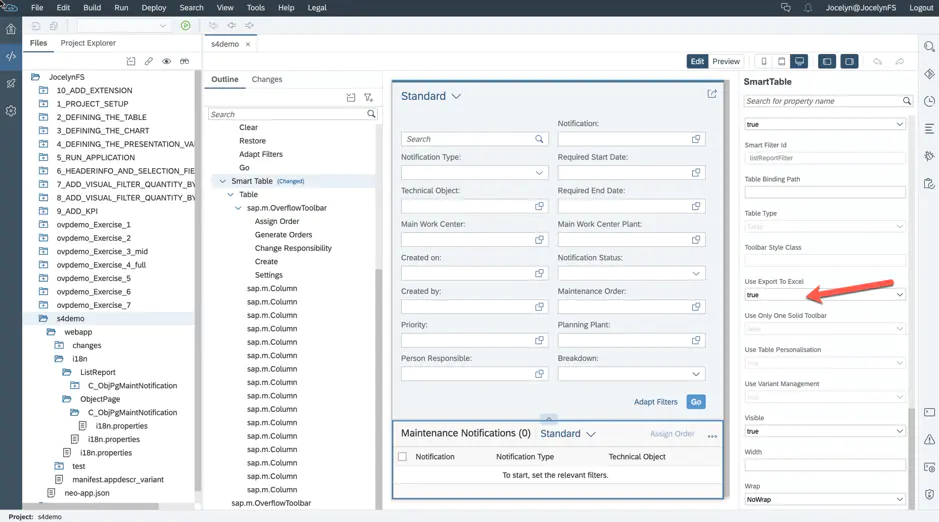
Save changes , Generate a file named changes Folder , It records the details of this attribute modification . This idea of saving attribute changes through a separate file , and SAP C4C Pass through Key User Tool perhaps Cloud Application Studio modify UI Generated after view Change Transaction It is used to record the modification details, which are consistent .

After modifying and saving , Open the app again , You can test this excel Export function .


After passing the local test , Adoption and deployment SAP standard Fiori Apply the same method , Put this Adaptation Project Deploy to the corresponding S/4HANA On the system .


Click on Show Details We can know which resources have been successfully deployed .
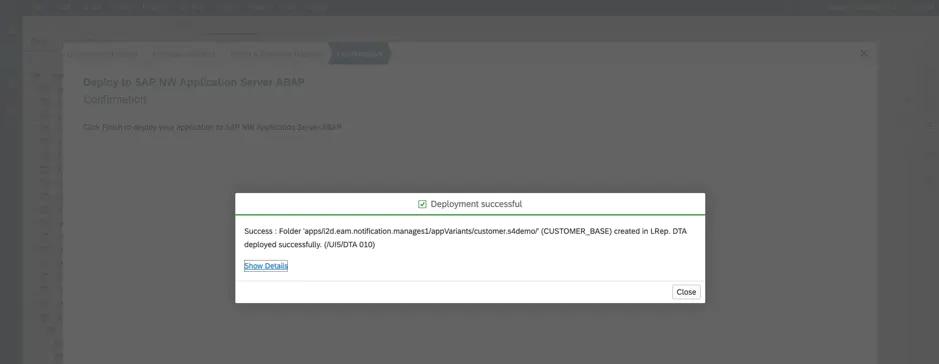
Tips for successful deployment :Folder XXXX ( CUSTOMER_BASE) created in LRep.
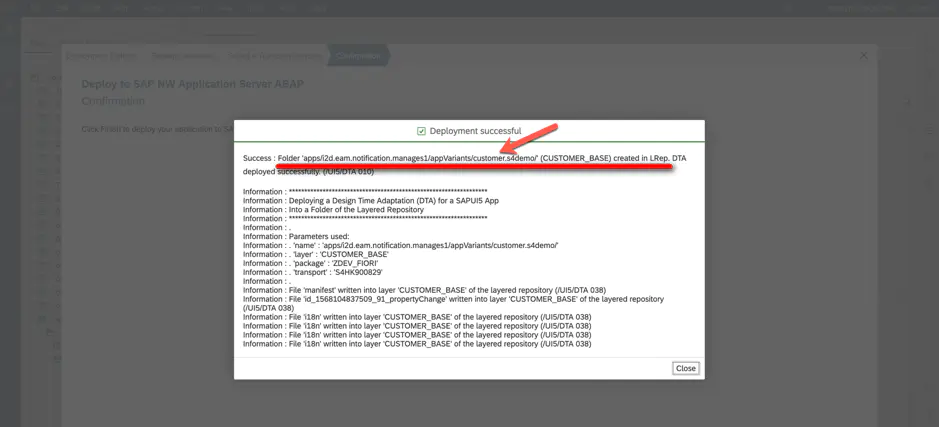
This LRep namely Layed Repository,S/4HANA A tiered storage system . So-called Layed, Embodied in the concept of layering introduced by this storage system , namely Customer Layer,Partner Layer,SAP Layer etc. . Different operators —— Customer ,Partner and SAP Standard developers , These tiered storage resources have different read and write permissions .

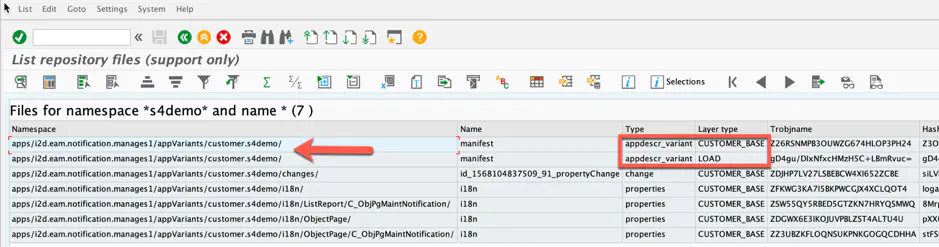
stay S/4HANA In the system , Execution report /UIF/GET_FILES_4_NS, You can see from WebIDE Deploy to S/4HANA LRep These resources :
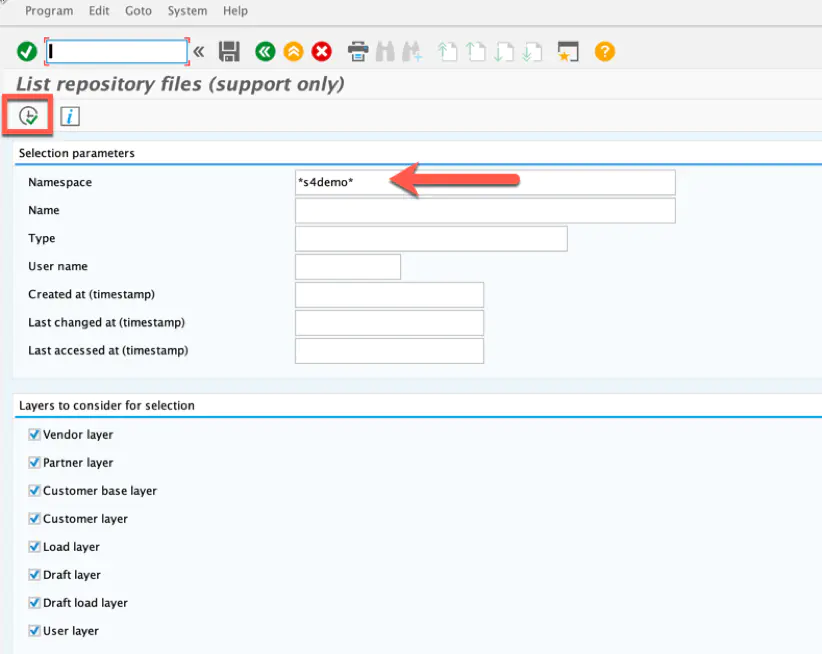
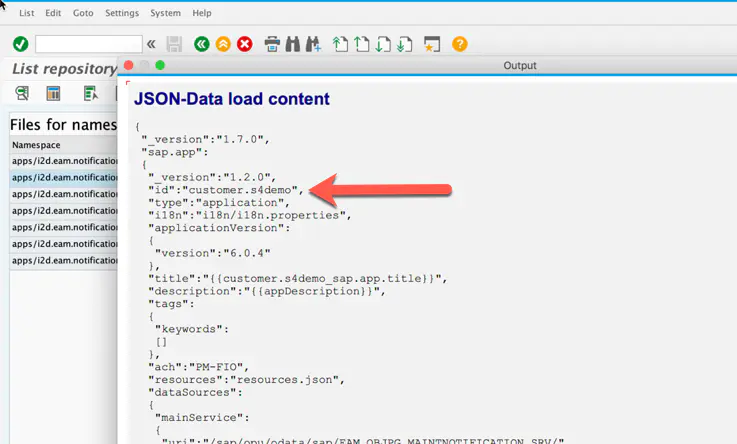
Used in the first run Fiori Adaptation Project Enhanced Fiori When applied , Stored in LRep Customer Layer Of Fiori Adaptation Project Described in UI5 Apply modification information , Hui He Fiori Merge the resources of standard application , Generate what the last customer sees in the browser , have Export to Excel Button on the Fiori application .
I hope this article can help you understand Fiori There is a basic understanding of another enhancement method of application , Thank you for reading .
边栏推荐
- 从零开始学 MySQL —数据库和数据表操作
- 固定资产管理子系统报表分为什么大类,包括哪些科目
- Measurement of reference loop gain and phase margin
- Mysql——》Innodb存储引擎的索引
- General use of qstringlist
- Rust language - Introduction to Xiaobai 05
- Clean up system cache and free memory under Linux
- Appium automated testing foundation - Supplement: introduction to desired capabilities parameters
- MySQL之MHA高可用配置及故障切换
- 【MySQL】索引的分类
猜你喜欢

元宇宙可能成为互联网发展的新方向

# CutefishOS系统~
![快乐数[环类问题之快慢指针]](/img/37/5c94b9b062a54067a50918f94e61ea.png)
快乐数[环类问题之快慢指针]
104. SAP UI5 表格控件的支持复选(Multi-Select)以及如何用代码一次选中多个表格行项目
MySQL之MHA高可用配置及故障切换

3DE 资源没东西或不对

The fixed assets management subsystem reports are divided into what categories and which accounts are included
Fully annotated SSM framework construction

keras训练的H5模型转tflite

多图预警~ 华为 ECS 与 阿里云 ECS 对比实战
随机推荐
SAP GUI 里的收藏夹事务码管理工具
MySQL中对于事务的理解
GenICam GenTL 标准 ver1.5(4)第五章 采集引擎
Appium自动化测试基础 — 补充:Desired Capabilities参数介绍
三翼鸟两周年:羽翼渐丰,腾飞指日可待
Recent public ancestor (LCA) online practices
Clean up system cache and free memory under Linux
Compensation des créneaux horaires
YOLOv5.5 调用本地摄像头
How to write a performance test plan
C#/VB. Net to add text / image watermarks to PDF documents
删除AWS绑定的信用卡账户
[C language] detailed explanation of malloc function [easy to understand]
3DE resources have nothing or nothing wrong
【JetCache】JetCache的使用方法与步骤
LC501. Mode in binary search tree
QT uses ffmpeg4 to convert the qimage of ARGB to yuv422p
twenty million two hundred and twenty thousand seven hundred and one
MySQL MHA high availability configuration and failover
并发编程系列之FutureTask源码学习笔记