当前位置:网站首页>Solve the problem that esp8266 cannot connect mobile phones and computer hotspots
Solve the problem that esp8266 cannot connect mobile phones and computer hotspots
2022-07-25 09:51:00 【F l e】
1、 Hardware platform 
I'm using Esp8266 NodeMcu(Esp-12s)
2、 development environment
Arduino IDE
3、 Development board model selection 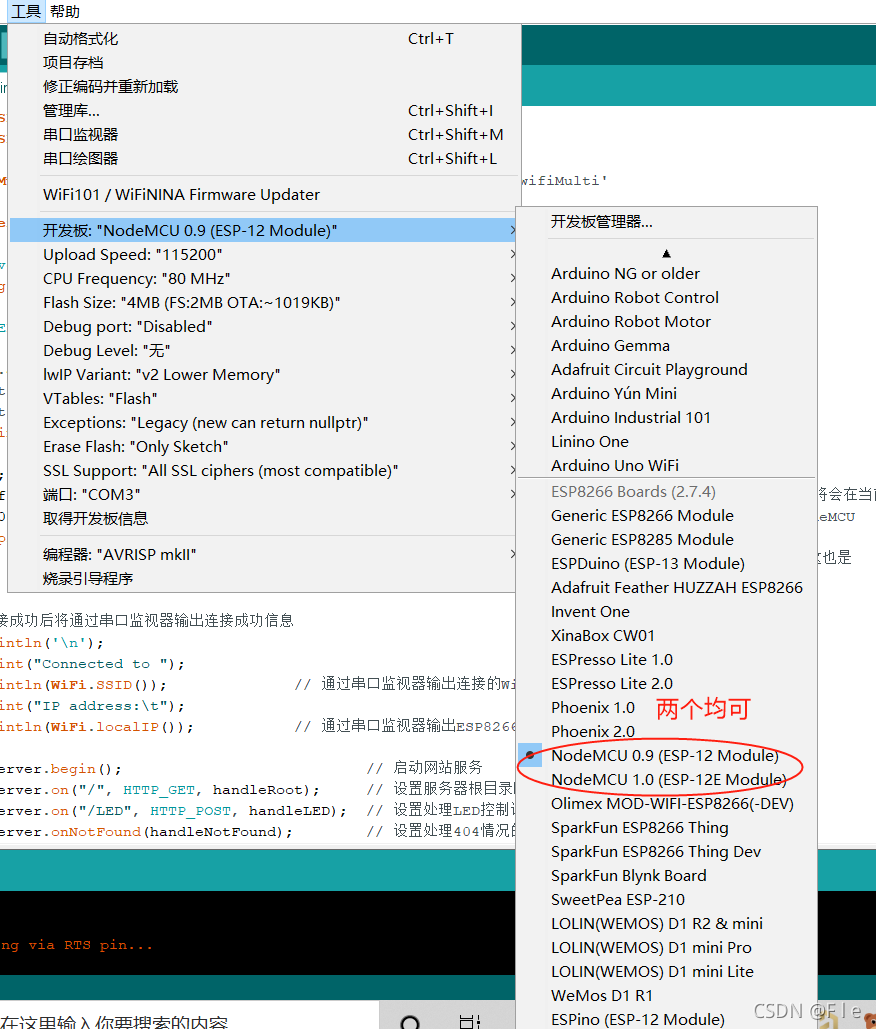
4、AP Pattern
#include <ESP8266WiFi.h> //  This program uses ESP8266WiFi library

const char *ssid = "Fle"; // esp8266 The establishment of a wifi name


const char *password = "gxd001213";  //esp8266 The establishment of a wifi password


void setup() {

  Serial.begin(9600);              //  Start serial communication

  WiFi.softAP(ssid, password);     //  This sentence is the key point .WiFi.softAP Used to start NodeMCU Of AP Pattern .
                                   //  There are two parameters in parentheses ,ssid yes WiFi name .password yes WiFi password .
                                   //  These two parameters are specific setup Define the position before the function .


  Serial.print("Access Point: ");    //  Output information through serial port monitor
  Serial.println(ssid);              //  Tell the user NodeMCU Established by WiFi name
  Serial.print("IP address: ");      //  as well as NodeMCU Of IP Address
  Serial.println(WiFi.softAPIP());   //  By calling WiFi.softAPIP() You can get NodeMCU Of IP Address , Fixed for 192.168.4.1

}

void loop() {

}


5、STA Pattern
#include <ESP8266WiFi.h> //  This program uses ESP8266WiFi library

const char* ssid     = "Fle";      //  Connect WiFi name ( Use mobile hotspot here Fle)

const char* password = "gxd001213";          //  Connect WiFi password


void setup() {

  Serial.begin(115200);         //  Start serial communication

  WiFi.begin(ssid, password);                  //  Start the network connection
  Serial.print("Connecting to ");              //  The serial port monitor outputs network connection information
  Serial.print(ssid); Serial.println(" ...");  //  Tell the user NodeMCU Is trying to WiFi Connect

  int i = 0;                                   //  This program statement is used to check WiFi Whether the connection is successful
  while (WiFi.status() != WL_CONNECTED) {
          // WiFi.status() The return value of the function is determined by NodeMCU Of WiFi Determined by the connection state .
    delay(1000);                               //  If WiFi If the connection is successful, the return value is WL_CONNECTED
    Serial.print(i++); Serial.print(' ');      //  Here through While Circulation NodeMCU Check every second WiFi.status() Function return value
  }                                            //  meanwhile NodeMCU Read the connection time of the monitor output through the serial port in seconds .
                                               //  This second reading is through the variable i Add it every second 1 To achieve .

  Serial.println("");                          // WiFi After successful connection
  Serial.println("Connection established!");   // NodeMCU Will output through the serial port monitor " Successful connection " Information .
  Serial.print("IP address: ");             //  It will also output NodeMCU Of IP Address . This function is achieved by calling
  Serial.println(WiFi.localIP());              // WiFi.localIP() Function to implement . The return value of this function is NodeMCU Of IP Address .
}

void loop() {

}


If there is a situation of waiting , hold AP Frequency band changed to 2.4GHZ, Looks like Esp8266 I won't support it 5GHZ Frequency band .
边栏推荐
猜你喜欢


随机推荐
*6-3 save small experts
初识Opencv4.X----方框滤波
无向连通图邻接表的创建输出广度深度遍历
matlab如何导入大量数据
初识Opencv4.X----图像模板匹配
关于MLOps中的数据工程,你一定要知道的.......
数字IC设计SOC入门进阶
Raspberry sect door ban system based on face recognition
chmod和chown对挂载的分区的文件失效
Get to know opencv4.x for the first time --- add salt and pepper noise to the image
深度学习 段错误(Segment Core/ Exit code 139)情况记录
CCF 201512-4 送货
matlab绘图|坐标轴axis的一些常用设置
Customize dialog to realize the pop-up box of privacy clause statement imitating Netease cloud music
【cf】Round 128 C. Binary String
Android & kotlin: puzzle solution
鱼眼图像自监督深度估计原理分析和Omnidet核心代码解读
yolov5实现小数据集的目标检测--kolektor缺陷数据集
First knowledge of opencv4.x --- image histogram drawing
[code source] add brackets to the daily question