当前位置:网站首页>Koa 框架
Koa 框架
2022-06-25 12:16:00 【BloggerM】
Koa 框架
认识 Koa
- 前面我们已经学习了express,另外一个非常流行的Node Web服务器框架就是Koa。
- Koa官方的介绍:
koa:next generation web framework for node.js;koa:node.js的下一代web框架;
- 事实上,
koa是express同一个团队开发的一个新的Web框架:- 目前团队的核心开发者
TJ的主要精力也在维护Koa,express已经交给团队维护了; Koa旨在为Web应用程序和API提供更小、更丰富和更强大的能力;- 相对于
express具有更强的异步处理能力(后续我们再对比); Koa的核心代码只有1600+行,是一个更加轻量级的框架,我们可以根据需要安装和使用中间件;
- 目前团队的核心开发者
- 事实上学习了
express之后,学习koa的过程是很简单的;
Koa 初体验
我们来体验一下
koa的Web服务器在桌面新建文件夹
learn_koa打开终端初始化项目
npm init -y在
package.json配置脚本{ "name": "learn_koa", "version": "1.0.0", "description": "", "main": "index.js", "scripts": { "start": "nodemon ./src/app.js" }, "keywords": [], "author": "", "license": "ISC", "dependencies": { "koa": "^2.13.4", "nodemon": "^2.0.16" } }根据脚本新建文件
src,在文件src下面新建文件夹app.js安装
koa框架npm i koa
启动项目
npm start
koa注册的中间件提供了两个参数:ctx:上下文(Context)对象;koa并没有像express一样,将req和res分开,而是将它们作为ctx的属性;ctx代表依次请求的上下文对象;ctx.request:获取请求对象;ctx.response:获取响应对象;const Koa = require("koa"); const app = new Koa(); // context 上下文对象 // 包含两个主要的对象 request responst app.use((context, next) => { console.log(context); console.log("普通中间件"); }); app.listen(8888, () => { console.log("服务器开启成功"); });
next:本质上是一个dispatch,类似于之前的next;
Koa中间件
koa通过创建的app对象,注册中间件只能通过use方法:Koa并没有提供methods的方式来注册中间件;- 也没有提供
path中间件来匹配路径;
- 但是真实开发中我们如何将路径和
method分离呢?- 方式一:根据
request自己来判断; - 方式二:使用第三方路由中间件;
- 方式一:根据
路由的使用
koa官方并没有给我们提供路由的库,我们可以选择第三方库:koa-routernpm install koa-router
我们可以先封装一个
user.router.js的文件:// router/user.js const Router = require("koa-router"); const userRouter = new Router({ prefix: "/user", }); userRouter.get("/", (ctx) => { // 响应结果 ctx.body = "用户列表"; }); userRouter.post("/", (ctx) => { // 响应结果 ctx.body = "添加成功"; }); userRouter.delete("/", (ctx) => { // 响应结果 ctx.body = "删除成功"; }); userRouter.patch("/", (ctx) => { // 响应结果 ctx.body = "修改成功"; }); module.exports.userRouter = userRouter;在
app中将router.routes()注册为中间件:const Koa = require("koa"); const { userRouter } = require("./router/user"); const app = new Koa(); // 注册路由中间件 // userRouter.routes() 加载路由规则 // userRouter.allowedMethods() 对于没有实现和没有使用的请求方式做出正确的响应 app.use(userRouter.routes()).use(userRouter.allowedMethods()); app.listen(8888, () => { console.log("服务器开启成功"); });注意:
allowedMethods用于判断某一个method是否支持:- 如果我们请求
get,那么是正常的请求,因为我们有实现get; - 如果我们请求
put、delete、patch,那么就自动报错:Method Not Allowed,状态码:405; - 如果我们请求
link、copy、lock,那么就自动报错:Not Implemented,状态码:501;
- 如果我们请求
参数解析:params - query
请求地址:
localhost:8888/user/2获取
params:// router/user.js const Router = require("koa-router"); const userRouter = new Router({ prefix: "/user", }); userRouter.get("/:id", (ctx) => { // params 方式传参 console.log(ctx.params.id); // 响应结果 ctx.body = "用户列表"; }); module.exports.userRouter = userRouter;
请求地址:
localhost:8888/user?name=张三&age=21获取
query:// router/user.js const Router = require("koa-router"); const userRouter = new Router({ prefix: "/user", }); userRouter.get("/", (ctx) => { // query 方式传参 console.log(ctx.query); // 响应结果 ctx.body = "用户列表"; }); module.exports.userRouter = userRouter;
参数解析:json
请求地址:
http://localhost:8888/userbody是json格式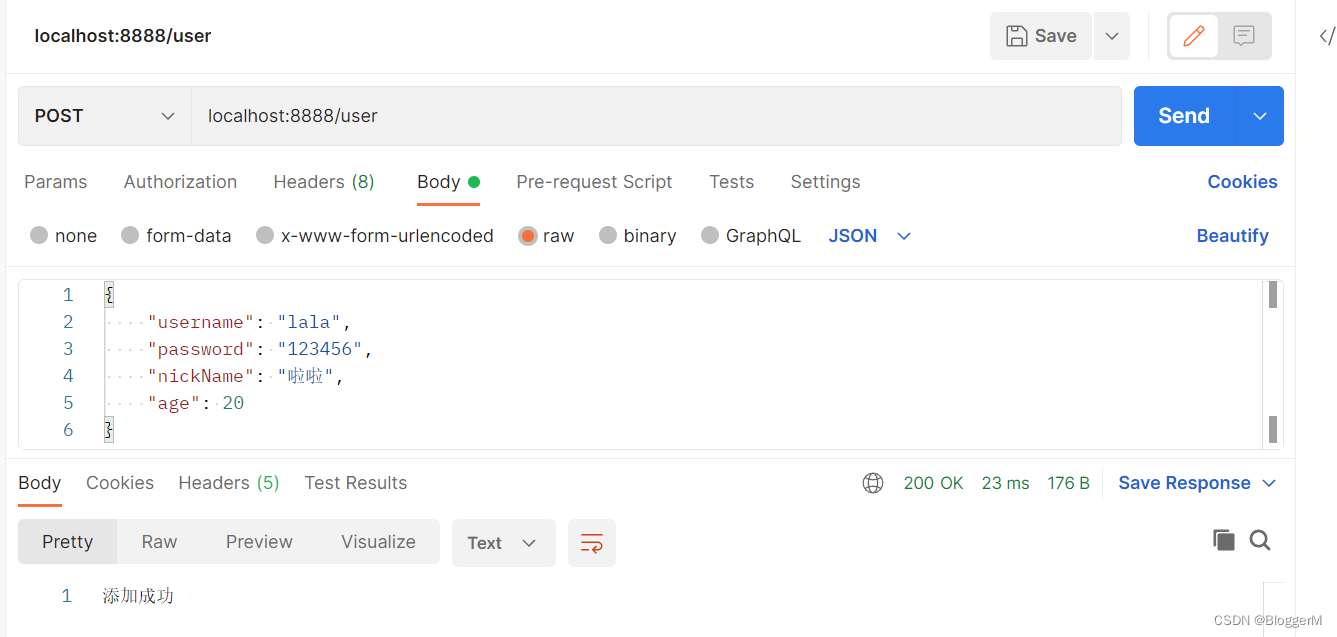
获取
json数据:安装依赖:
npm install koa-bodyparser;
使用
koa-bodyparser的中间件;在入口文件
index.js中const Koa = require("koa"); const bodyParser = require("koa-bodyparser"); const { userRouter } = require("./router/user"); const app = new Koa(); // bodyParser() 解析 json 数据的中间件 app.use(bodyParser()); // 注册路由中间件 // userRouter.routes() 加载路由规则 // userRouter.allowedMethods() 对于没有实现和没有使用的请求方式做出正确的响应 app.use(userRouter.routes()).use(userRouter.allowedMethods()); app.listen(8888, () => { console.log("服务器开启成功"); });在
router文件下面的user.js中// router/user.js const Router = require("koa-router"); const userRouter = new Router({ prefix: "/user", }); userRouter.post("/", (ctx) => { // json 方式传参 console.log(ctx.request.body); // 响应结果 ctx.body = "添加成功"; }); module.exports.userRouter = userRouter;
参数解析:x-www-form-urlencoded
请求地址:
http://localhost:8888/userbody是x-www-form-urlencoded格式:
获取
json数据:(和json是一致的)安装依赖:
npm install koa-bodyparser;使用
koa-bodyparser的中间件;在入口文件
index.js中const Koa = require("koa"); const bodyParser = require("koa-bodyparser"); const { userRouter } = require("./router/user"); const app = new Koa(); // bodyParser() 解析 json 数据的中间件 app.use(bodyParser()); // 注册路由中间件 // userRouter.routes() 加载路由规则 // userRouter.allowedMethods() 对于没有实现和没有使用的请求方式做出正确的响应 app.use(userRouter.routes()).use(userRouter.allowedMethods()); app.listen(8888, () => { console.log("服务器开启成功"); });在
router文件下面的user.js中// router/user.js const Router = require("koa-router"); const userRouter = new Router({ prefix: "/user", }); userRouter.put("/", (ctx) => { // json 方式传参 console.log(ctx.request.body); // 响应结果 ctx.body = "修改成功"; }); module.exports.userRouter = userRouter;
参数解析:form-data
请求地址:
http://localhost:8888/user/uploadbody是form-data格式
解析body中的数据,我们需要使用multer
安装依赖:
npm install koa-multer;
使用
multer中间件;// router/user.js const Router = require("koa-router"); const multer = require("koa-multer"); // 注意我这里安装的nanoid是3.x的版本,其它版本可能会报错 const { nanoid } = require("nanoid"); const { extname } = require("path"); const userRouter = new Router({ prefix: "/user", }); const storage = multer.diskStorage({ destination(req, file, cb) { cb(null, "uploads/"); }, filename(req, file, cb) { // 文件名 const fileName = nanoid(); // 文件的后缀名 const extName = extname(file.originalname); cb(null, fileName + extName); }, }); // 文件上传 const upload = multer({ storage, }); userRouter.post("/upload", upload.single("file"), (ctx) => { // form-data 方式传参 // 文件信息 console.log(ctx.req.file); // 表单数据 console.log(ctx.req.body); // 响应结果 ctx.body = "文件上传成功"; }); module.exports.userRouter = userRouter;
数据的响应
输出结果:
body将响应主体设置为以下之一:string:字符串数据ctx.response.body = "hello world";Buffer:Buffer数据Stream:流数据Object|| Array:对象或者数组// Object ctx.body = { name: "why", age: 18, height: 1.88, };// Array ctx.body = ["abc", "def", "nba"];null:不输出任何内容如果
response.status尚未设置,Koa会自动将状态设置为200或204。
请求状态:
statusctx.status = 201; ctx.response.status = 204;
静态服务器
koa并没有内置部署相关的功能,所以我们需要使用第三方库:
npm install koa-static
部署的过程类似于
express:const Koa = require("koa"); const bodyParser = require("koa-bodyparser"); const static = require("koa-static"); const { userRouter } = require("./router/user"); const app = new Koa(); // bodyParser() 解析 json 数据的中间件 app.use(bodyParser()); app.use(static("./dist/index.html")); // 注册路由中间件 // userRouter.routes() 加载路由规则 // userRouter.allowedMethods() 对于没有实现和没有使用的请求方式做出正确的响应 app.use(userRouter.routes()).use(userRouter.allowedMethods()); app.listen(8888, () => { console.log("服务器开启成功"); });
和express对比
- 在学习了两个框架之后,我们应该已经可以发现
koa和express的区别: - 从架构设计上来说:
express是完整和强大的,其中帮助我们内置了非常多好用的功能;koa是简洁和自由的,它只包含最核心的功能,并不会对我们使用其他中间件进行任何的限制。- 甚至是在
app中连最基本的get、post都没有给我们提供; - 我们需要通过自己或者路由来判断请求方式或者其他功能;
- 甚至是在
- 因为
express和koa框架他们的核心其实都是中间件:- 但是他们的中间件事实上,它们的中间件的执行机制是不同的,特别是针对某个中间件中包含异步操作时;
边栏推荐
- (4) Pyqt5 tutorial -- > Custom signal and slot (super winding...)
- 重装cuda/cudnn/pytorch
- Concat(), join(), reverse(), sort() method in JS array
- 架构师必备的七种能力
- list.replace, str.append
- Elemntui's select+tree implements the search function
- Laravel echart statistical chart line chart
- Zhangxiaobai's road of penetration (VI) -- the idea and process of SQL injection and the concat series functions and information of SQL_ Schema database explanation
- Zhangxiaobai's road to penetration (7) -sql injection detailed operation steps -union joint query injection
- Visual studio2019 link opencv
猜你喜欢

Total number of MySQL statistics, used and unused

Three jobs! You can learn this from me (attached with graduation vlog)

(3) Pyqt5 tutorial -- > signal and slot preliminary test
High performance + million level Excel data import and export

@Scheduled implementation of scheduled tasks (concurrent execution of multiple scheduled tasks)

How to implement a high-performance load balancing architecture?
![最大数[抽象排序之抽象规则]](/img/47/f6bafacc95f487854a3e304325f3f0.png)
最大数[抽象排序之抽象规则]

百度搜索稳定性问题分析的故事

MySQL adds, modifies, and deletes table fields, field data types, and lengths (with various actual case statements)

3+1 guarantee: how is the stability of the highly available system refined?
随机推荐
Laravel multi project mutual access
Possible causes of wechat applet decryption failure
PHP multidimensional array sorting
Wechat full-text search technology optimization
Visual studio2019 link opencv
百度搜索稳定性问题分析的故事
Zhangxiaobai's way of penetration (III) -- detailed explanation of SQL injection vulnerability principle (SQL Server)
(2) Pyqt5 tutorial -- > using qtdesigner to separate interface code
JS picture switching (simple and practical)
冷启动的最优解决方案
Lighten the source code -- lighten the app system development function introduction to the beautiful world lighten the app system development source code in China
英语口语 - 连读
画图常用配色
Swagger document generated by node project API in vscode
JS uses the for loop in the function to insert and delete the array at the specified position
GPS receiver design (1)
PHP appends the same elements to a two-dimensional array
Jupyter Notebook主题字体设置及自动代码补全
Navicat premium view password scheme
flutter 收到推送后自动消失问题