当前位置:网站首页>三层交换机配置MSTP协议详解【华为eNSP实验】
三层交换机配置MSTP协议详解【华为eNSP实验】
2022-07-24 13:37:00 【华为云】
一,前言
MSTP:在接入层交换机和汇聚层的交换机之间运行MSTP,防止数据在交换网络中无限循环从而产生交换网络的瘫痪,还可以实现均衡负载的作用
上一篇我们已经配置成功了路由/三层交换机DHCP下发地址。下面我们来完成三层交换机配置MSTP协议的任务。
任务需求如下:
8.为提高网络的可靠性,每台二层接入设备都需要和汇聚层设备进行互联, 所以需要配置STP协议在保证可靠的基础上防止环路的发生。(拓展)
10.MSTP、VRRP这些技术同学们可根据情况加以考虑和实现。(拓展)
我们先看一下拓扑图: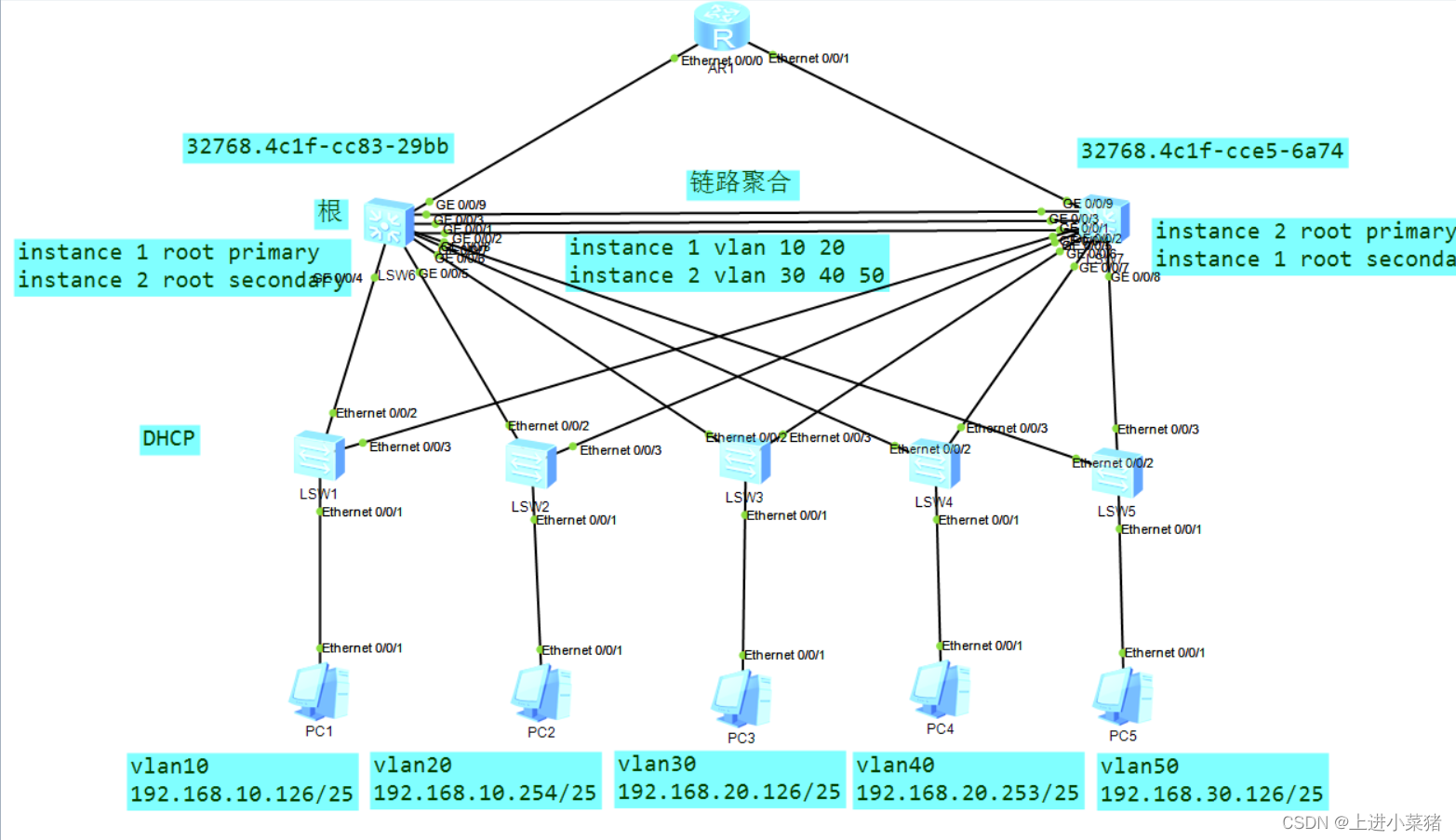
二,例子—简单配置MSTP协议
拓扑图如下: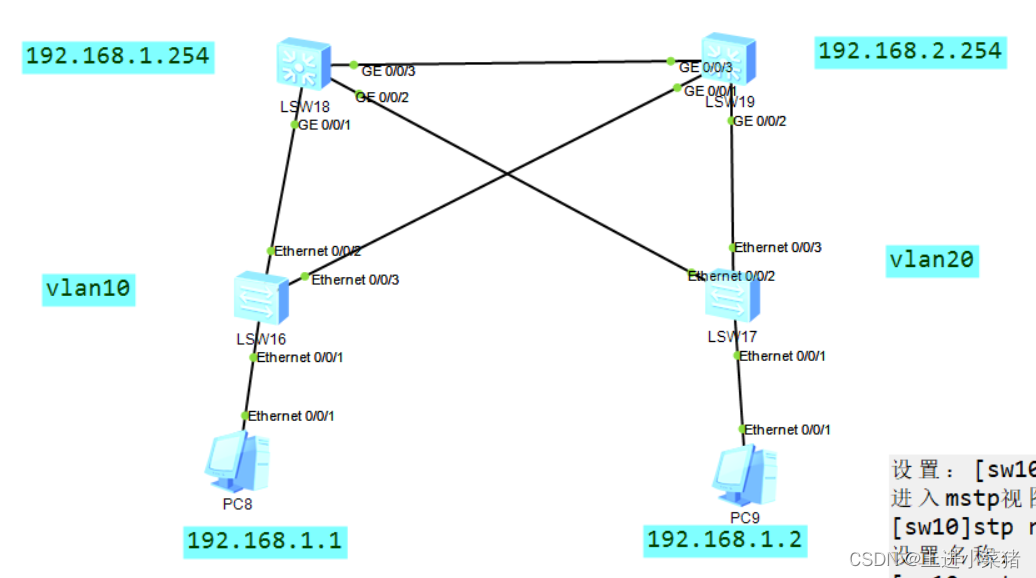
第一步lsw16配置
1.先创建vlan
vlan batch 10 202.到1号口配置
int eth 0/0/13.配置通信模式
port link-type access注意:
port default vlan 104.其他俩个端口
[sw1]port-group group-member Ethernet 0/0/2 to Ethernet 0/0/35.配置为trunk
port link-type trunk6.运行通过所有的vlan
port trunk allow-pass vlan all第二步lsw17配置
和上面一样。
唯一的区别是:
注意:
port default vlan 20第三步配置汇聚层交换机LSW18
1.先创建vlan
vlan batch 10 202.分组
port-group group-member GigabitEthernet 0/0/1 to GigabitEthernet 0/0/33.配置为trunk
port link-type trunk输出如下:
[cour1-GigabitEthernet0/0/1]port link-type trunk [cour1-GigabitEthernet0/0/2]port link-type trunk [cour1-GigabitEthernet0/0/3]port link-type trunk 4.设置允许所有vlan通过
port trunk allow-pass vlan all第四步配置汇聚层交换机LSW19
与第三步配置汇聚层交换机LSW18步骤一样。
第五步配置mstp
在sw10里
设置:[sw10]stp mode mstp
stp mode mstp进入mstp视图:
stp region-configuration 设置名称:
[sw10-mst-region]region-name mstp
region-name mstp设置版本号
[sw10-mst-region]revision-level 0
revision-level 0划分组
[sw10-mst-region]instance 1 vlan 10
[sw10-mst-region]instance 2 vlan 20
instance 1 vlan 10instance 2 vlan 20激活配置:
[sw10-mst-region]active region-configuration
active region-configuration 查看配置:
[sw10-mst-region]dis current-configuration
dis current-configuration如下mstp的所有配置:
stp region-configuration region-name mstprevision-level 0 instance 1 vlan 10 instance 2 vlan 20 active region-configuration如上步骤在sw16,17,18,19各运行一次。
查看
查看mstp
dis stp instance 1 brief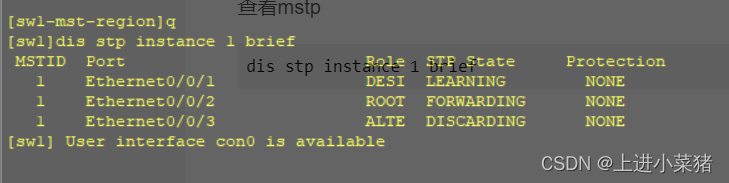
[sw1]dis stp instance 1 brief MSTID Port Role STP State Protection 1 Ethernet0/0/1 DESI LEARNING NONE 1 Ethernet0/0/2 ROOT FORWARDING NONE 1 Ethernet0/0/3 ALTE DISCARDING NONE便捷区:
1.先创建vlan
vlan batch 10 20
2.到1号口配置
int eth 0/0/1
3.配置通信模式
port link-type access
port default vlan 10
4.其他俩个端口
[sw1]port-group group-member Ethernet 0/0/2 to Ethernet 0/0/3
配置为trunk
port link-type trunk
运行通过所有的vlan
port trunk allow-pass vlan all
设置:[sw10]stp mode mstp
进入mstp视图:
[sw10]stp region-configuration
设置名称:
[sw10-mst-region]region-name mstp
设置版本号
[sw10-mst-region]revision-level 0
划分组
[sw10-mst-region]instance 1 vlan 10
[sw10-mst-region]instance 2 vlan 20
激活配置:
[sw10-mst-region]active region-configuration
查看配置:
[sw10-mst-region]dis current-configuration
如下mstp的所有配置:
stp region-configuration
region-name mstp
revision-level 0
instance 1 vlan 10
instance 2 vlan 20
active region-configuration
查看mstpdis stp instance 1 brief三.课设-三层交换机配置MSTP协议
看一下拓扑图: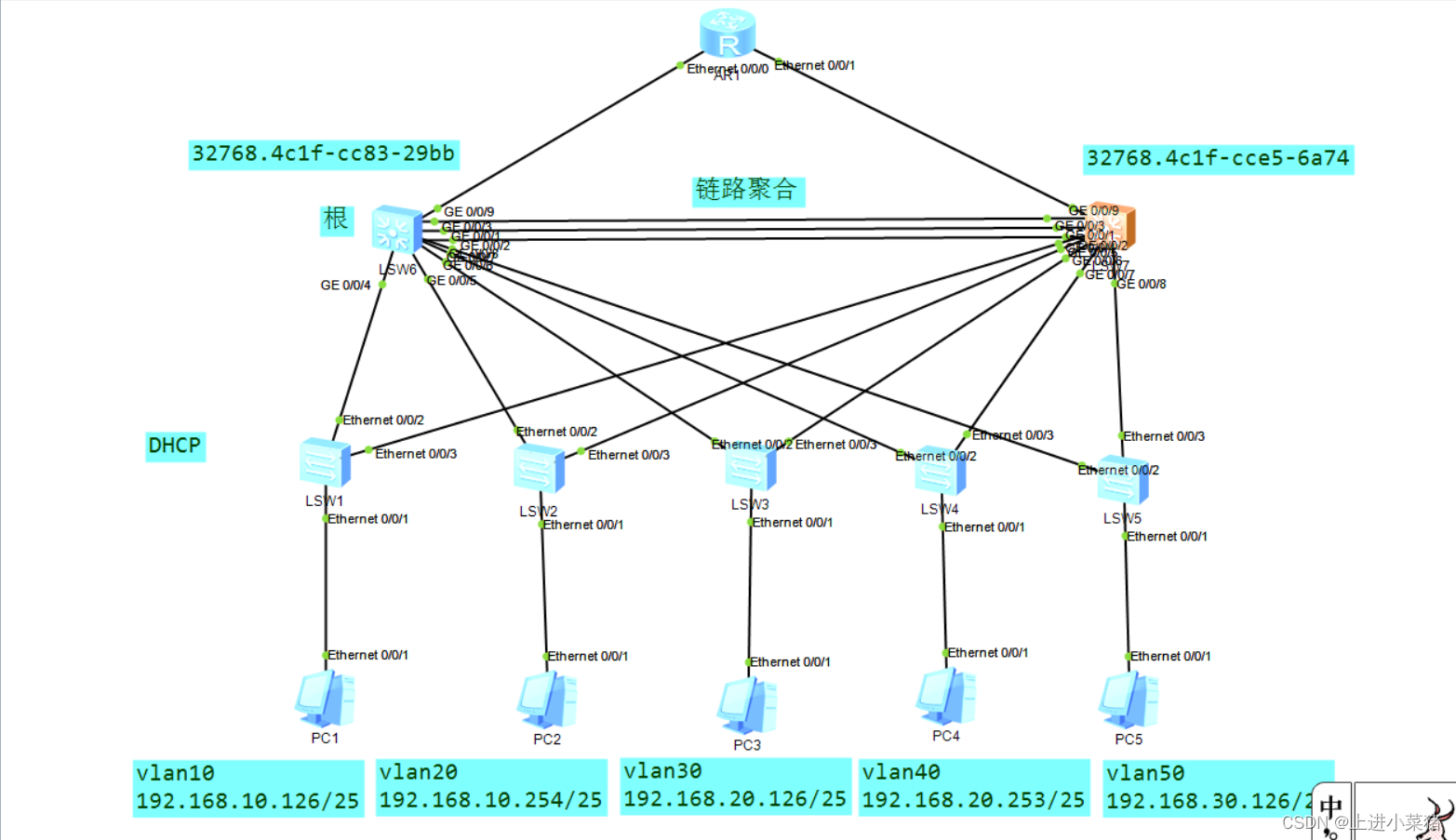
MSTP协议还是比较简单的。
先看一下,什么是MSTP协议:
MSTP多区域生成树协议:
形成多棵无环路的树,解决广播风暴并实现冗余备份。
多棵生成树在VLAN间实现负载均衡,不同VLAN的流量按照不同的路径转发。
汇聚层:先配置三层交换机:
LSW1如下:
stp instance 1 root primarystp instance 2 root secondaryLSW2如下:
stp instance 2 root primarystp instance 1 root secondary说明:LSW1是1的主根,2的备根。LSW2是2的主根,1的备根。
进入stp region-configuration视图:
设置名称,划分1和2的vlan,激活region-configuration
stp region-configuration region-name zhubo instance 1 vlan 10 20 instance 2 vlan 30 40 50 active region-configuration查看stp配置
display stp brief交换层:
之前已经配置了VLAN,所以我们直接:
stp region-configuration region-name zhubo instance 1 vlan 10 20 instance 2 vlan 30 40 50 active region-configuration即可。
检查结果如下: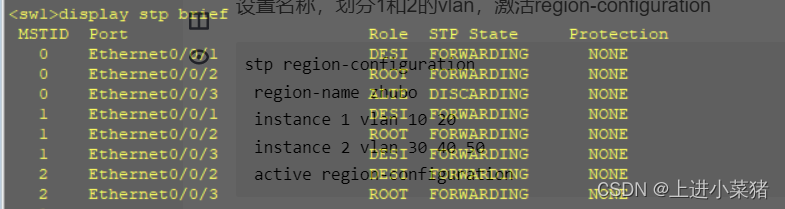
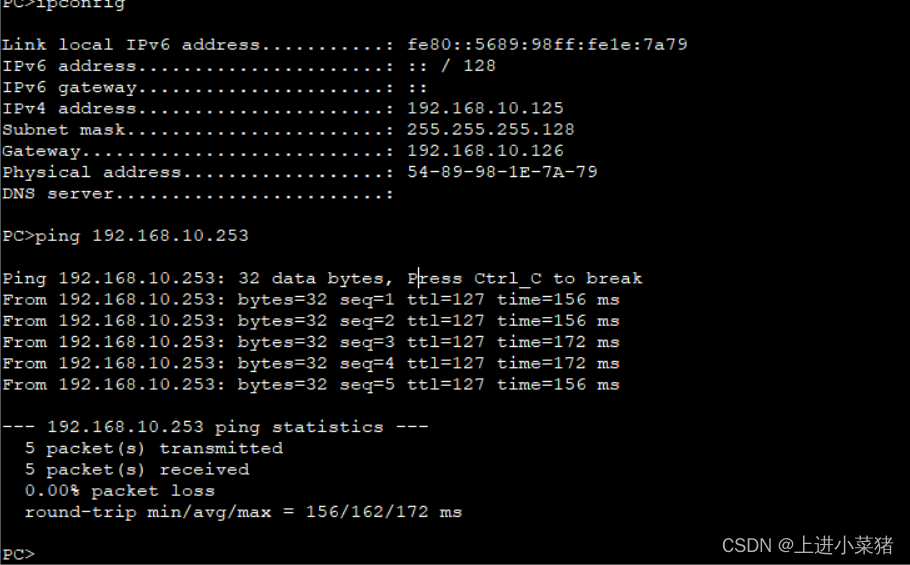
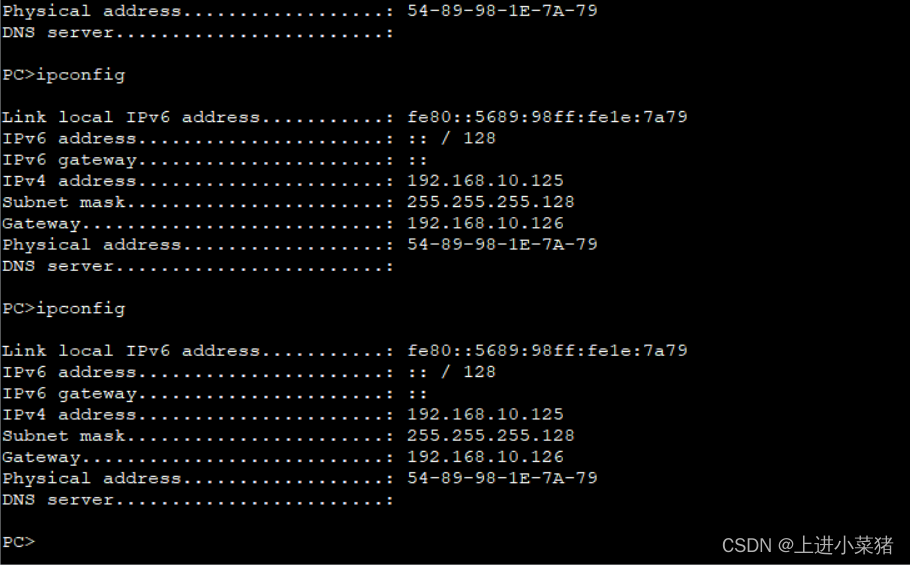
ping 192.168.10.253
边栏推荐
- 2022年全国职业院校技能大赛赛项比赛时间、承办校信息统计表(第二批)
- Writing browser plug-ins
- LEADTOOLS 22 套件 LEADTOOLS 超级套
- Handler learning
- Analysis of abnormal problems of embedded SD card
- Atcoder beginer contest 261 f / / tree array
- The EAS BOS development environment client cannot be started, but the server does show that it is ready
- CMake基本语法(一)
- Network security - file upload penetration test
- Collection collection framework
猜你喜欢

脑注意力机制启发的群体智能协同避障方法

How to generate expected data? Emory University and others' latest "deep learning controllable data generation" review, 52 page PDF, covering 346 documents, comprehensively expounds the controllable g

网络安全——文件上传白名单绕过

Network security - function bypass injection

第六章 总线

深入浅出边缘云 | 2. 架构

Chinese character style migration --- diversity regularization stargan for Chinese character multi font generation

Icml2022 | branch reinforcement learning

【论文阅读】Mean teachers are better role models

Summary of embedded network problems (packet loss of network card, unrecognized network card)
随机推荐
CMake基本语法(一)
Thread multithreading
2022.07.21
[acm/ two points] two points clear entry-level explanation
Network security - function bypass injection
WSDM 22 | graph recommendation based on hyperbolic geometry
Exploration of sustainable learning ability to support the application of ecological evolution of Pengcheng series open source large models
Explain the edge cloud in simple terms | 2. architecture
The EAS BOS development environment client cannot be started, but the server does show that it is ready
基于ABP实现DDD--实体创建和更新
Happy number ~ ~ ~ (in fact, I'm not happy at all) & ugly number
Queue (stack)
vscode配置用户代码片段(包括删除方法)
[机缘参悟-51]:既然人注定要死亡,为什么还要活着?
DDD based on ABP -- Entity creation and update
Repair the problem of adding device groups and editing exceptions on easycvr platform
Network security - Web penetration testing
Overview of multi view learning methods based on canonical correlation analysis
Redis (13) -- on master-slave replication of redis
Common OJ questions of stack and queue