当前位置:网站首页>Free personal virtual machine - AWS free EC2 package
Free personal virtual machine - AWS free EC2 package
2022-07-25 00:47:00 【Liu Shuijing】
Cloud age , Everyone should have their own virtual machine . Now Amazon has launched a free one-year package , This is really good news for individual users , Let's learn today , How to collect this wool .
register
Account information
open AWS Official website , Then click Register in the upper right corner , Come to the registration page :
Personal information
Fill in the registration information , Then continue to :
Payment information
Further improve personal information , Then go on .
Be careful , Here you need an international credit card (VISA or Master, If you haven't , You can send me your phone address privately , I recommend you to apply for a card ).
SMS 、 Telephone verification

If you can't receive text messages for a long time , You can choose Phone verification , fast .
Options

We are free users , Of course, we have to choose the basic scheme .
Create services
We have completed the above steps AWS Registration of , Next, we will create our virtual machine service .
Service selection
Log in with the account you just registered AWS, Get into AWS Management console selection EC2( You can also select services by clicking on the services in the upper left corner ).AWS Provides many services , Here we choose EC2(Elastic Compute Cloud):
Boot instance

Mirror selection
Click Start instance , Go to the image list :
Here you can choose the corresponding system image according to your own situation ( This article takes Ubuntu For example ).
Type selection
After selecting the corresponding system image , You will enter the instance type selection page :
The system will select by default t2.micro type , Now you can directly click the blue button in the lower right corner —— Review and start . If you want to make detailed settings , Just click next .
verification

Verification is to check the configuration of the previous host , It's like ordering food in a restaurant , The waiter will check the menu with you .
Boot instance

Next, it's time to start the instance we created , You need to download a key before starting . Take a name , Then download to local , You need to use it later when logging in remotely .
The first time you create an instance , The following conditions may occur during startup :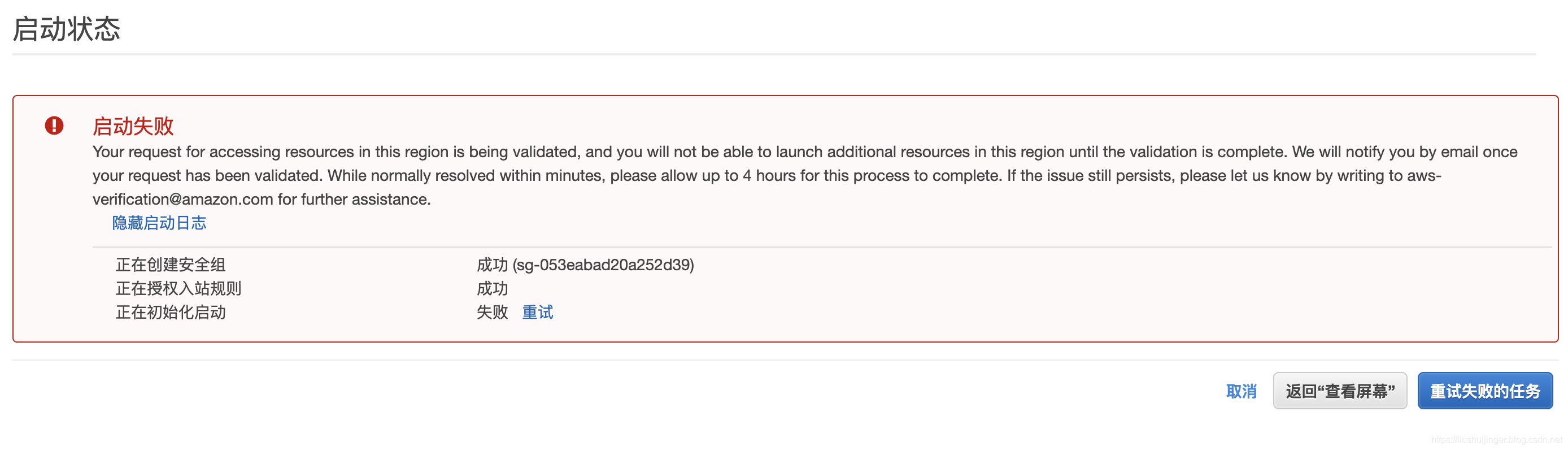
In this case , Don't panic , Just wait , After a while, you will receive a verified email , Next, click Retry OK 了 .
See the following page , Congratulations on the successful start of your instance .
Remote login
Click the combination of numbers and letters in the above figure ( Example of ID), Enter the instance list page .
Connect
Select your instance , And then click Connect , Or right click your instance and select Connect , The following prompt page pops up :
Turn on your terminal (Terminal perhaps iTerm2), Switch to key ( The one I just downloaded pem file ) In the directory , According to the command given on the prompt page , You can log in to the virtual machine we created .
If you think it's troublesome to switch to the key directory every time , Then add the key to this secret keystore :
ssh-add -k xxx.pem
In this way, the command to log in to the virtual machine can be executed in any directory . If so, you still feel troublesome , Then you can refer to 《Mac(OSX) Next comparable XShell The artifact of Termius》 The method in , Configure the key content and connection command to Termius in .
Set up personal network agent
Software installation
#  obtain root jurisdiction
sudo -s
#  to update apt-get
apt-get update
#  install  python  Package management tools  pip
apt-get install python-pip
#  install shadowsocks
pip install shadowsocks
If you encounter the following error
locale.Error: unsupported locale setting
Please execute the following order :
export LC_ALL=C
To configure
Create configuration folder
mkdir /etc/shadowsocks
create profile
vim /etc/shadowsocks/config.json
Edit profile
{

	"server":"0.0.0.0",
	"server_port":8116,
	"local_address":"127.0.0.1",
	"local_port":1080,
	"password":"password",
	"timeout":300,
	"method":"aes-256-cfb",
	"fast_open":false,
	"workers": 1
}
Ports and passwords can be customized .
start-up
#  start-up
ssserver -c /etc/shadowsocks/config.json -d start
#  stop it
ssserver -c /etc/shadowsocks/config.json -d stop
#  Restart
ssserver -c /etc/shadowsocks/config.json -d restart
Check whether the startup is successful
ps -aux | grep ssserver
Set boot up
vim /etc/rc.local
Paste and save the following contents :
sudo ssserver -c /etc/shadowsocks/config.json -d start
Save and exit , You can restart the instance to verify .
Configure client
download ShadowSocks And install , Open the server configuration :
Just fill in the corresponding contents in the configuration file .
Conclusion
OK, Go through the above steps , We have AWS The virtual machine has been free for one year . You can play freely on it , I need to remind you , It is better to turn on the bill notification in the bill control panel , So as not to cause additional costs . Set a reminder after one year , Remind yourself to close this account .
边栏推荐
- [mindspore] [training warning] warning when executing training code
- Leetcode 1260. two dimensional grid migration: two solutions (k simulations / one step)
- Managing databases in a hybrid cloud: eight key considerations
- Daily question 1 · 1260. Two dimensional network migration · simulation
- Ggplot2 visual faceting, visual faceted ridge plot with facet_wrap, and customize the background color of the faceted icon title box
- [untitled]
- Related knowledge of paging
- Notes on topic brushing (XXII) -- Dynamic Planning: basic ideas and topics
- px rem em
- Unity+photon self made multiplayer TPS game
猜你喜欢
C # "learning code snippet" - recursively obtain all files under the folder

BGP machine room and BGP

2022 Henan Mengxin League game 2: Henan University of technology K - Rice

Kubernetes application design guide
![[performance optimization] MySQL common slow query analysis tools](/img/97/c7604282544c5fa8cd7e85a6ab9154.png)
[performance optimization] MySQL common slow query analysis tools

Wireshark packet capturing and rapid packet location skills

Construction of Seata multilingual system

Unity panel control
Automated test series selenium three kinds of waiting for detailed explanation

Advanced multithreading (Part 2)
随机推荐
[LeetCode周赛复盘] 第 83 场双周赛20220723
#648 (Div. 2)(A. Matrix Game、B. Trouble Sort、C. Rotation Matching)
Improve static loading dynamic loading
Invitation letter | "people, finance, tax" digital empowerment, vigorously promote retail enterprises to achieve "doubling" of economies of scale
Netease game Flink SQL platform practice
[untitled]
[leetcode weekly replay] game 83 biweekly 20220723
R language uses ISNA function to check whether the list and dataframe contain missing values, marks abnormal values in data columns in dataframe as missing values Na, and uses na.omit function to dele
Automated test series selenium three kinds of waiting for detailed explanation
Add the two numbers in the linked list of the second question of C language. Ergodic method
Codeworks round 649 (Div. 2) ABC problem solution
Number of palindromes in question 5 of C language deduction (two methods)
What is the root password of MySQL initial installation
C recursively obtains all files under the folder and binds them to the treeview control
Fast development board for Godson solid state drive startup (burning system to solid state) - partition
Grafana connection tdengine reports an error 535
WPF implements RichTextBox keyword query highlighting
[mindspore] [training warning] warning when executing training code
MySQL的最左前缀原则
C language force buckle the eighth question of string conversion integer. Ergodic method