当前位置:网站首页>Talk about seven ways to realize asynchronous programming
Talk about seven ways to realize asynchronous programming
2022-07-04 17:33:00 【Young】
Recently, many friends left me messages , Can you summarize asynchronous programming , Today, let's talk about this topic briefly .
Early systems were synchronous , Easy to understand , Let's take an example
Synchronous programming
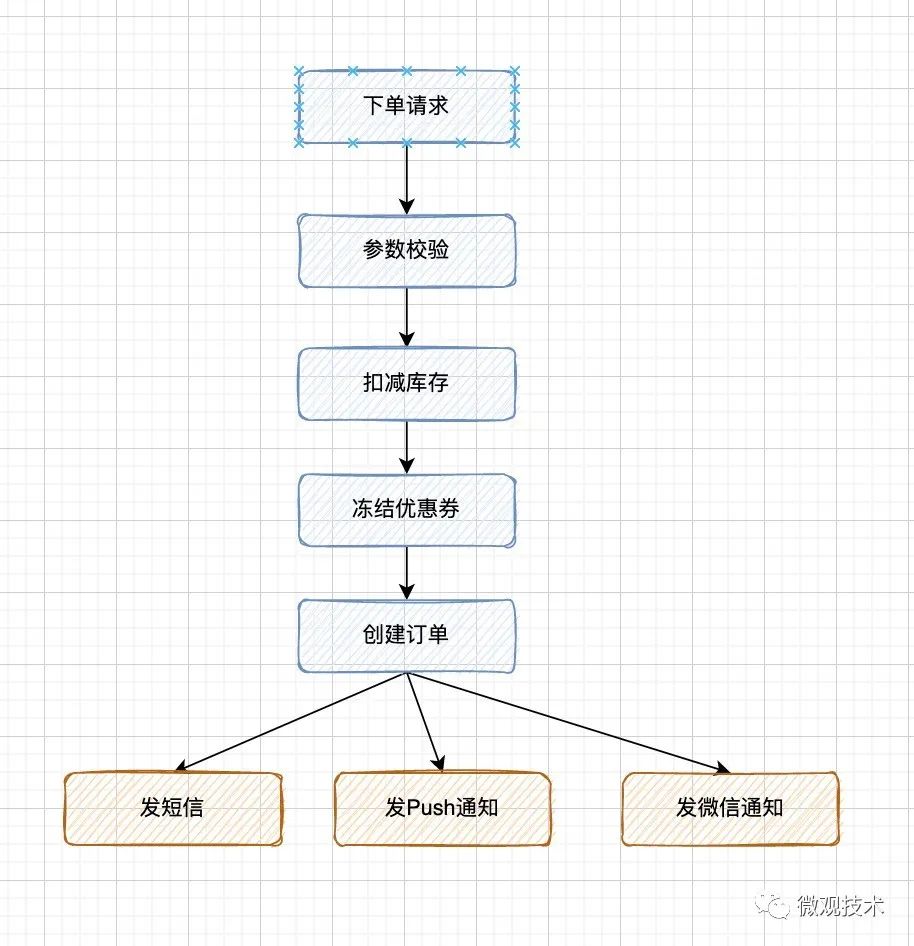
When a user creates an e-commerce transaction order , The business logic process to go through is still very long , Each step takes a certain amount of time , So the whole RT It will be longer .
therefore , Smart people began to think about whether they could separate some non core businesses from the main process , Hence the Asynchronous programming embryonic form .
Asynchronous programming is a means to make programs run concurrently . It allows multiple events to occur simultaneously , When a program calls a method that needs to run for a long time , It does not block the current execution process , The program can continue to run .
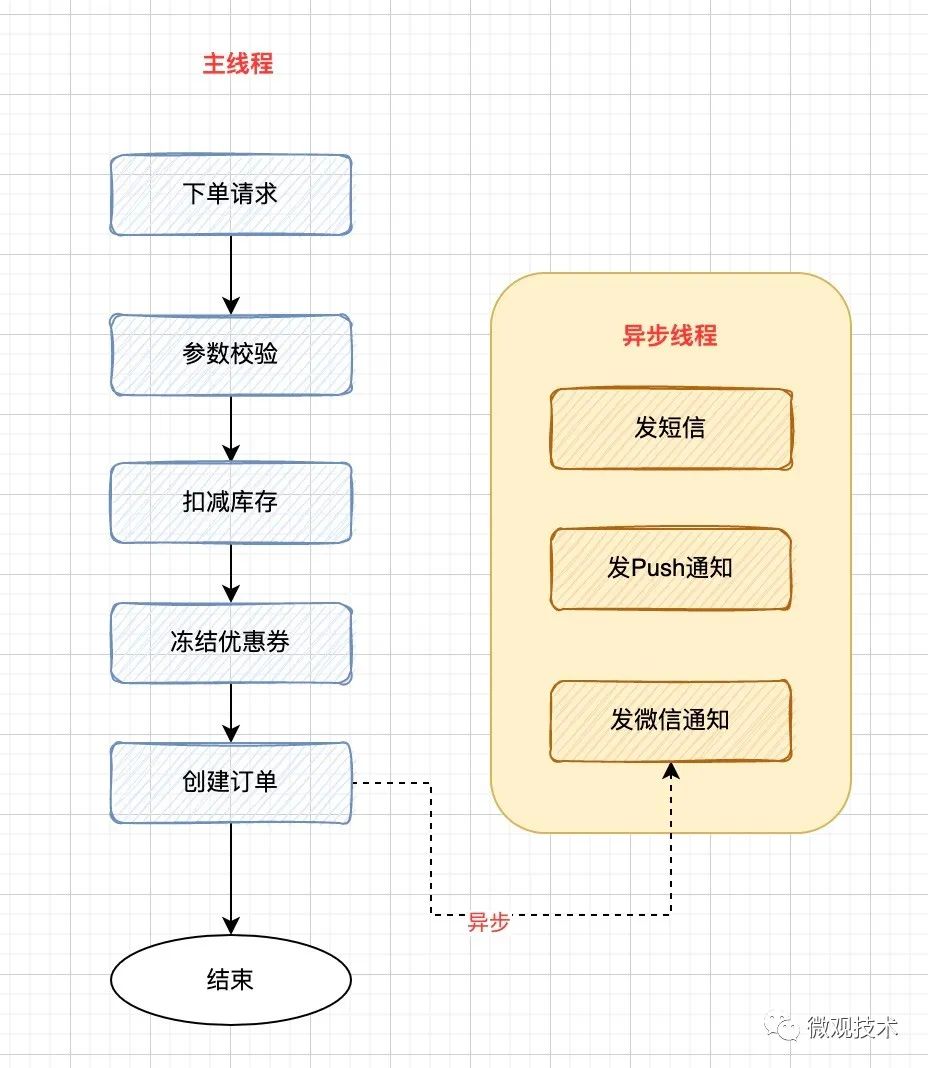
The core idea : Optimize performance with multithreading , Turn serial operation into parallel operation . Programs designed in asynchronous mode can significantly reduce thread waiting , Thus in high throughput scenarios , Greatly improve the overall performance of the system , Significantly reduces latency .
Next , Let's talk about the programming implementation of asynchrony
One 、 Threads Thread
Direct inheritance Thread class Is the easiest way to create asynchronous threads .
First , establish Thread Subclass , Ordinary class or anonymous inner class ; Then create subclass instances ; Finally through start() Method to start the thread .
public class AsyncThread extends Thread{
    @Override
    public void run() {
        System.out.println(" Current thread name :" + this.getName() + ",  Execution thread name :" + Thread.currentThread().getName() + "-hello");
    }
}
public static void main(String[] args) {

  //  Simulate business processes
  // .......

    //  Create asynchronous threads
    AsyncThread asyncThread = new AsyncThread();

    //  Start asynchronous thread
    asyncThread.start();
}
Of course, if you create one every time Thread Threads , Frequent creation 、 The destruction , Waste system resources . We can use thread pool
@Bean(name = "executorService")
public ExecutorService downloadExecutorService() {
    return new ThreadPoolExecutor(20, 40, 60, TimeUnit.SECONDS, new ArrayBlockingQueue<>(2000),
            new ThreadFactoryBuilder().setNameFormat("defaultExecutorService-%d").build(),
            (r, executor) -> log.error("defaultExecutor pool is full! "));
}
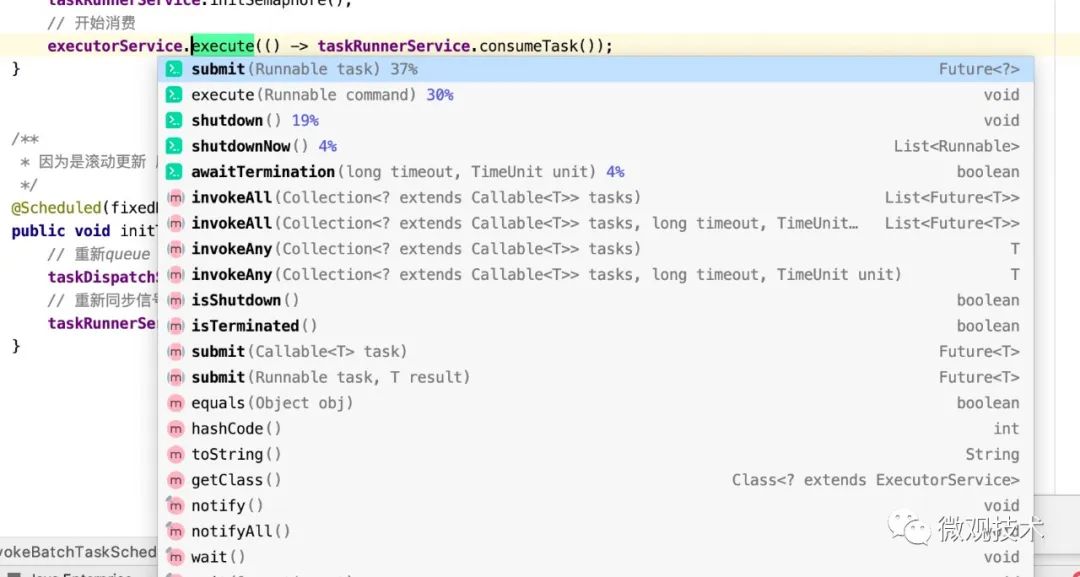
Encapsulate business logic into Runnable or Callable in , Leave it to Thread pool To execute
Two 、Future
Although the above method achieves multi-threaded parallel processing , But some businesses need more than just process execution , Also get the execution results .
Java from 1.5 Version start , Provides Callable and Future, You can get the task execution result after the task execution .
Of course, it also provides other functions , Such as : Cancel the task 、 Check whether the task is completed
Future Class is located java.util.concurrent It's a bag , Interface definition :
public interface Future<V> {
    boolean cancel(boolean mayInterruptIfRunning);
    boolean isCancelled();
    boolean isDone();
    V get() throws InterruptedException, ExecutionException;
    V get(long timeout, TimeUnit unit)
        throws InterruptedException, ExecutionException, TimeoutException;
}
Methods described :
- cancel(): Cancel the task , If you cancel the task successfully, return true, Returns if the cancel task fails false
- isCancelled(): Indicates whether the task was cancelled successfully , If the mission is cancelled before it is normally completed , Then return to true
- isDone(): Indicates whether the task has been completed , If completed , return true
- get(): Get execution results , This method will block , Will wait until the task is completed to return
- get(long timeout, TimeUnit unit): Used to get execution results , If within the specified time , We haven't got the result yet , Go straight back null
Code example :
public class CallableAndFuture {

    public static ExecutorService executorService = new ThreadPoolExecutor(4, 40,
            0L, TimeUnit.MILLISECONDS,
            new LinkedBlockingQueue<Runnable>(1024), new ThreadFactoryBuilder()
            .setNameFormat("demo-pool-%d").build(), new ThreadPoolExecutor.AbortPolicy());


    static class MyCallable implements Callable<String> {
        @Override
        public String call() throws Exception {
            return " Asynchronous processing ,Callable  Return results ";
        }
    }

    public static void main(String[] args) {
        Future<String> future = executorService.submit(new MyCallable());
        try {
            System.out.println(future.get());
        } catch (Exception e) {
            // nodo
        } finally {
            executorService.shutdown();
        }
    }
}
Future Represents the result of an asynchronous task that may not have been completed , adopt get Method to get the execution result , This method blocks until the task returns a result .
3、 ... and 、FutureTask
FutureTask Realized RunnableFuture Interface , be RunnableFuture Interface inherited Runnable Interface and Future Interface , So you can FutureTask Object is submitted as a task to ThreadPoolExecutor To carry out , It can also be directly Thread perform ; Because of the realization of Future Interface , So it can also be used to get the results of the task .
FutureTask Constructors :
public FutureTask(Callable<V> callable)
public FutureTask(Runnable runnable, V result)
FutureTask Often used to encapsulate Callable and Runnable, It can be submitted to the thread pool as a task for execution . Except as a separate class , Some functional functions are also provided for us to create custom task Class uses .
FutureTask Thread safety by CAS To guarantee .
ExecutorService executor = Executors.newCachedThreadPool();
// FutureTask packing callbale Mission , Then hand it over to the thread pool for execution
FutureTask<Integer> futureTask = new FutureTask<>(() -> {
    System.out.println(" The child thread starts to calculate :");
    Integer sum = 0;
    for (int i = 1; i <= 100; i++)
        sum += i;
    return sum;
});

//  Thread pool execution task ,  The running results are in  futureTask  Inside the object
executor.submit(futureTask);

try {
    System.out.println("task The sum of the running result calculation is :" + futureTask.get());
} catch (Exception e) {
    e.printStackTrace();
}
executor.shutdown();
Callable and Future The difference between :Callable Used to produce results ,Future Used to get results
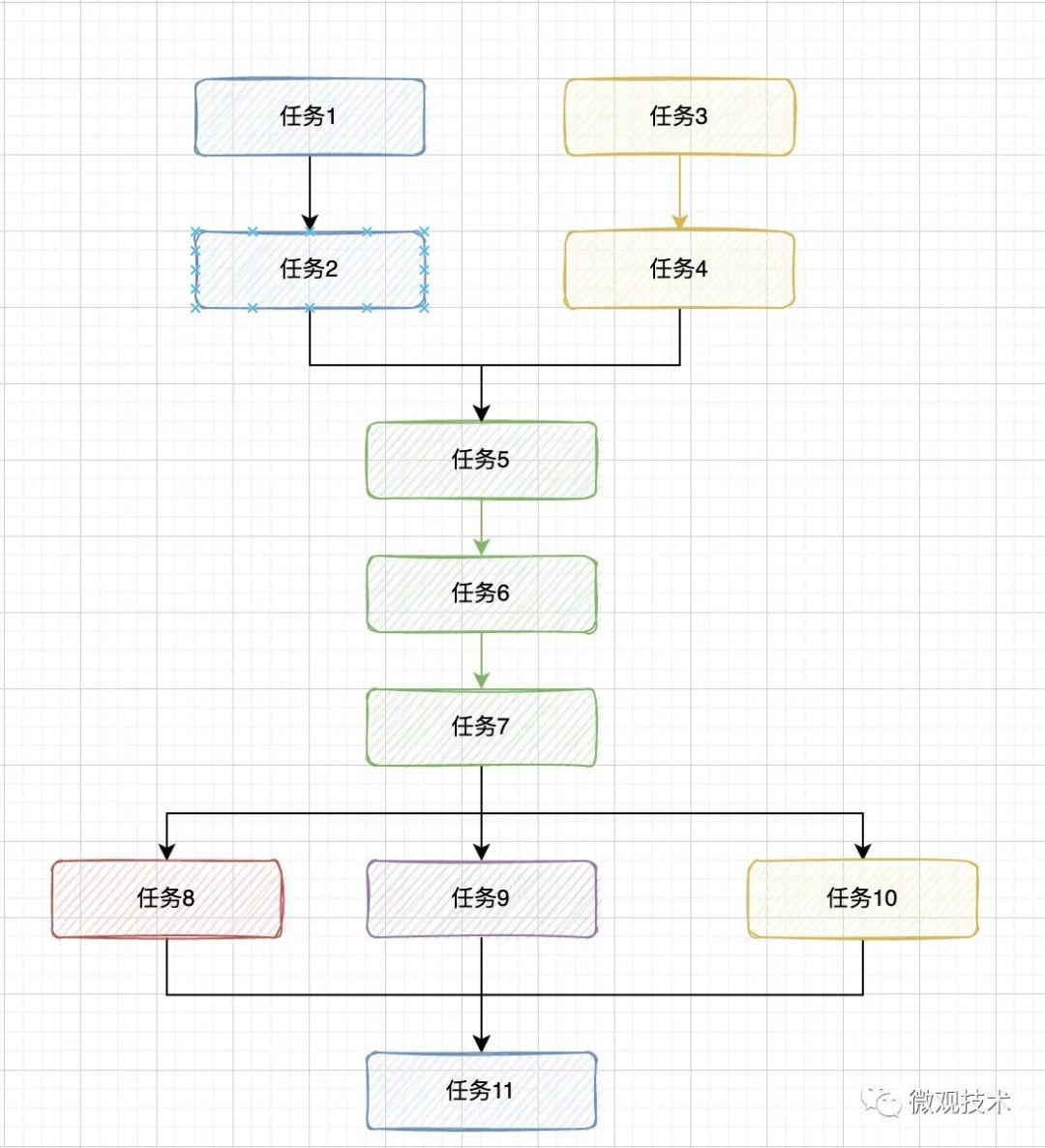
If it is multiple free serial tasks 、 Or parallel combination , It involves synchronous blocking between multiple threads to obtain results ,Future The code implementation will be cumbersome , We need to deal with each intersection manually , It's easy to make a mistake .
Four 、 Asynchronous framework CompletableFuture
Future Class passing get() Method block and wait to get the running result of asynchronous execution , Poor performance .
JDK1.8 in ,Java Provides CompletableFuture class , It is based on asynchronous functional programming . Relatively blocking waiting for the return result ,CompletableFuture The calculation results can be processed by callback , It realizes asynchronous non blocking , Better performance .
advantage :
- At the end of an asynchronous task , Methods that call back an object automatically
- When an asynchronous task fails , Methods that call back an object automatically
- After the main thread sets the callback , No longer concerned with the execution of asynchronous tasks
Examples of making tea :
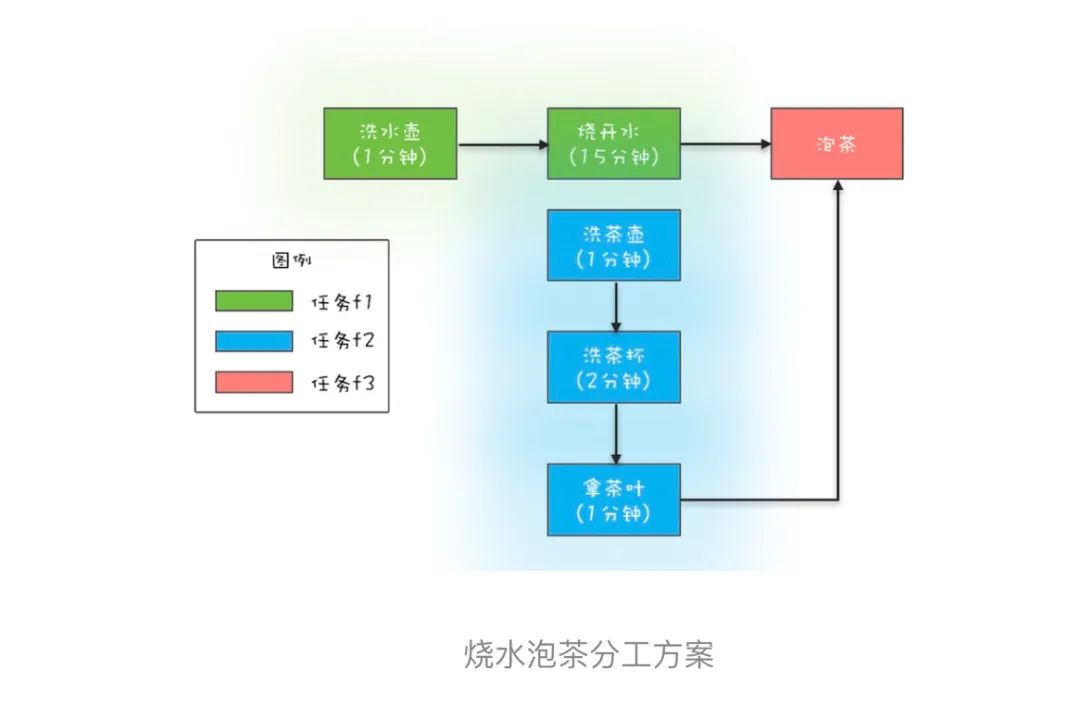
( Excerpt from : Geek time 《Java Concurrent programming practice 》)
// Mission 1: Wash the kettle -> The boiling water
CompletableFuture<Void> f1 =
        CompletableFuture.runAsync(() -> {
            System.out.println("T1: Wash the kettle ...");
            sleep(1, TimeUnit.SECONDS);

            System.out.println("T1: The boiling water ...");
            sleep(15, TimeUnit.SECONDS);
        });

// Mission 2: Wash the teapot -> Wash tea cups -> Take the tea
CompletableFuture<String> f2 =
        CompletableFuture.supplyAsync(() -> {
            System.out.println("T2: Wash the teapot ...");
            sleep(1, TimeUnit.SECONDS);

            System.out.println("T2: Wash tea cups ...");
            sleep(2, TimeUnit.SECONDS);

            System.out.println("T2: Take the tea ...");
            sleep(1, TimeUnit.SECONDS);
            return " Longjing ";
        });

// Mission 3: Mission 1 And tasks 2 When it's done : Make tea
CompletableFuture<String> f3 =
        f1.thenCombine(f2, (__, tf) -> {
            System.out.println("T1: Get the tea :" + tf);
            System.out.println("T1: Make tea ...");
            return " Tea :" + tf;
        });

// Wait for the task 3 Execution results
System.out.println(f3.join());

}
CompletableFuture Provides a very rich API, There are about 50 Kind of processing serial , parallel , Combination and methods of handling errors .
More about an article written before moving , Get it done CompletableFuture, What's the difference between concurrent asynchronous programming and serial programming ?
5、 ... and 、 SpringBoot annotation @Async
In addition to hard coded asynchronous programming processing ,SpringBoot The framework also provides Annotation type Solution , With Method body As boundary , The code logic inside the method body is executed asynchronously .
First , Use @EnableAsync Enable asynchronous annotation
@SpringBootApplication
@EnableAsync
public class StartApplication {

    public static void main(String[] args) {
        SpringApplication.run(StartApplication.class, args);
    }
}
Custom thread pool :
@Configuration
@Slf4j
public class ThreadPoolConfiguration {

    @Bean(name = "defaultThreadPoolExecutor", destroyMethod = "shutdown")
    public ThreadPoolExecutor systemCheckPoolExecutorService() {

        return new ThreadPoolExecutor(3, 10, 60, TimeUnit.SECONDS,
                new LinkedBlockingQueue<Runnable>(10000),
                new ThreadFactoryBuilder().setNameFormat("default-executor-%d").build(),
                (r, executor) -> log.error("system pool is full! "));
    }
}
Add annotations to the asynchronous processing method @Async , When the execute Method Invocation time , Through the customized thread pool defaultThreadPoolExecutor Asynchronous execution execute Method
@Service
public class AsyncServiceImpl implements AsyncService {

    @Async("defaultThreadPoolExecutor")
    public Boolean execute(Integer num) {
        System.out.println(" Threads :" + Thread.currentThread().getName() + " ,  Mission :" + num);
        return true;
    }

}
use @Async How to annotate and mark , Called asynchronous method . stay spring boot Use in application @Async It's simple :
- Annotate the asynchronous method class or startup class @EnableAsync
- Add to the method that needs to be called asynchronously @Async
- What is used @Async The class object of the annotation method should be Spring container-managed bean object ;
6、 ... and 、Spring ApplicationEvent event
Event mechanism is often used in some large projects ,Spring It provides a set of interfaces for event mechanism , It meets the decoupling of the architecture in principle .
ApplicationContext adopt ApplicationEvent Classes and ApplicationListener Interface for event handling . If it will achieve ApplicationListener Interface bean Inject into context , Then use it every time ApplicationContext Release ApplicationEvent when , Will inform the bean. Essentially , It's standard Observer design pattern .
ApplicationEvent By Spring All of the Event Class base class
First , Customize business event subclasses , Inherited from ApplicationEvent, Inject business model parameter classes through generics . amount to MQ The body of the message .
public class OrderEvent extends AbstractGenericEvent<OrderModel> {
    public OrderEvent(OrderModel source) {
        super(source);
    }
}
then , Write event listeners .ApplicationListener The interface is made by Spring Provide the interface that the event subscriber must implement , We need to define a subclass , Inherit ApplicationListener. amount to MQ The consumer side of
@Component
public class OrderEventListener implements ApplicationListener<OrderEvent> {
    @Override
    public void onApplicationEvent(OrderEvent event) {

        System.out.println("【OrderEventListener】 Monitor processing !" + JSON.toJSONString(event.getSource()));

    }
}
Last , Release events , Tell all listeners related to an event . amount to MQ The production side of .
OrderModel orderModel = new OrderModel();
orderModel.setOrderId((long) i);
orderModel.setBuyerName("Tom-" + i);
orderModel.setSellerName("judy-" + i);
orderModel.setAmount(100L);
//  Release Spring Event notification
SpringUtils.getApplicationContext().publishEvent(new OrderEvent(orderModel));
Add a meal :
[ The consumer end ] Threads :http-nio-8090-exec-1, Consumer events  {"amount":100.0,"buyerName":"Tom-1","orderId":1,"sellerName":"judy-1"}
[ Production end ] Threads :http-nio-8090-exec-1, Release events  1
[ The consumer end ] Threads :http-nio-8090-exec-1, Consumer events  {"amount":100.0,"buyerName":"Tom-2","orderId":2,"sellerName":"judy-2"}
[ Production end ] Threads :http-nio-8090-exec-1, Release events  2
[ The consumer end ] Threads :http-nio-8090-exec-1, Consumer events  {"amount":100.0,"buyerName":"Tom-3","orderId":3,"sellerName":"judy-3"}
[ Production end ] Threads :http-nio-8090-exec-1, Release events  3
There is a running demo Results of operation , We found that both the production side and the consumption side , The same thread is used http-nio-8090-exec-1,Spring The event mechanism of the framework defaults to synchronous blocking . Just understand the code specification , It has better expansibility , But the bottom layer still adopts synchronous calling mode .
So here comes the question , If you want to implement asynchronous calls , How to deal with it ?
We need to create one manually SimpleApplicationEventMulticaster, And set up TaskExecutor, At this time, all consumption events are executed by asynchronous threads .
@Component
public class SpringConfiguration {

    @Bean
    public SimpleApplicationEventMulticaster applicationEventMulticaster(@Qualifier("defaultThreadPoolExecutor") ThreadPoolExecutor defaultThreadPoolExecutor) {
        SimpleApplicationEventMulticaster simpleApplicationEventMulticaster = new SimpleApplicationEventMulticaster();
        simpleApplicationEventMulticaster.setTaskExecutor(defaultThreadPoolExecutor);
        return simpleApplicationEventMulticaster;
    }

}
Let's take a look at the operation results after the transformation :
[ Production end ] Threads :http-nio-8090-exec-1, Release events  1
[ Production end ] Threads :http-nio-8090-exec-1, Release events  2
[ Production end ] Threads :http-nio-8090-exec-1, Release events  3
[ The consumer end ] Threads :default-executor-1, Consumer events  {"amount":100.0,"buyerName":"Tom-2","orderId":2,"sellerName":"judy-2"}
[ The consumer end ] Threads :default-executor-2, Consumer events  {"amount":100.0,"buyerName":"Tom-1","orderId":1,"sellerName":"judy-1"}
[ The consumer end ] Threads :default-executor-0, Consumer events  {"amount":100.0,"buyerName":"Tom-3","orderId":3,"sellerName":"judy-3"}
SimpleApplicationEventMulticaster This is instantiated by ourselves Bean How about the default loading order of the system ? Will there be a conflict ?
Look up the Spring Source code , The processing logic is AbstractApplicationContext#initApplicationEventMulticaster In the method , adopt beanFactory Find out whether there are customized Bean, without , The container itself new One SimpleApplicationEventMulticaster Object into the container .
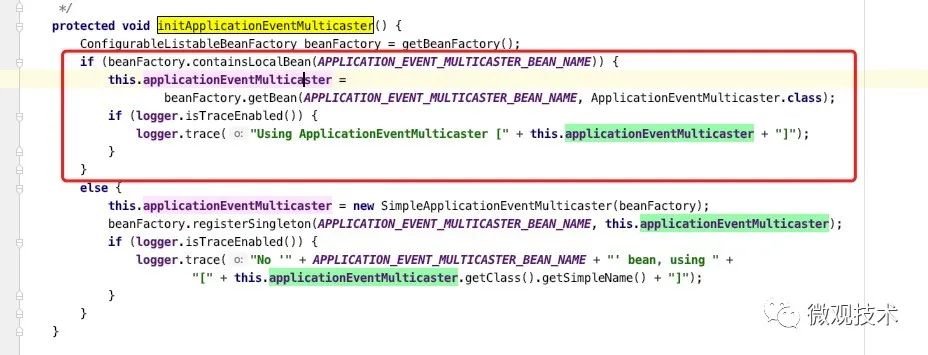
Code address :https://github.com/aalansehaiyang/wx-project
7、 ... and 、 Message queue
Asynchronous architecture is a typical architecture pattern in Internet system , Corresponding to synchronous architecture . Message queuing is inherently such an asynchronous architecture , With ultra-high throughput and ultra-low delay .
The main roles of message queue asynchronous architecture include message producers 、 Message queues and message consumers .
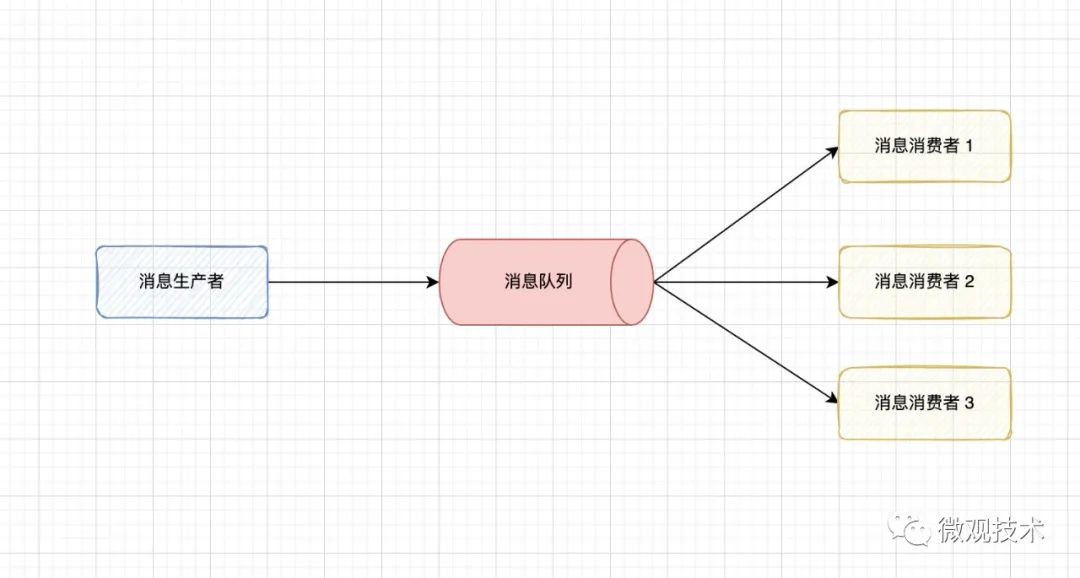
The message producer is the main application , The producer encapsulates the call request as a message and sends it to the message queue .
The function of message queue is to buffer messages , Waiting for consumers to spend . According to the consumption mode, it can be divided into Point to point mode and Publish subscribe mode Two kinds of .
Message consumer , Used to pull from the message queue 、 News consumption , Complete business logic processing .
Of course, there are many message queue frameworks on the market , Common are RabbitMQ、Kafka、RocketMQ、ActiveMQ and Pulsar etc.
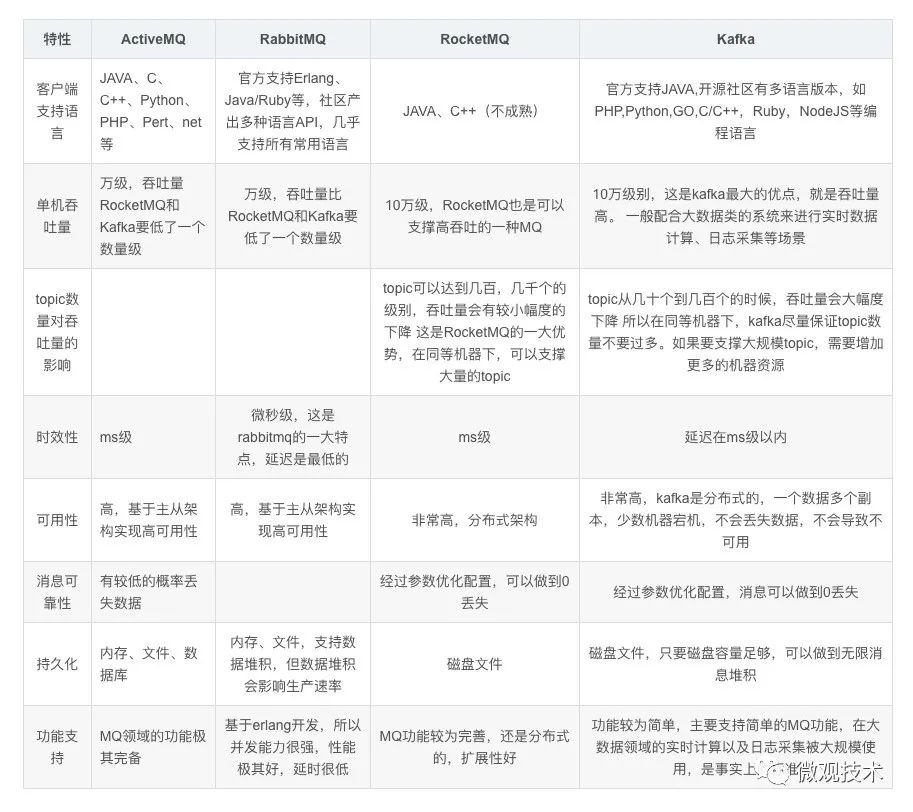
Different message queues have slightly different functional characteristics , But the overall architecture is similar , It's not going to unfold here .
We just need to remember one key point , With the help of message queue, this middleware can efficiently realize asynchronous programming .
边栏推荐
- Ble HCI flow control mechanism
- [acwing] 58 weeks 4490 dyeing
- Cann operator: using iterators to efficiently realize tensor data cutting and blocking processing
- Summary of tx.origin security issues
- How to choose one plus 10 pro and iPhone 13?
- What if Kaili can't input Chinese???
- NFT流动性市场安全问题频发—NFT交易平台Quixotic被黑事件分析
- NFT liquidity market security issues occur frequently - Analysis of the black incident of NFT trading platform quixotic
- 超大规模数仓集群在大型商业银行的落地实践
- PingCode 性能测试之负载测试实践
猜你喜欢

Chow Tai Fook fulfills the "centenary commitment" and sincerely serves to promote green environmental protection
What is low code development?
斑马识别成狗,AI犯错的原因被斯坦福找到了丨开源
【HCIA持续更新】广域网技术
聊聊异步编程的 7 种实现方式
数学分析_笔记_第7章:多元函数的微分学
CocosCreator事件派发使用

The Ministry of human resources and Social Security announced the new construction occupation
wuzhicms代码审计
Learn more about the basic situation of 2022pmp examination
随机推荐
La 18e Conférence internationale de l'IET sur le transport d'électricité en courant alternatif et en courant continu (acdc2022) s'est tenue avec succès en ligne.
中银证券网上开户安全吗?
World Environment Day | Chow Tai Fook serves wholeheartedly to promote carbon reduction and environmental protection
Cann operator: using iterators to efficiently realize tensor data cutting and blocking processing
电子宠物小狗-内部结构是什么?
Is it safe for Bank of China Securities to open an account online?
Win32 API 访问路由的加密网页
Offline and open source version of notation -- comprehensive evaluation of note taking software anytype
[template] [Luogu p4630] duathlon Triathlon (round square tree)
Firewall basic transparent mode deployment and dual machine hot standby
Two methods of MD5 encryption
CocosCreator事件派发使用
【云原生】服务网格是什么“格”?
[HCIA continuous update] WLAN overview and basic concepts
R language plot visualization: plot visualizes overlapping histograms and uses geom at the top edge of the histogram_ The rug function adds marginal rug plots
New technology releases a small program UNIPRO to meet customers' mobile office scenarios
Linear time sequencing
Developers, MySQL column finish, help you easily from installation to entry
Datakit -- the real unified observability agent
Internet addiction changes brain structure: language function is affected, making people unable to speak neatly