当前位置:网站首页>easyExce模板填充生成Excel的实际操作,多sheet页处理
easyExce模板填充生成Excel的实际操作,多sheet页处理
2022-07-29 19:20:00 【靓坤上海分坤】
之前使用word作为文件模板,添加变量生成word文件,现在需要使用Excel作为文件模板填充变量生成Excel,首先考虑使用国产的esayExcel进行填充生成,easyExcel官网地址
https://easyexcel.opensource.alibaba.com/docs/current/

下面看一下我这里需要制作的模板信息,这里包含普通变量,表格循环和图片展示,模板文件信 息如下
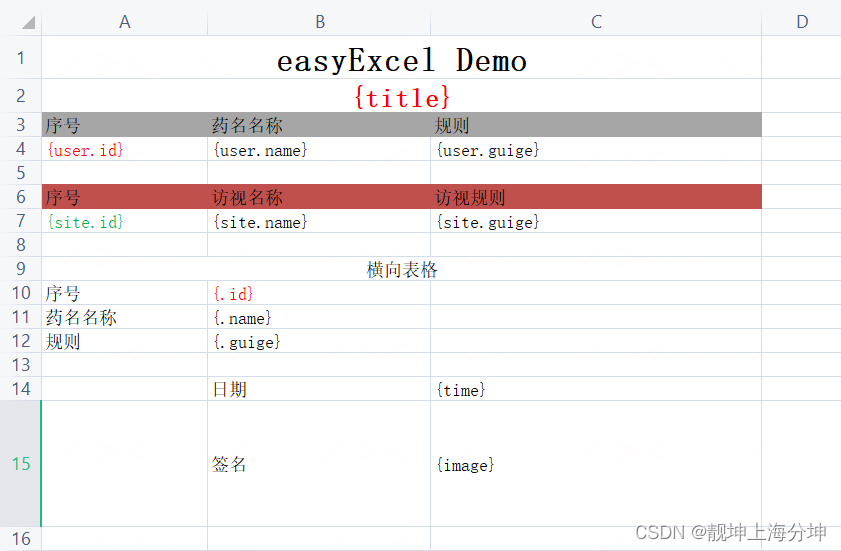
生成后的文件截图

具体代码如下,这里需要注意表格循环后面还有变量的话,填充的配置一定要是这个
FillConfig fillConfig = FillConfig.builder().forceNewRow(Boolean.TRUE).build();
会自动换行
package com.example.demo.util;

import com.alibaba.excel.EasyExcel;
import com.alibaba.excel.ExcelWriter;
import com.alibaba.excel.enums.WriteDirectionEnum;
import com.alibaba.excel.write.metadata.WriteSheet;
import com.alibaba.excel.write.metadata.fill.FillConfig;
import com.alibaba.excel.write.metadata.fill.FillWrapper;

import java.net.MalformedURLException;
import java.net.URL;
import java.util.ArrayList;
import java.util.HashMap;
import java.util.List;
import java.util.Map;

/**
 * @author qiankun.hu
 * @version 1.0.0
 * @createTime 2022年07月26日 13:47:00
 * @Description easyExcel模板填充
 */
public class EasyExcelUtil {

    public static void main(String[] args) throws MalformedURLException {

        List<Map<String, Object>> paramValueMapListNew = new ArrayList<>();
        for (int i = 0; i < 2; i++) {
            Map<String, Object> cmap = new HashMap<>();
            cmap.put("id", i);
            cmap.put("name", "药品" + i);
            cmap.put("guige",  i +"ml" );
            paramValueMapListNew.add(cmap);
        }

        long begin = System.currentTimeMillis();
        //设置输出流和模板信息
        ExcelWriter excelWriter = EasyExcel.write("D:\\workSpace\\66.xlsx").withTemplate("D:\\workSpace\\easy模板1.xlsx").build();
        WriteSheet writeSheet0 = EasyExcel.writerSheet(0).build();
        //开启自动换行,自动换行表示每次写入一条list数据是都会重新生成一行空行,此选项默认是关闭的,需要提前设置为true
        FillConfig fillConfig = FillConfig.builder().forceNewRow(Boolean.TRUE).build();
        excelWriter.fill(new FillWrapper("user", paramValueMapListNew), fillConfig, writeSheet0);
        excelWriter.fill(new FillWrapper("site", paramValueMapListNew), fillConfig, writeSheet0);

        FillConfig fillConfig2 = FillConfig.builder().direction(WriteDirectionEnum.HORIZONTAL).build();
        excelWriter.fill( paramValueMapListNew, fillConfig2, writeSheet0);

        Map<String, Object> map = new HashMap<>();
        map.put("title", "药品回收记录单");
        map.put("total", 1000);
        map.put("time", "2022年07月22日13:28:28");
        map.put("image", new URL("https://image.baidu.com/search/down?tn=download&ipn=dwnl&word=download&ie=utf8&fr=result&url=https%3A%2F%2Fgimg2.baidu.com%2Fimage_search%2Fsrc%3Dhttp%253A%252F%252Fimg.jj20.com%252Fup%252Fallimg%252F4k%252Fs%252F02%252F2109242306111155-0-lp.jpg%26refer%3Dhttp%253A%252F%252Fimg.jj20.com%26app%3D2002%26size%3Df9999%2C10000%26q%3Da80%26n%3D0%26g%3D0n%26fmt%3Dauto%3Fsec%3D1661051088%26t%3D66856c9f40dffe887a63f02f856d8637&thumburl=https%3A%2F%2Fimg0.baidu.com%2Fit%2Fu%3D3798217922%2C3880088897%26fm%3D253%26fmt%3Dauto%26app%3D120%26f%3DJPEG%3Fw%3D889%26h%3D500"));
        excelWriter.fill(map, writeSheet0);
        excelWriter.finish();
        System.out.println(System.currentTimeMillis() - begin);

    }
}
easyExcel maven版本
        <!--easyExcel-->
        <dependency>
            <groupId>com.alibaba</groupId>
            <artifactId>easyexcel</artifactId>
            <version>3.1.0</version>
</dependency>如果是多个sheet页制作,需要多个 WriteSheet 信息
WriteSheet writeSheet0 = EasyExcel.writerSheet(0).build(); 信息,改变其中的数字既可,多个sheet页参数信息不公用,
代码如下
        WriteSheet writeSheet0 = EasyExcel.writerSheet(0).build();
        //开启自动换行,自动换行表示每次写入一条list数据是都会重新生成一行空行,此选项默认是关闭的,需要提前设置为true
        FillConfig fillConfig = FillConfig.builder().forceNewRow(Boolean.TRUE).build();
        FillConfig fillConfig2 = FillConfig.builder().direction(WriteDirectionEnum.HORIZONTAL).build();
        //excelWriter.fill(paramValueMapListNew, fillConfig, writeSheet);
        excelWriter.fill(new FillWrapper("user", paramValueMapListNew), fillConfig, writeSheet0);
        excelWriter.fill(new FillWrapper("site", paramValueMapListNew), fillConfig, writeSheet0);
        excelWriter.fill( paramValueMapListNew, fillConfig2, writeSheet0);

        Map<String, Object> map1 = new HashMap<>();
        map1.put("title", "药品回收记录单");
        map1.put("total", 1000);
        map1.put("time", "2022年07月22日13:28:28");
        map1.put("image", new URL("https://image.baidu.com/search/down?tn=download&ipn=dwnl&word=download&ie=utf8&fr=result&url=https%3A%2F%2Fgimg2.baidu.com%2Fimage_search%2Fsrc%3Dhttp%253A%252F%252Fimg.jj20.com%252Fup%252Fallimg%252F4k%252Fs%252F02%252F2109242306111155-0-lp.jpg%26refer%3Dhttp%253A%252F%252Fimg.jj20.com%26app%3D2002%26size%3Df9999%2C10000%26q%3Da80%26n%3D0%26g%3D0n%26fmt%3Dauto%3Fsec%3D1661051088%26t%3D66856c9f40dffe887a63f02f856d8637&thumburl=https%3A%2F%2Fimg0.baidu.com%2Fit%2Fu%3D3798217922%2C3880088897%26fm%3D253%26fmt%3Dauto%26app%3D120%26f%3DJPEG%3Fw%3D889%26h%3D500"));
        excelWriter.fill(map1, writeSheet0);


        WriteSheet writeSheet1 = EasyExcel.writerSheet(1).build();
        excelWriter.fill(new FillWrapper("user", paramValueMapListNew), fillConfig, writeSheet1);
        excelWriter.fill(new FillWrapper("site", paramValueMapListNew), fillConfig, writeSheet1);
        excelWriter.fill( paramValueMapListNew, fillConfig2, writeSheet1);
        map1.put("image", new URL("https://image.baidu.com/search/down?tn=download&ipn=dwnl&word=download&ie=utf8&fr=result&url=https%3A%2F%2Fgimg2.baidu.com%2Fimage_search%2Fsrc%3Dhttp%253A%252F%252Fimg.jj20.com%252Fup%252Fallimg%252F4k%252Fs%252F02%252F2109242306111155-0-lp.jpg%26refer%3Dhttp%253A%252F%252Fimg.jj20.com%26app%3D2002%26size%3Df9999%2C10000%26q%3Da80%26n%3D0%26g%3D0n%26fmt%3Dauto%3Fsec%3D1661051088%26t%3D66856c9f40dffe887a63f02f856d8637&thumburl=https%3A%2F%2Fimg0.baidu.com%2Fit%2Fu%3D3798217922%2C3880088897%26fm%3D253%26fmt%3Dauto%26app%3D120%26f%3DJPEG%3Fw%3D889%26h%3D500"));
excelWriter.fill(map1, writeSheet1);边栏推荐
- Typescript使用修饰器混合方法到类
- Chapter 01 Installation and use of MySQL under Linux [1. MySQL Architecture] [MySQL Advanced]
- 腾讯安全发布 Tencent Cloud EdgeOne,为企业出海打造安全加速一体化服务
- yarn的安装和使用(yarn安装mysql)
- 【AutoSAR 七 工具链简介】
- Custom Components -behaviors
- 欧盟计划斥资百亿欧元补贴,吸引台积电、英特尔、三星等赴欧盟建厂
- OpenCV - 图像二值化处理 腐蚀膨胀 边缘检测 轮廓识别
- 搭建自己的以图搜图系统 (一):10 行代码以图搜图
- Mobile Banking Experience Test: How to Get the Real User Experience
猜你喜欢



随机推荐
C#_OpenCV使用相机
线程池 ThreadPoolExecutor 详解
【APP 改进建议】希望增加 pdf 及 word 的导出能力
无代码开发平台角色设置入门教程
Chengdu | Changed to software testing, from zero income to over 10,000 monthly salary, a new turning point in life...
Typescript mix method to class with decorator
How to read excel test data in Go language, easy to learn
Function declaration and scope
uniapp H5 跳转应用外页面
LeetCode #88.合并两个有序数组
数字孪生万物可视 | 联接现实世界与数字空间
直播预约 | 如何通过MLOps解放和提升AI生产力?
不堆概念、换个角度聊多线程并发编程
PyQt5快速开发与实战 7.2 信号与槽再细分 && 7.3 信号与槽的高级玩法
Test basis: Redis of Nosql database
m10
并发编程学习笔记 之 常用并发容器的概念及使用方法
函数的声明与作用域
【体系结构 三 流水线技术】
HMS Core音频编辑服务音源分离与空间音频渲染,助力快速进入3D音频的世界