当前位置:网站首页>A long detailed explanation of C language operators
A long detailed explanation of C language operators
2022-07-25 23:44:00 【Bin * Zai】
Long detailed explanation C Language operators
- Preface
- 1、 Operator classification
- 2、 arithmetic operator
- 3、 Shift operator
- 4. Bit operators
- 5. Assignment operator
- 6. Monocular operators
- 7、 Relational operator
- 8、 Logical operators
- 9、 Conditional operators
- 10、 Comma expression
- 11、 Subscript reference 、 Function calls and structure members
- 12、 Expression evaluation
Preface
c Operators in languages are the foundation of foundations , In order to facilitate their future study , It is hereby summarized . I also hope that the content of this article can be widely c Language learners 、 Lovers read . If there are errors and deficiencies , Please Yasheng .
Tips : The following is the main body of this article , The following cases can be used for reference
1、 Operator classification
Operators can be divided into the following categories :
1 arithmetic operator
2 Shift operator
3 Bit operators
4 Assignment operator
5 Monocular operators
6 Relational operator
7 Logical operators
8 Conditional operators
9 Comma expression
10 Subscript reference 、 Function calls and structure members
2、 arithmetic operator
Arithmetic operators have :
Add :+;
reduce :-;
ride :*;
except :/;
Remainder :%
Both ends of the remainder operator must be integers , Other arithmetic operators can be integers at both ends , It can also be a floating-point number .
about / The operator , If both sides are integers , Then perform integer division , It's an integer , Such as 1/2=0. One end of each end is a floating point number , Then the floating-point division is performed , Such as 1/2.0=0.5;1.0/2.0=0.5.
3、 Shift operator
The operands of the shift operator can only be integers
3.1 Shift left operator <<
Shift left operator shift rule : Abandon on the left , Zero on the right .( The shift operator moves bits , Binary bit has original code 、 Inverse code 、 Complement code , Integers are stored in memory as complements ).
Move left with positive numbers
The code display results are as follows :#define _CRT_SECURE_NO_WARNINGS 1 #include <stdio.h> int main() { int a = 7; int b = a << 1; printf("a = %d\n", a); printf("b = %d\n", b); return 0; }The results are as follows :
Result analysis :
7 Binary display of
Source code :00000000000000000000000000000111
Inverse code :00000000000000000000000000000111
Complement code :00000000000000000000000000000111
take 7 Discard a bit to the left of the binary complement of , Zero on the right , Get the following
Complement code :000000000000000000000000000001110
Red ones are discarded , Green is the zero added . So the final complement is 00000000000000000000000000001110.
Because the source code of positive numbers 、 Inverse code 、 The complement is the same . So this is also the source code . Restore it to decimal number 14(8+4+2).

Negative numbers move left
The code display results are as follows :#define _CRT_SECURE_NO_WARNINGS 1 #include <stdio.h> int main() { int a = -7; int b = a << 1; printf("a = %d\n", a); printf("b = %d\n", b); return 0; }The results are as follows :
Result analysis :
-7 Binary display of
Source code :10000000000000000000000000000111
Inverse code :11111111111111111111111111111000
Complement code :11111111111111111111111111111001
take -7 Discard a bit to the left of the binary complement of , Fill zero on the right to get the following
Complement code :111111111111111111111111111110010
Red ones are discarded , Green is the zero added . So the final complement is
11111111111111111111111111110010
Restore it to the original code ( Subtract one to get the inverse code , Then take the inverse of the numerical value )
11111111111111111111111111110001( Inverse code )
10000000000000000000000000001110( Original code )
The decimal number obtained from binary source code is -14( -(8+4+2) )

Conclusion
The shift left operator has multiply 2 The effect of , And its own value has not changed ( In code a).
3.2 Shift right operator >>
Shift rules :
First, the right shift operation is divided into two types :
1. Logical shift
On the right side of the discarded , Left complement 0.
2. Arithmetic shift
On the right side of the discarded , The left is filled with the sign bit of the original value .
Positive numbers move right :
Based on the above shift rules , For positive numbers , Shift it to the right , Whether logical shift or arithmetic shift , Both get the same value .
Move negative numbers to the right :
Say first conclusion :VS2022 It's using
| Arithmetic shift right |
The code display results are as follows :
#define _CRT_SECURE_NO_WARNINGS 1
#include <stdio.h>

int main()
{

	int a = -7;
	int b = a >> 1;
	printf("a = %d\n", a);
	printf("b = %d\n", b);
	return 0;
}
The results are as follows :
Result analysis : The analysis method is the same as that of the shift left operator . The right side of the binary complement is discarded , Because it's a negative number , The sign bit on the left is 1, So fill in the left 1. Finally, restore it to the original code , Get decimal digits , That is, the value we want .

Be careful : The shift operator does not move negative numbers , You can't move floating point numbers , This is not defined by the standard .
4. Bit operators
Operands of bit operators must be integers , And press 2 Perform bit operations on hexadecimal numbers
& , Bitwise AND : Two corresponding 2 Hexadecimal numbers are bitwise AND , As long as there is 0 Then for 0, All two are 1, result Only then 1.
| , Press bit or : Two corresponding 2 Hexadecimal numbers are bitwise OR , As long as there is 1 Then for 1, All two are 0, The result is 0.
^ , Bitwise XOR : Two corresponding 2 If the hexadecimal number is the same, it is 0, The difference is 1. According to the rule of bitwise XOR , Two identical numbers are exclusive or 0, Any number and 0 XOR is equal to itself .
4.1 Bitwise AND
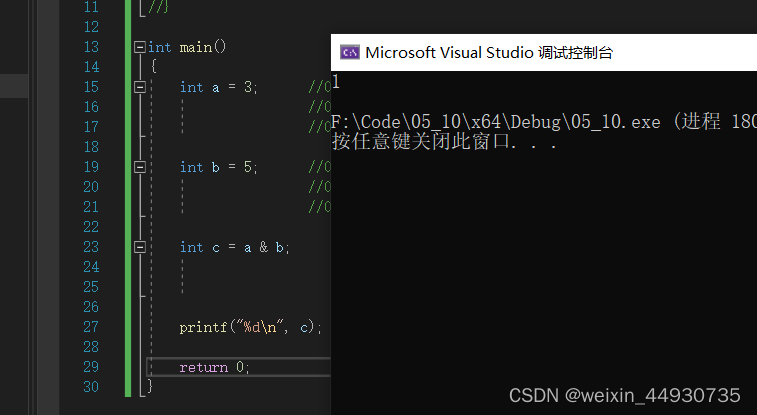
Positive numbers are bitwise AND
int main()
{

	int a = 3;      //00000000000000000000000000000011  Original code   The original code of a positive number 、 Inverse code 、 The complement is the same
	                //00000000000000000000000000000011  Inverse code
	                //00000000000000000000000000000011  Complement code

	int b = 5;      //00000000000000000000000000000101  Original code
					//00000000000000000000000000000101  Inverse code
					//00000000000000000000000000000101  Complement code

	int c = a & b;      //00000000000000000000000000000011  Complement code  3
						//00000000000000000000000000000101  Complement code  5
						//00000000000000000000000000000001  Complement code  1

	printf("%d\n", c);

	return 0;
Code printing results
Negative numbers are bitwise AND
int main()
{

	int a = -3;    //10000000000000000000000000000011  Original code
	               //10000000000000000000000000000100  Inverse code
	               //11111111111111111111111111111011  Complement code

	int b = -5;    //10000000000000000000000000000101  Original code
	               //10000000000000000000000000000110  Inverse code
	               //11111111111111111111111111111001  Complement code

	int c = a & b;       //11111111111111111111111111111011  Complement code  -3
	                     //11111111111111111111111111111001  Complement code  -5
	                     //11111111111111111111111111111001  Complement code  -7
	                     //11111111111111111111111111111000  Inverse code  -7
	                     //10000000000000000000000000000111  Original code  -7
	printf("%d\n", c);
	return 0;
}
Code printing results
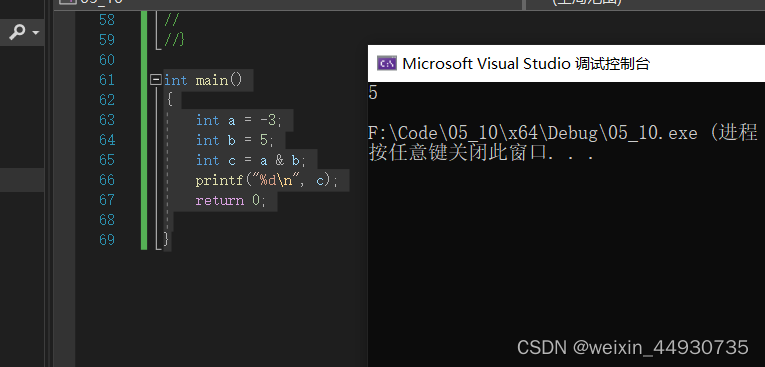
One positive and one negative bitwise AND
int main()
{

	int a = 3;
	int b = -5;
	int c = a & b;
	printf("%d\n", c);
	return 0;

}
Print the results
int main()
{

	int a = -3;
	int b = 5;
	int c = a & b;
	printf("%d\n", c);
	return 0;

}
Print the results


4.2 Press bit or
Positive numbers are bitwise OR
int main()
{

	int a = 3;  //00000000000000000000000000000011  Original code   The original code of a positive number 、 Inverse code 、 The complement is the same
               //00000000000000000000000000000011  Inverse code
               //00000000000000000000000000000011  Complement code

	int b = 5;  //00000000000000000000000000000101  Original code
				//00000000000000000000000000000101  Inverse code
				//00000000000000000000000000000101  Complement code

	int c = a | b;        //00000000000000000000000000000011  Complement code  3
						  //00000000000000000000000000000101  Complement code  5
	                      //00000000000000000000000000000111  Complement code  7

	printf("%d\n", c);
	return 0;
Print the results
Negative bitwise OR
int main()
{

	int a = -3;  //11111111111111111111111111111101  Complement code

	int b = -5;  //11111111111111111111111111111011  Complement code

	int c = a | b;      //11111111111111111111111111111101  Complement code  -3
						//11111111111111111111111111111011  Complement code  -5
	                    //11111111111111111111111111111111  Complement code  -1
	                    //11111111111111111111111111111110  Inverse code  -1
	                    //10000000000000000000000000000001  Original code  -1

	printf("%d\n", c);
	return 0;

}
Print the results


4.3 Bitwise XOR
1. Same element XOR , The result is zero , Any number and zero exclusive or is itself .2. XOR operation has commutative law
int main()
{

	int a = 3;          //00000000000000000000000000000011  Original code   The original code of a positive number 、 Inverse code 、 The complement is the same
                       //00000000000000000000000000000011  Inverse code
	                    //00000000000000000000000000000011  Complement code

	int b = 5;          //00000000000000000000000000000101  Original code
				        //00000000000000000000000000000101  Inverse code
					    //00000000000000000000000000000101  Complement code

	int c = a ^ b;      //00000000000000000000000000000011  Complement code  3
						//00000000000000000000000000000101  Complement code  5
	                    //00000000000000000000000000000110  Complement code  6


	printf("%d\n", c);
	return 0;

}
Print the results

4.4 practice
practice 1: Cannot create temporary variable ( The third variable ), Realize the exchange of two numbers .
Code implementation
#define _CRT_SECURE_NO_WARNINGS 1
#include <stdio.h>

int main()
{

	int a = 3;
	int b = 5;
	a = a ^ b;            //3 ^ 5
	b = a ^ b;            //3 ^ 5 ^ 5  Same element XOR , The result is zero , Any number and zero exclusive or is itself .
	a = a ^ b;            //3 ^ 5 ^ 3  XOR operation is commutative
	printf("a = %d\n", a);
	printf("b = %d\n", b);
	return 0;
}
Code printing results

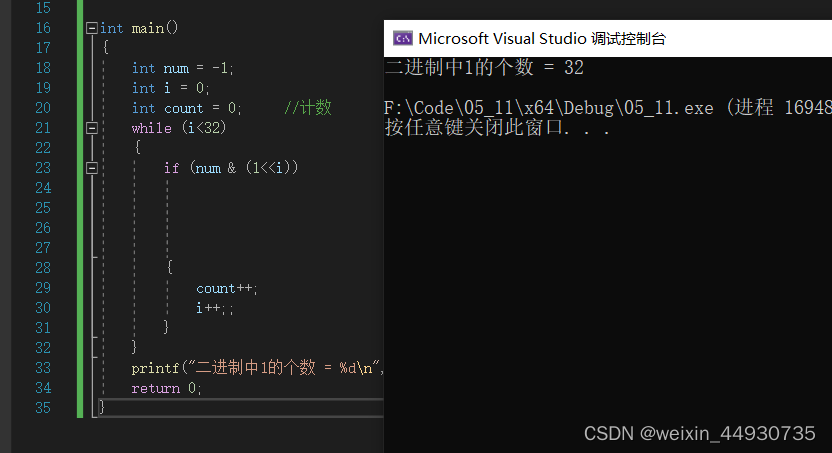
practice 2: Write code to achieve : Find an integer stored in binary in memory 1 The number of .
Code implementation
int main()
{

	int num = -1;
	int i = 0;
	int count = 0;     // Count
	while (i<32)
	{

		if (num & (1<<i))            //1 The binary bits of are shifted from right to left ,num The corresponding number and 1 Binary phase of and ,
			                         // If the corresponding binary result is 1, Explain that the decimal number obtained is not 0. explain num The corresponding binary bit is 1
			                         //11111111111111111111111111111111
			                         //00000000000000000000000000010000  hypothesis 1 Moved left to the fifth place ,-1 The complement of
			                         //00000000000000000000000000010000  The result is not 0, Can enter if loop .
		{

			count++;
			i++;;
		}
	}
	printf(" Binary 1 The number of  = %d\n", count);
	return 0;
}
Code printing results
5. Assignment operator
Assignment operator code demonstration

Continuous assignment
Continuous assignment is generally not recommended .

Compound assignor
+=: a=a+1;a=a+2
-=: a=a-2
*=: a=a×4
/=: a=a/6
%=: a=a%4
>>=: a=a>>4
<<=: a=a<<2
&=: a=a&2
|=: a=a|5
^=: a=a^6Compound assignment operators assign values to themselves after operation .
<< Operator code example

6. Monocular operators
6.1 Monocular operator classification
The unary operator has only one operand

6.2 Use and demonstration of logical inverse operator
int main()
{

	int flag = 3;
	//flag It's true , Get into if
	if (flag)
	{

	}

	//flag For false , Get into if
	if (!flag)
	{

	}

	return 0;
}
c In language 0 Said the false , Not 0 Said really .
6.3sizeof and Array
sizeof Is an operator , It's not a function , It calculates the memory space occupied by the variable , Unit is byte , You can also calculate the space occupied by variables created by types , Unit is byte .
Code demonstration
int main()
{

	int arr[5] = {
      0 };// An integer variable is four bytes , An integer array of five elements is 20 Bytes
	printf("%d\n", sizeof(arr));

	int a = 10;
	int m = sizeof(a);// The calculation is a The amount of memory occupied , Unit is byte
					  // It calculates the memory space occupied by the variable , Unit is byte

	int n = sizeof(int);  // Calculate the space occupied by the variable created by the type , Unit is byte

	printf("m=%d\n", m);
	printf("n=%d\n", n);

	return 0;
}
Print the results

6.4 ++ And - - The operator
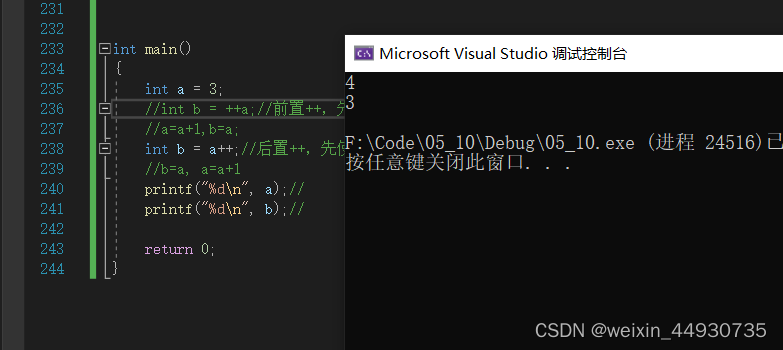
In front of ++, Such as ++a, Add first , Reuse . After ++, Such as a++, First use a, Then add . It is worth noting that the priority of suffix autoincrement is higher than that of prefix autoincrement . In the adjustment part of the cycle as , There is no difference between pre and post ,++a And a++ All are a=a+1.
In front of - - And post - - Empathy
Code demonstration
int main()
{

	int a = 3;
	//int b = ++a;// In front of ++, First ++, After use
	//a=a+1,b=a;
	int b = a++;// After ++, First use , Again ++
	//b=a, a=a+1
	printf("%d\n", a);//
	printf("%d\n", b);//

	return 0;
}
Print the results
6.5 ~ The operator
Negate operator : All bits of the binary number of a number are bitwise reversed
Code demonstration
int main()
{

	int a = 0;              //00000000000000000000000000000000 -> Complement code  0
	int b = 3;              //00000000000000000000000000000011 -> Original code  3

	printf("%d\n", ~a);     //11111111111111111111111111111111 ->~a Complement code
	                        //11111111111111111111111111111110 ->~a Inverse code
	                        //10000000000000000000000000000001 ->~a Original code  -1

	printf("%d\n", ~b);     //11111111111111111111111111111100 ->~b Complement code
	                        //11111111111111111111111111111011 ->~b Inverse code
	                        //10000000000000000000000000000100 ->~b Original code

	return 0;
}
Print the results

6.5.1 Some specific applications of inversion
Assign a bit of the binary bit of a number by 1 Change to 0 Or by 0 Change to 11.
example 1. The integer 13 The fifth bit of the binary bit of is composed of 0 Change it to 1, Find the result .
Their thinking : take 1 The binary bit of is shifted left 4 position , And again 13 Phase or .
Code demonstration :
int main()
{

	int a = 13;
	a |= (1 << 4);           //00000000000000000000000000001101 -> Original code  13
	                         //00000000000000000000000000010000 ->1 Move left 4 position
	                         //00000000000000000000000000011101 -> Phase or result  29
	printf("%d\n", a);

    return 0;
}
Print the results

example 2. The integer 29 The fifth bit of the binary bit of is composed of 1 Change it to 0, Find the result .
Their thinking : take 1 The binary bit of is shifted left 4 position , Take the opposite , And then it's with 29 Meet each other .
Code demonstration :
int main()
{

	int a = 29;
	a &= (~(1 << 4));         //00000000000000000000000000011101 -> Original code  29
							  //11111111111111111111111111101111 ->1 Move left 4 The bit is reversed
							  //00000000000000000000000000001101 -> Phase or result  13
	printf("%d\n", a);

    return 0;
}
Print the results

6.6 Cast operator ()
Save data of one type into variables of another type , Compiler will warn .
example int a = 3.14;, The compiler will 3.14 The default is double Data of type , Store it in an integer variable , The police will be called (“ initialization ”: from "double" To "int", Data may be lost ). take 3.14 Cast , It becomes an integer 3, Warning disappears .int a =(int)3.14;.
7、 Relational operator
>
>=
<
<=
!=      Used for testing “ It's not equal ”
==     Used for testing “ equal ”
- Relational operators are often placed in if sentence 、 while sentence 、for Used as a judgment condition in the statement .
- It should be noted that , During programming == and = Accidentally make a mistake , The resulting error .
To avoid this kind of mistake , It is best to 3==a This kind of writing , This kind of writing is writing = When compiling , Will report an error directly , Because variables cannot be assigned to a constant . In the case of misuse of two operators, conventional writing will lead to code errors and will not find errors .- Not all objects can be compared with relational operators . Such as if(“abc” == “abcdef”), This writing method is compared with the address of the first character of two strings . The comparison of two strings should use library functions strcmp To compare .strcmp The function syntax is “int strcmp(char *str1,char *str2)”, Its purpose is to compare strings str1 and str2 Are they the same? , If the same, return 0, If different , If the former is greater than the latter, it returns 1, Otherwise return to -1.strcmp Compare the ASCII code , If the character of a string ASCII The code is smaller than the character corresponding to the second string , Then the return -1; If it is greater than , return 1.
8、 Logical operators
0 For false , Not 0 It's true .
&& Logic and : Both are true , It is true , If one is false, it is false .( also )
| | Logic or : One of the two is true , It is true , Both are false .( perhaps )
8.1 Distinguish between logical operators and bitwise operators
Bit operators are two operands A And B Press 2 Perform bit operations on hexadecimal numbers , Logical operators do not use binary bits , Only care about A And B True or false
1&2 ------->0 Bitwise AND 00000001 And 00000010 Carry out bitwise and get 00000000
1&&2 ----->1 Logic and
1|2 ------>3 Press bit or 00000001 And 00000010 Perform bitwise or get 00000011
1||2 ------>1 Logic or
8.2 Code demonstration
example 1
int main()
{

	int i = 0, a = 0, b = 2, c = 3, d = 4;
	i = a++ && ++b && d++;

	printf("a = %d\nb = %d\nc = %d\nd = %d\n", a, b, c, d);
	return 0;
}
Print the results
&& : The left is false , Not on the right ( It loses the meaning of calculation )

example 2
int main()
{

	int i = 0, a = 1, b = 2, c = 3, d = 4;
	i = a++ && ++b && d++;

	printf("a = %d\nb = %d\nc = %d\nd = %d\n", a, b, c, d);
	return 0;
}
Print the results
&& : True on the left , The right side still needs to be calculated

example 3
int main()
{

	int i = 0, a = 1, b = 2, c = 3, d = 4;
	i = a++ || ++b || d++;

	printf("a = %d\nb = %d\nc = %d\nd = %d\n", a, b, c, d);
	return 0;
}
Print the results
| | : True on the left , Not on the right .

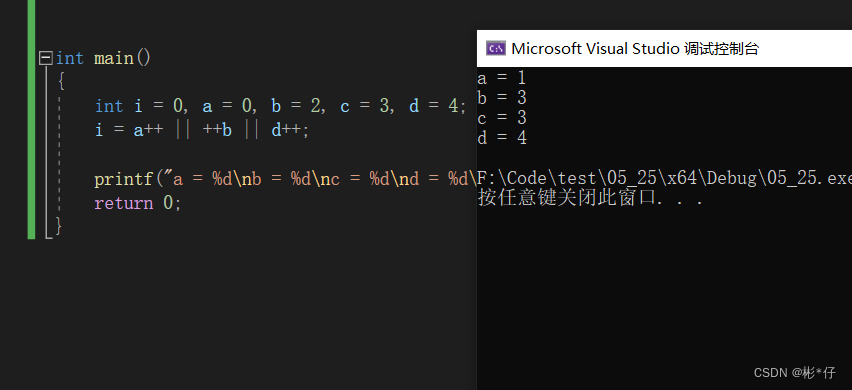
example 4
int main()
{

	int i = 0, a = 0, b = 2, c = 3, d = 4;
	i = a++ || ++b || d++;

	printf("a = %d\nb = %d\nc = %d\nd = %d\n", a, b, c, d);
	return 0;
}
Print the results
| | : The left is false , The right side still needs to be calculated
Conclusion :
&& : The left is false , Not on the right .( It loses the meaning of calculation )
| | : True on the left , Not on the right .( It loses the meaning of calculation )
9、 Conditional operators
(?:) In parentheses are conditional operators , It's the only one A trinocular operator
exp ? exp : exp ----> expression 1? expression 2: expression 3
1 It's true , use 2,2 The result of is the result of the whole expression ;
1 For false , use 3,3 The result of is the result of the whole expression .
Code demonstration
int main()
{

	int a = 3;
	int b = 0;

	b = (a > 5 ? 3 : -3);    //(a > 5) ? (b = 3) : (b = -3);

	printf("%d\n", b);
	return 0;
}
Print the results

10、 Comma expression
exp1, exp2, exp3, …expN
Comma expression , Is multiple expressions separated by commas .
Comma expression , Execute from left to right . The result of the entire expression is the result of the last expression
Code demonstration
int main()
{

	int a = 1;
	int b = 2;
	int c = (a > b, a = b + 10, a, b = a + 1);
	printf("%d\n", c);

	return 0;
}
Print the results

11、 Subscript reference 、 Function calls and structure members
11.1 [ ] Subscript reference operator
Operands : An array name + An index value
Create array :int arr[10];
Use the subscript reference operator :arr[9] = 10; It can also be written as 9[arr] = 10;( The latter is not recommended )
[ ] The two operands of are arr and 9.
arr[9]-----> * (arr+9 )----->* (9+arr)----->9[arr]
arr Is the address of the first element of the array ,arr+9 It's just skipping 9 Elements , It's pointing to 10 Elements , By dereferencing *(arr+9) Is the tenth element .
11.2 ( ) Function call operands
( ), This bracket is the function call operator . The function call operator accepts one or more operands : The first operand is the function name , The remaining operands are the arguments passed to the function . Function call operand has at least one operand , That is the function name .
example :int c = Add(a,b); , The parentheses here are function call operators , The operands are :Add,a,b.
11.3 Access structure member operators
. Structural variable . Member name
-> Structure pointer variable -> Member name <===> * ( Structure pointer variable ). Member name
Code demonstration
struct Peo
{

	char name[20];
	char tele[12];
	char sex[5];
	int high;
};

struct St
{

	struct Peo p;  // It contains a structure above
	int num;
	float f;
};

void print1(struct Peo* sp)// Receive address with pointer
{

	printf("%s %s %s %d\n", sp->name, sp->tele, sp->sex, sp->high);// Access member variables through pointers : Structure pointer -> Member variables , Or you could write it as
                                                                   //*sp.name, *sp.tele, *sp.sex, *sp.high
}

void print2(struct Peo p)// The structural variables are passed , Use structural variables to receive
{

	printf("%s %s %s %d\n", p.name, p.tele, p.sex, p.high);// Access member variables through struct variables : Structural variable . Member variables

}
int main()
{

	struct Peo p1 = {
      " Zhang San ", "15596668862", " male ", 181 };
	struct St s = {
      {
     "lisi", "15596668888", " Woman ", 166}, 100, 3.14f };

	printf("%s %s %s %d\n", p1.name, p1.tele, p1.sex, p1.high);
	printf("%s %s %s %d %d %f\n", s.p.name, s.p.tele, s.p.sex, s.p.high, s.num, s.f);
	// Access the members of structural variables through the point operator
	printf("----------------------\n");

	print1(&p1);    // Call the custom print function , Structural parameters : Address
	print2(p1);     // Call the custom print function , Structural parameters : Pass structure variable

					// When the structure passes parameters, try to pass the address of the structure . When a function passes parameters , Parameters need to be stacked ,
					//  A formal parameter is a copy of an argument , If you pass the structure variable itself , To reopen
					// Create a space for creating formal parameters , When the structure is too large , The system overhead of parameter stack pressing is relatively large , So it can lead to performance degradation .

	return 0;
}
Print the results

12、 Expression evaluation
The order in which expressions are evaluated is partly determined by the precedence and associativity of operators . Again , The operands of some expressions may need to be converted to other types during evaluation .
12.1 Implicit type conversion
C The integer arithmetic operation of is always performed with at least the precision of the default integer ( The default is integer precision )
To get this accuracy , In the expression Characters and short operands ( Character and short operands are smaller in size than integer ) Convert to normal integer before use , This transformation is called Improve the overall shape .
Integer lifting method :
- Integer promotion is promoted according to the sign bit of the data type of the variable . The high position is 1 It's a negative number , repair 1. The high position is 0, Is a positive number , repair 0.
- Unsigned integer promotion , High direct compensation 0.
Negative integer promotion
char a = -1;
-1 It's an integer. , The size is four bytes ,32 A bit .a It's character type , The size is one byte ,8 A bit . When saving in a character variable , Truncation occurred , Just stay behind 8 position .
11111111111111111111111111111111(-1 Complement code )—>11111111
Before the arithmetic operation, the integer should be promoted .
When integer lifting , High supplementary sign bit , That is to say 1
The result of integer improvement is
11111111111111111111111111111111( Complement code )
Positive integer raised
char a = 1;
1 It's an integer. , The size is four bytes ,32 A bit .a It's character type , The size is one byte ,8 A bit . When saving in a character variable , Truncation occurred , Just stay behind 8 position .
00000000000000000000000000000001(-1 Complement code )—>00000001
Before the arithmetic operation, the integer should be promoted .
When integer lifting , High supplementary sign bit , That is to say
The result of integer improvement is
00000000000000000000000000000001( Complement code )
Code demonstration
int main()
{

	char a = 5;
	char b = 126;
	char c = a + b;
	printf("%d\n", c);

	return 0;
}
Print the results
Result analysis
5---->00000000000000000000000000000101( Complement code )
Deposit in a in , Truncation occurred ---->00000101
123---->00000000000000000000000001111110( Complement code )
Deposit in b in , Truncation occurred ---->01111110
Before adding , To do integer lifting , The highest positions are 0, So the sign bit is positive , repair 0.
00000101---->00000000000000000000000000000101( Complement code )
01111110---->00000000000000000000000001111110( Complement code )
Add up to get ---->00000000000000000000000010000011( Complement code )
Deposit in c in , Truncation occurred ---->10000011
When printing , To do integer lifting , The highest position is 1, So the sign bit is negative , repair 1.
10000010---->11111111111111111111111110000011( Complement code )
Restore to the original code ---->10000000000000000000000001111101( Original code )---->-125

Be careful : We can find that signed numbers are improved by integer , Not necessarily equal to your original number , It will not only change in value , The positivity and negativity may also change , It will change from positive to negative , Or from negative to positive .
Looking at a code
int main()
{

	char c = 1;
	printf("%d\n", sizeof(c));
	printf("%d\n", sizeof(+c));
	printf("%d\n", sizeof(-c));

	return 0;
}
Print the results
second 、 The three printing functions have positive and negative signs , Description of the operation , Before the operation, the integer should be promoted , So it becomes an integer , The size is 4 Bytes .

12.2 Arithmetic conversion
char The type is essentially an integer , also char The type and short int The type is smaller than int type , So they and int What happens between types is integer promotion .
If the operands of an operator belong to different types , Then unless one of the operands is converted to another operand type , Otherwise, the operation cannot be carried out . The following hierarchy is called Ordinary arithmetic conversion .
long double
double
float
unsigned long int
long int
unsigned int
int
Upward conversion , If the type of an operand is lower in the list above , Then first convert to the type of another operand and then perform the operation .
12.3 The properties of the operator
There are three factors that affect the evaluation of complex expressions
- The priority of the operator
- Associativity of manipulators
- Whether to control the order of evaluation
Which of the two adjacent operands should be executed first ? Depending on their priorities .
If both have the same priority , Depending on their combination (left—>right or right—>left).
&&, | | And other operators will control the evaluation order .
&& : The left is false , Not on the right .( It loses the meaning of calculation );
| | : True on the left , Not on the right .( It loses the meaning of calculation )
There are some expressions after determining the above three factors , Nor can we determine the unique operation order , This expression is called the problem expression .
Problem expression 1
a * b + c * d + e * f
The operation order of the five operators is 13254 Or is it 14253
Problem expression 2
c + --c
When c Be on it ( Put it in the register ), It will affect the operation order
int c = 2;
c stay - - It was put in the register before ,c + --c ------> 2+1=3
c stay - - Then put it in the register ,c + --c ------> 1+1=2
There are many problem expressions , Different An analysis , Try to make the expression clear in programming , Don't write problem expressions .
边栏推荐
- initializer_list工具库学习
- Reduce method of array
- 152. Product maximum subarray - dynamic programming
- chown: changing ownership of ‘/var/lib/mysql/‘: Operation not permitted
- WebMvcConfigurationSupport
- 赋值时'1和'b1有什么区别
- Taobao Search case
- Scroll series
- What is the difference between hot deployment and hot loading?
- The late Apple co-founder Steve Jobs was posthumously awarded the U.S. presidential medal of freedom
猜你喜欢

Release of v6.5.1/2/3 series of versions of Xingyun housekeeper: the ability of database OpenAPI continues to be strengthened
How to solve cross domain problems

Why are there many snapshot tables in the BI system?

Matchmaker's words
SAP Message No. VG202 IDoc E1EDK18 中付款条款已经转移:检查数据

学习探索-波浪
Docker 安装 Redis-5.0.12(远程访问)

ES6 syntax (difference between let, const, VaR, deconstruction assignment, arrow function, residual parameters, extension method of array)

S4/hana ME21N create Po output control message button missing solution (switch EDI output mode brf+ to Nast mode)
Swap, move, forward, exchange of utility component learning
随机推荐
Docker 安装 Redis-5.0.12(远程访问)
Pytorch data input format requirements and conversion
Reduce method of array
[QNX hypervisor 2.2 user manual]9.6 GDB
ratio学习之ratio_add,ratio_subtract,ratio_multiply,ratio_divide的使用
意向不到的Dubug妙招
【MUDUO】EventLoopThreadPool
Promise asynchronous callback function
Topsis与熵权法
Get the data of Mafeng Hotel
typescript ts 基础知识之类
Scaffold installation
arcgis根据矢量范围裁取tif影像(栅格数据)、批量合并shp文件、根据矢量范围裁取区域内的矢量,输出地理坐标系、转换16位TIF影像的像素深度至8位、shp文件创建和矢量框标绘设置
疫情之下的好消息
数组中重复的数字
LeetCode 0135. 分发糖果
SAP Message No. VG202 IDoc E1EDK18 中付款条款已经转移:检查数据
TS interface
学习探索-波浪
【MUDUO】Thread封装