当前位置:网站首页>用Unity实现Flat Shading
用Unity实现Flat Shading
2022-06-30 13:06:00 【异次元的归来】
用Unity实现Flat Shading
要实现平面着色,就要使每个三角面是平滑的,我们可以从像素的法线向量入手,让每个像素的法线都等于该三角面的法线,而不是来自于三个顶点法线的插值。为了求得平面法线,可以利用硬件提供的ddx和ddy函数,分别计算tangent和binormal向量,最后叉乘得到normal:
	float3 dpdx = ddx(i.worldPos);
	float3 dpdy = ddy(i.worldPos);
	i.normal = normalize(cross(dpdy, dpdx));

除此之外,我们还可以借助geometry shader,直接修改顶点的normal,再传入fragment shader:
[maxvertexcount(3)]
void MyGeometryProgram (
	triangle InterpolatorsVertex i[3],
	inout TriangleStream<InterpolatorsVertex> stream
) {
	float3 p0 = i[0].worldPos.xyz;
	float3 p1 = i[1].worldPos.xyz;
	float3 p2 = i[2].worldPos.xyz;

	float3 triangleNormal = normalize(cross(p1 - p0, p2 - p0));
	i[0].normal = triangleNormal;
	i[1].normal = triangleNormal;
	i[2].normal = triangleNormal;

	stream.Append(i[0]);
	stream.Append(i[1]);
	stream.Append(i[2]);
}
接下来,我们希望在平面着色的基础上为三角面加上线框。那么直观上来说,越靠近三角形边上的点需要进行额外的线框着色,而位于三角形内部的点则不受影响。这里可以借助三角形的重心坐标来进行判断,位于三角形边上的点,其重心坐标(x,y,z)中必定有一项为0。我们首先在geometry shader中添加重心坐标这一属性:
[maxvertexcount(3)]
void MyGeometryProgram (
	triangle InterpolatorsVertex i[3],
	inout TriangleStream<InterpolatorsVertex> stream
) {
	...
	i[0].barycentricCoordinates = float2(1, 0);
	i[1].barycentricCoordinates = float2(0, 1);
	i[2].barycentricCoordinates = float2(0, 0);
	...
}
这里只用了float2来表示重心坐标,是因为重心坐标有这样的性质:x+y+z=1。
有了重心坐标之后,我们就能利用它来绘制线框。首先,可以取重心坐标中的最小值,表示三角形中的点到边的最近距离,然后直接拿来计算颜色:
	float3 albedo = GetAlbedo(i);
	float3 barys;
	barys.xy = i.barycentricCoordinates;
	barys.z = 1 - barys.x - barys.y;

	float minBary = min(barys.x, min(barys.y, barys.z));
	return albedo * minBary;
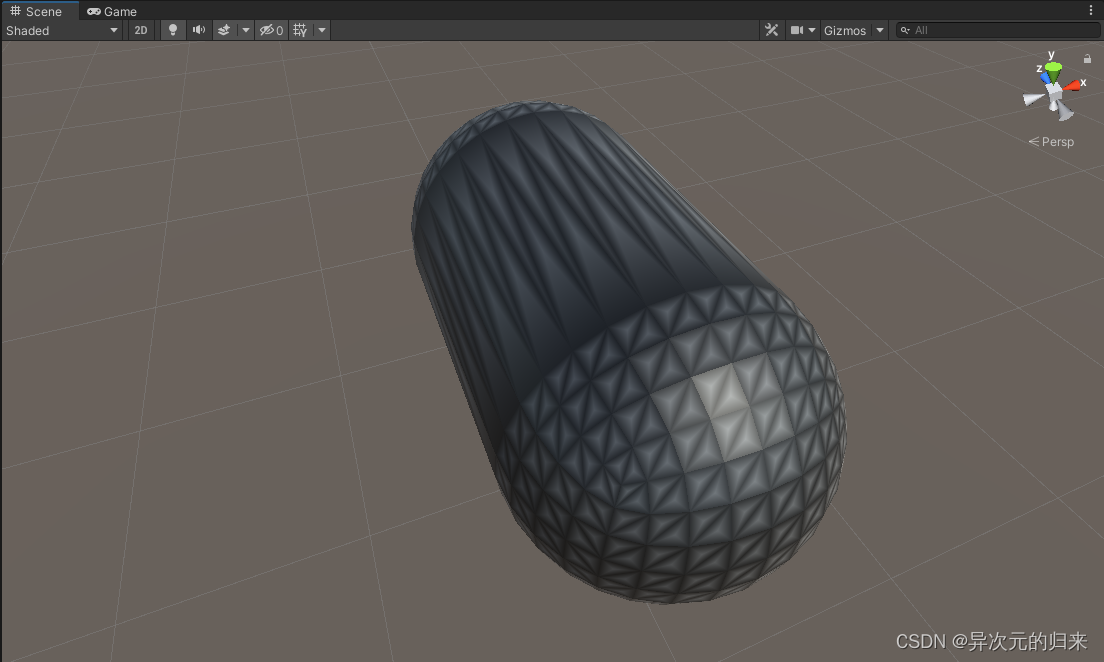
雏形有了,但是黑色的地方太多了,原因是重心坐标中的最小值最大也就只有1/3,还得是在重心的位置。因此,需要把这个范围进行调整,我们可以使用smoothstep函数,只让距离很小的一部分点的着色变黑,然后平滑过渡到正常颜色:
	float3 albedo = GetAlbedo(i);
	float3 barys;
	barys.xy = i.barycentricCoordinates;
	barys.z = 1 - barys.x - barys.y;

	float minBary = min(barys.x, min(barys.y, barys.z));
	minBary = smoothstep(0, 0.1, minBary);
	return albedo * minBary;

看上去效果不错。不过美中不足的是,线框的宽度是各不相同的,这也很好理解,毕竟一个三角形所能覆盖的屏幕空间区域是不同的,覆盖面积大的三角形,重心坐标的变化就会慢一些,也就是经过多个像素才可能使重心坐标从0变化到0.1。那么,有办法统一三角形的线框宽度吗?这就需要我们把重心坐标的变化率考虑进来。变化率越小的,让线框变黑的阈值也应该越小。说到变化率,我们想起了之前提到的ddx和ddy函数:
	float3 albedo = GetAlbedo(i);
	float3 barys;
	barys.xy = i.barycentricCoordinates;
	barys.z = 1 - barys.x - barys.y;

	float minBary = min(barys.x, min(barys.y, barys.z));
    // 等价于 float delta = fwidth(minBary);
	float delta = abs(ddx(minBary)) + abs(ddy(minBary));
	minBary = smoothstep(0, delta, minBary);
	return albedo * minBary;

我们也可以进一步调节smoothstep的参数,来控制线框的宽度:
minBary = smoothstep(delta, 2 * delta, minBary);

我们注意到,此时有些地方出现了很明显的锯齿。这是因为我们是先取的重心坐标的最小值,然后对其求导,但是这可能是不连续的。所以我们需要调整一下顺序,先分别对重心坐标的xyz求导:
	float3 albedo = GetAlbedo(i);
	float3 barys;
	barys.xy = i.barycentricCoordinates;
	barys.z = 1 - barys.x - barys.y;

	float3 deltas = fwidth(barys);
	barys = smoothstep(deltas, 2 * deltas, barys);
	float minBary = min(barys.x, min(barys.y, barys.z));
	return albedo * minBary;

效果拔群。那么最后,我们将一些可调节的参数暴露出来,方便我们随时调整表现:
	float3 albedo = GetAlbedo(i);
	float3 barys;
	barys.xy = i.barycentricCoordinates;
	barys.z = 1 - barys.x - barys.y;

	float3 deltas = fwidth(barys);
	float3 smoothing = deltas * _WireframeSmoothing;
	float3 thickness = deltas * _WireframeThickness;
	barys = smoothstep(thickness, thickness + smoothing, barys);
	float minBary = min(barys.x, min(barys.y, barys.z));
	return lerp(_WireframeColor, albedo, minBary);
这样我们就能够调整线框的颜色,过渡的平滑度,还有线框本身的宽度了:

如果你觉得我的文章有帮助,欢迎关注我的微信公众号:Game_Develop_Forever
Reference
边栏推荐
猜你喜欢
On the simplification and acceleration of join operation
科普达人丨漫画图解什么是eRDMA?

华为帐号多端协同,打造美好互联生活

mysql拒绝访问、管理员身份打开的

Open source of xinzhibao applet

SQL attendance statistics monthly report

Resource realization applet opening wechat official small store tutorial

Embedded development: five C features that may no longer be prohibited

Assertions of regular series

ABAP工具箱 V1.0(附实现思路)
随机推荐
数字化转型道阻且长,如何迈好关键的第一步
Methodology for troubleshooting problems (applicable to troubleshooting problems arising from any multi-party cooperation)
MySQL如何将列合并?
华为帐号多端协同,打造美好互联生活
Common UI components
一文讲清楚什么是类型化数组、ArrayBuffer、TypedArray、DataView等概念
逆向调试入门-PE中的VA与RVA换算04/07
防火墙基础之总部双机热备与分支基础配置
visualstudio 和sql
IDEA 2021.3 执行 golang 报错:RNING: undefined behavior version of Delve is too old for Go version 1.18
[kali] Kali system, software update (with image source)
get请求与post提交区别的简易理解
With the development of industrial Internet, the landing and application of the Internet has become wider
Kaniko official documents - build images in kubernetes
ERROR: Cannot uninstall ‘PyYAML‘. It is a distutils installed project and thus we cannot accurately
Unity Animator 参数
幸运哈希竞猜系统开发(源码部署)趣投哈希游戏玩法开发(案例需求)
RK356x U-Boot研究所(命令篇)3.3 env相关命令的用法
Lucky hash quiz system development (source code deployment) fun investment hash game play development (case requirements)
点击table的td单元格出现dialog弹窗,获取值后将值放回td单元格