当前位置:网站首页>node+express如何操作cookie
node+express如何操作cookie
2022-06-23 03:42:00 【亿速云】
node+express如何操作cookie
这篇文章主要介绍了node+express如何操作cookie的相关知识,内容详细易懂,操作简单快捷,具有一定借鉴价值,相信大家阅读完这篇node+express如何操作cookie文章都会有所收获,下面我们一起来看看吧。

Cookie:有时也用其复数形式 Cookies。类型为“小型文本文件”,是某些网站为了辨别用户身份,进行Session跟踪而储存在用户本地终端上的数据(通常经过加密),由用户客户端计算机暂时或永久保存的信息。
用node操作cookie我们需要cookie-parser模块
npm i cookie-parser -s
接下来在我们的文件中引入此模块
// 引入express模块const express = require('express')// 实例化expressconst app = express()// 操作cookie模块const cookieParser = require('cookie-parser');// 加入cookie签名app.use(cookieParser('真的好离谱')); //使用cookie中间件,加密值为:‘真的好离谱’参数详解
name: 一个唯一确定cookie的名称。
value: 存储在cookie中字符串的值。
domain: cookie对于那个域下是有效的,
path: 表示这个cookie影响到的路径,浏览器会根据这个配置,向指定的域中匹配的路径发送cookie。
expires: 失效时间,表示cookie何时失效的时间,如果不设置这个时间,浏览器就会在页面关闭时将删除所有的cookie,不过我们也可以自己设置过期时间。
注意:如果客户端和服务器端设置的时间不一致,使用expires就会存在偏差。
max-age: 用来告诉浏览器此cookie多久过期(单位是秒),一般的情况下,max-age的优先级高于expires。
HttpOnly: 告诉浏览器不允许通过脚本document.cookie去更改值,这个值在document.cookie中也是不可见的,但是在http请求会携带这个cookie,
注意:这个值虽然在脚本中使不可取的,但是在浏览器安装目录中是以文件形式存在的,这个设置一般在服务器端设置的。
secure:安全标志,指定后,当secure为true时候,在HTTP中是无效的,在HTTPS中才有效,表示创建的cookie只能在HTTPS连接中被浏览器传递到服务器端进行会话验证,如果是HTTP连接则不会传递该信息,所以一般不会被且听到。
关于读取问题
req.cookies:读取到的是我们未加密的cookie;
req.signedCookies:读取我们的加密cookie。
案例
app.get('/', (req, res) => { res.cookie('cart', { items: [1, 2, 3] }, { maxAge: 10000 * 2, httpOnly: true, signed: true, path: '/' }); res.cookie('user', '张三', { httpOnly: true, path: '/user', signed: true }) res.send('ok') console.log(req.cookies) console.log(req.signedCookies)})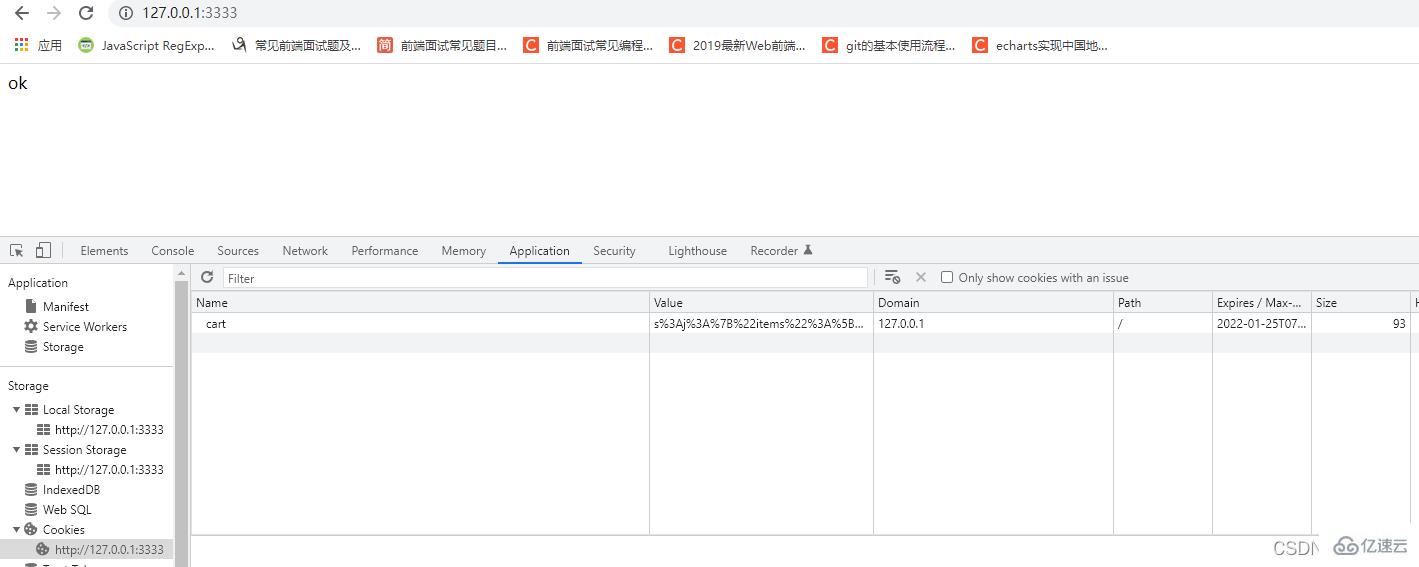

app.get('/user', (req, res) => { console.log(req.cookies) res.send(req.signedCookies)})
app.get('/news', function (req, res) { res.cookie('Age', '大白', { maxAge: 10000 * 2, httpOnly: true, signed: true }) res.cookie('Age', '0', { maxAge: 0 }); //删除cookie res.send('你好nodejs news')})
当maxAge为0时会删除我们的cookie。
关于“node+express如何操作cookie”这篇文章的内容就介绍到这里,感谢各位的阅读!相信大家对“node+express如何操作cookie”知识都有一定的了解,大家如果还想学习更多知识,欢迎关注亿速云行业资讯频道。
边栏推荐
- 纳瓦尔宝典:不靠运气致富的原则
- Firewall and IP security policy configuration
- mysql,字段问题
- [advanced Android] kotlin delegate attribute
- Golang resource embedding scheme
- 页面导出excel的三种方式
- The MIUI 13 development version of Xiaomi mobile phone blocks the chrome application and cannot be opened after installation
- Flink practice tutorial: advanced 7- basic operation and maintenance
- Customization of openfeign
- Learning summary of spanquery source code
猜你喜欢
直接插入排序

【owt】owt-client-native-p2p-e2e-test vs2017构建 4 : 第三方库的构建及链接p2pmfc.exe

Google Earth Engine(GEE)——长时间序列逐月VCI数据提取分析和面积计算(墨西哥为例)

bubble sort
![[machine learning] wuenda's machine learning assignment ex2 logistic regression matlab implementation](/img/eb/0d4caf0babbe14f51f4dbf1b9ae65d.png)
[machine learning] wuenda's machine learning assignment ex2 logistic regression matlab implementation

centos7 安装 MySQL 及配置 innodb_ruby

Gakataka student end to bundle Version (made by likewendy)
线上MySQL的自增id用尽怎么办?

【二分】leetcode1011. Capacity To Ship Packages Within D Days

MySQL common instructions
随机推荐
Which insurance company is the most cost-effective for purchasing serious illness insurance?
How to implement collection sorting?
【LeetCode】179. Maximum number
Preliminary sequencing problem
Record an edusrc vulnerability mining
线上MySQL的自增id用尽怎么办?
SwiftUI 组件大全之使用 ScrollView 和 GeometryReader 创建动画 3D卡片 滚动效果
mysql,字段问题
C. Differential Sorting
Learning summary of spanquery source code
MySQL common instructions
直接插入排序
[tcapulusdb knowledge base] [list table] example code of batch deleting data at specified location in the list
[Zeng shuge's laser slam notes] gmapping filter based slam
1058 multiple choice questions (20 points)
How to save the model obtained from sklearn training? Just read this one
Is LinkedList a one-way linked list or a two-way linked list?
Firewall and IP security policy configuration
[metauniverse 7ai rope skipping] how is this app light application realized? What are the application scenarios?
January 17, 2022: word rule II. Give you a pattern and a character