当前位置:网站首页>2.19 haas506 2.0 development tutorial - Bluetooth - Bluetooth communication (only supports versions above 2.2)
2.19 haas506 2.0 development tutorial - Bluetooth - Bluetooth communication (only supports versions above 2.2)
2022-07-24 15:54:00 【Zhiyunfu】
haas506 2.0 Development tutorial - bluetooth - Bluetooth communication
bluetooth
Bluetooth technology is an open global specification for wireless data and voice communication , It's based on low-cost, short-range wireless connections , A special short-range wireless technology connection to establish communication environment for fixed and mobile devices .
Case description
1. This case is divided into master and slave for testing , For debugging convenience, use the mobile debugging software to verify the Bluetooth function
2. Host function : By searching the device name and UUID Connect , After successful connection, send signals to the slave at fixed intervals , And receive slave information at any time
3. Slave function : After being connected by the host, it keeps sending messages to the host , And receive messages sent by the host at any time
Slave test ( Support 601 And 320)
1. Bluetooth debugging tool
Mobile download nRF connect Connect the development board as a host ( Search the name in the mobile browser and download it by yourself )
This software is very easy to use Bluetooth control app, Multiple software can be connected to Bluetooth and uploaded at a high speed , Let you complete the configuration of more software more efficiently , And it can also intelligently detect Bluetooth and data 
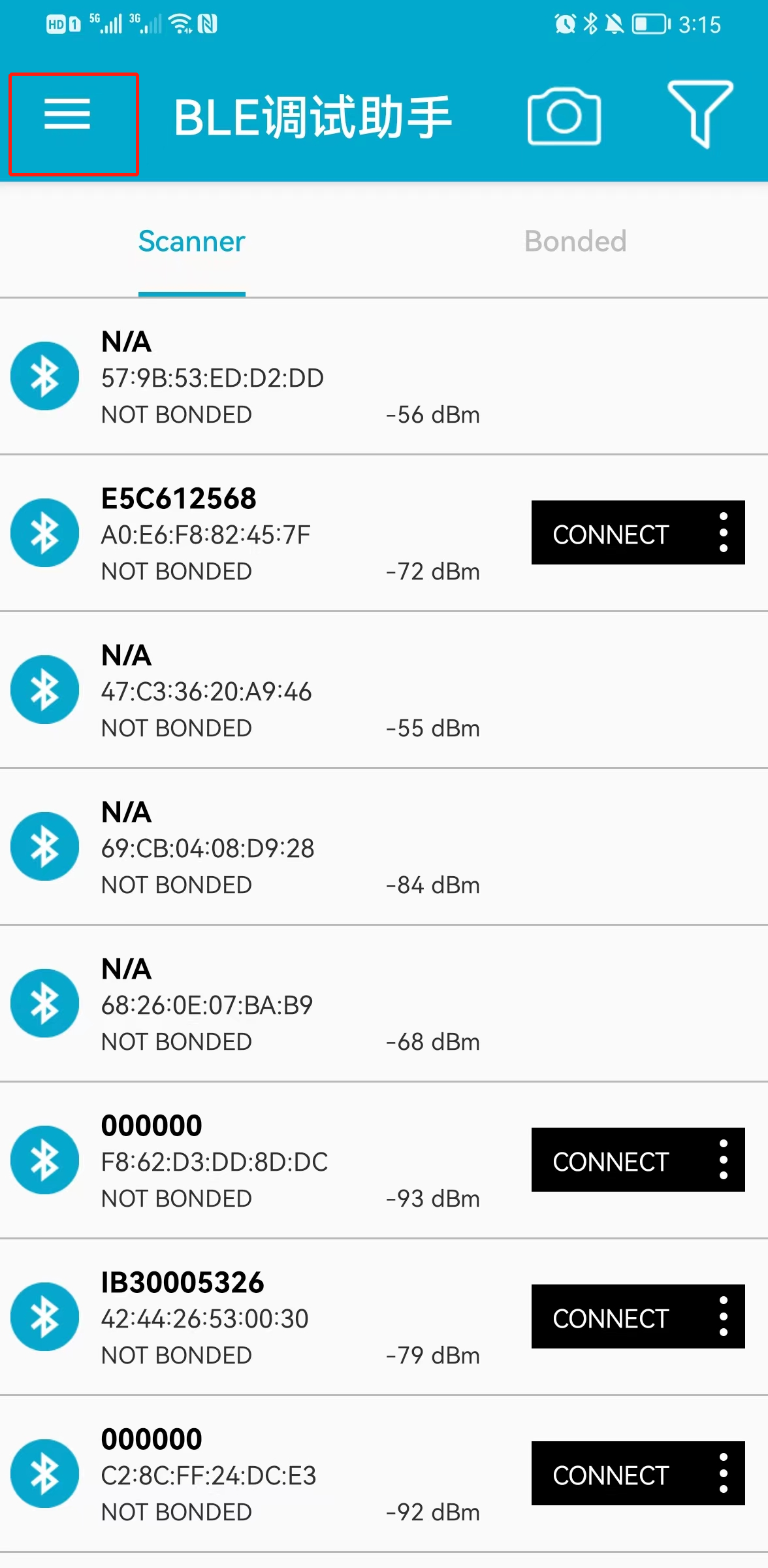
After the software is opened, the interface is as follows :
2. Device side development
Burn the following code into the development board
Be careful :
- UUID You have to use 128 byte
- The device name can be changed by itself , Easy to find by mobile phone
mian.py
import bluetooth
from bluetooth import BLE
from bluetooth import UUID
import ustruct
import utime as time
from micropython import const

_ble_rx = None

#adv
_IRQ_CENTRAL_CONNECT = const(1)
_IRQ_CENTRAL_DISCONNECT = const(2)
_IRQ_GATTS_WRITE = const(3)

_FLAG_READ = const(0x0002)
_FLAG_WRITE = const(0x0008)
_FLAG_NOTIFY = const(0x0010)

_ADV_TYPE_FLAGS = const(0x01)
_ADV_TYPE_NAME = const(0x09)
_ADV_TYPE_UUID16_COMPLETE = const(0x3)
_ADV_TYPE_UUID32_COMPLETE = const(0x5)
_ADV_TYPE_UUID128_COMPLETE = const(0x7)
_ADV_TYPE_APPEARANCE = const(0x19)

# Slave UUID,UUID Must be 128 Bit byte , namely 16 Base number 32 position .
_UART_UUID = bluetooth.UUID("211e1c1a-1816-1412-0f0d-0b0907050301")
_UART_TX = (
    bluetooth.UUID("211e1c1a-1816-1412-0f0d-0b0907050301"),
    _FLAG_READ | _FLAG_WRITE ,
)
_UART_RX = (
    bluetooth.UUID("211e1c1a-1816-1412-0f0d-0b0907050301"),
    _FLAG_READ | _FLAG_NOTIFY,
)

_UART_SERVICE = (
    _UART_UUID,
    (_UART_TX, _UART_RX),
)

# Generate a payload to be passed to gap_advertise(adv_data=...).
def advertising_payload(limited_disc=False, br_edr=False, name=None, services=None, appearance=0):
    payload = bytearray()

    def _append(adv_type, value):
        nonlocal payload
        payload += ustruct.pack("BB", len(value) + 1, adv_type) + value

    _append(
        _ADV_TYPE_FLAGS,
        ustruct.pack("B", (0x01 if limited_disc else 0x02) + (0x18 if br_edr else 0x04)),
    )

    if name:
        _append(_ADV_TYPE_NAME, name)

    if services:
        for uuid in services:
            b = bytes(uuid)
            if len(b) == 2:
                _append(_ADV_TYPE_UUID16_COMPLETE, b)
            elif len(b) == 4:
                _append(_ADV_TYPE_UUID32_COMPLETE, b)
            elif len(b) == 16:
                _append(_ADV_TYPE_UUID128_COMPLETE, b)

    # See org.bluetooth.characteristic.gap.appearance.xml
    if appearance:
        _append(_ADV_TYPE_APPEARANCE, ustruct.pack("<h", appearance))

    return payload

class BLESimplePeripheral:
############################################################################################
    def __init__(self, ble, name="name"):      # Slave device name , Change your name to make it easier to find
############################################################################################
        self._ble = ble
        self._payload = advertising_payload(name=name, services=[_UART_UUID])
        self._ble.active(True)
        self._ble.irq(self._irq)
        self._connections = set()
        self._write_callback = None
        ((self._handle_tx, self._handle_rx,),) = self._ble.gatts_register_services((_UART_SERVICE,))
        self._advertise()

    def _irq(self, event, data):
        global _ble_msg
        # Track connections so we can send notifications.
        if event == _IRQ_CENTRAL_CONNECT:
            print('connect')
        elif event == _IRQ_CENTRAL_DISCONNECT:
            print('disconnect')
            self._advertise()
        elif event == _IRQ_GATTS_WRITE:
            buffer = self._ble.gatts_read(_ble_rx)
            print('recv data:',buffer)


    def send(self, data):
        #for conn_handle in self._connections:
        self._ble.gatts_notify(0, 0, data)

    def is_connected(self):
        return len(self._connections) > 0

    def _advertise(self, interval_us=500000):
        print("Starting advertising")
        self._ble.gap_advertise(interval_us, adv_data=self._payload)

    def on_write(self, callback):
        self._write_callback = callback

def demo():
    ble = bluetooth.BLE()
    p = BLESimplePeripheral(ble)

    i = 0
    while True:
        if 1:
            for _ in range(3):
                data = str(i) + "_"
                p.send(data)
                i += 1
        time.sleep_ms(1000)

if __name__ == "__main__":
    demo()
3. A functional test
After the development board program runs , Open software
stay SCANNER All searchable Bluetooth devices can be seen on the interface , Find the Bluetooth name corresponding to the development board , Click to connect

Automatically jump after connecting , Click on Unknown Service
 1, Send a message to the development board
 2, Messages sent from the current development board

Specific operation of sending message , It opens at 1 Middle up arrow
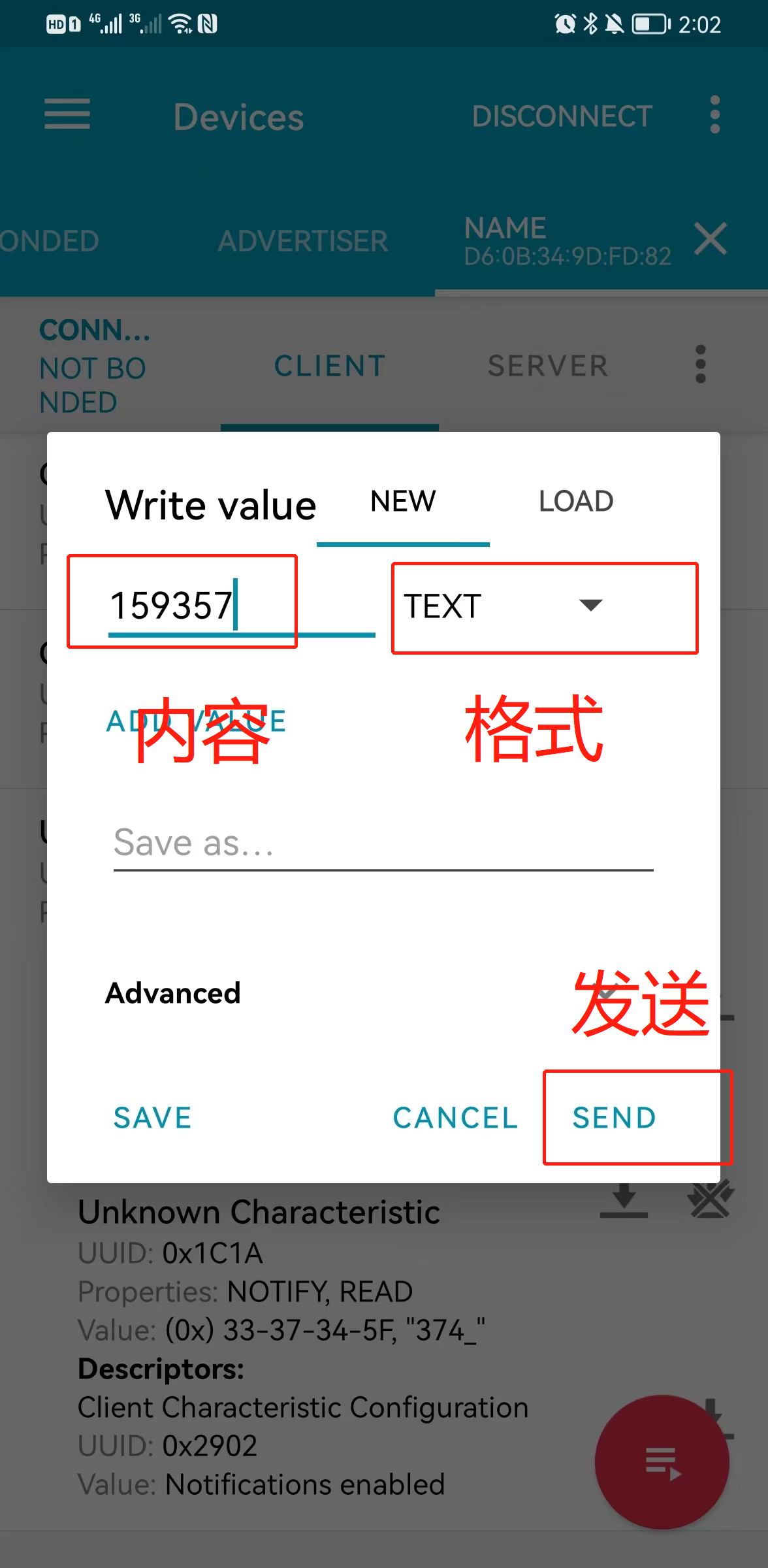
Development board serial port tool accepts content 
Check the detailed received content of the mobile phone 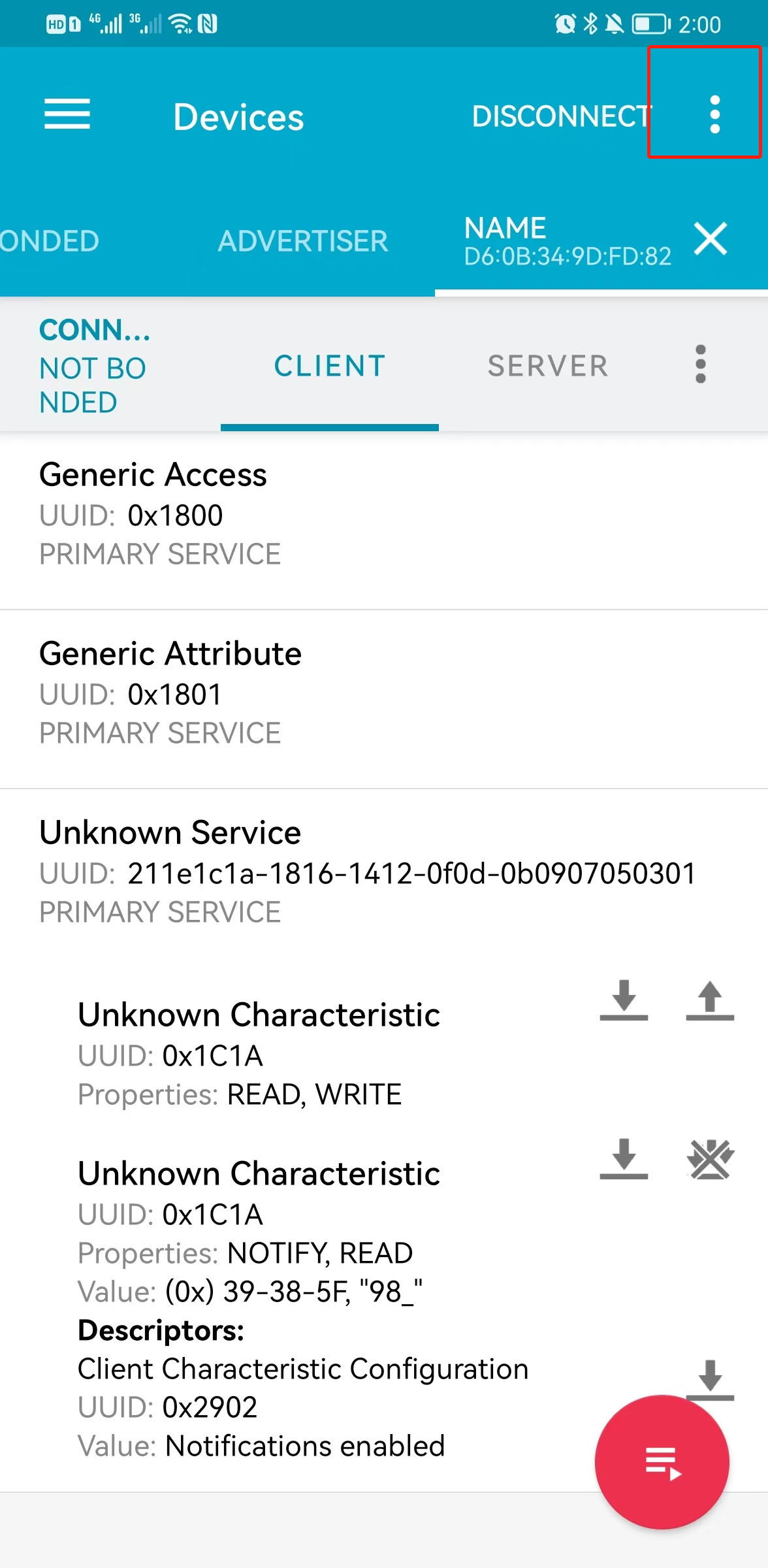

Filter log Grade , Select a different level to see the message of the corresponding level 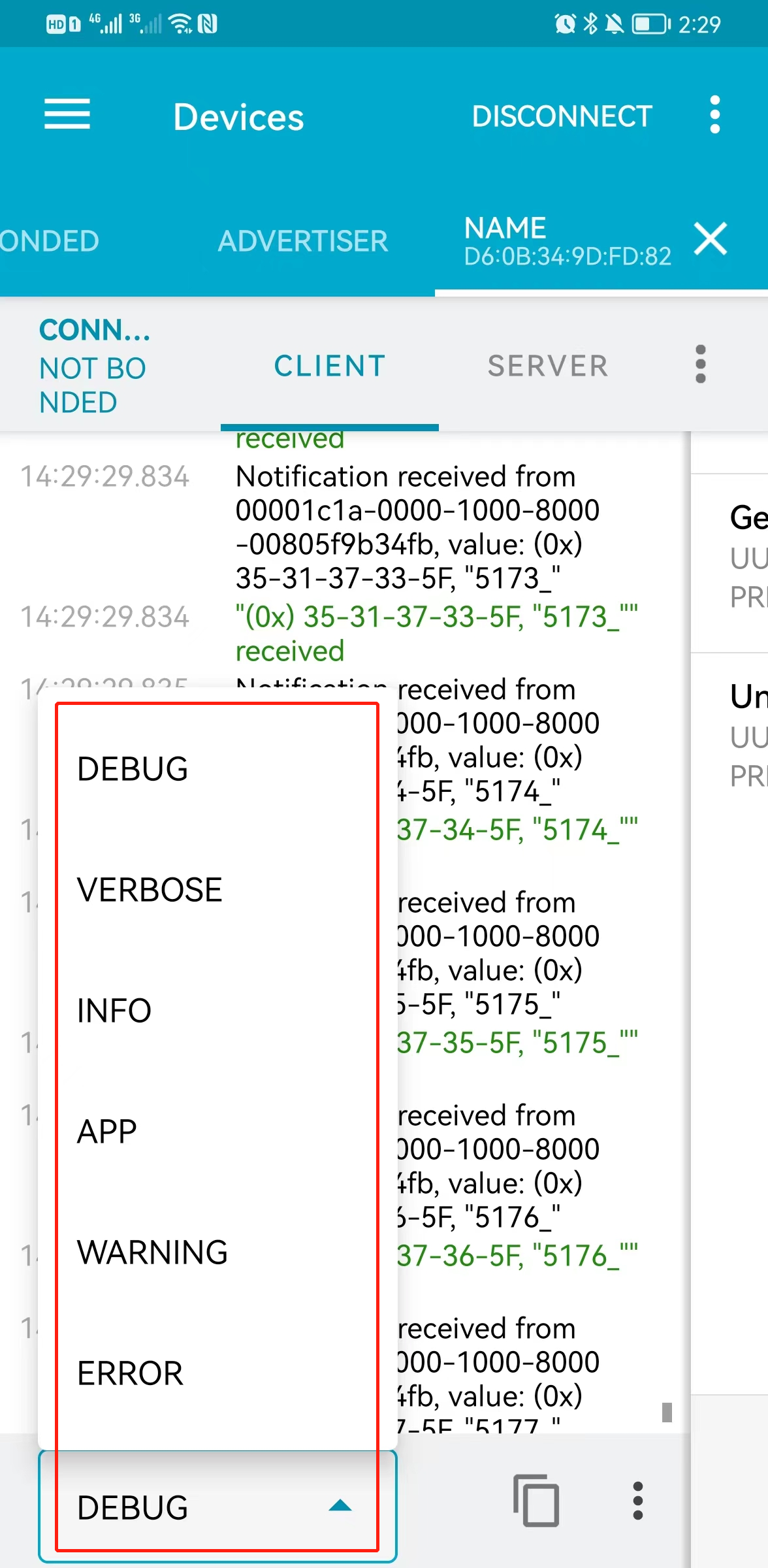
Host test ( Support only 320)
Use the mobile phone as a slave , Use the development board to connect the mobile phone . It is convenient to view the data communication between master and slave .
Need to download another software
- nRF connect Simulate slave data
- BLE Debugging assistant Data transfer
1. Simulate slave data
The slave information just debugged clone To mobile phone , Take the mobile phone as the slave , Convenient debugging .
Disconnect the slave , Search Bluetooth , Find the cloning information of the slave device ,clone After that, the slave information will be saved on the mobile phone .


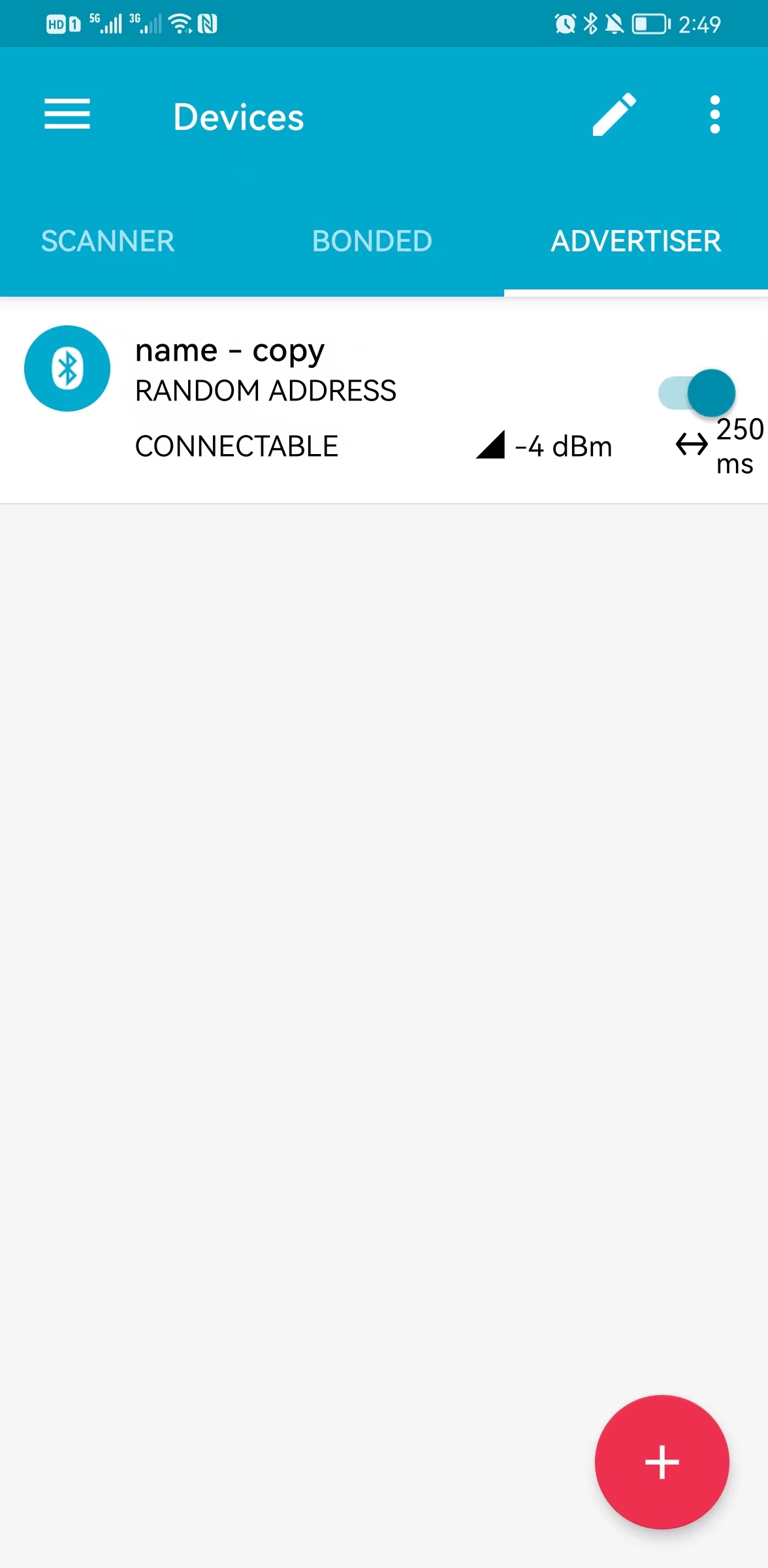
Finally, change the name of the slave Bluetooth device to name, Make sure the names are the same , Convenient host connection 
clone After that, OK. , The mobile phone can be used as a slave instead of the development board just now .
2.BLE Debugging assistant
In order to easily see the data sending and receiving of the slave , You need to download another mobile software 
After entering the software interface , Switch to device mode in the upper left corner , Turn on broadcast
Such a slave is set
- nRF connect Simulate slave data
- BLE Debugging assistant Data transfer


3. Host device development
Burn the following code
Be careful :
- Modify the slave to be connected UUID, There are comments in the code
- Modify the slave name to be connected name
mian.py
import bluetooth
from bluetooth import BLE
from bluetooth import UUID
import ustruct
import utime as time
from micropython import const

_IRQ_CENTRAL_CONNECT = const(1)
_IRQ_CENTRAL_DISCONNECT = const(2)
_IRQ_GATTS_WRITE = const(3)
_IRQ_GATTS_READ_REQUEST = const(4)
_IRQ_SCAN_RESULT = const(5)
_IRQ_SCAN_DONE = const(6)
_IRQ_PERIPHERAL_CONNECT = const(7)
_IRQ_PERIPHERAL_DISCONNECT = const(8)
_IRQ_GATTC_SERVICE_RESULT = const(9)
_IRQ_GATTC_SERVICE_DONE = const(10)
_IRQ_GATTC_CHARACTERISTIC_RESULT = const(11)
_IRQ_GATTC_CHARACTERISTIC_DONE = const(12)
_IRQ_GATTC_DESCRIPTOR_RESULT = const(13)
_IRQ_GATTC_DESCRIPTOR_DONE = const(14)
_IRQ_GATTC_READ_RESULT = const(15)
_IRQ_GATTC_READ_DONE = const(16)
_IRQ_GATTC_WRITE_DONE = const(17)
_IRQ_GATTC_NOTIFY = const(18)
_IRQ_GATTC_INDICATE = const(19)

_ADV_IND = const(0x00)
_ADV_DIRECT_IND = const(0x01)
_ADV_SCAN_IND = const(0x02)
_ADV_NONCONN_IND = const(0x03)

#########################################################################################################
_ENV_SENSE_UUID = bluetooth.UUID("211e1c1a-1816-1412-0f0d-0b0907050301")   # Slave UUID
#########################################################################################################
print('_ENV_SENSE_UUID:',_ENV_SENSE_UUID)
# org.bluetooth.characteristic.temperature
_TEMP_UUID = bluetooth.UUID(0x2A6E)
_TEMP_CHAR = (
    _TEMP_UUID,
    bluetooth.FLAG_READ | bluetooth.FLAG_NOTIFY,
)
_ENV_SENSE_SERVICE = (
    _ENV_SENSE_UUID,
    (_TEMP_CHAR,),
)

_UART_SERVICE_UUID = bluetooth.UUID("6E400001-B5A3-F393-E0A9-E50E24DCCA77")
_UART_RX_CHAR_UUID = bluetooth.UUID("6E400002-B5A3-F393-E0A9-E50E24DCCA77")
_UART_TX_CHAR_UUID = bluetooth.UUID("6E400003-B5A3-F393-E0A9-E50E24DCCA77")

_MY_SERVICE_UUID = bluetooth.UUID(0x181A)

# org.bluetooth.characteristic.gap.appearance.xml
_ADV_APPEARANCE_GENERIC_THERMOMETER = const(768)

_ADV_TYPE_FLAGS = const(0x01)
_ADV_TYPE_NAME = const(0x09)
_ADV_TYPE_UUID16_COMPLETE = const(0x3)
_ADV_TYPE_UUID32_COMPLETE = const(0x5)
_ADV_TYPE_UUID128_COMPLETE = const(0x7)
_ADV_TYPE_UUID16_MORE = const(0x2)
_ADV_TYPE_UUID32_MORE = const(0x4)
_ADV_TYPE_UUID128_MORE = const(0x6)
_ADV_TYPE_APPEARANCE = const(0x19)

def decode_field(payload, adv_type):
    i = 0
    result = []
    while i + 1 < len(payload):
        if payload[i + 1] == adv_type:
            result.append(payload[i + 2 : i + payload[i] + 1])
        i += 1 + payload[i]
    return result

def decode_name(payload):
    n = decode_field(payload, _ADV_TYPE_NAME)
    return str(n[0], "utf-8") if n else ""

def decode_services(payload):
    services = []
    for u in decode_field(payload, _ADV_TYPE_UUID16_COMPLETE):
        services.append(bluetooth.UUID(ustruct.unpack("<h", u)[0]))
    for u in decode_field(payload, _ADV_TYPE_UUID32_COMPLETE):
        services.append(bluetooth.UUID(ustruct.unpack("<d", u)[0]))
    for u in decode_field(payload, _ADV_TYPE_UUID128_COMPLETE):
        services.append(bluetooth.UUID(u))
    return services

class BLETemperatureCentral:
    def __init__(self, ble):
        self._ble = ble
#############################################################################################################
        self._ble.gap_scan_name('name')   # Slave device name
#############################################################################################################
        self._ble.gattc_set_uuids(0xFFF2, 0xFFF1)
        self._ble.active(True)
        time.sleep_ms(3000)
        self._ble.irq(self._irq)
        self._reset()

    def _reset(self):
        # Cached name and address from a successful scan.
        self._name = None
        self._addr_type = None
        self._addr = None

        # Cached value (if we have one)
        self._value = None

        # Callbacks for completion of various operations.
        # These reset back to None after being invoked.
        self._scan_callback = None
        self._conn_callback = None
        self._read_callback = None

        # Persistent callback for when new data is notified from the device.
        self._notify_callback = None

        # Connected device.
        self._conn_handle = None
        self._start_handle = None
        self._end_handle = None
        self._value_handle = None

    def _irq(self, event, data):
        if event == _IRQ_SCAN_RESULT:
            addr_type, addr, adv_type, rssi, adv_data = data
            if adv_type in (_ADV_IND, _ADV_DIRECT_IND) and _ENV_SENSE_UUID in decode_services(adv_data):
                # Found a potential device, remember it and stop scanning.
                self._addr_type = addr_type
                self._addr = bytes(addr)  # Note: addr buffer is owned by caller so need to copy it.
                self._name = decode_name(adv_data) or "?"

        elif event == _IRQ_SCAN_DONE:
            time.sleep_ms(1000)
            self._ble.gap_scan(None)
            val = 1
            if self._scan_callback:
                if self._addr:
                    # Found a device during the scan (and the scan was explicitly stopped).
                    self._scan_callback(self._addr_type, self._addr, self._name)
                    self._scan_callback = None
                else:
                    # Scan timed out.
                    self._scan_callback(None, None, None)

        elif event == _IRQ_PERIPHERAL_CONNECT:
            print('connect')

        elif event == _IRQ_PERIPHERAL_DISCONNECT:
            print('disconnect')

        elif event == _IRQ_GATTC_SERVICE_RESULT:
            # Connected device returned a service.
            conn_handle, start_handle, end_handle, uuid = data
            if conn_handle == self._conn_handle and uuid == _ENV_SENSE_UUID:
                self._start_handle, self._end_handle = start_handle, end_handle

        elif event == _IRQ_GATTC_SERVICE_DONE:
            # Service query complete.
            if self._start_handle and self._end_handle:
                self._ble.gattc_discover_characteristics(
                    self._conn_handle, self._start_handle, self._end_handle
                )
            else:
                print("Failed to find environmental sensing service.")

        elif event == _IRQ_GATTC_CHARACTERISTIC_RESULT:
            # Connected device returned a characteristic.
            conn_handle, def_handle, value_handle, properties, uuid = data
            if conn_handle == self._conn_handle and uuid == _TEMP_UUID:
                self._value_handle = value_handle

        elif event == _IRQ_GATTC_CHARACTERISTIC_DONE:
            # Characteristic query complete.
            if self._value_handle:
                # We've finished connecting and discovering device, fire the connect callback.
                if self._conn_callback:
                    self._conn_callback()
            else:
                print("Failed to find temperature characteristic.")

        elif event == _IRQ_GATTC_READ_RESULT:
            buffer = self._ble.gattc_read(0,0)
            print('recv data:',buffer)

        elif event == _IRQ_GATTC_READ_DONE:
            # Read completed (no-op).
            conn_handle, value_handle, status = data

        elif event == _IRQ_GATTC_NOTIFY:
            # The ble_temperature.py demo periodically notifies its value.
            conn_handle, value_handle, notify_data = data
            if conn_handle == self._conn_handle and value_handle == self._value_handle:
                self._update_value(notify_data)
                if self._notify_callback:
                    self._notify_callback(self._value)
        elif event == _IRQ_GATTC_WRITE_DONE:
            conn_handle, value_handle, status = data
            print("TX complete")

    # Returns true if we've successfully connected and discovered characteristics.
    def is_connected(self):
        return self._conn_handle is not None and self._value_handle is not None

    # Find a device advertising the environmental sensor service.
    def scan(self, callback=None):
        self._addr_type = None
        self._addr = None
        self._scan_callback = callback
        self._ble.gap_scan(20000, 30000, 30000)

    # Connect to the specified device (otherwise use cached address from a scan).
    def connect(self, addr_type=None, addr=None, callback=None):
        self._addr_type = addr_type or self._addr_type
        self._addr = addr or self._addr
        self._conn_callback = callback
        if self._addr_type is None or self._addr is None:
            return False
        self._ble.gap_connect(self._addr_type, self._addr)
        return True

    # Disconnect from current device.
    def disconnect(self):
        if not self._conn_handle:
            return
        self._ble.gap_disconnect(self._conn_handle)
        self._reset()

    # Issues an (asynchronous) read, will invoke callback with data.
    def read(self, callback):
        if not self.is_connected():
            return
        self._read_callback = callback
        self._ble.gattc_read(self._conn_handle, self._value_handle)

    # Sets a callback to be invoked when the device notifies us.
    def on_notify(self, callback):
        self._notify_callback = callback

    def _update_value(self, data):
        # Data is sint16 in degrees Celsius with a resolution of 0.01 degrees Celsius.
        self._value = ustruct.unpack("<h", data)[0] / 100
        return self._value

    def value(self):
        return self._value

    def write(self, v, response=False):
        # if not self.is_connected():
        # return
        self._ble.gattc_write(0, 0, v, 1 if response else 0)
        print("data_send:", v)
v = 0
def demo():
    time.sleep_ms(2000)
    ble = bluetooth.BLE()
    central = BLETemperatureCentral(ble)
    time.sleep_ms(2000)
    not_found = False

    def on_scan(addr_type, addr, name):
        if addr_type is not None:
            print("Found sensor:", addr_type, addr, name)
            global v
            v = 1
        else:
            nonlocal not_found
            not_found = True
            print("No sensor found.")

    central.scan(callback=on_scan)
    global v
    while True:
        print('whit connect -----------')
        if v ==1:
            central.connect()
            break
        time.sleep_ms(10)

    while True:
        ble.gattc_notify(1, 1)
        central.write('123', False)
        time.sleep_ms(1000)

if __name__ == "__main__":
    demo()
4. Function debugging
After downloading the code log as follows 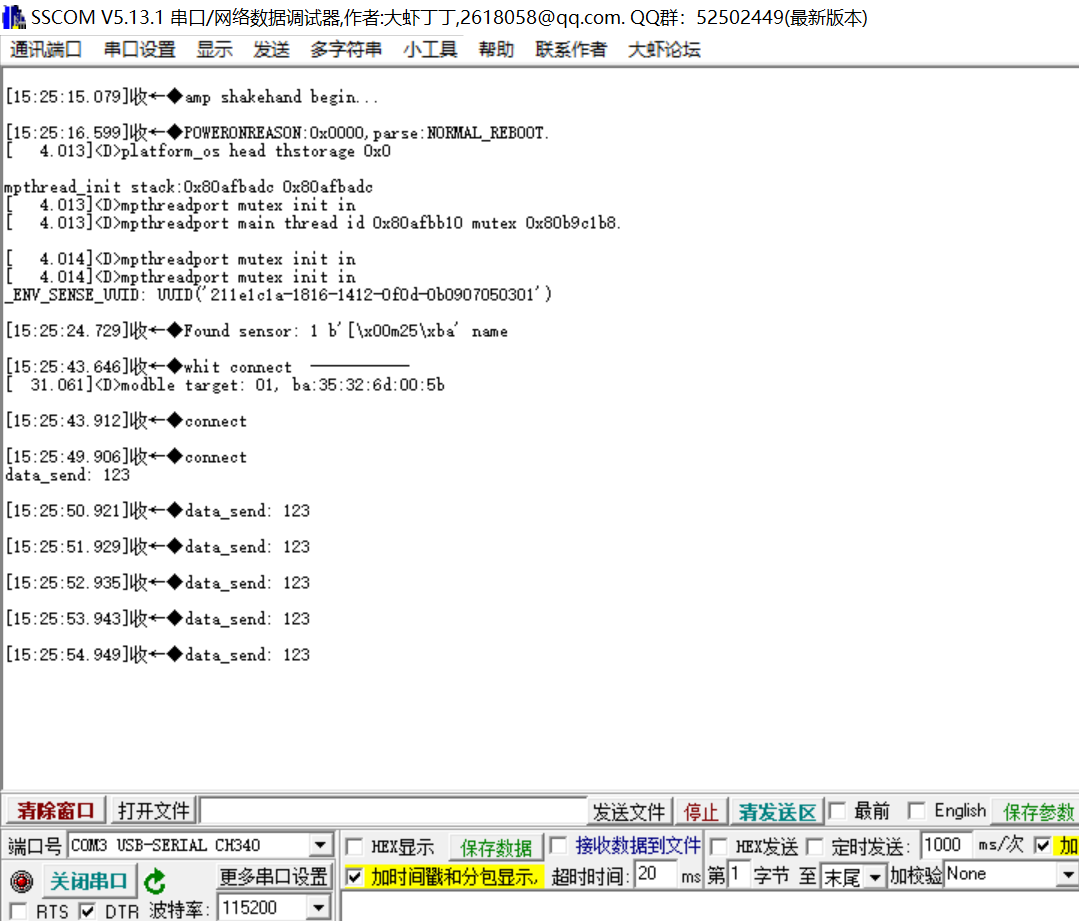
The mobile terminal shows the connection , And can receive data 
Send data test 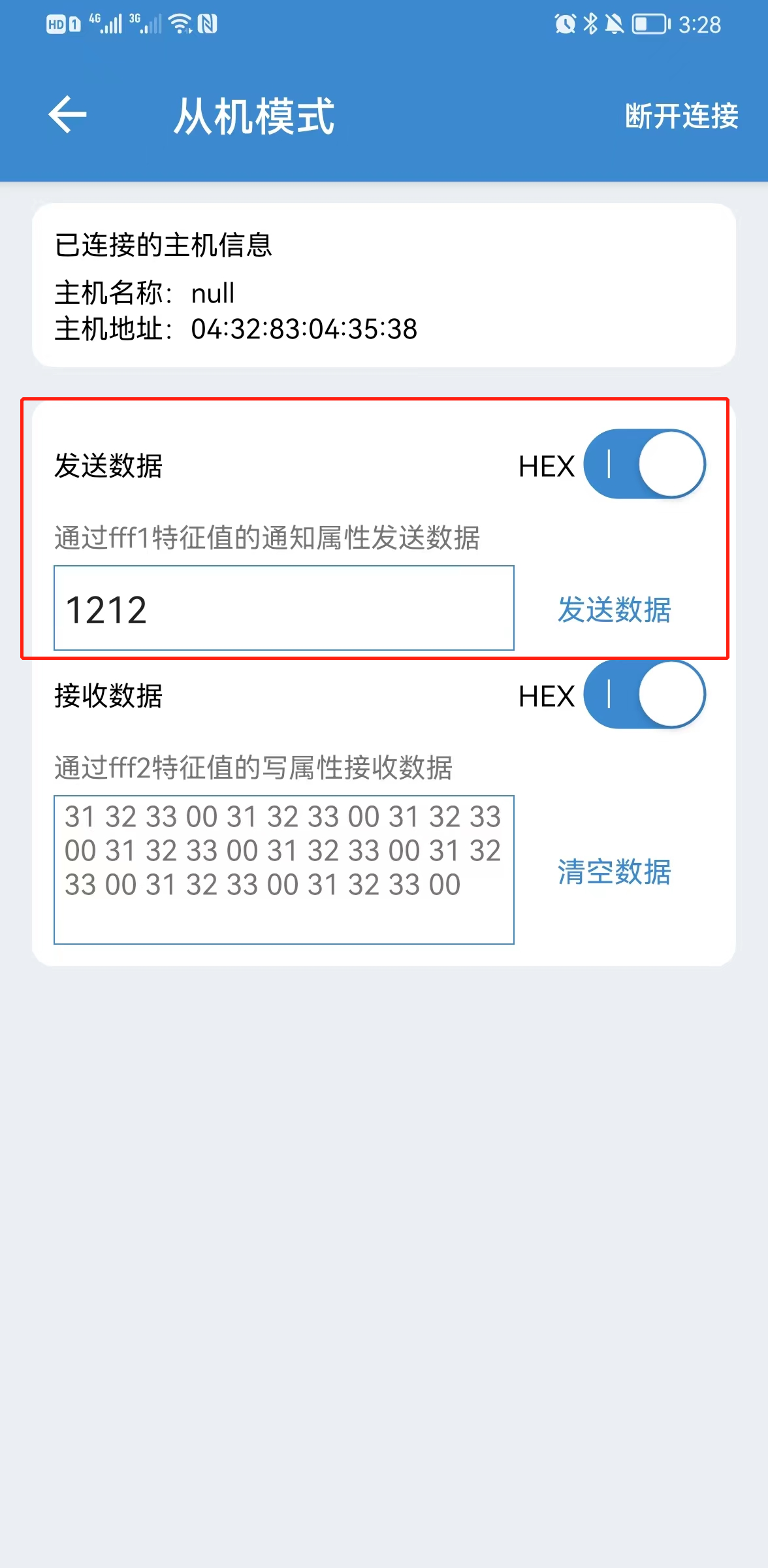
The computer receives data 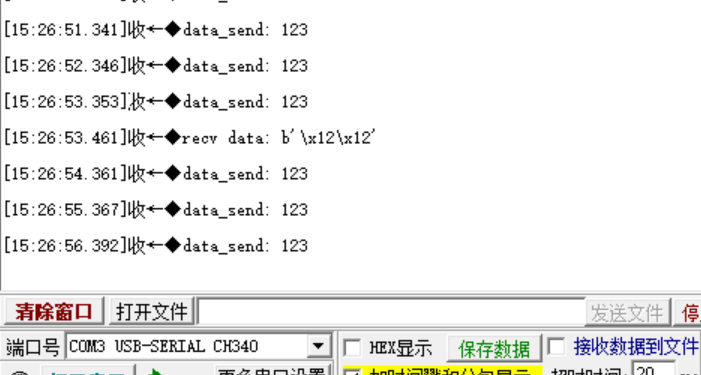
class - bluetooth
bluetooth - bluetooth
Module function :
- This module provides an interface for the Bluetooth controller on the board . At present, it supports low-power Bluetooth (BLE) Of Central( The central ), Peripheral( peripherals ), Broadcaster( Broadcaster ), and Observer ( The observer ) role , as well as GATT Server for (Server) And the client (Client).
matters needing attention :
- Currently, this module only supports low-power Bluetooth (BLE)
bluetooth.BLE
Class function :
- This class is low-power Bluetooth (BLE), yes bluetooth The main classes in the module .
BLE - establish BLE object
The functionality :
- establish BLE object .
The function prototype :
- ble = bluetooth.BLE()
Parameter description : nothing
Return value :
- BLE Object success , Returns the Singleton's BLE object ;BLE Object creation failed , return None
active - change BLE RF activity status
The functionality :
- change BLE RF activity status , And return the current state .
matters needing attention :
- Before using any other method on this class , RF must be active .
The function prototype :
- BLE.active(active)
Parameter description :
| Parameters | type | Required parameters ? | explain |
|---|---|---|---|
| active | Boolean type | yes | True: Activate BLE radio frequency ; False: close BLE radio frequency |
Return value :
- nothing
irq - Event handling
The functionality :
- Sign up for a BLE Event callback of protocol stack . The callback function takes two parameters : event - Event code and data - Tuple type of event value .
matters needing attention :
In tuples addr, adv_data,char_data,notify_data, and uuid Is read-only , Point to bluetooth Internal ringbuffer, And only in IRQ Valid during the call of the processing function . If the program needs to save these values , In the IRQ After the handler returns, access ( for example , By saving it in a class instance or global variable ), Then it needs to be used bytes() or bluetooth.UUID() And so on , like this :
connected_addr = bytes(addr) # equivalently: adv_data, char_data, or notify_data matched_uuid = bluetooth.UUID(uuid)for example , Scanning results IRQ The handler may check adv_data To determine whether it is the right device , Then copy the address data for use elsewhere in the program . And from IRQ Print data in the handler print(bytes(addr)).
The function prototype :
- BLE.irq(handler)
Parameter description :
| Parameters | type | Required parameters ? | explain |
|---|---|---|---|
| handler | functional | yes | The function takes two input parameters event and data |
Return value :
- nothing
gap_advertise - On or off BLE radio broadcast
The functionality :
- Set a specific broadcast interval ( The unit is microseconds ) Turn on BLE radio broadcast , The minimum interval is 625us. close BLE On the radio , Set the broadcast interval parameter (interval_us) Set to None.
matters needing attention :
- Use
The function prototype :
- BLE.gap_advertise(interval_us, adv_data=None, *, resp_data=None, connectable=True)
Parameter description :
| Parameters | type | Required parameters ? | explain |
|---|---|---|---|
| interval_us | integer | yes | Broadcast interval , by None Turn off the broadcast when |
| adv_data | string | no | adv_data Can point to any type that implements the buffering protocol ( for example bytes,bytearray,str), by None Use the value of the last call |
| resp_data | string | no | resp_data Can point to any type that implements the buffering protocol ( for example bytes,bytearray,str), by None Use the value of the last call |
| connectable | Boolean type | no | Indicates whether it can be connected |
Return value :
- nothing
gap_scan - BLE scanning
The functionality :
- At a specific interval (interval_us) and window (window_us) perform BLE Scanning operation ; The scanner will every interval_us Microsecond operation window_us Microsecond , Total duration duration_ms millisecond . The default interval and window are 1.28 The second and 11.25 millisecond ( Background scan )
matters needing attention :
- For each scan result , Will trigger _IRQ_SCAN_RESULT event , With event data (addr_type, addr, adv_type, rssi, adv_data). When scanning stops ( Complete or explicitly stop due to duration ), Will trigger _IRQ_SCAN_DONE event . The observer role is used .
addr_type Value indicates public or random address :
0x00 - public 0x01 - RANDOM( static state 、RPA or NRPA, The type is encoded in the address itself )
adv_type Value corresponds to Bluetooth specification :
0x00 - ADV_IND - Connectable and scannable undirected advertisements 0x01 - ADV_DIRECT_IND - Connected targeted advertising 0x02 - ADV_SCAN_IND - Scannable undirected advertisements 0x03 - ADV_NONCONN_IND - Unconnected undirected advertising 0x04 - SCAN_RSP - Scan response
The function prototype :
- BLE.gap_scan( duration_ms , interval_us, window_us, active=False )
Parameter description :
| Parameters | type | Required parameters ? | explain |
|---|---|---|---|
| duration_ms | integer | yes | Scan duration , The unit is millisecond , When set to 0 when , Scan indefinitely ; When set to None Stop scanning when |
| interval_us | integer | no | Scan interval , In microseconds |
| window_us | integer | no | Scan window time , In microseconds |
| active | Boolean type | no | Set to True when , Indicates that you want to accept the scan response in the result (scan_rsp), The default is False |
Return value :
- nothing
gap_connect - Connect BLE Peripherals
The functionality :
- Connect BLE Peripherals
matters needing attention :
- Central equipment (Central) Pass as an observer gap_scan Method to obtain peripheral device information , Or the peripheral device address is known , Then it can be triggered by the device information BLE Connection request . After success , Will trigger _IRQ_PERIPHERAL_CONNECT event , The incident data With connection handle .
The function prototype :
- BLE.gap_connect( addr_type , addr , scan_duration_ms=2000 , min_conn_interval_us=None , max_conn_interval_us=None )
Parameter description :
| Parameters | type | Required parameters ? | explain |
|---|---|---|---|
| addr_type | enum | yes | 0x00 - Public address ;0x01 - Random address |
| addr | string | yes | Address of the device to be connected |
| scan_duration_ms | integer | no | The device will wait up to scan_duration_ms To receive the broadcast load from the device |
| min_conn_interval_us | integer | no | Minimum connection interval , In microseconds |
| max_conn_interval_us | integer | no | Maximum connection interval , In microseconds |
Return value :
- nothing
gatts_register_services - register GATT service
One GATT The server has a set of registration services . Each service may contain one or more features , Each feature has a value . Features can also contain descriptors , The descriptor itself also has a value . These values are stored locally , And generated during service registration “ Value handle ” visit . They can also be read or written from remote client devices . Besides , The server can actively send the connection handle to the connected client “ notice ” features . in the majority of cases , Peripheral devices act as GATT The server .
The functionality :
- Configure the server with the specified service
matters needing attention :
- You must stop before registering for the service BLE radio broadcast .
Each service is a tuple of two elements , One of them is UUID, The other is the list of eigenvalues . Each eigenvalue is a tuple of two or three elements , Contains a UUID, An indication value , Another optional descriptor list ; Each descriptor has a tuple of two elements , Contains a UUID, An indication value . These marked values are combinations of marked bitwise or defined below , They set the behavior of features or descriptors and security and privacy requirements .
from micropython import const
_FLAG_BROADCAST = const(0x0001)
_FLAG_READ = const(0x0002)
_FLAG_WRITE_NO_RESPONSE = const(0x0004)
_FLAG_WRITE = const(0x0008)
_FLAG_NOTIFY = const(0x0010)
_FLAG_INDICATE = const(0x0020)
_FLAG_AUTHENTICATED_SIGNED_WRITE = const(0x0040)

_FLAG_AUX_WRITE = const(0x0100)
_FLAG_READ_ENCRYPTED = const(0x0200)
_FLAG_READ_AUTHENTICATED = const(0x0400)
_FLAG_READ_AUTHORIZED = const(0x0800)
_FLAG_WRITE_ENCRYPTED = const(0x1000)
_FLAG_WRITE_AUTHENTICATED = const(0x2000)
_FLAG_WRITE_AUTHORIZED = const(0x4000)
The function prototype :
- BLE.gatts_register_services( services_definition )
Parameter description :
| Parameters | type | Required parameters ? | explain |
|---|---|---|---|
| services_definition | list | yes | List of services |
Return value :
- A list of tuples , Each tuple represents a service , Each element in a tuple corresponds to a value handle , The handle of the feature and descriptor sentence is flattened into the same tuple in the defined order . The following example registers two services (HR and UART), These three value handles (hr, tx, rx) Can be used for gatts_read, gatts_write, gatts_notify and gatts_indicate.
gatts_read - Read local values
The functionality :
- Read local GATT Characteristic values in services
matters needing attention :
- This value may be through local gatts_write Written in , It may also be written through a remote client .
The function prototype :
- BLE.gatts_read(0)
Return value :
- nothing
gatts_write - Write local value
The functionality :
- Write local GATT Characteristic values in services
matters needing attention :
- After writing , The client can read the value .
The function prototype :
- BLE.gatts_write( 0, data , send_update=False )
Parameter description :
| Parameters | type | Required parameters ? | explain |
|---|---|---|---|
| data | string | yes | Write data |
| send_update | Boolean type | no | by True when , Any client subscribing to this value will receive the notification of writing this characteristic value |
Return value :
- nothing
gattc_read - GATT Remote read operation
The functionality :
- Issue a remote read to the connected server
matters needing attention :
- When values are available , Will trigger _IRQ_GATTC_READ_RESULT event , With read results . Besides , The completion of reading will trigger _IRQ_GATTC_READ_DONE event .
The function prototype :
- BLE.gattc_read( conn_handle , 0)
Parameter description :
| Parameters | type | Required parameters ? | explain |
|---|---|---|---|
| conn_handle | integer | yes | Connection handle |
Return value :
- nothing
gattc_write - GATT Remote write operation
The functionality :
- Send remote write to the connected server
matters needing attention :
- If you receive a response from a remote server , Will trigger _IRQ_GATTC_WRITE_DONE event .
The function prototype :
- BLE.gattc_write( conn_handle , 0, data , mode=0 )
Parameter description :
| Parameters | type | Required parameters ? | explain |
|---|---|---|---|
| conn_handle | integer | yes | Connection handle |
| mode | integer | yes | mode=0( The default value is ), Is no response write , The other party does not return for confirmation , Nor will it trigger any events ; mode=1 yes write-with-response, The remote server sends a response to the data it receives / confirm |
Return value :
- nothing
bluetooth.UUID
Class function :
- Create a with the specified value UUID example .
matters needing attention :
- UUID It could be a 16 An integer , for example 0x2908; It can also be 128 Bit UUID character , for example ’6E400001-B5A3-F393-E0A9-E50E24DCCA9E‘
######################################
gattc_set_uuids - Set characteristic values
gap_scan_name - Scan Bluetooth name
gattc_notify - Notification enable
######################################
边栏推荐
- Introduction to bermudagrass
- 2022 / 7 / 20 training record
- 未来数据库需要关心的硬核创新
- kubernetes GPU的困境和破局
- After taking aiyouteng's medicine, Naifei's condition improved
- What is a firewall? What role can firewalls play?
- MySQL source code analysis -- data structure of index
- Yolov3 trains its own data set
- Using JS to implement click events
- yolov6训练自己的数据集
猜你喜欢

Using JS to implement click events

【LOJ3247】「USACO 2020.1 Platinum」Non-Decreasing Subsequences(DP,分治)
![[shaders realize pixelate mosaic effect _shader effect Chapter 7]](/img/0f/3e8d9468d94b14217875c7e447aa15.png)
[shaders realize pixelate mosaic effect _shader effect Chapter 7]

You can't just focus on flex layout and elaborate animation to explain all flex layout methods! Easy to understand dry goods tutorial

Research on the efficiency of numpy array access
![[SWT] scrolling container to realize commodity list style](/img/84/07e7c794aaef3fb64f173b50150b21.png)
[SWT] scrolling container to realize commodity list style

Yolov6 trains its own data set

How to deal with being attacked? Advanced anti DDoS IP protection strategy

Introduction to bermudagrass
【TA-霜狼_may-《百人计划》】图形3.4 延迟渲染管线介绍
随机推荐
Leetcode 223. 矩形面积
Is Huishang futures platform safe? Is it OK to open a futures account?
Lsyncd搭建同步镜像-用Lsyncd实现本地和远程服务器之间实时同步
[SWT] scrolling container to realize commodity list style
Pattern water flow lamp 1: check the table and display the LED lamp
Arduino IDE ESP32固件安装和升级教程
Varnish4.0 cache agent configuration
2022/7/18 CF training
Fine tune layoutlm V3 for bill data processing and content recognition
Which is a good noise reduction Bluetooth headset? Ranking of the most cost-effective noise reduction Bluetooth headsets
Analysys analysis "2022 China data security market data monitoring report" was officially launched
Dynamics crm: how to set the order of forms
Can flush accounts be opened directly? Is it safe to open an account? How to open an account??
简化理解:发布订阅
Netease email (126/163): authorization code acquisition strategy
公钥私钥传输,以及对CA证书的理解
【洛谷】P1908 逆序对
Configuring WAPI certificate security policy for Huawei wireless devices
华为无线设备配置WAPI-证书安全策略
Read the paper with me - multi model text recognition network