当前位置:网站首页>记账APP:小哈记账1——欢迎页的制作
记账APP:小哈记账1——欢迎页的制作
2022-07-24 06:26:00 【Hebuter-Rui】
项目介绍:
小哈记账是一款用于记账APP,基于Android Studio开发工具,采用Java语言进行开发,同时使用litepal和阿里云数据库进行数据的增删查改,以图标的形式在App的界面上显示。App可以清晰显示收支情况,并以图表的形式展示每月收支情况;同时可以记录消费用途,项目能够精确到每一个款项的收入支出时间、结余并且可以设置每月的预算。超出预算提醒,并且有每周,每月及每年的账单统计,较为清晰明确帮助用户分析自己当前的支出和收入。同时拥有用户登录、注册、修改头像等功能。
本项目中使用到的技术:LitePal数据库,阿里云RDS数据库,MPAndroidChart图表库,部分自定义控件等。
支持Android5.0以上版本。
本文将介绍小哈记账的欢迎页面制作。
效果图:
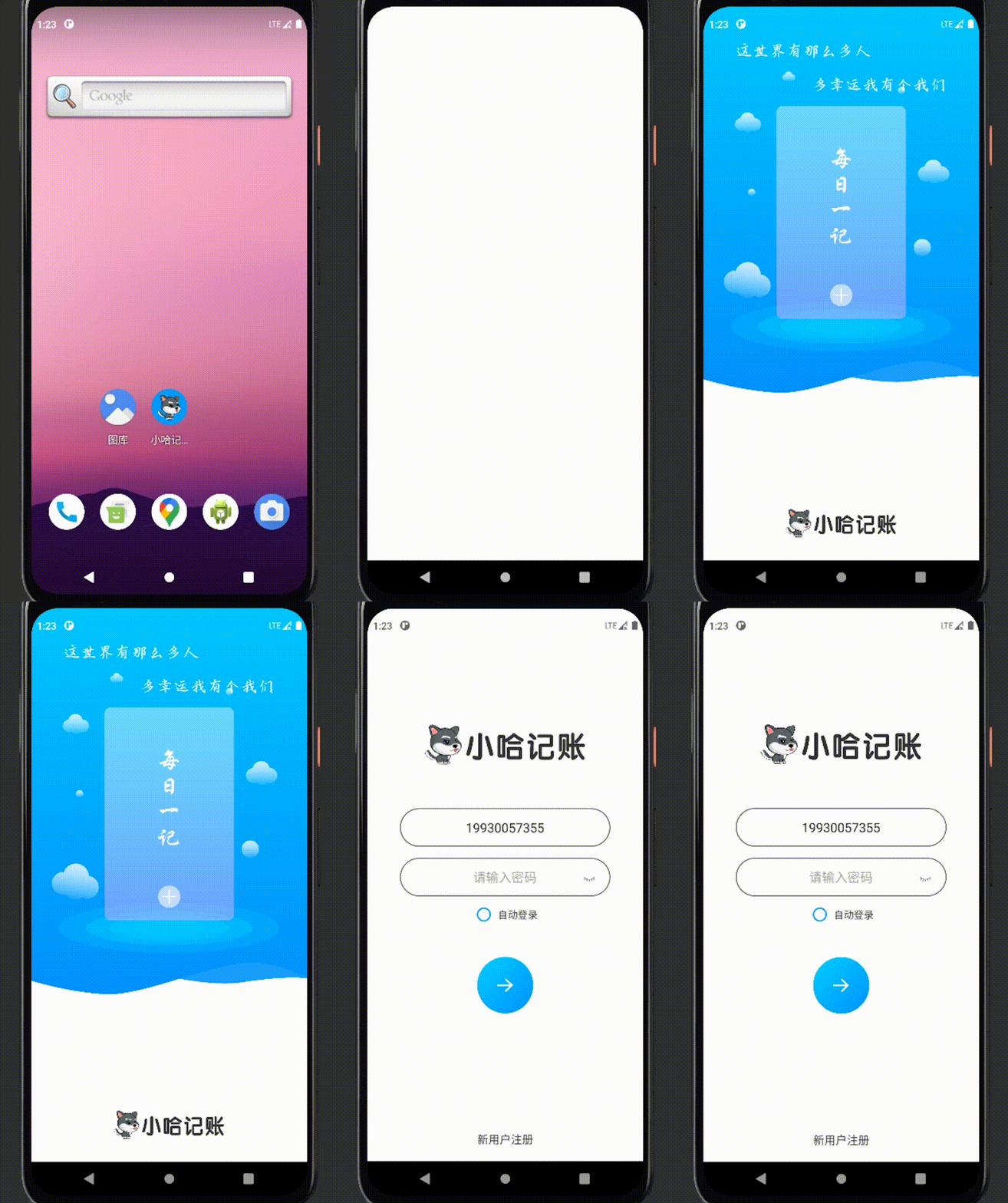
源代码:
activity_welcome.xml文件
本文件用于设置欢迎页面的布局,本案例由两个ImageView控件和一个TextView控件组成。
两个ImageView控件分别用于存放背景图和LOGO,TextView控件用于存放欢迎语句。
<?xml version="1.0" encoding="utf-8"?>
<RelativeLayout android:layout_width="match_parent"
    android:layout_height="match_parent"
    xmlns:android="http://schemas.android.com/apk/res/android">

    <ImageView
        android:id="@+id/s1"
        android:layout_width="match_parent"
        android:layout_height="560sp"
        android:layout_alignParentTop="true"
        android:background="@drawable/welcome_top"
        android:scaleType="fitXY"/>

    <ImageView
        android:layout_width="220sp"
        android:layout_height="44sp"
        android:layout_alignParentBottom="true"
        android:layout_centerHorizontal="true"
        android:layout_marginBottom="30sp"
        android:background="@drawable/login_logo2" />

    <TextView
        android:id="@+id/welcome_text"
        android:layout_width="wrap_content"
        android:layout_height="wrap_content"
        android:layout_alignParentTop="true"
        android:layout_centerHorizontal="true"
        android:layout_marginTop="50sp"
        android:text="这世界有那么多人\n\n         多幸运我有个我们"
        android:textColor="@color/white"
        android:textSize="24sp" />

</RelativeLayout>
WelcomeActivity.java
该文件用于实现欢迎页面功能,在onCreate函数中设置了该页面停留3秒后跳转至主页面。
package com.example.xiaohaaccounting.Activity;

import androidx.annotation.NonNull;

import android.content.Intent;
import android.graphics.Typeface;
import android.os.Bundle;
import android.os.Handler;
import android.os.Message;
import android.widget.TextView;

import com.example.xiaohaaccounting.R;
import com.example.xiaohaaccounting.Utils_class.MyAppCompatActivity;

public class WelcomeActivity extends MyAppCompatActivity {

    private Handler handler = new Handler(){
        @Override
        public void handleMessage(@NonNull Message msg) {
            switch (msg.what){
                case 1:
                    startActivity(new Intent(WelcomeActivity.this, LoginActivity.class));
                    WelcomeActivity.this.finish();
                    break;
                case 2:
                    break;
                default:
                    break;
            }
        }
    };

    @Override
    protected void onCreate(Bundle savedInstanceState) {
        super.onCreate(savedInstanceState);

        setContentView(R.layout.activity_welcome);

        TextView welcome_text = (TextView) findViewById(R.id.welcome_text);
        Typeface typeface = Typeface.createFromAsset(getAssets(),"qingcha_kaiti.ttf");//文本字体
        welcome_text.setTypeface(typeface);
        handler.sendEmptyMessageDelayed(1,1000*3);//停留3s
    }

}
MyAppCompatActivity.java
该文件是本项目中的自定义通用AppCompatActivity文件,用于设置顶部状态栏透明,记录活动的创建与销毁(用于后续退出登录功能做铺垫)。
package com.example.xiaohaaccounting.Utils_class;

import android.graphics.Color;
import android.os.Build;
import android.os.Bundle;
import android.view.View;
import android.view.Window;
import android.view.WindowManager;

import androidx.appcompat.app.ActionBar;
import androidx.appcompat.app.AppCompatActivity;

/**
 * 我的Activity
 * 顶部状态栏透明
 * 记录活动创建销毁
 * */

public class MyAppCompatActivity extends AppCompatActivity {

    @Override
    protected void onCreate(Bundle savedInstanceState) {
        super.onCreate(savedInstanceState);
        ActivityCollector.addActivity(this);

        if (Build.VERSION.SDK_INT >= 21) {//21表示5.0
            Window window = getWindow();
            window.clearFlags(WindowManager.LayoutParams.FLAG_TRANSLUCENT_STATUS);
            window.getDecorView().setSystemUiVisibility(View.SYSTEM_UI_FLAG_LAYOUT_FULLSCREEN
                    | View.SYSTEM_UI_FLAG_LAYOUT_STABLE);
            window.addFlags(WindowManager.LayoutParams.FLAG_DRAWS_SYSTEM_BAR_BACKGROUNDS);
            window.setStatusBarColor(Color.TRANSPARENT);
        } else if (Build.VERSION.SDK_INT >= 19) {//19表示4.4
            getWindow().addFlags(WindowManager.LayoutParams.FLAG_TRANSLUCENT_STATUS);
        }

        ActionBar actionBar = getSupportActionBar();
        if(actionBar != null){
            actionBar.hide();
        }
    }

    @Override
    protected void onDestroy() {
        super.onDestroy();
        ActivityCollector.removeActivity(this);
    }

}
写好以上三个文件欢迎页面我们就做好了,但是此时因为还没有做登录页面(LoginActivity .java),所以大家欢迎页跳转会出现问题,登录页面的制作将在第三篇文章中进行详细介绍。
边栏推荐
猜你喜欢

Ue4/5 cannot open the file "xxx.generated.h" (cannot open file xxx.generated.h) solution summary

Jinan renshe has signed 1w+ electronic labor contract, which greatly helps HR digitalization
tensorflow einsum函数

C language from entry to soil (II)

【方向盘】IDEA的代码审查能力,来保证代码质量

C language from entry to Earth - array
Create WPF project
Vs debugging

上传excel文件

"Big factory interview" JVM Chapter 21 questions and answers
随机推荐
5. Template cache. Drawing a square can only move within the triangle
找工作备忘
聚合型新生态模式-分享购,会员及奖励制度
【LeetCode】444. 序列重建
C language from entry to soil (III)
你不可能让每个人都满意!
STM32基于hal库的adc以DMA的多通道采样以及所遇问题解决
You are you, and no one can replace you
[learning notes] possible reasons and optimization methods for white screen on Web pages
Mqtt learning
Day (0~6) represents the starting position of the first day of each month, stop represents the number of days of each month, and there are two blank spaces between each day. Input different days and s
Who you are is up to you!
Redis fragment cluster
Job search memo
Don't compare with anyone, just be yourself
MySql的DDL和DML和DQL的基本语法
owasp top10 渗透测试
[USB voltmeter and ammeter] Based on stm32f103c8t6 for Arduino
第二部分—C语言提高篇_4. 二级指针
Libc.so.6/glibc cross compilation