当前位置:网站首页>MongoDB系列之Window环境部署配置
MongoDB系列之Window环境部署配置
2022-06-26 12:41:00 【smileNicky】
在学习MongoDB的一些常用命令之前还是需要安装部署好开发环境的,本博客基于Window系统介绍MongoDB的一些常规安装部署配置
1、实验环境
- MongoDB Server5.0.9
- Navicat15.0.28
- RoboMongo 0.9.0
- Window10系统
2、下载MongoDB Server
去官网下载https://www.mongodb.com/try/download,选择 当前Community Server 5.0.9 的版本,Platform选择window

3、安装MongoDB Server
点击download后,点击msi格式的安装文件,安装MongoDB服务端,基本就是Next一直点,不过有一个地方需要注意,如图,这里最好不勾选,因为勾选后会访问国外的网站。所以速度比较慢
4、启动MongoDB Server
在新版本安装好之后都是默认启动的,如果要修改数据存储路径,也可以这样修改一下
mongod.exe -dbpath="C:\Program Files\MongoDB\Server\5.0\data"

5、配置环境变量
先新建一个MongoDB的根路径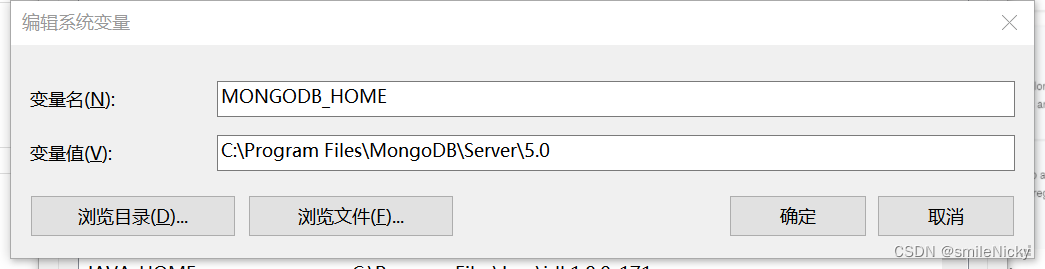
然后在Path里加上配置,如图:
启动一个cmd窗口,输入mongod -help查看帮助信息,有打印出来,说明安装配置成功
6、客户端软件选择
客户端也是比较多的,比如Navicat和Robomongo
Navicat要比较高版本才能支持mongo的连接,使用也是比较容易
Robomongo的客户端软件
边栏推荐
猜你喜欢

ES基于Snapshot(快照)的数据备份和还原

Some conclusions about Nan

装饰器(Decorator)
NVM installation tutorial

MySQL讲解(二)

2、并行接口、协议和相关芯片介绍(8080、8060)

Basic methods for network diagnosis and hardware troubleshooting of Beifu EtherCAT module

Oplg: new generation cloud native observable best practices

Bifu divides EtherCAT module into multiple synchronization units for operation -- use of sync units
![Hdu1724[Simpson formula for integral]ellipse](/img/57/fb5098e150b5f3d91a5d0983a336ee.png)
Hdu1724[Simpson formula for integral]ellipse
随机推荐
QT . Establishment and use of pri
Adapter mode
Machine learning notes - seasonality of time series
Solutions to insufficient display permissions of find and Du -sh
5月产品升级观察站
Beifu PLC model selection -- how to see whether the motor is a multi turn absolute value encoder or a single turn absolute value encoder
IDC报告:百度智能云AI Cloud市场份额连续六次第一
A primary multithreaded server model
组合模式(Composite )
中国剩余定理模板题 互质与非互质
Analysis of state transition diagram of Beifu NC axis
MySQL explanation (I)
Beifu PLC realizes data power-off maintenance based on cx5130
Processsing function random
MySQL数据库常见故障——遗忘数据库密码
Bigint: handles large numbers (integers of any length)
Aesthetic experience (episode 238) Luo Guozheng
Es6: iterator
LAMP编译安装
shell脚本详细介绍(四)