当前位置:网站首页>Loopholes in the missed scanning system of Lvmeng and its repair scheme
Loopholes in the missed scanning system of Lvmeng and its repair scheme
2022-06-25 07:13:00 【Python's path to becoming a God】
Green Alliance missed scanning system vulnerabilities and repair plan
Loophole 1

Detailed description :
1.X-Content-Type-Options HTTP The message header is equivalent to a prompt flag , Is used by the server to prompt the client to follow in Content-Type In the first part of the book MIME type Set up , It can't be modified . This will disable the client's MIME Type sniffing behavior , let me put it another way , This means that the webmaster is sure that there is no problem with his settings .X-Content-Type-Options The missing response header makes the target URL More vulnerable to cross site scripting attacks .
2.HTTP X-XSS-Protection The response header is Internet Explorer,Chrome and Safari A feature of , When cross site scripting attacks are detected (XSS) when , Browser will stop loading page .X-XSS-Protection The missing response header makes the target URL More vulnerable to cross site scripting attacks .
3.OPTIONS Method is used to request to get the Request-URI The identified resource is requesting / The function options that can be used in the communication process of the response . Through this method , The client can take specific resource requests before , Decide what measures are necessary for the resource , Or understand the performance of the server .OPTIONS Methods may expose some sensitive information , This information will help the attacker prepare for further attacks .
4.Web Server for HTTP Missing... In the response header of the request Strict-Transport-Security, This will invalidate the security features provided by the browser . When Web Server's HTTP The head contains Strict-Transport-Security Head time , The browser will continue to use HTTPS To visit Web Site , It can be used to resist protocol degradation attacks and Cookie Hijack attacks .
The optional values are : max-age=SECONDS, Indicates the effective time of this order in the future includeSubDomains, Can be used to specify whether it is effective for subdomains Loophole damage : Web Server for HTTP Missing... In the response header of the request Strict-Transport-Security, This will invalidate the security features provided by the browser , More vulnerable to Web The impact of front-end hacker attacks .
5.Web Server for HTTP Missing... In the response header of the request Referrer-Policy, This will invalidate the security features provided by the browser . When the user clicks on a link in the browser , Will produce a HTTP request , For getting new page content , And in the header of the request , It will contain a Referrer, To specify from which page the request is to jump , It is often used to analyze user sources and other information . But it has also become an unsafe factor , So there it is Referrer-Policy, Used for filtration Referrer What's on the front page , The optional items are : no-referrer no-referrer-when-downgrade origin origin-when-cross-origin same-origin strict-origin strict-origin-when-cross-origin unsafe-url Loophole damage : Web Server for HTTP Missing... In the response header of the request Referrer-Policy, This will invalidate the security features provided by the browser , More vulnerable to Web The impact of front-end hacker attacks .
6.Web Server for HTTP Missing... In the response header of the request X-Permitted-Cross-Domain-Policies, This will invalidate the security features provided by the browser . When some online Web Flash When you need to load the contents of other fields , quite a lot Web By setting a crossdomain.xml File mode to control its cross domain mode . It's likely that some developers haven't modified crossdomain.xml File permissions , But there are and cross domain Flash The need to share data , At this time, you can set X-Permitted-Cross-Domain-Policies Head way to replace crossdomain.xml file , The optional values are : none master-only by-content-type by-ftp-filename all Loophole damage : Web Server for HTTP Missing... In the response header of the request X-Permitted-Cross-Domain-Policies, This will invalidate the security features provided by the browser , More vulnerable to Web The impact of front-end hacker attacks .
7.Web Server for HTTP Missing... In the response header of the request X-Download-Options, This will invalidate the security features provided by the browser . Loophole damage : Web Server for HTTP Missing... In the response header of the request X-Download-Options, This will invalidate the security features provided by the browser , More vulnerable to Web The impact of front-end hacker attacks .
8.HTTP Response head Content-Security-Policy Allows the site manager to control which resources the user agent can load for a specified page . With a few exceptions , The policy setting mainly involves specifying the source of the server and the end point of the script .Content-Security-Policy The missing response header makes the target URL More vulnerable to cross site scripting attacks .
9. Clickjacking (ClickJacking) It's a visual deception . Attacker uses a transparent 、 Invisible iframe, Overlay on a web page , Then entice the user to operate on the web page , At this time, the user will click the transparent iframe page . Through adjustment iframe Page location , Can induce the user to just click on iframe On some functional buttons of the page .
HTTP In response header information X-Frame-Options, You can indicate whether the browser should load a iframe Pages in . If the server response header does not contain X-Frame-Options, Then the website exists ClickJacking Attack risk . Website can be set by X-Frame-Options Prevent pages within the site from being embedded by other pages to prevent click hijacking .
resolvent :
The above vulnerabilities are http-header( Response head ) Missing vulnerability , We can add the corresponding response header by adding a filter , The specific code is as follows :
@Component
public class AddResponseHeaderFilter extends OncePerRequestFilter {


    @Override
    protected void doFilterInternal(HttpServletRequest httpServletRequest, HttpServletResponse response, FilterChain filterChain) throws ServletException, IOException {


        response.addHeader("content-test","1234");
        // X-Frame-Options  There are three kinds of values :DENY、SAMEORIGIN、ALLOW-FROM url
        response.addHeader("X-Frame-Options","SAMEORIGIN");
        response.addHeader("Referrer-Policy","origin");
        response.addHeader("Content-Security-Policy", "object-src 'none'");
        response.addHeader("X-Permitted-Cross-Domain-Policies","master-only");
        response.addHeader("X-Content-Type-Options","nosniff");
        response.addHeader("X-XSS-Protection","1; mode=block");
        response.addHeader("X-Download-Options","noopen");
        response.addHeader("Strict-Transport-Security","max-age=63072000; includeSubdomains; preload");
        //  Address security vulnerabilities : Detected target server enabled OPTIONS Method
        response.setHeader("Access-Control-Allow-Origin", "*");
        response.setHeader("Access-Control-Allow-Credentials", "true");
        response.setHeader("Access-Control-Allow-Methods", "GET, HEAD, POST, PUT, PATCH, DELETE, OPTIONS");
        response.setHeader("Access-Control-Max-Age", "86400");
        response.setHeader("Access-Control-Allow-Headers", "*");
        //  If it is OPTIONS Then end the request
        if (HttpMethod.OPTIONS.toString().equals(httpServletRequest.getMethod())) {

            response.setStatus(HttpStatus.NO_CONTENT.value());
        }
        // Join the filter chain
        filterChain.doFilter(httpServletRequest,response);

    }
}
Loophole 2

Detailed description :
jQuery Is the U.S. John Resig A set of open source programmers 、 Cross browser JavaScript library . jQuery Greater than or equal to 1.2.0 to 3.5.0 There is a cross site scripting vulnerability in the version of , The vulnerability stems from WEB The application lacks correct verification of client data . Even if the execution sanitize Handle , And will still execute... That will come from untrusted sources HTML Pass to jQuery Of DOM Operation method ( namely html()、.append() etc. ), An attacker could exploit this vulnerability to execute client code .
The principle of vulnerability can be found in the following links :https://mp.weixin.qq.com/s/QW5v5d7829m0Pz6AA6_XPQ
resolvent :
to update jQuery Version to 3.5.0 above , But update jQuery It will cause problems in our application , Because the higher version jQuery Will discard many lower version functions , This is an auxiliary plug-in for application migration that we can introduce at the same time jQuery-migrate, Download the latest version of the plug-in to solve the above problem , The download link is attached as follows .
jQuery download :https://jquery.com/download/
jQuery-migrate download :https://www.bootcdn.cn/jquery-migrate/
Loophole 3

Detailed description :
Spambot Search Internet sites , Start looking for email addresses to build spontaneous email ( spam ) The mailing list for . If a response containing one or more email addresses is detected , Can be used to send spam . and , The email address found may also be a dedicated email address , It should be inaccessible to the general public .
resolvent :
Remove the real email address in our code , Including comments , As shown in the following code :
/* * JQuery zTree core v3.5.16 * http://zTree.me/ * * Copyright (c) 2010 Hunter.z * * Licensed same as jquery - MIT License * http://www.opensource.org/licenses/mit-license.php * * email: [email protected] * Date: 2014-03-09 */
Loophole 4

Detailed description :
Cookie Usually by Web The server is created and stored in the client browser , Used to save the user's identity on the client 、Session Information , Even authorization information . client JavaScript The code can operate Cookie data . If it is used on the client side JavaScript Create or modify the site cookie, Then the attacker can view the code , Read the code to understand its logic , Even according to their own knowledge will be used to modify cookie. once cookie Contains very important information , For example, permission information is included , It is easy for an attacker to use these vulnerabilities to carry out attacks such as privilege escalation .
resolvent :
In the previous article, there are loopholes 1 Based on the filter , Add processing cookie Problem code , Filter all requests , Problem solvable .
@Component
public class AddResponseHeaderFilter extends OncePerRequestFilter {


    @Override
    protected void doFilterInternal(HttpServletRequest httpServletRequest, HttpServletResponse response, FilterChain filterChain) throws ServletException, IOException {


        response.addHeader("content-test","1234");
        // X-Frame-Options  There are three kinds of values :DENY、SAMEORIGIN、ALLOW-FROM url
        response.addHeader("X-Frame-Options","SAMEORIGIN");
        response.addHeader("Referrer-Policy","origin");
        response.addHeader("Content-Security-Policy", "object-src 'none'");
        response.addHeader("X-Permitted-Cross-Domain-Policies","master-only");
        response.addHeader("X-Content-Type-Options","nosniff");
        response.addHeader("X-XSS-Protection","1; mode=block");
        response.addHeader("X-Download-Options","noopen");
        response.addHeader("Strict-Transport-Security","max-age=63072000; includeSubdomains; preload");
        //  Address security vulnerabilities : Detected target server enabled OPTIONS Method
        response.setHeader("Access-Control-Allow-Origin", "*");
        response.setHeader("Access-Control-Allow-Credentials", "true");
        response.setHeader("Access-Control-Allow-Methods", "GET, HEAD, POST, PUT, PATCH, DELETE, OPTIONS");
        response.setHeader("Access-Control-Max-Age", "86400");
        response.setHeader("Access-Control-Allow-Headers", "*");
        //  If it is OPTIONS Then end the request
        if (HttpMethod.OPTIONS.toString().equals(httpServletRequest.getMethod())) {

            response.setStatus(HttpStatus.NO_CONTENT.value());
        }
        // Handle cookie problem
        Cookie[] cookies = httpServletRequest.getCookies();
        if (cookies != null) {

            for (Cookie cookie : cookies) {

                String value = cookie.getValue();
                StringBuilder builder = new StringBuilder();
                builder.append(cookie.getName()+"="+value+";");
                builder.append("Secure;");//Cookie Set up Secure identification
                builder.append("HttpOnly;");//Cookie Set up HttpOnly
                res.addHeader("Set-Cookie", builder.toString());
            }
        }
        // Join the filter chain
        filterChain.doFilter(httpServletRequest,response);
    }
}
Loophole 5

Detailed description :
Target application usage detected HTTP Connect to accept the login request from the client , If the login request data is not encrypted , It is possible for an attacker to sniff the request data submitted by the client , The request data usually contains the user name and password , Leading to information disclosure . This vulnerability belongs to Web Common vulnerabilities in application security .
resolvent :
Use HTTPS Connect to send login request data . The specific implementation method is as follows :
1. Generate Certificate
Open the directory where the certificate is generated , Enter... In the view box cmd.

2. Enter the following command in the small black box , enter
keytool -genkeypair -alias "boot" -keyalg "RSA" -keystore "seek.keystore"
3. Enter the command key , What I type here is 123456, You can't see what you've entered

4… Enter the secret key again :123456

5. Then enter the information step by step , Finally, confirm the input Y, Click enter

6. Again 2 Enter the secret key password for times :123456

7. Put the generated certificate into resources Under the table of contents

8. In the project applicaion.properties perhaps applicaion.yml Configure the following information in the configuration class
server.port=8084
server.ssl.key-store= classpath:seek.keystore
server.ssl.key-store-password=123456
server.ssl.keyStoreType=jks
server.ssl.keyAlias=boot
9. In the front page, the following tags are uniformly introduced to enable https:
<meta http-equiv="Content-Security-Policy" content="upgrade-insecure-requests">
10. stay springboot Add the following code to the startup class of :
   /** * it's for set http url auto change to https */
    @Bean
    public TomcatServletWebServerFactory servletContainer() {
     //springboot2  New changes

        TomcatServletWebServerFactory tomcat = new TomcatServletWebServerFactory() {


            @Override
            protected void postProcessContext(Context context) {


                SecurityConstraint securityConstraint = new SecurityConstraint();
                securityConstraint.setUserConstraint("CONFIDENTIAL");
                SecurityCollection collection = new SecurityCollection();
                collection.addPattern("/*");
                securityConstraint.addCollection(collection);
                context.addConstraint(securityConstraint);
            }
        };
        tomcat.addAdditionalTomcatConnectors(initiateHttpConnector());
        return tomcat;
    }

    private Connector initiateHttpConnector() {

        Connector connector = new Connector("org.apache.coyote.http11.Http11NioProtocol");
        connector.setScheme("http");
        connector.setPort(8080);
        connector.setSecure(false);
        connector.setRedirectPort(8084);
        return connector;
    }
Loophole 6
![[ Failed to transfer the external chain picture , The origin station may have anti-theft chain mechanism , It is suggested to save the pictures and upload them directly (img-CXRrUZQp-1645236603199)(C:\Users\DEFT\Desktop\ Real estate management system \ Real estate management system vulnerability report and solution \6.png)]](/img/24/ab1ee7ddce7d828717a3d3f311821f.jpg)
Detailed description :
Slow-motion HTTP A denial of service attack is a specific attack on Web Application layer denial of service attack , The attacker manipulates the chicken on the Internet , To the goal Web The server is massive HTTP Request attack , Until the server bandwidth is full , Caused a denial of service . Slow down HTTP Denial of service attacks have evolved and developed , There are three main types of attacks , Namely Slow headers、Slow body、Slow read. With Slow headers For example ,Web Apply to deal with HTTP You have to receive everything before you ask HTTP Head , because HTTP The head contains some Web Important information that the application may use . Attackers take advantage of this , To launch a HTTP request , It's been sending HTTP Head , Consumes connection and memory resources of the server . Packet capture data is visible , Attack client and server establishment TCP After connection , Every time 10 Seconds before sending a message to the server HTTP Head , and Web The server did not receive 2 A continuous \r\n when , Will think that the client did not send the header , And continuously wait for the client to send data . If the malicious attacker client continues to establish such a connection , Then the available connections on the server will be filled little by little , This leads to a denial of service . This type of attack is called slow HTTP Denial of service attacks .
resolvent :
In the project applicaion.properties perhaps applicaion.yml Configure the following information in the configuration class
server:
  ...
  tomcat:
    max-connections: 10000 #  maximum connection
  connection-timeout: 1000 #  Connection timeout
Loophole 7

Detailed description :
In order to get the website domain name conveniently , Developers generally rely on HTTP Host header. for example , stay php In the use _SERVER[“HTTP_HOST”]. But this header Is not trustworthy , If the application is not correct host header Value to process , It is possible to cause the incoming of malicious code .
Solution and verification process :
After searching for relevant information , There are two ways to solve this vulnerability :
1. If the project tomcat External introduced by the server tomcat, modify tomcat The configuration file server.xml Add access IP Just a white list

2. If it's embedded tomcat, such as springboot project , You can choose the following methods to add filters ( Filter still uses the filter used by vulnerability 1 , Add some code ):
import org.springframework.http.HttpMethod;
import org.springframework.http.HttpStatus;
import org.springframework.stereotype.Component;
import org.springframework.web.filter.OncePerRequestFilter;

import javax.servlet.FilterChain;
import javax.servlet.ServletException;
import javax.servlet.http.HttpServletRequest;
import javax.servlet.http.HttpServletResponse;
import java.io.IOException;

@Component
public class AddResponseHeaderFilter extends OncePerRequestFilter {

    // Determine whether the host is in the white list
    private boolean checkBlankList(String host){

        /* // This section is used to check whether there is a port , Remove the port if any ( According to their own needs to see whether to add ) if (host.contains(":")){ host = host.substring(0,host.indexOf(":")); } */
        // here host Sometimes the project port number is included , The following white list IP It can be written as a set , See if the collection contains the current access IP
        if (host.contains(" Change to yours ip Address ")||host.contains(" Change to yours ip Address ")){

            return true;
        }
        return false;
    }

    @Override
    protected void doFilterInternal(HttpServletRequest httpServletRequest, HttpServletResponse response, FilterChain filterChain) throws ServletException, IOException {

        //  Head attack detection   Filter host names
        if (httpServletRequest.getMethod().equals("POST")){

            System.out.println("POST==================================================");
        }
        String requestHost = httpServletRequest.getHeader("host");
        if (requestHost != null && !checkBlankList(requestHost)) {

            response.setStatus(403);
            return;
        }
        filterChain.doFilter(httpServletRequest,response);

    }
}
Those that are not on our host's white list at this time host Access will be denied , Let's modify host To test :
1. Test before repair : Use burpsuite Software packet capturing test , Open the software and visit our test site ,ip by 180.201.151.125, The port number is 8084
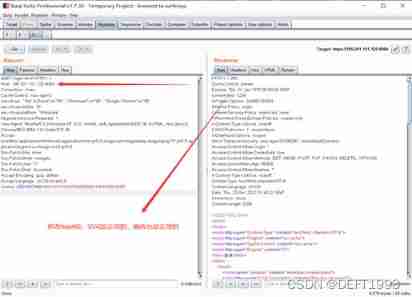
modify host after :
2. Post repair test :
modify host after :
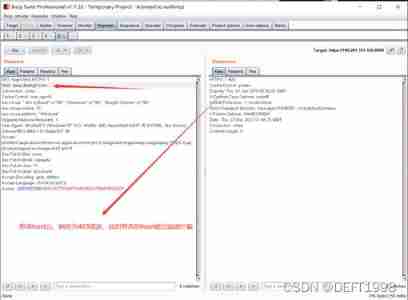
At this time, we naturally think that we have finished , The leak has been fixed , But the actual results are not satisfactory , The vulnerability is still detected after green alliance scanning !
The vulnerability is mainly found in the login request , We thought that the previous test did not add parameters , That is, the account and password required for the login page , Therefore, we add the following account and password parameters to the test :
![[ Failed to transfer the external chain picture , The origin station may have anti-theft chain mechanism , It is suggested to save the pictures and upload them directly (img-Gfeaeq3e-1645236603202)(C:\Users\DEFT\AppData\Roaming\Typora\typora-user-images\image-20211227144851909.png)]](/img/3c/8ac32d28973d270c10d8ea5aa6a9d1.jpg)
And then we modify it host Continue testing :
![[ Failed to transfer the external chain picture , The origin station may have anti-theft chain mechanism , It is suggested to save the pictures and upload them directly (img-KJnBnlaT-1645236603202)(C:\Users\DEFT\AppData\Roaming\Typora\typora-user-images\image-20211227145019814.png)]](/img/ba/881e86662fa39d12434ebcf0b09a84.jpg)
After the above tests , This indicates that the vulnerability still exists in our project , after debug And log printing , We found that the set filter did not take effect on the login request , Login request is POST request :
![[ Failed to transfer the external chain picture , The origin station may have anti-theft chain mechanism , It is suggested to save the pictures and upload them directly (img-StvK51nf-1645236603202)(C:\Users\DEFT\AppData\Roaming\Typora\typora-user-images\image-20211227145213289.png)]](/img/a5/1c38615837224114695f6f86df5572.jpg)
therefore , Go back to the part of the project that handles the login request , The project is springboot project , Used spring security Login authentication , So the login request is made by spring security To complete , So we guess that the filter we added is spring security It doesn't work internally , Refer to... According to this idea spring security Whether there is relevant filter inside , Inquiry ,spring security There is a filter chain inside , It will be printed out when we start the project , The filter chain is as follows :
Creating filter chain: any request, [org.springframework.secu[email protected]608aed14, org.spring[email protected]f76ba38, [email protected]e91, org.[email protected]69e19cb, org.springframework.s[email protected]3386990d, org.sp[email protected]5e6e4341, org.springframework.[email protected]7e2986c0, org.springfram[email protected]27098668, o[email protected]73edeae3, org[email protected]50a23426, org.springfr[email protected]6b53f420]
You can see that there is a filter named in the filter chain UsernamePasswordAuthenticationFilter, From the name, we can see that this is a filter chain for handling user names and passwords , We add the previously customized filter to this filter , Add as follows :
import org.springframework.context.annotation.Configuration;
import org.springframework.beans.factory.annotation.Autowired;
import org.springframework.context.annotation.Bean;
import org.springframework.security.config.annotation.authentication.builders.AuthenticationManagerBuilder;
import org.springframework.security.config.annotation.web.builders.HttpSecurity;
import org.springframework.security.config.annotation.web.builders.WebSecurity;
import org.springframework.security.config.annotation.web.configuration.EnableWebSecurity;
import org.springframework.security.config.annotation.web.configuration.WebSecurityConfigurerAdapter;
import org.springframework.security.core.Authentication;
import org.springframework.security.core.userdetails.UserDetailsService;
import org.springframework.security.crypto.bcrypt.BCryptPasswordEncoder;
import org.springframework.security.crypto.password.PasswordEncoder;
import org.springframework.security.web.authentication.UsernamePasswordAuthenticationFilter;
import org.springframework.security.web.authentication.logout.LogoutSuccessHandler;
import org.springframework.security.web.authentication.www.BasicAuthenticationFilter;
import org.springframework.security.web.firewall.HttpFirewall;
import org.springframework.security.web.firewall.StrictHttpFirewall;

import javax.servlet.ServletException;
import javax.servlet.http.HttpServletRequest;
import javax.servlet.http.HttpServletResponse;
import java.io.IOException;

@EnableWebSecurity
@Configuration
public class SpringSecurityConfig extends WebSecurityConfigurerAdapter {


    @Override
    protected void configure(HttpSecurity httpSecurity) throws Exception {

        httpSecurity.addFilterBefore(new AddResponseHeaderFilter(), UsernamePasswordAuthenticationFilter.class);
                .authorizeRequests()
                .anyRequest()
                .permitAll();

}
Then we re - test the packets :
![[ Failed to transfer the external chain picture , The origin station may have anti-theft chain mechanism , It is suggested to save the pictures and upload them directly (img-hNhRVVUE-1645236603203)(C:\Users\DEFT\AppData\Roaming\Typora\typora-user-images\image-20211227150501240.png)]](/img/76/8b1c76dfb790feed7283ffe7453c24.jpg)
After scanning with the scanner again, the vulnerability repair is completed !
attach :http Status code
200 OK // Client request successful
400 Bad Request // Client request has syntax error , Not understood by the server
401 Unauthorized // Request not authorized , The status code must be equal to WWW-Authenticate Header fields are used together
403 Forbidden // The server receives the request , But refused to provide service
404 Not Found // The requested resource does not exist ,eg: I typed the wrong one URL
500 Internal Server Error // An unexpected error occurred on the server
503 Server Unavailable // The server is currently unable to process the client's request , It may return to normal after some time
eg:HTTP/1.1 200 OK (CRLF)
边栏推荐
- 【一起上水硕系列】Day 4
- 从感知机到Transformer,一文概述深度学习简史
- lotus v1.16.0-rc2 Calibration-net
- Power representation in go language
- Qcom--lk phase I2C interface configuration scheme -i2c6
- Coffee script unmatched outent error
- Pratique de gestion hiérarchique basée sur kubesphere
- Ctfhub web information disclosure directory traversal
- 终于等到你,小程序开源啦~
- 313. Binary sum
猜你喜欢

Power representation in go language

Americo technology launches professional desktop video editing solution

【一起上水硕系列】Day 4

CTFHub-Web-信息泄露-目錄遍曆

了解zbrush雕刻软件,以及游戏建模的分析
Ctfhub web - divulgation d'informations - traversée du Répertoire

Event registration Apache pulsar x kubesphere online meetup hot registration
![[Yu Yue education] engineering testing technology reference of Wenhua University](/img/69/50a8786ea062a541df9e07c1e16db5.jpg)
[Yu Yue education] engineering testing technology reference of Wenhua University

赚够钱回老家吗

Message queue table structure for storing message data
随机推荐
Learn the first routine of FPGA
Love Terminator
Blue Bridge Cup SCM module code (nixie tube) (code + comments)
R & D thinking 07 - embedded intelligent product safety certification required
SQL query, if value is null then return 1 - SQL query, if value is null then return 1
Streaming a large file using PHP
Kubernetes 集群中流量暴露的几种方案
【工具分享】一款颜值与技能并重的软件
[2022 dark horse programmer] SQL optimization
父爱的表达方式
[acnoi2022] the structure of President Wang
lotus v1.16.0-rc3 calibnet
Efficient exploration | an application practice of ES geographical location query
Ctfhub web - divulgation d'informations - traversée du Répertoire
【C语言】给字符串增加分隔符
The upper and lower lines of the shell are merged into one line
Cloning and importing DOM nodes
Shandong finds clean energy that can be used by China for 3800 years? You should know the truth first
Shell命令学习
Event registration Apache pulsar x kubesphere online meetup hot registration