当前位置:网站首页>Day 5 script and UI System
Day 5 script and UI System
2022-06-25 08:28:00 【Code Knight】
What is the GUI?
 One 、 Use script to operate common UI Control

1、 Create game interface
Create a new one 3D engineering , By default Scene New China UI Control . The control is actually a game object , stay Hierarchy Right click in the blank area of the window to open the menu , Select in menu UI, There are many controls to choose from .


(1)Canvas And EventSystem brief introduction

(2) Interface scale problem


(3) build UI Test scenarios
 Tip:
Tip:

 -01-02

-03

-04

-05

such , A simple UI The interface is set up .
Tip:
The canvas size we have built in the scene may be different from the game ruler , So we want the canvas size to change with the screen size , The following modifications are required :

2、 Rectangular transformation (Rect Transform) Components


3、 picture (Image) Components

Code :
using UnityEngine;
using UnityEngine.UI;//UI The script should contain secondary namespaces

public class NewBehaviourScript : MonoBehaviour
{
    Image image;
    // You can specify another picture in the compiler
    public Sprite otherSprite;

    float fillAmount = 0;

    void Start()
    {
        image = GetComponent<Image>();
        // Change the picture directly to another picture
        if (otherSprite!=null)
        {
            image.sprite = otherSprite;
        }
        // Change the picture type to Filled,360° fill , Easy to rotate animation
        image.type = Image.Type.Filled;
        image.fillMethod = Image.FillMethod.Radial360;
    }
    void Update()
    {
        // Make an animated effect of rotating the display , The straight line effect is similar
        // Value 0~1
        image.fillAmount = fillAmount;
        fillAmount += 0.01f;
        if (fillAmount > 10)
        {
            fillAmount = 0;
        }
    }
}
Demonstration effect :
 Tip:
Tip:

4、 Text (Text) Components


This is a paragraph. <color=#ff0000ff> rich <b> writing </b><size=50> Ben </size></color> 
5、 Button (Button) Components
Button is Unity The control commonly used in :


(1) Button appearance switching method

(2) Buttons are combined controls

(3)OnClick( Click on ) event


using UnityEngine;

public class ButtoTest : MonoBehaviour
{
    public void TestButtonClick(int param)
    {
        Debug.Log("clicked it");
        Debug.Log(" The event parameters are :" + param);
    }
}


Tip:

6、 Radio buttons (Toggle) Components

using UnityEngine;
using UnityEngine.UI;

public class ToggleTest : MonoBehaviour
{
    Toggle toggle;
    void Start()
    {
        toggle = GetComponent<Toggle>();
        // Initial unchecked
        toggle.isOn = false;
    }
    public void TestToggleChange(bool b)
    {
        if(b)
        {
            Debug.Log(" Check the radio box ");
        }
        else
        {
            Debug.Log(" Uncheck the radio box ");
        }
    }
}


7、 Slider bar (Slider) Components


using UnityEngine;
using UnityEngine.UI;

public class SliderTest : MonoBehaviour
{
    // Controlled pictures
    public Image image;
    // Slide bar component
    Slider slider;
    void Start()
    {
        slider = GetComponent<Slider>();
        slider.minValue = 0;
        slider.maxValue = 1;
        // Change the picture type to Filled,360 fill
        image.type = Image.Type.Filled;
        image.fillMethod = Image.FillMethod.Radial360;
    }
    void Update()
    {
        // For each frame, the value of the slider determines the fill size of the picture
        image.fillAmount = slider.value;
    }
}

8、 Input box (Input Field) Components


9、 Scroll area (Scroll Rect) Components


Tip:


public void OnScrollChange(Vector2 pos)
{
    Debug.Log(" Scroll position :"+pos)
}
Two 、 Scripts and event systems


 Tip:
Tip:

1、 Common input events


2、 Common input event parameters


3、 Dynamically add event response methods


using UnityEngine;
using UnityEngine.UI;

public class NewBehaviourScript : MonoBehaviour
{
    void Start()
    {
        Button btn;
        // Get three sub buttons , Add respectively OnClick event
        btn = transform.GetChild(0).GetComponent<Button>();
        btn.onClick.AddListener(Btn1);
        // use lambda The same goes for expressions
        btn = transform.GetChild(1).GetComponent<Button>();
        btn.onClick.AddListener(() => { Debug.Log(" Button 2"); });

        btn = transform.GetChild(2).GetComponent<Button>();
        btn.onClick.AddListener(Btn3);
    }

    void Btn1()
    {
        Debug.Log(" Button 1");
    }

    void Btn3()
    {
        Debug.Log(" Button 3");
        Debug.Log(" Delete button 3 Response function of ");
        Button btn = transform.GetChild(2).GetComponent<Button>();
        btn.onClick.RemoveAllListeners();
    }
}

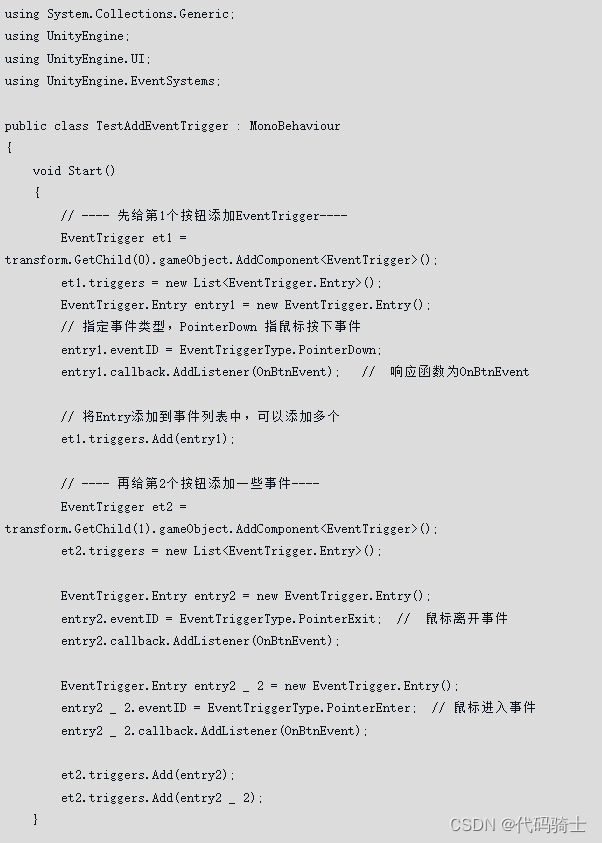
4、 Event trigger (Event Trigger)

5、 Advanced techniques for dynamically binding events



3、 ... and 、 Example : Interface making and adaptation

1、 Set up UI canvas


2、 Make game interface preparation
(1) Prepare my material

(2) Initialize the material


open Window ----2D---Sprite Editor open Sprite Editor window ,( then Project Select the picture in the window )
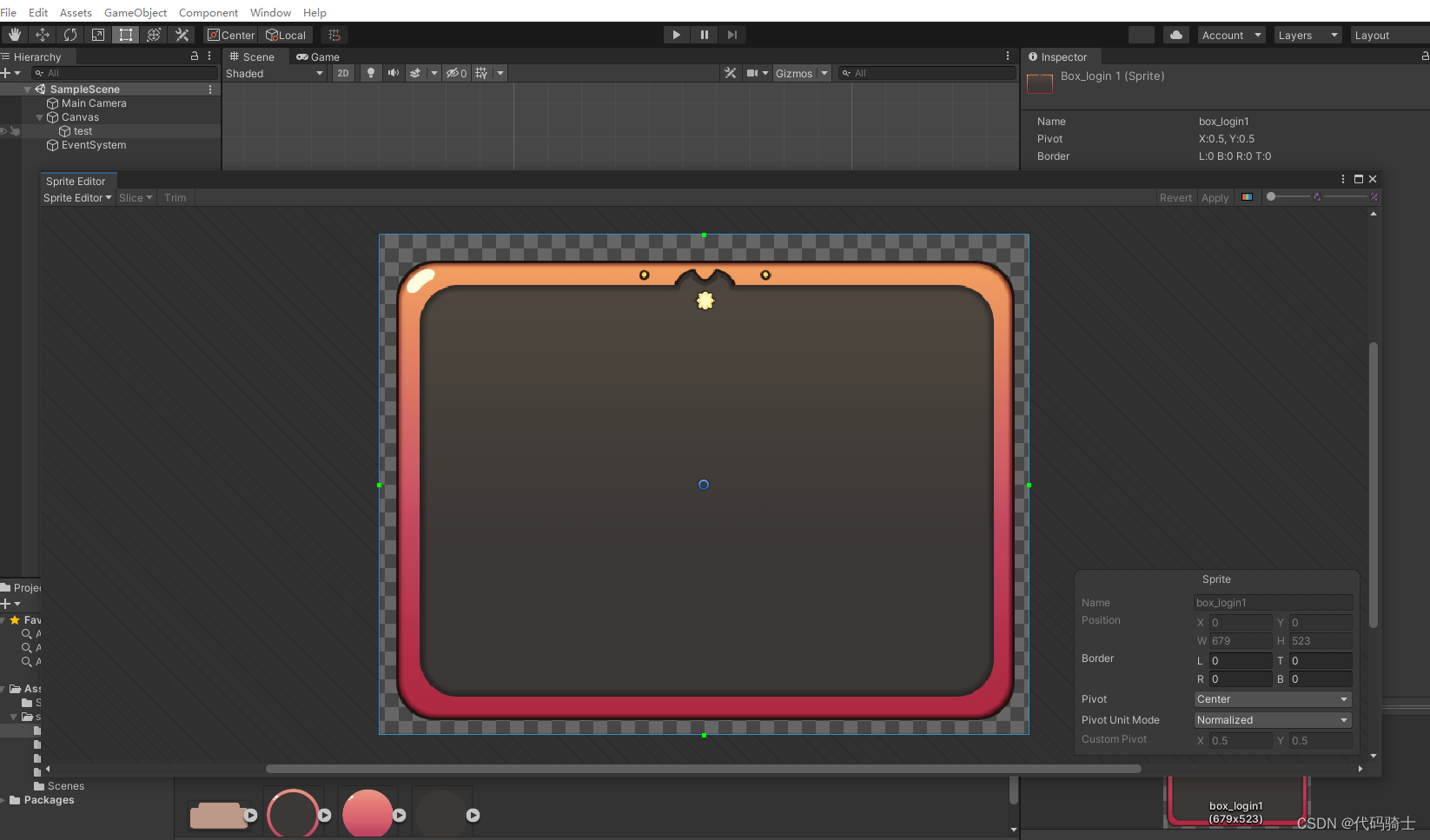


Next, stretch to see that the rounded corners of the image will be very smooth .

3、 Making the game interface
(1) Interface partition


Build the top control

Maintain zoom

4、 Make backpack interface

5、 Use the progress bar to make a blood bar


边栏推荐
- Not afraid of losing a hundred battles, but afraid of losing heart
- 软件确认测试有什么作用?确认测试报告的价格是多少?
- Niuke: flight route (layered map + shortest path)
- 打新债的安全性 有风险吗
- iframe简单使用 、获取iframe 、获取iframe 元素值 、iframe获取父页面的信息
- 420 sequence traversal of binary tree 2 (429. sequence traversal of n-ary tree, 515. find the maximum value in each tree row, 116. fill in the next right node pointer of each node, 104. maximum depth
- How to calculate the fuzzy comprehensive evaluation index? How to calculate the four fuzzy operators?
- 4个不可不知的采用“安全左移”的理由
- Establish open data set standards and enable AI engineering implementation
- [unexpected token o in JSON at position 1 causes and solutions]
猜你喜欢




随机推荐
iframe简单使用 、获取iframe 、获取iframe 元素值 、iframe获取父页面的信息
Remove headers from some pages in a word document
How to calculate the characteristic vector, weight value, CI value and other indicators in AHP?
企业全面云化的时代——云数据库的未来
With the beauty of technology enabled design, vivo cooperates with well-known art institutes to create the "industry university research" plan
Socket problem record
Jdbc-dao layer implementation
Not afraid of losing a hundred battles, but afraid of losing heart
初识生成对抗网络(12)——利用Pytorch搭建WGAN-GP生成手写数字
Internet of things (intelligent irrigation system - Android end)
What are the indicators of DEA?
TCP acceleration notes
自制坡道,可是真的很香
[supplementary question] 2021 Niuke summer multi school training camp 4-N
What do various optimizers SGD, adagrad, Adam and lbfgs do?
Scanpy(七)基于scanorama整合scRNA-seq实现空间数据分析
TCP MIN_RTO 辩证考
417 sequence traversal of binary tree 1 (102. sequence traversal of binary tree, 107. level traversal of binary tree II, 199. right view of binary tree, 637. layer average of binary tree)
How to do factor analysis? Why should data be standardized?
[supplementary question] 2021 Niuke summer multi school training camp 6-n