当前位置:网站首页>Google search skills - programmer is recommended
Google search skills - programmer is recommended
2022-08-11 02:46:00 【ZWZhangYu】
Article table of contents
Foreword
When I used Google to search for an abnormal problem yesterday, I inadvertently found the following prompt
For reference as above, I listed some keywords at random. Obviously, I couldn’t find the exact matching result. I noticed the prompt in the red box, which reminded me that the current result does not match SpringBoot, whether it must contain, when I clicked must include: 
when IAfter clicking, the search bar adds double quotes to the SpringBoot keyword, which seems to indicate that the search results must contain the springboot keyword.
This piqued my curiosity. Although I often use Google to search, the biggest feature of using it is through keyword matching instead of using a long sentence.For better query questions and learning in the future, I need to learn more about Google search skills.
Google search syntax instructions
Use quotation marks to look up an exact word or phrase
You can use "" to specify that search results contain specific words or phrases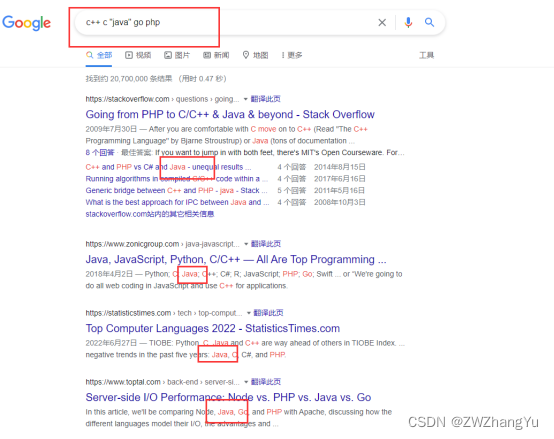
In the above query, I marked "java" as a must, and you can see that the results all contain the content about java.
OR query
Separate search terms with OR and execute two search queries simultaneously, which will find pages that contain one of multiple words.
Normally, Google will search all the words you type.By using the OR instruction, Google will know that it needs to look up one set of words or another.OR must be all caps or Google will think it's just part of the keyword and won't execute that search syntax.
Exclude specific sites
Use a hyphen before a word or website to exclude it from search results.
Example:
Exclude Wikipedia pages from search results, syntax: - site:wikipedia.org
Example:
The top search for SpringBoot below is the official website of spring.io
The above syntax is used to exclude the search results of this website
springboot-site::spring.io
You can see that a specific website has been excluded
Title Search
Command: allintitle
Use allintitle:[search phrase] to find pages with these words in the title
Example: Find pages with both "Apple" and "notebook" in the title, syntax: allintitle:Apple notebook
Example:
Note: this is not the contentThe keyword matches, but the keyword matching based on the title, which tends to query more precise content.
Restrict search results to specific sites
Directive: site
Function: Use site:[URL] to limit search results to specific sites
Example: Search only stackoverflow.com finds
site:stackoverflow.com springboot springcloud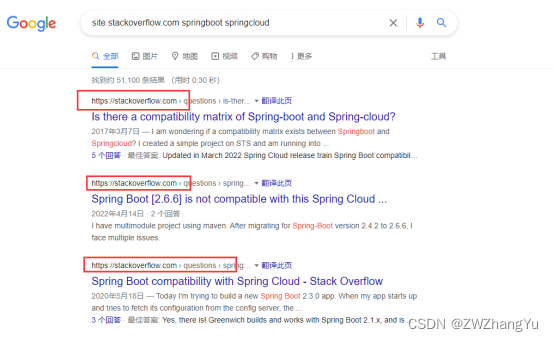
View information about a region
Command: location:
Function: Use location:[location] to view relevant information in a certain area
Example: hotel location:anhui to query hotels in Anhui
Limit results to specific file formats
Directive: filetype:
Function: Use filetype:[suffix] to limit the result to a specific file format, such as PDF or DOC.
Example: springboot filetype:pdf Query about Springboot pdf file
Summary
[1] Reasonable use of some search commands can help better obtain the desired results, such as precise search, excluding specific websites, searching only on certain websites, querying data in a specific format, restricting regions, etc.
[2] There are still many related search commands. The above are just some of the search commands that I think are more suitable for developers. They are also good for allintext and intext, but they are not as simple as direct search, and the search results are different.Not too many, and the fewer commands you use, the more portable you will be.
边栏推荐
猜你喜欢


随机推荐
夫妻一方婚内向异性大额转款,怎么判
Entity to Vo conversion
MySQL - 一条SQL在MySQL中是如何被执行的?
【PHP】入门知识
《人生若如初见》命运多舛,人物饱满,朱亚文角色反差太惊喜
Multi-threaded ThreadPoolExecutor
面试常考的7种排序算法
Gaussian beam focused by thermal lens
What does the sanction of the mixer Tornado mean for the DeFi market?
gRPC基础概念:闭包
Oops Framework模板项目新手引导
ES6进阶 字符串处理新特性
全局大喇叭--广播机制
ARM开发(四)新手小白如何阅读芯片手册,裸机驱动开发步骤以及纯汇编实现点灯,汇编结合c点灯,c实现点灯
创业的第125天——随记
0图中等 LeetCode565. 数组嵌套
OpenCV创始人:开源绝不能完全免费!
[4G/5G/6G专题基础-154]: 5G无线准入控制RAC(Radio Admission Control)
小幻美图 API
解决vim与外界的复制粘贴(不用安装插件)