当前位置:网站首页>5 minutes to learn how to install MySQL
5 minutes to learn how to install MySQL
2022-06-25 20:13:00 【Cheng Xiaoqi】
Preface : I saw a lot of mysql Installation tutorial for , Whether it's a video or an article , It's basically complicated , It takes half an hour to move , It's ok if you can learn to waste your time . It can't be abolished , I've been through it for many hours and a half . The main reason is the update of the version , Causing some of the tutorials to fail . So you must read the corresponding version before learning , If there is too much difference, it is better to forget .
Be careful : It uses windows10 operating system
Let's move on to today's theme :
1、 Get into mysql Official website https://dev.mysql.com/downloads/ Download installation package , Here's the picture . There's so much in here , At first, I was confused , I found that most of the tutorials were selected by me . But these two also change frequently . In order to be able to install and use normally , Select first 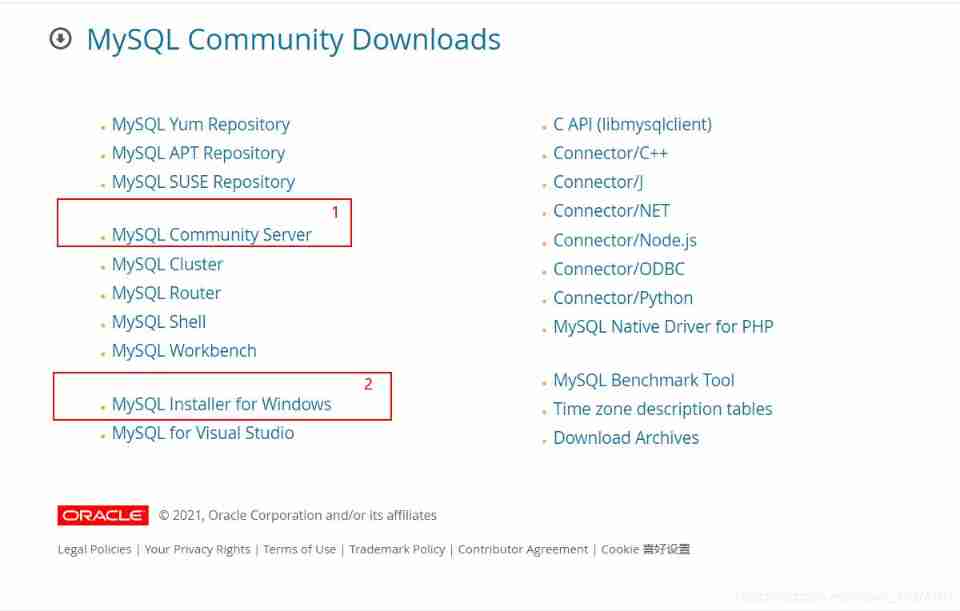
2、 Enter the figure below , Click download to get an installation package , Unzip it to a place you can remember , This path will be used later 
3、 Environment configuration , The advantages are similar jdk. Path selected bin. Here's the picture 
4、 everything , Only east wind . Here are the most exciting moments , Let's start mysql database .
Use win+x Get the picture below : Select the options in the red box 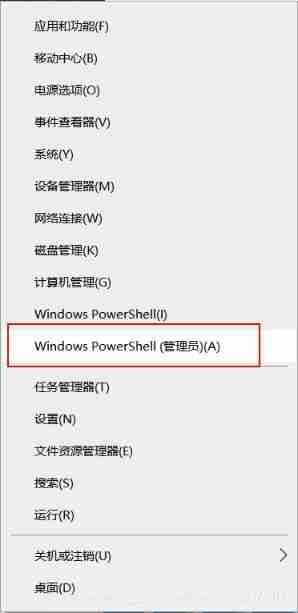
Let's go first bin Catalog
cd [ Just now bin Catalog 】
eg:cd D:\Mysql\mysql-8.0.26-winx64\bin>
Then the input mysqld -install, After entering, the... Will appear Service succussfully installed
Continue to input mysqld --initialize-insecure --user=mysql , There may be a Caton in this step , Wait a little longer , Don't turn it off ( Etc. 10 Minutes or no response, you can press enter or ctrl+c, This time is almost complete , That's who I am ), I turned it off for the first time , As a result, there was a problem with initialization , Failed to start the service in the next step
Then input net start mysql( Opening service )
Continue to input mysql -u root -p Enter the management interface , There will be password, Never mind , Next we'll set up
Continue to input ALTER USER ‘root’@‘localhost’ IDENTIFIED WITH mysql_native_password BY ‘ Your password ’; ( final “;” Don't forget ,‘ Your password ’ Enter the password you want to set )
It's almost over , Last input exit Exit the management interface
The last step is to restart
Input net stop mysql close mysql service
Input net start mysql Turn on mysql service
It's all over here .
It's not easy to code words , If you feel useful, you can give the thumbs-up + Collection + Focus on once , If you have questions, you can also leave a message in the comment area
Reference article :Windows10 Under the MySQL8.0 Download and install of
边栏推荐
- Yum command
- Arduino ide + esp8266+mqtt subscribe to publish temperature and humidity information
- Hdoj topic 2005 day
- Installing or uninstalling VMware could not find the network location
- JS asynchronism (I. asynchronous concept, basic use of web worker)
- 2021-08-25
- Applet canvas generate sharing Poster
- Wechat applet connects to the server to display mqtt data information
- Applet password input box
- [harmonyos] [arkui] how can Hongmeng ETS call pa
猜你喜欢

Applet password input box

Applet canvas generate sharing Poster

Single chip microcomputer line selection method to store impression (address range) method + Example

Redis core article: the secret that can only be broken quickly
Wechat applet cloud function does not have dependency option installed

Jsonp processing non homologous

CG kit explore high performance rendering on mobile terminal

Bindgetuserinfo will not pop up

Web components - Basics

200 OK (from memory cache) and 200 OK (from disk cache)
随机推荐
PHP FPM, workman, spoole, golang simple performance test
200 OK (from memory cache) and 200 OK (from disk cache)
Read multiple associations from a field using delimiters in laravel
The native JS mobile phone sends SMS cases. After clicking the button, the mobile phone number verification code is sent. The button needs to be disabled and re enabled after 60 seconds
Force wechat page font size to be 100%
Redis core article: the secret that can only be broken quickly
<C>. Rolling phase division
Panda weekly -2022/02/18
206. reverse linked list (insert, iteration and recursion)
Life cycle function of composite API
Wechat applet cloud function does not have dependency option installed
PAT B1051
Png to NII
Use of serialize() and serializearray() methods for form data serialization
SQL statement select summary
Browser performance optimization (19)
Profile path and name
Leaflet modify popup style
Database data type design (the most detailed in the whole network)
Matlab_ two point zero five