当前位置:网站首页>Tcp/ip explanation (version 2) notes / 3 link layer / 3.4 bridge and switch
Tcp/ip explanation (version 2) notes / 3 link layer / 3.4 bridge and switch
2022-06-23 06:02:00 【M rookie M】
3.4 Bridges and switches
IEEE 802.1d The standard specifies the operation of the bridge , It also specifies the operation of the switch ( In essence, a switch is a high-performance bridge )
Bridges or switches are used to connect multiple physical link layer networks ( Such as : A pair of physical Ethernet segments ) Or multiple site groups
The most basic setup involves connecting two switches to form an extended LAN , Pictured 3-8 Shown

chart 3-8
Simple extended Ethernet LAN with two switches
Each switch port has a reference number , Each site ( Including switches ) All have their own MAC Address
The switch in the figure A and B Already connected to each other , An extended LAN is formed
In this example , The client system is connected to the switch A, The server is connected to the switch B, And the ports are numbered for reference
Please note that , Each network element , Including switches , All have their own MAC Address
as time goes on , Every bridge will “ Study ” Non local MAC Address , Each switch eventually knows which port it needs to pass to reach each site
This information is provided on a per port basis ( It may also be based on each VLAN) Tables stored in each switch ( be called Filter database (filtering databases)) in
After each switch knows the location of each site , These databases will contain as shown in Figure 3-9 Information shown

chart 3-9
chart 3-8 Switches in A and B Filter database on , It's over time , Created by observing the source address on the frame seen on the switch port (“ Study of the ”)
When a switch ( bridge ) The first time you open it , Its database is empty , So it doesn't know the location of any site except itself
Whenever the switch ( bridge ) When a frame sent to a station other than itself is received , It makes a copy of each port, not the port where the frame arrives , And send a copy of the frame from each port
If the switch ( bridge ) Never know where the site is , Then each frame will be transmitted on each network segment , This leads to unnecessary overhead
Learning ability is a standard function of switches and bridges , It can significantly reduce the cost
Now , Most operating systems support the ability to bridge between network interfaces , This means that a standard computer with multiple interfaces can be used as a bridge
For example, in Windows in , You can access the network connection menu from the control panel , Select the interface to bridge , Right click the mouse and select bridge connection to bridge the interfaces together
After completion , A new icon will appear , Used to represent the bridge itself , Most of the common network attributes on the interface have disappeared , These properties will appear on the bridge device ( See the picture 3-10)
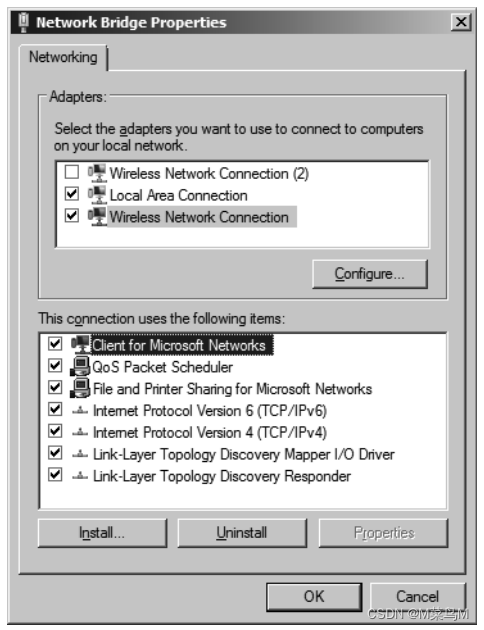
chart 3-10
stay Windows in , The network bridge device selects the network interface to be bridged 、 Right click and select “ Bridge network interface ” Function to create
Once the bridge is established , The bridge equipment needs to be further modified
chart 3-10 It shows Windows 7 Internet bridge virtual device “ attribute ” panel
The properties of bridge devices include the list of underlying devices to be bridged and the set of services running on the bridge ( Such as :Microsoft Network client 、 File and printer sharing, etc )
Linux The system uses command line parameters , Work in a similar way

chart 3-11
In this simple topology , be based on Linux Of PC Is configured as a bridge , Used to connect two Ethernet network segments
As a learning bridge , It will gradually accumulate a table , This table is used to record which port should be used to connect to a system on the extended LAN
chart 3-11 The simple network in uses a Linux With two Ethernet ports PC As a bridge
port 2 Connected to a single site , port 1 Connecting the rest of the network
The following command can open the bridge :
Linux# brctl addbr br0
Linux# brctl addif br0 eth0
Linux# brctl addif br0 eth1
Linux# ifconfig eth0 up
Linux# ifconfig eth1 up
Linux# ifconfig br0 up
These commands create a bridge device br0 And interface eth0 and eth1 Add to bridge
It can be used brctl delif Command delete interface
After the interface is established , have access to brctl showmacs Command to view the filter database ( stay Linux It's called in the term forwarding databases or fdbs):
Linux# brctl show
bridge name   bridge id           STP enabled   interfaces
br0           8000.0007e914a9c1   no            eth0 eth1

Linux# brctl showmacs br0
port no   mac addr            is local?   ageing timer
1         00:04:5a:9f:9e:80   no          0.79
2         00:07:e9:14:a9:c1   yes         0.00
1         00:08:74:93:c8:3c   yes         0.00
2         00:14:22:f4:19:5f   no          0.81
1         00:17:f2:e7:6d:91   no          2.53
1         00:90:f8:00:90:b7   no          17.13
Because the site may move 、 Replace the network card 、 change MAC Address or other change , So when the bridge finds that it can access a through a port MAC Address time , You cannot assume that this information will never change
To solve this problem , After learning an address each time , Will start a timer for it ( The general default is 5 minute )
stay Linux in , A fixed time associated with the bridge is applied to each learned item
If at specified ageing The address in the entry is not seen again within the time , Delete the entry :
Linux# brctl setageing br0 1
Linux# brctl showmacs br0
port no   mac addr            is local?   ageing timer
1         00:04:5a:9f:9e:80   no          0.76
2         00:07:e9:14:a9:c1   yes         0.00
1         00:08:74:93:c8:3c   yes         0.00
2         00:14:22:f4:19:5f   no          0.78
1         00:17:f2:e7:6d:91   no          0.00
Here's a demonstration , take ageing The value of is set lower
When an entry is deleted due to expiration
Subsequent frames of the deleted destination will be sent again from each port except the receiving port ( be called flooding (flooding)), The entry is then re added to the filter database
Using filtering databases and learning capabilities is just a performance optimization , Even if the database table is empty, it will not affect the normal operation of the network , But there will be more expenses
Next, we will study the interconnection of more than two bridges through redundant links
under these circumstances , Frame flooding may cause flooding “ disaster ”, The frame will loop indefinitely
边栏推荐
- Pat class B 1022 d-ary a+b
- PAT 乙等 1025 反转链表
- 雷达图canvas
- Software design and Development Notes 2: serial port debugging tool based on QT design
- ssm项目搭建
- 关于安装pip3 install chatterbot报错的问题
- AHA C language Chapter 7 you can do more with it (talks 27-28)
- Prometheus, incluxdb2.2 installation and flume_ Export download compile use
- Advanced Mathematics (Seventh Edition) Tongji University exercises 1-9 personal solutions
- 密码学系列之:PKI的证书格式表示X.509
猜你喜欢

Raspberry pie assert preliminary exercise
Redis cache penetration solution - bloom filter

新课上线 | 每次 5 分钟,轻松玩转阿里云容器服务!

ssm项目搭建

Centos7 deploy radius service -freeradius-3.0.13-15 EL7 integrating MySQL

Centos7 installation of postgresql8.2.15 and creation of stored procedures
Wireshark TS | 视频 APP 无法播放问题

True MySQL interview question (XXII) -- condition screening and grouping screening after table connection

数字藏品到底有什么魔力?目前有哪些靠谱的团队在开发

MDM data cleaning function development description
随机推荐
Alibaba cloud ack one and ACK cloud native AI suite have been newly released to meet the needs of the end of the computing era
【数据库备份】通过定时任务完成MySQL数据库的备份
iNFTnews | 加密之家从宇宙寄来的明信片,你会收到哪一张?
Activity startup mode and life cycle measurement results
Pyinstaller 打包pyttsx3 出错
Excel sheet column number for leetcode topic resolution
Pyinstaller sklearn报错的问题
True MySQL interview question (24) -- row column exchange
Behind the hot digital collections, a strong technical team is needed to support the northern technical team
PAT 乙等 1010 C语言
PAT 乙等 1014 C语言
MySQL character set
Pat class B 1018 C language
编址和编址单位
ant使用总结(二):相关命令说明
数字藏品如何赋能经济实体?
What benefits have digital collections enabled the real industry to release?
jvm-01. Instruction rearrangement
Raspberry pie assert preliminary exercise
Centos7部署radius服务-freeradius-3.0.13-15.el7集成mysql