当前位置:网站首页>Grayog log server single node deployment
Grayog log server single node deployment
2022-07-27 07:31:00 【Boys looking forward to the future】
Information https://docs.graylog.org/docs/
brief introduction
Graylog Project by Lennart Koopmann stay 2009 Started around . at that time , The most famous log management software vendor Issued a quotation for their one-year License , This license is very expensive , So he decided to write a log management system by himself . Now you might say that this is a little too optimistic ( I will build it in two weeks , End of quotation ), But the situation is hopeless : There are basically no other products on the market , In particular, there is no open source alternative .
Architecture
For Graylog When expanding resources , There are some rules of thumb :
- Graylog Nodes should focus on CPU power . These also provide services for the browser's user interface .
- Elasticsearch Nodes should have as many RAM And the fastest disk you can get . Everything here depends on I / O Speed .
- MongoDB Store meta information and configuration data , It doesn't require a lot of resources .
And remember , Ingested news only Stored in Elasticsearch in . If you are in Elasticsearch Lost data in cluster , The message will disappear - Unless you have created an index backup .
Single node architecture

Cluster architecture
The load balancer can use Graylog REST API Upper HTTP ping Graylog node , To check whether they are active , And take the dead node out of the cluster .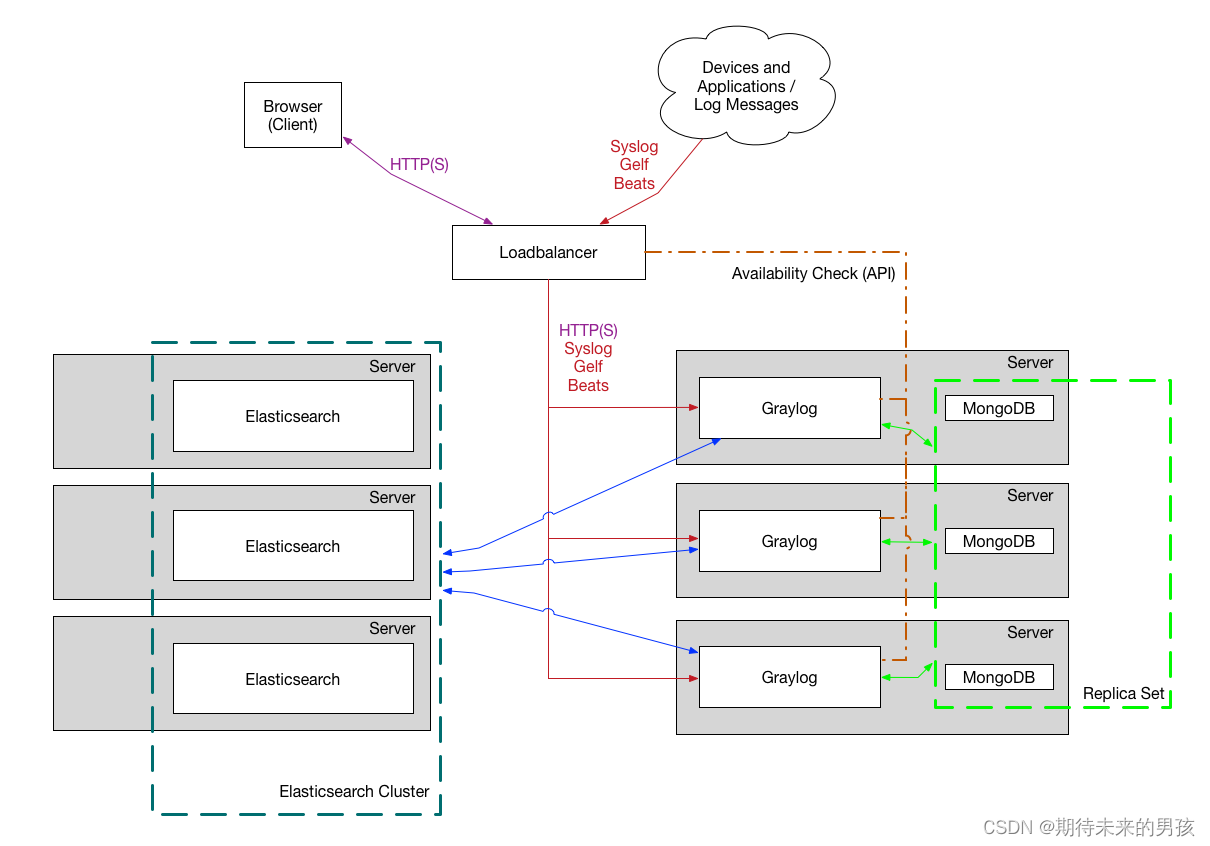
Single node deployment
Environmental Science :CentOS Linux release 8.1.1911 (Core)
Running environment
yum install java-<version_number>-openjdk-headless.x86_64
If you want to use it later , You need to install EPEL, And install the software package pwgen.
yum install epel-release
yum install pwgen.

install MongoDB
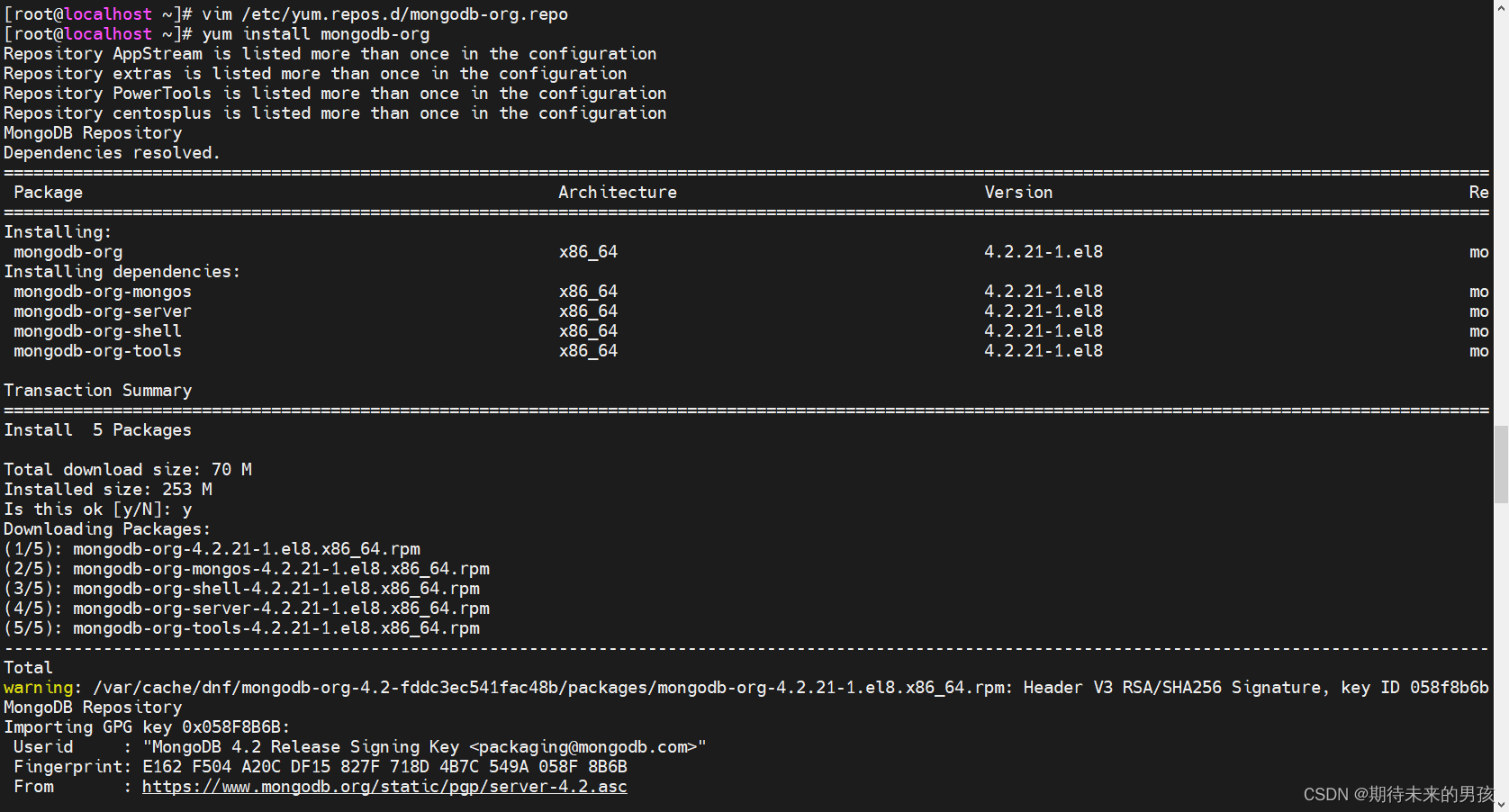
stay CentOS Installation on MongoDB We should follow MongoDB In the document Of RHEL and CentOS course . First add a repository file that contains the following :
cat /etc/yum.repos.d/mongodb-org.repo
[mongodb-org-4.2]
name=MongoDB Repository
baseurl=https://repo.mongodb.org/yum/redhat/$releasever/mongodb-org/4.2/x86_64/
gpgcheck=1
enabled=1
gpgkey=https://www.mongodb.org/static/pgp/server-4.2.asc

#
yum install mongodb-org
#
 systemctl daemon-reload
 systemctl enable mongod.service
 systemctl start mongod.service
 systemctl --type=service --state=active | grep mongod
install ELASTICSEARCH
Graylog Currently supports all Elasticsearch edition , Up to 7.10.2. Follow the instructions below to start the installation .
Warning : I won't support it Elasticsearch 7.11 And higher . It will destroy you Graylog example !
First , Installation elasticity GPG secret key , Then add a repository file that contains the following :
rpm --import https://artifacts.elastic.co/GPG-KEY-elasticsearch
#
vim /etc/yum.repos.d/elasticsearch.repo
[elasticsearch-7.x]
name=Elasticsearch repository for 7.x packages
baseurl=https://artifacts.elastic.co/packages/oss-7.x/yum
gpgcheck=1
gpgkey=https://artifacts.elastic.co/GPG-KEY-elasticsearch
enabled=1
autorefresh=1
type=rpm-md
#
yum install elasticsearch-oss
modify Elasticsearch The configuration file (), And set the cluster name to and uncomment To enable this operation :/etc/elasticsearch/elasticsearch.ymlgraylogaction.auto_create_index: false
tee -a /etc/elasticsearch/elasticsearch.yml > /dev/null <<EOT cluster.name: graylog action.auto_create_index: false EOT
After modifying the configuration , You can start Elasticsearch:
 systemctl daemon-reload
 systemctl enable elasticsearch.service
 systemctl restart elasticsearch.service
 systemctl --type=service --state=active | grep elasticsearch

install Graylog
install Graylog Repository configuration and Graylog In itself
rpm -Uvh https://packages.graylog2.org/repo/packages/graylog-4.2-repository_latest.rpm
yum install graylog-server graylog-enterprise-plugins graylog-integrations-plugins graylog-enterprise-integrations-plugins
Edit profile
Read the instructions in the configuration file and edit them as needed , be located . Add... In addition , Because these are mandatory ,Graylog Will not start without them ./etc/graylog/server/server.confpassword_secretroot_password_sha2
echo -n "Enter Password: " && head -1 </dev/stdin | tr -d '\n' | sha256sum | cut -d" " -f1

[[email protected] ~]# echo -n "Enter Password: " && head -1 </dev/stdin | tr -d '\n' | sha256sum | cut -d" " -f1
Enter Password: Lxf940709.
74e948e73f347a6f273947eec0ed21fc50f37d98cc11ae693b3b9b3d12cd21db

[[email protected] ~]# pwgen -N 1 -s 96
FVZWbcO8utWunsLvWj0BgYlgCgYAI0NqPVJFX5DkcvgQO4eCqfPvf0ngFjd05KHy0gBlDWYD8aVQZcd7Qq1YF5kOdJA0Ucvo


[[[email protected] ~]# cat /etc/graylog/server/server.conf | grep ^[^#] | grep pass
password_secret = FVZWbcO8utWunsLvWj0BgYlgCgYAI0NqPVJFX5DkcvgQO4eCqfPvf0ngFjd05KHy0gBlDWYD8aVQZcd7Qq1YF5kOdJA0Ucvo
root_password_sha2 = 74e948e73f347a6f273947eec0ed21fc50f37d98cc11ae693b3b9b3d12cd21db
After modifying the configuration , You can start Graylog:
 systemctl daemon-reload
 systemctl enable graylog-server.service
 systemctl start graylog-server.service
 systemctl --type=service --state=active | grep graylog

To configure HTTP
# To configure IP Address
http_bind_address = 192.168.73.128:9000

# Restart the service
systemctl restart graylog-server.service

边栏推荐
猜你喜欢

单臂路由(讲解+实验)

在mac中使用docker来搭建oracle数据库服务器

利用 Amazon DynamoDB 和 Amazon S3 结合 gzip 压缩,最大化存储玩家数据

IO中节点流和处理流的理解学习

Top ten interview questions for software testing (with answers and analysis)

Zabbix: 将收集到值映射为易读的语句

tigervnc的使用

vlan间路由(讲解+验证)

Actual combat of flutter - Request encapsulation (I)

(2022杭电多校三)1009.Package Delivery(贪心)
随机推荐
Shell系统学习之Shell条件测试,判断语句和运算符
functools模块
(2022杭电多校三)1011.Taxi(曼哈顿最值+二分)
flink去重(一)flink、flink-sql中常见的去重方案总结
闭散列和开散列解决哈希冲突
tigervnc的使用
杂谈:最近好多朋友谈出国……
yhb_sysbench
[wsl2] configure the USB camera connecting the USB device and using the host
Single arm routing (explanation + experiment)
Use of tigervnc
在mysql中同时使用left join on 和where 的查询结果分析
Routing between VLANs (explanation + verification)
Usage of string class
Expose Prometheus metrics in Perl programs
Oracle cleans up the Database disk space of tables with referenced partitions
oracle的触发器的使用举例
MySQL: 提高最大连接数
Demonstrate the use of foreign keys with Oracle
flink中维表Join几种常见方式总结