当前位置:网站首页>MFS详解(五)——MFS元数据日志服务器安装与配置
MFS详解(五)——MFS元数据日志服务器安装与配置
2022-06-13 06:15:00 【永远是少年啊】
今天继续给大家介绍Linux运维相关知识,本文主要内容是MFS元数据日志服务器安装与配置。
一、元数据服务器安装
在上文中MFS详解(四)——MFS管理服务器安装与配置中,我们介绍了MFS管理服务器的安装与配置。在本文中,我们继续在该设备上安装MFS的元数据服务器。MFS的元数据服务器依赖包已经在上文中安装,我们在这里就不需要再次安装了。
首先,为了避免之前的安装对我们产生的影响,我们需要删除之前MFS解压出来的已经被我们完成编译过的MFS目录,我们可以重新解压缩MFS的安装包使用。
进入到新解压的MFS目录后,我们还是先执行命令:
./configure --prefix=/usr/local/mfsmetadata --with-default-user=mfs --with-default-group=mfs
即可完成对MFS的预编译,执行命令:
make && make install
即可完成对MFS的编译和安装。
二、元数据服务器配置
在完成MFS元数据服务器的安装后,接下来,我们需要对MFS的元数据服务器进行配置。首先,我们先将MFS的元数据服务器的配置复制下来,执行命令:
cd /usr/local/mfsmetadata/etc/mfs/
cp -a mfsmetalogger.cfg.sample mfsmetalogger.cfg
之后,我们打开mfsmetalogger.cfg文件,并修改该文件下的MASTER_HOST参数,将其修改为MFS管理服务器(其实在本次实战中就是本设备)的IP地址,修改完成后的配置文件如下所示: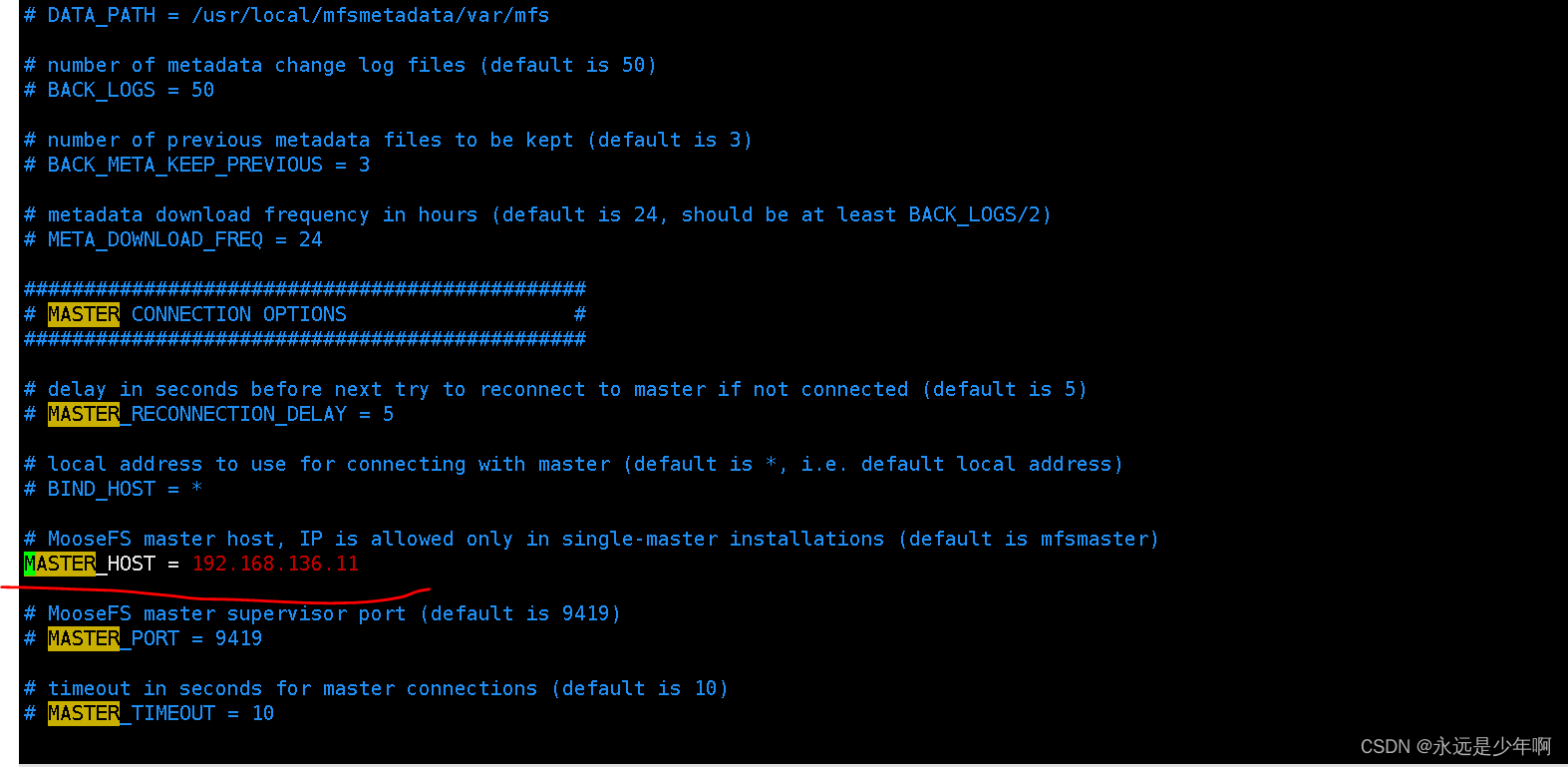
之后,我们再把MFS元数据日志服务器授予mfs的用户和组权限,执行命令:
chown -R mfs:mfs /usr/loca/mfsmetadata/sbin/mfsmetalogger start
即可完成MFS元数据日志服务器的配置。
三、元数据服务器启动
在完成上述所有步骤后,我们就可以开启MFS元数据日志服务器了,执行命令:
/usr/local/mfsmetadata/sbin/mfsmetalogger start
该命令执行结果如下所示:
从上图可以看出,我们的MFS元数据日志服务器启动成功!
原创不易,转载请说明出处:https://blog.csdn.net/weixin_40228200
边栏推荐
- [MySQL] basic knowledge review
- Detailed explanation of Yanghui triangle
- Wechat applet (pull-down refresh data) novice to
- Failed to extract manifest from apk: processexception:%1 is not a valid Win32 Application.
- High burst solution 2
- USB debugging assistant 20181018 (v1.3)
- 超有范的 logo 在线设计制作工具
- synchronized浅析
- Echart折线图:多条折线图每次仅展示一条
- c语言对文件相关的处理和应用
猜你喜欢

1+1>2,Share Creators可以帮助您实现

JVM Foundation

Hbuilderx: installation of hbuilderx and its common plug-ins

AI realizes "Resurrection" of relatives | old photo repair | old photo coloring, recommended by free app

【新手上路常见问答】一步一步理解程序设计

超有范的 logo 在线设计制作工具

华为开发者认证与DevEco Studio编译器下载

The boys x pubgmobile linkage is coming! Check out the latest game posters

Download and installation of universal player potplayer, live stream m3u8 import

Annotation only integration SSM framework
随机推荐
Echart柱状图:堆叠柱状图value格式化显示
【var const let区别】
Fusionpbx installation - road to dream
Echart histogram: echart implements stacked histogram
不在以下合法域名列表中,微信小程序解决办法
智能数字资产管理助力企业决胜后疫情时代
Notifyitemchanged flash back
安全基线检查脚本—— 筑梦之路
Uniapp mobile terminal uses canvas to draw background convex arc
Usegeneratedkeys=true configuration
电镀挂具RFID工序管理解决方案
免费录屏软件Captura下载安装
楊輝三角形詳解
RN Metro packaging process and sentry code monitoring
The boys x pubgmobile linkage is coming! Check out the latest game posters
Detailed explanation of PHP distributed transaction principle
Custom view - extensible collapsexpendview
Wechat applet: basic review
华为开发者认证与DevEco Studio编译器下载
自定义View