当前位置:网站首页>Common bypass methods for file upload vulnerabilities
Common bypass methods for file upload vulnerabilities
2022-07-23 11:30:00 【Flat and barren, all out.】
title: 2022-07-13 File upload vulnerability
category: / Small bookmaker / note /2022-07
Common bypass methods
front end js testing
For front-end js The test can pass burp Carry out middleman modification of data package , Let's talk first. webshell Change the suffix of the document to js Supported suffixes , Change back to the original suffix in the middleman interception
Back end mime check
You can also use the front end js The detection method bypasses
Naming rules bypass
Back end file tail filtering
about php End of file filtering , May adopt phtml,php3,php5,phps wait , You can also use case to bypass , If you filter the end of the file too strictly, you can try uploading .htaccess file
The trailing space bypasses
about windows It will automatically remove the space after the end of the file , But for the server, if there is no trim($file_ext); Empty function from beginning to end , You can add a space after the end of the file , For example, yes. ’.php’ Filter , It doesn't match ’.php ' Final document , The server will still parse normally
At the end of . Bypass
about windows It will automatically remove the ., But for the server, if there is no deldot($file_name); Delete the dot function at the end of the file name , You can add a ., about ’.php’ Filter , Will not filter out ’.php.' file
End case bypass
If there is no strtolower() function , Description there is no case filtering , Therefore, you can consider case bypass
Add at the end of the file ::$DATA Bypass
If it is window The server of can use this method to bypass , Because when you add :: D A T A Then the file will be treated as a file stream , And keep the previous file name , such as " 1. p h p : : DATA Then the file will be treated as a file stream , And keep the previous file name , such as "1.php:: DATA Then the file will be treated as a file stream , And keep the previous file name , such as "1.php::DATA",Windows Will automatically remove the end of ::$DATA become "1.php"
Double writing bypasses
For regular expressions, filter out some characters , Or some functions remove . And spaces are removed only once , You can write more spaces and dots . Bypass
.htaccess Bypass
.htaccess yes apache Unique files , Be responsible for the configuration of web pages under relevant directories . adopt htaccess file , Can help us to achieve : Webpage 301 Redirect , Customize 404 Error page , Change the file extension , Allow or organize specific users or , Directory access , List of prohibited directories , Configure default documents and other functions , The most important one is to change the file parsing rules , For example, parse the image file into php file #F44336, So as to upload a carry webshell The picture file of , You can successfully link ,
Usage method
<FilesMatch "hello">
SetHandler application/x-httpd-php
</FilesMatch>
For file names that exist hello The file of , It will automatically resolve to php file , about .htaccess Files cannot have prefixes , The name can only be .htaccess, Otherwise it's useless
apache Parsing vulnerabilities
apache Parsing vulnerabilities :Apache It is interpreted from right to left , That is, from the end of the file name to the beginning of the file name , If you don't know the suffix, move to the left , Until the suffix can be recognized
- Upload picture horse :1.png
- Burp Modify the horse name in the picture :1.php.123456
- ( First identify 123456 suffix , Can't recognize . Recognize again php suffix )
%00 truncation
php Version less than 5.3.4( Higher version php The official fix this loophole ),php Of magic_quotes_gpc by OFF state
%00 Bypass is mainly aimed at white name bypass
principle : Whitelist filtering must read suffixes from the back to the front , So I read .jpg Put it in the white list .
But when calling the file, the file name is read from front to back , So see .php The following terminator stops reading , The suffix of the final read file name is .php
%00 yes URl code , Only aim at get The ginseng , Therefore, it is not applicable to post Transfer file address
The principle is : Generally, uploaded files are not sent directly to the server , Instead, put it in the temporary directory first , Then rename ( Often the pictures we see on the web page are a string of numbers , That is the renamed ), Finally, send it to the server 

Finally, the storage path of the renamed file is used GET Parameters of parameter transfer
0x00 truncation
about post Please tell me , No longer applicable to %00 truncation , Other methods and %00 be similar
Now enter the file name you want to name after the address and add any characters at the end , Facilitate subsequent changes 
adopt 16 The method of decimal system , Change the characters at the end of the file name to 00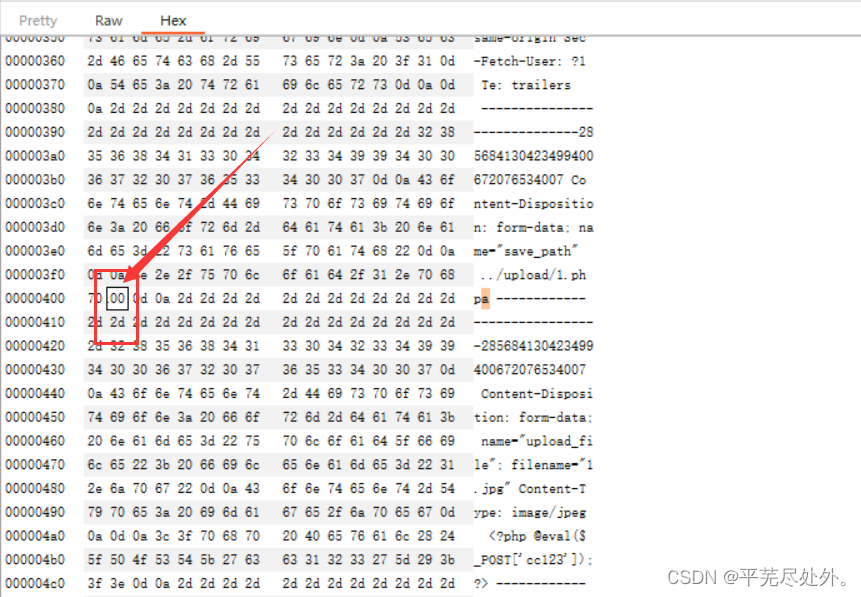
Related reference links :https://www.cnblogs.com/domb2235/p/15654493.html
Image content attribute detection bypasses
For some file upload vulnerabilities, file attributes will be detected , It's not just about detecting the beginning and end of the file , These need to make pictures of horses ,windows Pass through copy Command is enough .
copy 1.png/b+2.php 3.png
Pictures of horses are generally not automatically executed , It is necessary to exploit the vulnerabilities contained in the file
Second rendering of the picture
Sometimes the server will render the uploaded image twice , Generate a new picture , So as to filter out webshell Script , At this time, you only need to compare the rendered image with the image before rendering , Look at the same place , That is, where the rendering has not changed , Insert... Here webshell The script can be , Recommended online gif picture
Related links https://ce.pwnthebox.com/writeup?id=956
Make links :
https://blog.csdn.net/weixin_45519736/article/details/105775721
Conditional competition
Conditional competition is actually through burp Constantly transfer files to the server , The speed of file processing by the server is limited , As long as the speed of uploading files is faster than that of the server processing files , Then the uploaded files will stay on the server for a short time , At this time python Script , Keep asking for this file , This file is usually a pony , Because the file only stays for a short time , Therefore, when changing files, Trojan files can be generated , When python When this file is requested , This file will automatically generate a Trojan horse , In order to bypass the file filtering mechanism .
Code reference for eligible competition
$is_upload = false;
$msg = null;

if(isset($_POST['submit'])){

    $ext_arr = array('jpg','png','gif');
    $file_name = $_FILES['upload_file']['name'];
    $temp_file = $_FILES['upload_file']['tmp_name'];
    $file_ext = substr($file_name,strrpos($file_name,".")+1);
    $upload_file = UPLOAD_PATH . '/' . $file_name;

    if(move_uploaded_file($temp_file, $upload_file)){

        if(in_array($file_ext,$ext_arr)){

             $img_path = UPLOAD_PATH . '/'. rand(10, 99).date("YmdHis").".".$file_ext;
             rename($upload_file, $img_path);
             $is_upload = true;
        }else{

            $msg = " Only upload is allowed .jpg|.png|.gif Type file !";
            unlink($upload_file);
        }
    }else{

        $msg = ' Upload error !';
    }
}
Key points :
- Uploaded files can stay on the server for a short time
- The uploaded file cannot be a Trojan horse directly , Is a file that can generate Trojans
- Conditional competition must consider the adaptability of the platform , If the server resources are occupied too much , Will cause the server to crash
Reference link :https://ce.pwnthebox.com/writeup?id=962
https://blog.csdn.net/qq_46150940/article/details/115639419
Logical arrays bypass
For some whitelist bypass , Sometimes I will judge whether the received file name is an array , If it is not divided into arrays
if (!is_array($file)) {
            $file = explode('.', strtolower($file));
}
$ext = end($file);
explode(a,b) Function to a For division , hold b Converted to an array .
end() Move the pointer inside the array to the last element of the array , And the return value .
Then splice again ,
$file_name = reset($file) . '.' . $file[count($file) - 1];
reset() Function moves the pointer inside the array to the first element of the array , And the return value .
count() Number of function array elements .
adopt $file_name = reset($file) . '.' . $file[count($file) - 1]; You can know that the final file name is formed by splicing the first and last elements of the array
When we pass in an array by ourselves
$file[0]=1.php/.
f i l e [ 2 ] = j p g so e n d ( ) The function gets file[2]=jpg so end() The function gets file[2]=jpg so end() The function gets file[2], It can also be seen in the code audit that the judgment of the end of the file is through end() Judge the obtained content
$ext = end($file);
$allow_suffix = array('jpg','png','gif');
        if (!in_array($ext, $allow_suffix)) {
            $msg = " Do not upload this suffix file !";
        }
however count( f i l e ) = 2 , file)=2, file)=2,file[count( f i l e ) − 1 ] = file) - 1]= file)−1]=file[1], We didn't bring in f i l e [ 1 ] , therefore file[1], therefore file[1], therefore file[1] It's empty , So by $file_name = reset($file) . '.' . $file[count($file) - 1]; The result of function execution $file=1.php/.
And then pass move_uploaded_file() Characteristics of functions , The end of the file is ignored /.,php File upload succeeded
Bypass for file content
phtml File bypass
Sometimes it will detect whether the contents of the file contain ’<?', about php In terms of documents, it is impossible to bypass , May adopt phtml File bypass ,phtml The file can be parsed normally , The content format is as follows
<script language="php"> eval($_POST[1]); </script>
边栏推荐
猜你喜欢



随机推荐
C语言中的流氓goto语句
some、every、find、findIndex的用法
【Pyautogui学习】屏幕坐标、鼠标滚动
The problem that GBK codec cannot decode may be caused by the file name
Points for attention when using El table to lazy load tree tables
Php+ code cloud code hook automatically updates online code
The object in $attrs doesn't change, but it triggers watch listening?
动态设置卡片的主题色
flex+js实现内部盒子高度跟随其中最大的高度
Rice mall registration
Basis of penetration test
Web component - the lifecycle of a custom element
General Query & paging code
Composants web - cycle de vie des éléments personnalisés
Use of views
Common errors in C language debugging -- brief answer
NFT数字藏品开发:数字藏品在未来究竟有哪些可能的应用场景?
py程序可以运行,但打包出的exe运行提示错误:加载“cv2”二进制扩展时检测到递归。请检查OpenCV安装。
Keras saves the best model in the training process
uni-app小程序中v-show与display:flex一起使用时v-show不生效!