当前位置:网站首页>Misc of CTF-Memory Analysis (Volatility)
Misc of CTF-Memory Analysis (Volatility)
2022-07-30 06:34:00 【[email protected]】
Introduction to Volatility:
Volatility is an open source, Python-based memory forensics toolset that can analyze various data in memory.Volatility supports the extraction and analysis of RAM data in 32-bit or 64-bit Windows, Linux, Mac, and Android operating systems.(High-level version of kali now needs to download Volatility by itself, which depends on python environment installation)
 volatility use:
Begin preparation:
volatility -f
Get the parameters of --profile
Use the imageinfo plugin to guess the profile value of the dump file: WinXPSP2x8
[email protected]:~/quzhen# volatility -f mem.vmem imageinfo
 List processes:
[email protected]:~/quzhen# volatility -f mem.vmem --profile=WinXPSP2x86 pslist

List registers cached in memory:
volatility -f mem.vmem --profile=WinXPSP2x86 hivelist

hivedump prints out the data in the registry:
volatility -f mem.vmem –profile=WinXPSP2x86 hivedump -o virtual address of the registry

Get users in SAM table:
volatility -f mem.vmem –profile=WinXPSP2x86 printkey -K “SAM\Domains\Account\Users\Names”
You can see there are four users in the picture below

Get the last login account:
volatility -f mem.vmem – profile=WinXPSP2x86 printkey -K “SOFTWARE\Microsoft\Windows NT\CurrentVersion\Winlogon”
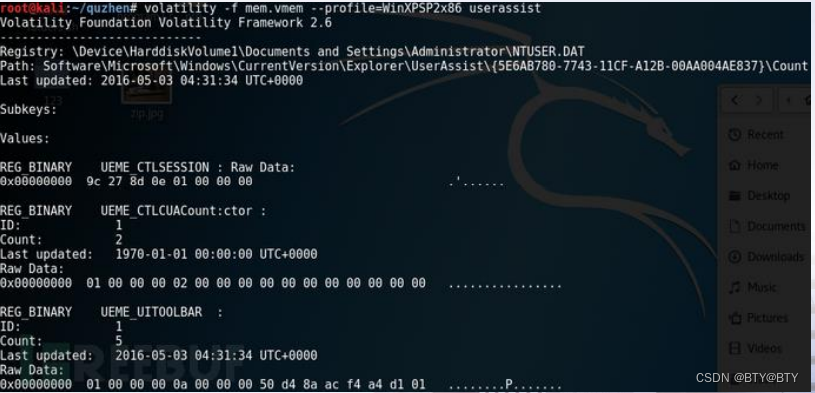
Extract the information recorded in the memory about which programs are running at that time, how many times they have been run, and the last running time.
volatility -f mem.vmem – profile=WinXPSP2x86 userassist
dmp save a process data:
volatility -f mem.vmem –profile=WinXPSP2x86 -p [PID] -D [the directory where the dumped files are saved]

Extract cmd command usage retained in memory:
volatility -f mem.vmem –profile=WinXPSP2x86 cmdscan

Get the current network connection:
volatility -f mem.vmem --profile=WinXPSP2x86 netscan

Get the usage of IE browser:
volatility -f mem.vmem --profile=WinXPSP2x86 iehistory
Get the system password in memory (using hashdump to extract):

volatility -f mem.vmem –profile=WinXPSP2x86 hashdump -y 0xe1035b60 -s 0xe16aab60
Attached tool download address: https://github.com/volatilityfoundation
版权声明
本文为[[email protected]]所创,转载请带上原文链接,感谢
https://yzsam.com/2022/211/202207300539173598.html
边栏推荐
- 函数解剖——深挖getchar()与putchar()
- 攻防世界easy_web
- 使用Nodejs搭建Web Server(入门教程)
- ‘kaggle视频游戏销售数据的可视化和分析‘项目实现
- Application Practice | Application Practice of Apache Doris in Baidu Intelligent Cloud Billing System
- 秒杀项目的总结及面试常见问题
- 0基础玩转C语言—初识C语言(上)
- php-fpm
- uncategorized SQLException; SQL state [null]; error code [0]; sql injection violation, syntax error
- uni-app:关于自定义组件、easycom规范、uni_modules等问题
猜你喜欢




随机推荐
CTF之misc-其他类型隐写
多线程之间的5中通信方式
P3 元宝第五单元笔记
0基础玩转C语言—初识C语言(下)
Operators and Interaction Basics
Misc of CTF-image steganography
SSTI靶场
【墨者学院】身份认证失效漏洞实战
强国杯初赛WP
mysql处理insert冲突的解决方案
中间件cors三行代码解决跨域问题GET,POST跨域访问解决
CTF之misc-内存分析(Volatility)
分支和循环语句
你怎么看待scanf()中%d的“吃空白”行为?
Qt在QTableWidget、View等表格中添加右击菜单
空杯心态,知行合一
社区版idea 最右侧没有Database怎么办
DVWA安装教程(懂你的不懂·详细)
猜数字小游戏(随机生成’三剑客‘)
连接云服务器Docker中的Mysql 详细图文操作(全)