当前位置:网站首页>AWS elastic three swordsman
AWS elastic three swordsman
2022-07-28 02:31:00 【51CTO】
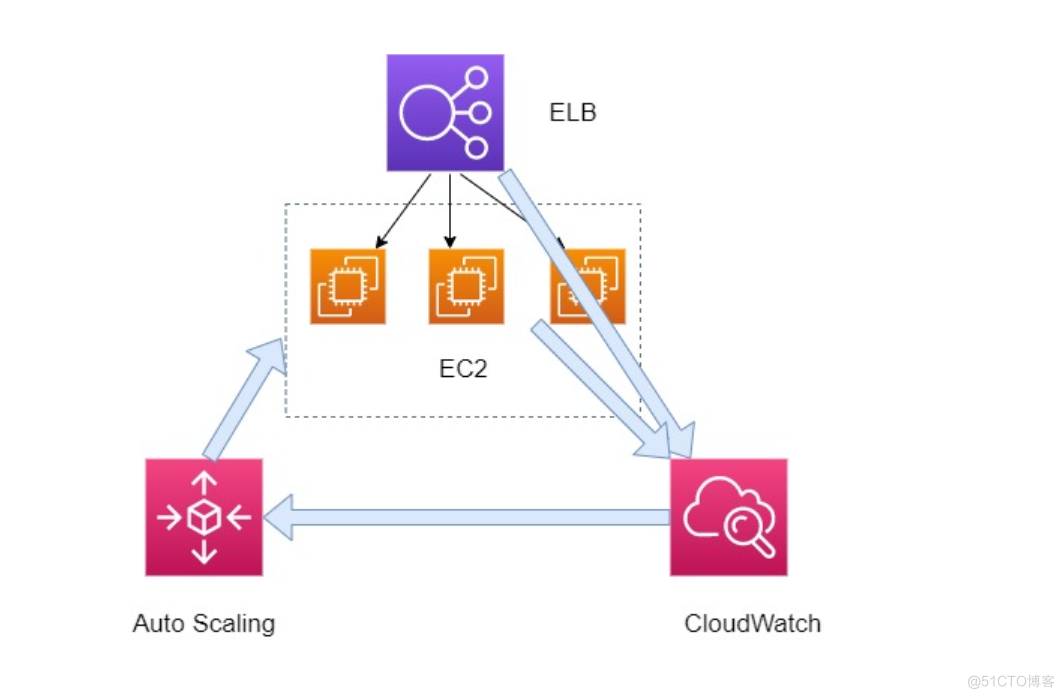
Auto Scaling Group and Amazon ELB If you want to work together , Also need to carry CloudWatch Monitoring services are used together .
Amazon ELB You can put some delay data or computing resources CPU When the usage data is collected CloudWatch above .
CloudWatch You can alert these collected data , According to the threshold you set , Automatically give an alarm . When the threshold is reached , Will give an alarm , Will send the alarm to Auto Scaling Group Elastic scalability group service .
Auto Scaling Group After receiving the alarm , Will be based on the one already defined Templates , Start a compute node . Start the computing resources , Then you can register the computing resources to Amazon ELB Load balancing service . At this time Scale Out Horizontal expansion .
Similarly, when calculating the resource access volume , The same process as above , nothing but Auto Scaling Group Turn off this computing resource .
The above three services , Also known as AWS Elastic Three Musketeers .
Expansion strategy
Target tracking scaling Target tracking expansion strategy
Define a... In advance metric indicators , for instance CPU Usage quantity , Single machine requests, etc , As long as this target is reached , According to launch configuration To increase or decrease EC2 Example .
Step scaling
Step scaling , This can define multiple indicators , Then increase or decrease the number of instances according to different indicators . for instance CPU achieve 40%, Add one , achieve 70% , Add three and so on , This is more flexible , Recommended .
Scheduled scaling
This is a cyclical scaling , Cope with predictable traffic peaks , For example, various festivals , The flow is up , We can increase the machine in advance to provide load .
Termination strategy
The termination strategies are 5 Optional options :Default、OldestInstance、OldestLaunchConfiguration、NewestInstance、ClosestToNextInstanceHour.
- Default( Default termination policy ): The default termination policy helps ensure that your network architecture is evenly distributed across multiple zones .
- If there are instances in multiple zones , Select the zone that has the most instances and at least one instance is not protected by shrink . If there are multiple zones with this number of instances , Then select the availability zone where the instance with the oldest startup configuration is located .
- Determine which unprotected instances in the selected zone use the oldest boot configuration . If there is an instance of this kind , Then terminate the instance .
- If there are multiple instances using the oldest boot configuration , Then determine which unprotected instances are closest to the next billing hour .( This will help you make the most of your EC2 Instance and manage Amazon EC2 Use cost .) If there is an instance of this kind , Then terminate the instance .
- If there are multiple unprotected instances closest to the next billing hour , Then randomly select one of the instances .
- OldestInstance Terminate the oldest instance in the Group . When you will Auto Scaling The instances in the group are upgraded to new EC2 Instance type , When you can gradually replace instances of older types with instances of newer types , This option is very useful .
- OldestLaunchConfiguration Terminate the latest instance in the Group . If you want to test a new boot configuration but don't want to keep it in production , This strategy is very useful .
- NewestInstance Terminate the instance with the oldest startup configuration . If you want to update a group and phase out instances in the previous configuration , This strategy is very useful .
- ClosestToNextInstanceHour Terminate the instance closest to the next billing hour . This strategy will help you make the most of your instances and manage Amazon EC2 Use cost .
Expansion process
You can pause and resume your Auto Scaling One or more extended processes of the Group . If you need to investigate configuration problems or contact Web Other application related issues , Then make changes to the application without triggering the extension process , Then this setting is very useful .
Amazon EC2 Auto Scaling The following extension processes are supported :
- Launch
- Terminate
- HealthCheck
- ReplaceUnhealthy
- AZRebalance
- AlarmNotification
- ScheduledActions
- AddToLoadBalancer
Preheating time function
- When the warning is triggered , Instance on , At the same time, turn on the preheating time timer , After the instance is opened, add ELB Target group , Wait for the warm-up time to pass ,ELB Yes EC2 Take a health check , After passing the inspection ELB Official forwarding traffic , The main purpose is to enable the machine to start and complete the service loading . Usually , Just put into use Auto Scaling The instance needs to be preheated to pass Auto Scaling Health check .Auto Scaling Etc Check the grace period Check the running status of the instance only after the end .
Reduction of the machine
Cooling time
Auto Scaling After the group is expanded with a simple expansion policy , Will wait until the cooling time is completed , Then execute any expansion activities that the simple expansion strategy can start .( For example, if the startup of an instance requires the installation of configuration scripts and files , It may take a few minutes , in the meantime , If there is no cooling time , For any standard accuracy alarm , May trigger every minute CloudWatch alert , Which leads to Auto Scaling The group starts another instance each time the alarm is triggered ).
because autoscaling The guiding principle of is to increase rapidly when increasing , Reduce slowly according to demand when reducing , Avoid sudden traffic rebound . So here is a name CoolDown Period Time limit of , The unit is seconds , If it's just trigger An increase , After the service is added, this CoolDown Time begins to count , If there is another one before the end of this time trigger To increase , The number of services increased in the previous time will also be included in the second increase . But the reduction is a little different , When the service decreases, this time starts to calculate , But if there is an increase suddenly before the end of this time trigger, Then this increase does not need to be limited by this time , It can be increased immediately , There is no need to wait until the end of this time .( The default value is 300 second )
Instance protection
If the protection has been set to avoid reduction , The newly started instance will be protected from reduction by default . When shrinking Auto Scaling The protected instance will not be selected as the instance to be terminated . Changing this option will not affect existing instances .
spare - restart 、 To turn it off ASG Examples in
To avoid ASG Auto instance terminated, Follow the steps below :
- stay ASG Property panel example Tab the instance to be maintained Set as standby .( This operation will change the instance from ASG The associated ELB Unregister , If the requirements do not affect the business , Please make sure that there are other instances that are still working )
- To restart 、 Shutdown and other maintenance operations .
- stay Set to available front , Ensure that the instance is started , Running normally .
- Will instance Set to enable .( Be sure to check the steps 3, Otherwise, it will lead to Set to enable Was immediately terminated)
边栏推荐
- Wechat campus maintenance and repair applet graduation design finished product of applet completion work (4) opening report
- 剑指offer专项突击版第12天
- Detailed explanation of the lock algorithm of MySQL lock series (glory Collection Edition)
- Promise从入门到精通(第3章 自定义(手写)Promise)
- 并发编程的三大核心问题(荣耀典藏版)
- 产品解读丨MeterSphere UI测试模块的设计与分布式扩展
- 借助Elephant Swap打造的ePLATO,背后的高溢价解析
- Get the difference data of two sets
- Wechat campus bathroom reservation applet graduation design finished product (1) development outline
- Codeworks round 807 (Div. 2) a-c problem solution
猜你喜欢

CeresDAO:Ventures DAO的“新代言”

借助Elephant Swap打造的ePLATO,背后的高溢价解析

探究flex-basis
![[Yugong series] use of tabby integrated terminal in July 2022](/img/df/bf01fc77ae019200d1bf57be783cb9.png)
[Yugong series] use of tabby integrated terminal in July 2022
Read Plato & nbsp; Eplato of farm and the reasons for its high premium

Wechat campus maintenance and repair applet graduation design finished product of applet completion work (4) opening report

产品解读丨MeterSphere UI测试模块的设计与分布式扩展

【ROS进阶篇】第九讲 基于Rviz和Arbotix控制的机器人模型运动

C # using ABP warehouse to access the database error record set

【ROS进阶篇】第十讲 基于Gazebo的URDF集成仿真流程及实例
随机推荐
小程序毕设作品之微信校园维修报修小程序毕业设计成品(4)开题报告
Shell regular and metacharacters
54: Chapter 5: develop admin management services: 7: face warehousing process; Face login process; The browser turns on the video debugging mode (so that the camera can also be turned on in the case o
LeetCode 热题 HOT 100 -> 2.两数相加
In practical work, how do I use postman for interface testing?
Wechat campus maintenance and repair applet graduation design finished product of applet completion work (4) opening report
MySQL high availability and master-slave synchronization
获取两个集合相差数据
[深入研究4G/5G/6G专题-42]: URLLC-14-《3GPP URLLC相关协议、规范、技术原理深度解读》-8-低延时技术-2-基于slot的调度与Slot内灵活的上下行符号配比
Mysql Explain 详解(荣耀典藏版)
MySQL数据库InnoDB存储引擎中的锁机制(荣耀典藏版)
Three core issues of concurrent programming (glory Collection Edition)
pytorch优化器设置
Detailed explanation of the lock algorithm of MySQL lock series (glory Collection Edition)
Appium click operation sorting
Digital empowerment and innovation in the future: hese eredi appears at the 5th Digital China Construction Summit
Promise从入门到精通 (第2章 Promise的理解和使用)
Clear the cause of floating and six methods (solve the problem that floating affects the parent element and the global)
Synchronized details
What is eplato cast by Plato farm on elephant swap?