当前位置:网站首页>视频播放器(二):视频解码
视频播放器(二):视频解码
2022-06-30 07:15:00 【木火火ZERO】
1. FFmpeg解码流程

2. 代码
    std::string input_file = "1.mp4";
    std::string output_file = "1.yuv";

    // 创建输出文件
    FILE *out_fd = nullptr;
    out_fd = fopen(output_file.c_str(), "wb");
    if (!out_fd)
    {

        printf("can't open output file");
        return;
    }

    AVFormatContext *fmt_ctx = nullptr;
    fmt_ctx = avformat_alloc_context();

	// 打开输入视频文件
    int ret = avformat_open_input(&fmt_ctx, input_file.c_str(), nullptr, nullptr);
    if(ret < 0)
    {

        av_log(nullptr, AV_LOG_ERROR, "can not open input: %s \n", err2str(ret).c_str());
        return;
    }

	// 获取视频文件信息
    ret = avformat_find_stream_info(fmt_ctx, nullptr);
    if(ret < 0)
    {

        av_log(nullptr, AV_LOG_ERROR, "avformat_find_stream_info failed: %s \n", err2str(ret).c_str());
        return;
    }

	// 打印视频信息
    //av_dump_format(fmt_ctx, 0, input_file.c_str(), 0); // 第四个参数,输入流为0, 输出流为1

	// 查找视频流序号
    int video_index = -1;
    for (int i = 0; i < fmt_ctx->nb_streams; ++i)
    {

        if(fmt_ctx->streams[i]->codecpar->codec_type == AVMEDIA_TYPE_VIDEO)
        {

            video_index = i;
        }
    }

    if(video_index == -1)
    {

        av_log(nullptr, AV_LOG_ERROR, "can not find video \n");
        return;
    }

    // 找视频流解码器
    const AVCodec *video_codec = avcodec_find_decoder(fmt_ctx->streams[video_index]->codecpar->codec_id);

    AVCodecContext *codec_ctx = avcodec_alloc_context3(video_codec);
    avcodec_parameters_to_context(codec_ctx, fmt_ctx->streams[video_index]->codecpar);

    // 打开视频解码器
    ret = avcodec_open2(codec_ctx, video_codec, nullptr);
    if(ret < 0)
    {

        av_log(nullptr, AV_LOG_ERROR, "avcodec_open2 failed: %s \n", err2str(ret).c_str());
        return;
    }

	// 其他YUV格式转换成YUV420P
    SwsContext *img_convert_ctx = nullptr;
    img_convert_ctx = sws_getContext(codec_ctx->width, codec_ctx->height, codec_ctx->pix_fmt,
                                     codec_ctx->width, codec_ctx->height, AV_PIX_FMT_YUV420P, SWS_BICUBIC, NULL, NULL, NULL);

    // 创建packet,用于存储解码前的数据
    AVPacket packet;
    av_init_packet(&packet);

    // 创建Frame,用于存储解码后的数据
    AVFrame *frame = av_frame_alloc();
    frame->width = fmt_ctx->streams[video_index]->codecpar->width;
    frame->height = fmt_ctx->streams[video_index]->codecpar->height;
    frame->format = fmt_ctx->streams[video_index]->codecpar->format;
    av_frame_get_buffer(frame, 32);

	// 创建YUV Frame,用于存储解码后的数据
    AVFrame *yuv_frame = av_frame_alloc();
    yuv_frame->width = fmt_ctx->streams[video_index]->codecpar->width;
    yuv_frame->height = fmt_ctx->streams[video_index]->codecpar->height;
    yuv_frame->format = AV_PIX_FMT_YUV420P;
    av_frame_get_buffer(yuv_frame, 32);

    // while循环,每次读取一帧,并转码
    while (av_read_frame(fmt_ctx, &packet) >= 0)
    {

        if(packet.stream_index == video_index)
        {

            // 开始解码
            // 发送数据到解码队列
            // 旧API:avcodec_decode_video2
            // 新API:avcodec_send_packet与avcodec_receive_frame
            ret = avcodec_send_packet(codec_ctx, &packet);
            if (ret < 0)
            {

                av_log(nullptr, AV_LOG_ERROR, "avcodec_send_packet failed: %s \n", err2str(ret).c_str());
                break;
            }

            while (avcodec_receive_frame(codec_ctx, frame) >= 0)
            {

                //
                sws_scale(img_convert_ctx,
                          (const uint8_t **)frame->data,
                          frame->linesize,
                          0,
                          codec_ctx->height,
                          yuv_frame->data,
                          yuv_frame->linesize);

				// 数据写入到yuv文件中
                int y_size = codec_ctx->width * codec_ctx->height;
                fwrite(yuv_frame->data[0], 1, y_size, out_fd);
                fwrite(yuv_frame->data[1], 1, y_size/4, out_fd);
                fwrite(yuv_frame->data[2], 1, y_size/4, out_fd);
            }

        }

        av_packet_unref(&packet);
    }


    if (out_fd)
    {

        fclose(out_fd);
    }

    avcodec_free_context(&codec_ctx);
    avformat_close_input(&fmt_ctx);
    avformat_free_context(fmt_ctx);
其中:
std::string err2str(int err)
{

    char errStr[1024] = {
    0};
    av_strerror(err, errStr, sizeof(errStr));
    return errStr;
}
转码后,使用pplay播放:
转换成yuv后,播放: ffplay -s 640x352 -pix_fmt yuv420p 1.yuv
-s 640x352 为视频 宽 x 高
3. 解释
3.1 sws_getContext
struct SwsContext* sws_getContext(int srcW,
                                  int srcH,
                                  enum AVPixelFormat srcFormat,
                                  int dstW,
                                  int dstH,
                                  enum AVPixelFormat dstFormat,
                                  int flags,
                                  SwsFilter *srcFilter,
                                  SwsFilter *dstFilter,
                                  const double *param )
参数:
- srcW 源视频帧的width;
- srcH 源视频帧的height;
- srcFormat 源视频帧的像素格式format;
- dstW 转换后视频帧的width;
- dstH 转换后视频帧的height;
- dstFormat 转换后视频帧的像素格式format;
- flags 转换的算法
- srcFilter、dstFilter 分别定义输入/输出图像滤波器信息,如果不做前后图像滤波,输入NULL;
- param 定义特定缩放算法需要的参数,默认为NULL
函数返回SwsContext结构体,定义了基本变换信息
例子:
sws_getContext(w, h, YV12, w, h, NV12, 0, NULL, NULL, NULL);      // YV12->NV12 色彩空间转换
sws_getContext(w, h, YV12, w/2, h/2, YV12, 0, NULL, NULL, NULL);  // YV12图像缩小到原图1/4
sws_getContext(w, h, YV12, 2w, 2h, YN12, 0, NULL, NULL, NULL);    // YV12图像放大到原图4倍,并转换为NV12结构
3.2 sws_scale
int sws_scale(struct SwsContext *c,
              const uint8_t *const srcSlice[],
              const int srcStride[],
              int srcSliceY,
              int srcSliceH,
              uint8_t *const dst[],
              const int dstStride[] )
参数:
- c 是由 sws_getContext 所取得的参数;
- srcSlice[] 输入数据buffer;
- srcStride[] 每一列的byte数,比实际width值要大;
- srcSliceY 第一列要处理的位置;这里我是从头处理,所以直接填0;
- srcSliceH 高度;
- dst[] 目标数据buffer;
- dstStride[] 同srcStride[]
解码后YUV格式的视频像素数据保存在AVFrame的data[0]、data[1]、data[2]中,但是这些像素值并不是连续存储的,每行有效像素之后存储了一些无效像素。
以亮度Y数据为例,data[0]中一共包含了linesize[0]*height个数据。但是处于优化等方面的考虑,linesize[0]实际上并不等于宽度width,而是一个比宽度大一些的值。因而需要使用sws_scale()进行转换,转换后去除了无效数据,width与linesize[0]取值相等。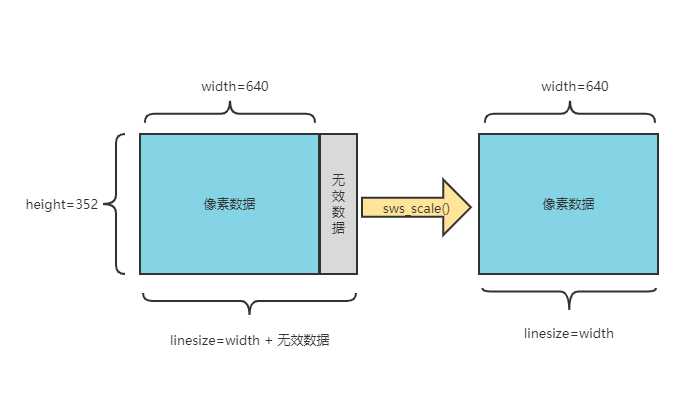
4. 参考资料
https://ffmpeg.org/doxygen/trunk/group__libsws.html#gae531c9754c9205d90ad6800015046d74
https://www.cnblogs.com/cyyljw/p/8676062.html
ffmpeg代码实现h264转yuv
《基于 FFmpeg + SDL 的视频播放器的制作》课程的视频
边栏推荐
- The first up Master of station B paid to watch the video still came! Price "Persuading" netizens
- vs2019和sql
- Golan common shortcut key settings
- Traverse map
- Connection flood attack principle
- [semidrive source code analysis] [x9 chip startup process] 34 - RTOS side display module SDM_ display_ Init display initialization source code analysis
- Go常用命令
- Qtcreator debug code after configuring CDB debugger view variable value display card
- Finished product upgrade procedure
- MAX6675 usage notes
猜你喜欢


随机推荐
Promise async/await
Go语言指针介绍
【Hot100】11. Container with the most water
Basic fragmentary thoughts
已解决:initialize specified but the data directory has files in it. Aborting
IDEA import导入的类明明存在,却飘红?
Binary tree traversal
【SemiDrive源码分析】【X9芯片启动流程】33 - Display模块 相关概念解析
All errors reported by NPM
Linux server installation redis
Unity中实现溶解(Dissolve)特效及其原理解析
Write and run the first go language program
Finished product upgrade procedure
Connection Flood攻击原理
Xshell transfer file
Browser downloads files as attachments
Go common commands
Mysql5.7 compressed version installation tutorial
Error reporting record
Go项目目录结构介绍