当前位置:网站首页>GOM login configuration free version generate graphic tutorial
GOM login configuration free version generate graphic tutorial
2022-07-26 14:24:00 【51CTO】
GOM Login configuration generates graphic tutorial
GOM Engine I released count More , Favorite friend I share the version of this engine .
The reason is that the version of this engine is beautiful , There are many functional systems , Activities and playing methods are also very rich , There are many functions that other engines cannot do , So I have studied more recently .
Many friends will ask me about how to configure the login of this engine ? In fact, it is also very simple , Now AISI will introduce to you how to generate a login !
Download one randomly in the version Library GOM The legendary version of the engine , After opening, you can see a folder of the lander !

Double click to open and find GameOfMir Login generator .exe, Double-click to open , This is the main program of the lander generator ! List of logins

Resources The directory is the directory of game patches , Generally, they are all matched , The legendary servers downloaded in the version library are all modified , Default is fine !
The shortcut is the name of the game , Modify at will !
Remote lists and alternate lists need to be uploaded to the website , Otherwise, there is no way to read , If it is a stand-alone game, you can use the list of Chi net http://www.pkp123.cn:88/
If you want to use your own list, you can upload your configured list file to http://www.pkp123.cn:88/ Then copy and paste the address , It can be kept forever !
In other places, it is generally OK by default , And adjust the resolution of the lander , And so on can be defaulted !
Next, the generation method of list file is introduced in detail :
The generated list file is still GameOfMir Login generator .exe Finish in , Click the top remote list button .

First, select whether the list of landers is automatically expanded , It is suggested that the new area should be expanded automatically , The old area can not
Then add the server , Fill in the name of the server , For example, telecommunication area , Or Netcom area , Or double line area and so on , After filling in, click Add Group !
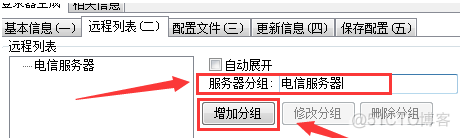
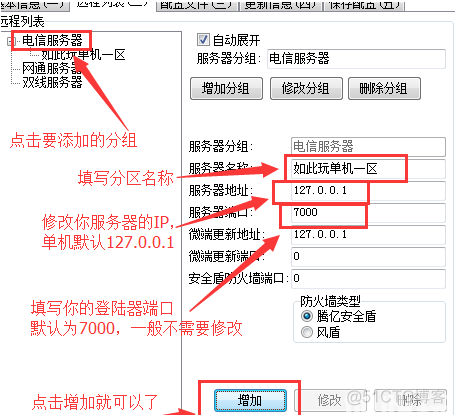
Then the server name will be displayed on the left , When it's all done , We add the name of the partition
Click next after adding , Modify the configuration file ,

Fill in your announcement address , Customer service address , Official home address , The announcement address is the content displayed in the small window of the lander , Then fill in the list to refresh , If you often open new areas , To click auto refresh , So players can see the new area for the first time !
Step 4: skip directly if it is a single machine , Then go to the best step and click save configuration , Then click generate lander , Note that there is no way to use the lander at this time , Because our list of landers has not been uploaded , But there is no way to generate a list file without clicking generate lander ! So just click !
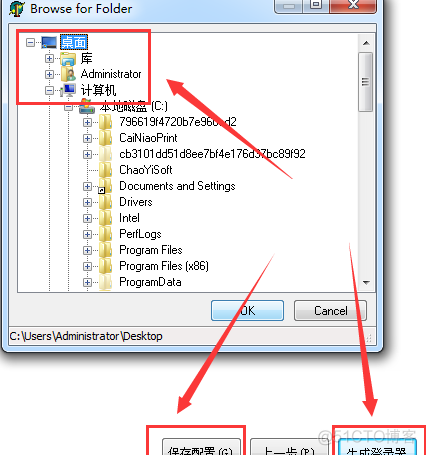
Select the directory to store , Let's choose the desktop , And then click OK, You can generate a lander and list file !

Now let's upload the list file :
open http://www.pkp123.cn:88/ Click to select file , Then click upload

After uploading, you can see the file address , We copy the address and paste it to
After copying it, paste the file address of the lander into the remote list and alternate list in the first step

Then click the button below to directly generate the remote list without configuration !
If you like it, remember to praise and pay attention
边栏推荐
- TDengine 助力西门子轻量级数字化解决方案 SIMICAS 简化数据处理流程
- Plato Farm有望通过Elephant Swap,进一步向外拓展生态
- "Baget" takes you one minute to build your own private nuget server
- PHP uses sqlserver
- Multithreading - thread pool
- 低功耗多通道WFAS1431无线数据采集采发仪使用流程说明
- 12437 words, take you to explore the principle of RPC communication
- Meeting seating and submission for approval of OA project
- MLX90640 红外热成像仪测温传感器模块开发笔记(六)
- Job 7.25 sorting and searching
猜你喜欢

My creation Anniversary - from the heart

12437 words, take you to explore the principle of RPC communication

【深度学习】全连接网络

Technology evolution analysis framework based on two-level topic model and its application

GDB common commands

Leetcode1170- compare the occurrence frequency of the minimum letter of the string (the corresponding occurrence frequency of each string minimum element in the map set storage array)

Image-Level 弱监督图像语义分割汇总简析

How can red star Macalline design cloud upgrade the traditional home furnishing industry in ten minutes to produce film and television level interior design effects

敏捷开发与DevOps的对比

Sequence traversal of binary tree (implemented in C language)
随机推荐
Leetcode question type priority queue (TOPK question)
如何做 APP 升级测试 ?
初识Opencv4.X----图像透视变换
Understand the meaning of length in MySQL data types
My meeting of OA project
网络图片转本地导致内核退出
Multithreading - thread pool
Meeting seating and submission for approval of OA project
2022-07-26 Daily: the first anniversary of the establishment of alphafold DB database, research on the lighting point of official promotion
Plato Farm有望通过Elephant Swap,进一步向外拓展生态
Flink SQL (III) connects to the external system system and JDBC
Redis的数据操作
mysql5.7通过文件zip方式安装-九五小庞
What is the problem of the time series database that has been developed for 5 years?
uni-app从创建到运行到微信开发者工具
【愚公系列】2022年7月 Go教学课程 017-分支结构之IF
Redis learning notes
MySQL-04 存储引擎和数据类型
Mlx90640 infrared thermal imager temperature sensor module development notes (6)
TDengine 助力西门子轻量级数字化解决方案 SIMICAS 简化数据处理流程