当前位置:网站首页>利用PHP开发的一款万能、表白墙系统部分代码片段
利用PHP开发的一款万能、表白墙系统部分代码片段
2022-06-11 10:06:00 【低调抖腿】
表白墙系统
文章目录
前言
本系统最初的模型是高校中传统的“表白墙”,以前大学食堂门口贴满A4纸的“表白墙”,逐渐演变成为一些很火的“万能墙”,但基本上通过都是QQ空间或微信朋友圈的方式发布出稿件!很费力!于是便萌生了这个想法,我们能不能用已学的知识做一个网页版的,全自动的万能墙系统。此系统采用了layui2.0开源模块UI框架(镜像站www.layuiweb.com),感谢专业前端工程师(贤心)倾情打造,layui的样式本人十分喜爱。
一、需求分析
*MYSQL完成后台管理设计
*系统分为前后台前台展示文章,后台发布文章
*后台需要管理员的账号密码
*后台存在文章管理和栏目管理
*进入后台能够实现删除和修改发表标签功能
*在前台能够发布信息
二、系统分析
1.模块划分
2.E-R图
二、搭建准备工作(完成数据库和工具准备)
1.搭建环境
工具需要:宝塔面板
2.下载完成一键安装phpmyadmin nginx或apache php(php版本需要大于5.6以上)
3.创建数据库和数据表相关内容最后写成一键搭建
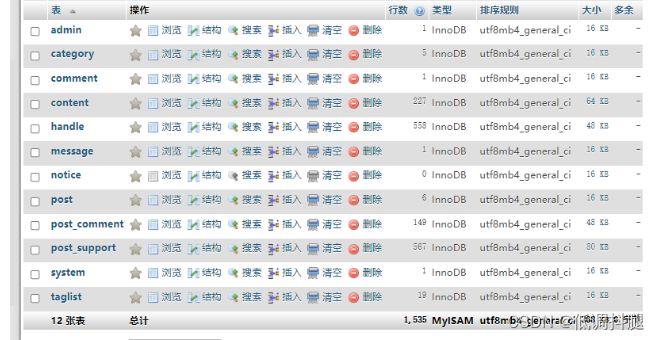
三、重要代码以及步骤
1.项目初始化和部分重要函数代码展示
init.php初始化代码:(配置文件操作)
<?php
//设置字符集
header('content-type:text/html;charset=utf-8');
ini_set('session.cookie_httponly', 1); //设置防止xss攻击
session_start(); //开启session
//调试开关
define('APP_DEBUG', true);
//开启调试时,显示错误报告
ini_set('display_errors', APP_DEBUG);
//定义前后台公共目录常量
define('APP_PATH', './app/');   //支持库文件目录
define('UPLOAD_PATH', './upload/');  //上传文件目录
//载入函数库
require APP_PATH . 'function.php';
//载入数据库函数
require APP_PATH . 'db.php';
//载入模块库
require APP_PATH . 'module.php';
app/function.php函数库部分代码
//配置文件操作
function C($name)
{

	static $config = null; //保存项目中的设置
	if (!$config) {
              //函数首次被调用时载入配置文件
		$config = require APP_PATH . 'config.php';
	}
	return isset($config[$name]) ? $config[$name] : '';
}
app/config.php配置文件代码
return [
	//数据库连接信息
	'DB_CONNECT' => [
		'host' => 'localhost',	             //服务器地址
		'user' => 'wnq',		     //用户名
		'pass' => 'PGcrPaaiTyWdcMLb',		     //密码
		'dbname' => 'wnq',             //数据库名
		'port' => '3306',		             //端口
	],
	'DB_CHARSET' =>	'utf8',	             //字符集
];
app/db.php数据库部分代码
//通过预处理方式执行SQL
function db_query($sql, $type = '', $data = [])
{

	//获取数据库连接
	$link = db_connect();
	//预处理SQL语句
	if (!$stmt = mysqli_prepare($link, $sql)) {

		E('数据库操作失败。', mysqli_error($link) . "\nSQL语句:" . $sql);
	}
	//无参数绑定时,直接执行
	if ($data == []) {

		mysqli_stmt_execute($stmt);
	} else {

		//批量处理
		$data = (array)$data;							//如果不是数组,强制转换为数组
		is_array(current($data)) || $data = [$data];	//自动识别批量模式
		$params = array_shift($data);					//准备待绑定的变量
		db_bind_param($stmt, $type, $params);			//参数绑定
		mysqli_stmt_execute($stmt);						//执行第1个
		foreach ($data as $row) {
    							//批量执行剩余的
			foreach ($row as $k => $v) {

				$params[$k] = $v;	//变更参数值
			}
			mysqli_stmt_execute($stmt);
		}
	}
	return $stmt;
}
2.管理员登录和后台相关代码
前台登录样式login.php
	<div class="bg-image-pattern"></div>
	<div class="layui-container">
		<div class="admin-login-background">
			<div class="layui-form login-form">
				<form class="layui-form" action="">
					<div class="layui-form-item logo-title">
						<h1>系统登录</h1>
					</div>
					<div class="layui-form-item">
						<label class="layui-icon layui-icon-username" for="username"></label>
						<input type="text" id="username" lay-verify="required|account" placeholder="用户名或者邮箱" autocomplete="off" class="layui-input" >
					</div>
					<div class="layui-form-item">
						<label class="layui-icon layui-icon-password" for="password"></label>
						<input type="password" id="password" lay-verify="required|password" placeholder="密码" autocomplete="off" class="layui-input" value="">
					</div>
					<div class="layui-form-item">
						<div class="layui-btn layui-btn-fluid login" lay-submit="" lay-filter="login">登 入</div>
					</div>
				</form>
			</div>
		</div>
	</div>
后台登陆api/login.php
// 初始化
require './init.php';

class Login
{

    /** * 登录 * @return array|string */
    public static function inLogin()
    {

        $username = I('username', 'post', '');
        $password = I('password', 'post', '');
        // 查询列表
        $result = module_login_to($username, $password);
        $arr = [];
        if ($result) {

            $arr = [
                'code' => 200,
                'tips' => "登录成功",
            ];
            $_SESSION['islogin'] = true;
        } else {

            $arr = [
                'code' => 100,
                'tips' => "账号密码错误",
            ];
            $_SESSION['islogin'] = false;
        }
        return toJson($arr);
    }
后台相关功能部分代码:(留言增删api/comment.php,api/post.php,标签增删api/tag.php,)
// 初始化
require './init.php';

class Comment
{

    /** * 留言 * @return array|string */
    public static function CommentList()
    {

        $id = I('id', 'post', 'string', "");

        if ($id == "") {

            return toJson([
                'code' => 100,
                'data' => [],
                'tips' => "ID不能为空"
            ]);
        }
        // 查询列表
        $result = module_comment_list($id);
        $arr = [];
        foreach ($result as $key => $row) {

            $data[] = [
                'id' => $id,
                'cid' => $row['c_id'],
                'content' => $row['c_content'],
                'post_id' => $row['post_id'],
                'avatar' => $row['user_id'] ? qqAvatar($row['user_id']) :  'asset/images/anonymous.png',
                "c_time" => TimeAgo($row['c_time']),
                "i" => $key + 1
            ];
        }
        $arr = [
            'islogin' => $_SESSION['islogin'] ? '1' : '',
            'code' => 200,
            'data' => $data,
        ];
        return toJson($arr);
    }
    /** * 添加留言 */
    public static function SaveComment()
    {

        //id
        $id = I('id', 'post', 'string', "");

        if ($id == "") {

            return toJson([
                'code' => 100,
                'data' => [],
                'tips' => "ID不能为空"
            ]);
        }
        //QQ
        $qq = baoguoInput($_POST['qq']);
        //内容
        $content = baoguoInput($_POST['content']);
        // 表单类型验证
        get_form_type($qq, $qq, $content);
        //敏感词拦截
        get_fuck($content);
        //判断内容长度
        get_text_length($content, 2);
        $result =  db_exec(DB_AFFECTED, 'INSERT INTO `post_comment` (`post_id`,`user_id`,`c_content`,`c_time`) VALUES(?,?,?,?)', 'ssss', [$id, $qq, $content, $_SERVER["REQUEST_TIME"]]);
        //判断插入状态
        if ($result) {

            $sup = module_comment_count($id);
            $sups = isset($sup['count']) ? $sup['count'] : 0;
            $data = ['code' => 200, 'tips' => '发布成功,数据重载中', "count" => $sups];
            exit(toJson($data));
        } else {

            $data = ['code' => 400, 'tips' => "发布失败"];
            exit(toJson($data));
        }
    }

    /** * 删除留言 */
    public static function delComment()
    {

        $id = I('id', 'post', '');
        if (module_comment_del($id)) {

            return toJson([
                'code' => 200,
                'tips' => "删除成功",
            ]);
        } else {

            return toJson([
                'code' => 500,
                'tips' => "删除失败",
            ]);
        }
    }
}


if ($_SERVER['REQUEST_METHOD'] == 'POST') {

    if (I('save', 'post', 'string', "") == 1) {

        // 添加数据
        Comment::SaveComment();
    } else if (I('save', 'post', 'string', "") == 2) {

        if (isset($_SESSION['islogin']) && $_SESSION['islogin']) {

            Comment::delComment();
        } else {

            exit(toJson(['code' => 400, 'tips' => '非法访问']));
        }
    } else {

        // 获取列表
        Comment::CommentList();
    }
} else {

    exit(toJson(['code' => 400, 'tips' => '非法访问']));
}
3.用户发表留言和前台相关代码
发送缩略图片api/image.php,留言内容限制,相关样式代码
html代码
<!--loading-->
	<div id="loading"></div>
	<!--背景-->
	<div class="bg-image"></div>
	<div class="bg-image-pattern"></div>
	<!--提示-->
	<div class="post-loading">
		<div class="post-tips"></div>
	</div>
	<!--header-->
	<div class="header">
		<div class="top" id="main">
			<div class="logo action"><a class="home">万能墙</a></div>
						<span class="start"><i class="baoguo-write-l" style="margin-right:0px;font-weight: 600;"></i></span>
		</div>

	</div>
	<!--发布表单-->
	<div class="addPost">
		<div class="inputPost" id="inputPost">
			<!--<input type="text" id="code" name="code" placeholder="qq邮箱验证码">-->
			<div class="tagList">
			</div>
			<!--<input type="text" id="tag" name="tag" placeholder="点击进行选择" readonly>-->
			<textarea id="content" placeholder="说点你想说的话..."></textarea>
			<div class="inputBottom">
				<input type="text" id="qq" name="qq" placeholder="你的QQ...">
				<a class="anonymous"><i class="baoguo-user-l"></i></a>
				<a class="upimage"><i class="baoguo-image-l add"></i></a>
				<input type="file" name="image" id="image" accept="image/*" style="display:none">
				<div class="submit s1"><img src="/asset/images/submit.png"></div>
			</div>
			<div id="yulan-image"><img class="yulan"></div>
		</div>
	</div>
		<!--评论表单-->
	<div class="addComment">
		<div class="inputComment inputPost">
			<textarea id="ccontent" placeholder="说点你想说的话..."></textarea>
			<div class="inputBottom">
				<input type="text" id="cqq" name="qq" placeholder="你的QQ...">
				<div class="submit s2"><img src="/asset/images/submit.png"></div>
				<div class="submit-close closeComment">取消</div>
			</div>
			<div id="yulan-image"><img class="yulan"></div>

			<div>
				<style> .ly-color .layui-timeline-item {
       color: #ff7b8c; } </style>
				<ul class="layui-timeline ly-color" id="CommentList">
					<li class="layui-timeline-item">
						<div class="layui-timeline-content layui-text">
							<div class="user">
								<div class="desc"><img class="avatar" src="">
									<div>
										<div class="title"> 一楼 </div>
										<div class="subtitle">11分钟前 | 来自网页端</div>
									</div>
								</div>
							</div>
							<p class="comment-content">
								万能墙的一切准备工作似乎都已到位。发布之弦,一触即发。
								<br>不枉近百个日日夜夜与之为伴。因小而大,因弱而强。
								<br>无论它能走多远,抑或如何支撑?至少我曾倾注全心,无怨无悔
							</p>
						</div>
					</li>
				</ul>
			</div>

		</div>


	</div>
	<!--帖子-->
	<div class="post"></div>
	<!--更多-->
	<div class="more"><a><i class="baoguo-angle-down-l"></i></a></div>
	<!--footer-->
	<div class="footer">万能墙系统
	<br>
	此页面仅供演示使用!
	<br>
发送缩略图app/image.php
//图像处理函数

//定义常量,表示缩略图缩放类型
define('IMAGE_FILL', 0);		//等比例填充白色背景
define('IMAGE_SCALE', 1);		//等比例缩放
define('IMAGE_SCALE_FILL', 2);	//等比例缩放,最大缩放

/** * 为图片生成缩略图 * @param int $mode 缩略图生成模式 * @param string $file_path 原图路径 * @param int $new_width 目标宽度 * @param int $new_height 目标高度 * @param array $config 保存选项 * @return array [0]表示成功或失败,成功时[1]表示文件路径,失败时[1]表示错误信息 */
function image_thumb($mode, $file_path, $new_width, $new_height, $config=[]){

	//获取原图的宽高,并判断文件类型
	$info = getimagesize($file_path);
	$width = $info[0];      //图片宽度
	$height = $info[1];     //图片高度
	$mime = $info['mime'];  //图片类型
	//关联图像 MIME 类型和文件扩展名
	$file_type = [
		'image/png' => '.png',
		'image/jpeg' => '.jpg'
	];
	//判断图像类型,只允许 JPG 和 PNG 两种类型
	if(!isset($file_type[$mime])){

		return [false, '图片创建缩略图失败:只支持 jpg 和 png 类型的图片。'];
	}
	//生成缩略图
	$im = image_create($mime, $file_path);
	switch($mode){

		case IMAGE_FILL:
			$im = image_thumb_fill($im, $width, $height, $new_width, $new_height);
			break;
		case IMAGE_SCALE_FILL:
			$im = image_thumb_scale($im, $width, $height, $new_width, $new_height, true);
			break;
		default:
			$im = image_thumb_scale($im, $width, $height, $new_width, $new_height);
	}
	//准备保存选项
	$config = array_merge([
		'base_path' => './',			//上传基本路径
		'sub_path' => date('Y-m/d/'),	//自动生成的子目录
		'name'=> md5(uniqid(rand())).$file_type[$mime] //自动创建文件名
	], $config);
	//自动创建目录
	$save_path = $config['base_path'].$config['sub_path'];
	if(!file_exists($save_path) && !mkdir($save_path, 0777, true)){

		return [false, '文件保存失败:创建目录失败'];
	}
	//将保存缩略图到指定目录
	image_save($mime, $im, $save_path.$config['name']);
	//返回文件路径(不包括base_path)
	return [true, $config['sub_path'].$config['name']];
}

/** * 生成缩略图(等比例填充白色背景) * @param resource $im 原图资源 * @param int $width 原图宽度 * @param int $height 原图高度 * @param int $new_width 目标宽度 * @param int $new_height 目标高度 * @return 缩略图资源 */
function image_thumb_fill($im, $width, $height, $new_width, $new_height){

	//等比例缩放计算
	if($width/$new_width > $height/$new_height) {

		$dst_width = $new_width;
		$dst_height = round($new_width / $width * $height);
	}else{

		$dst_height = $new_height;
		$dst_width = round($new_height / $height * $width);
	}
	//创建缩略图资源
	$thumb = imagecreatetruecolor($new_width, $new_height);
	//填充白色背景
	imagefill($thumb, 0, 0, imagecolorallocate($thumb, 255, 255, 255));
	//计算缩略图在画布上的位置
	$dst_x = ($new_width - $dst_width) / 2;
	$dst_y = ($new_height - $dst_height) / 2;
	//将按比例将缩略图重新采样,调整其位置
	imagecopyresampled($thumb, $im, $dst_x, $dst_y, 0, 0, $dst_width, $dst_height, $width, $height);
	return $thumb;
}

/** * 生成缩略图(等比例缩放) * @param resource $im 原图资源 * @param int $width 原图宽度 * @param int $height 原图高度 * @param int $max_width 最大宽度 * @param int $max_height 最大高度 * @param bool $fill 是否最大缩放 * @return 缩略图资源 */
function image_thumb_scale($im, $width, $height, $max_width, $max_height, $fill=false){

	$dst_width = $width;
	$dst_height = $height;
	if($width/$max_width > $height/$max_height) {

		if($fill || ($width > $max_width)){

			$dst_width = $max_width;
			$dst_height = round($max_width / $width * $height);
		}
	}else{

		if($fill || ($height > $max_height)){

			$dst_height = $max_height;
			$dst_width = round($max_height / $height * $width);
		}
	}
	//创建缩略图资源
	$thumb = imagecreatetruecolor($dst_width, $dst_height);
	//将原图缩放填充到缩略图画布中
	imagecopyresampled($thumb, $im, 0, 0, 0, 0, $dst_width, $dst_height, $width, $height);
	return $thumb;
}

/** * 根据原图文件创建图像资源 * @param string 图像MIME类型 * @param string 原图文件路径 * @return 返回创建的图像资源 */
function image_create($mime, $file_path){

	switch($mime){

		case 'image/png':  return imagecreatefrompng($file_path);
		case 'image/jpeg': return imagecreatefromjpeg($file_path);
	}
}
/** * 保存图像资源 * @param string $mime 图像MIME类型 * @param resource $im 图像资源 * @param string $save_path 保存路径 * @return 成功返回true */
function image_save($mime, $im, $save_path){

	switch($mime){

		case 'image/png':  return imagepng($im, $save_path);
		case 'image/jpeg': return imagejpeg($im, $save_path, 100);
	}
}
生成分页app/page.php
//分页函数

//获取SQL分页 Limit
function page_sql($page, $size){

	return ($page-1) * $size . ',' . $size;
}

//生成URL参数
function page_url(){

	$params = $_GET;
	unset($params['page']);
	return http_build_query($params);
}

//获取分页HTML(简单效果)
function page_html_simple($total, $page, $size){

	//计算总页数
	$maxpage = max(ceil($total/$size), 1);
	//如果不足2页,则不显示分页导航
	if($maxpage <= 1) return '';
	//获取URL参数字符串
	$url = page_url();
	$url = $url ? "?$url&page=" : '?page=';
	//拼接 首页
	$first = "<a href=\"{
      $url}1\">首页</a>";
	//拼接 上一页
	$prev = ($page==1) ? '<span>上一页</span>' :
			'<a href="'.$url.($page-1).'">上一页</a>';
	//拼接 下一页
	$next = ($page==$maxpage) ? '<span>下一页</span>' :
			'<a href="'.$url.($page+1).'">下一页</a>';
	//拼接 尾页
	$last = "<a href=\"{
      $url}{
      $maxpage}\">尾页</a>";
	//组合最终样式
	return "$first $prev $next $last 当前为:$page/$maxpage";
}

//获取分页HTML
function page_html($total, $page, $size, $num=5){

	$page = max((int)$page, 1);             //当前访问的页码,最低为1
	$maxpage = max(ceil($total/$size), 1);  //计算总页数
	$num = floor($num/2);                   //计算当期页前后显示的相关链接个数
	$url = page_url();		                //获取URL参数字符串
	//拼接URL
	$url = $url ? "?$url&page=" : '?page=';
	$html = ''; //保存拼接结果
	//生成首页、上一页
	if($page > 1){

		$html .= "<a href=\"{
      $url}1\">首页</a>";
		$html .= '<a href="'.$url.($page-1).'">上一页</a>';
	}else{

		$html .= '<span>首页</span>';
		$html .= '<span>上一页</span>';
	}
	//生成分页导航
	$start = $page - $num;
	$end = $page + $num;
	if($start < 1){

		$end = $end+(1-$start);
		$start = 1;
	}
	if($end > $maxpage){

		$start = $start-($end-$maxpage);
		$end = $maxpage;
	}
	($start < 1) && $start = 1;
	($start > 1) && $html .= '<i>...</i>';
	for($i=$start; $i<=$end; ++$i){

		if($i == $page){

			$html .= "<a href=\"{
      $url}{
      $i}\" class=\"curr\">$i</a>";
		} else {

			$html .= "<a href=\"{
      $url}{
      $i}\">$i</a>";
		}
	}
	($end < $maxpage) && $html .= '<i>...</i>';
	//生成下一页、尾页
	if($page == $maxpage){

		$html .= '<span>下一页</span>';
		$html .= '<span>尾页</span>';
	}else{

		$html .= '<a href="'.$url.($page+1).'">下一页</a>';
		$html .= "<a href=\"{
      $url}{
      $maxpage}\">尾页</a>";
	}
	//返回结果
	return $html;
}
留言字数限制app/function.php
function get_text_length($content, $len = 3)
{

	//最少字数限制
	$minCommentlength = $len;
	//最多字数限制
	$maxCommentlength = 500;
	$pointCommentlength = mb_strlen($content, 'utf-8');
	if ($pointCommentlength < $minCommentlength) {

		header("Content-type: text/html; charset=utf-8");
		$data = array(
			'code' => 400,
			'tips' => '内容最少输入10字'
		);
		exit(json_encode($data));
	}
	if ($pointCommentlength > $maxCommentlength) {

		header("Content-type: text/html; charset=utf-8");
		$data = [
			'code' => 400,
			'tips' => '内容最多输入500字'
		];
		exit(json_encode($data));
	}
}
4.相关成果展示
万能墙系统介绍
之前写过点击这里查看
边栏推荐
猜你喜欢

What are the functions and features of EMG linear light emitter?

远程工作时代的物联网安全
jedisLock—redis分布式锁实现

图片规则翻页

Ugui mouse click diffusion UI effect
UGUI鼠标点击扩散UI效果

MySQL transaction

全局池化–Pytorch

Beginning simple blog emlog theme template V3

What are the differences between Parker pilot solenoid valve and direct acting solenoid valve?
随机推荐
Inductive bias的一些理解
DataGrip 2022,DataGrip 功能
[torch]: parallel training and can dynamically set the batch size of the first GPU
Ugui picture wall
MD5 learning
oracle 11g rac 磁盘组有空间无法增加数据文件?
Can station B make money?
Drink at night, 50 classic SQL questions, really fragrant~
Detailed explanation of Lora module wireless transceiver communication technology
流式计算知识
ESP8266_ SNTP(Simple Network Time Protocol)
对于力士乐电磁换向阀的功能与作用,你知道多少
Mysql--事务
赛灵思引脚约束文件 .xdc
Interview questions: REM layout, flex layout, etc
动态渲染数据和轮播图
Picture rule page turning
本人书签常存的地址
锐意进取,砥砺前行,JASMINER持续深耕品牌实力
New feature of ES6 - arrow function