当前位置:网站首页>How to efficiently transfer enterprise business data?
How to efficiently transfer enterprise business data?
2022-06-24 15:35:00 【Knowledge and action software EDI】
When an enterprise conducts business transactions with its suppliers , A large amount of business data needs to be transmitted . These data come in many forms , Complicated structure , It is very difficult to transmit . How to efficiently transmit enterprise business data has become a key problem to be overcome in the process of enterprise development .
Please imagine such a scenario , You need to receive supplies from multiple suppliers . These suppliers provide you with information about different kinds of goods .A The supplier will send the delivery notice and other information in PDF Sent to you in the form of , and B The supplier uses Excel Send its delivery notice in the form of . After receiving the business information from the above two suppliers , You first need to manually enter it into your business system ( If you do not currently have a business system , You need to transform these business information into data forms that can be understood within your enterprise , So that it can be handled within the company ).
When less business information is transmitted , There is no obvious disadvantage in manual entry . But when your business volume surges , Manual entry will seriously affect the rate of enterprise business data transmission . The first problem is that the business data formats are different , It takes a lot of learning time for business personnel to understand business data . The second problem is the large amount of data , Manual processing of large amounts of data is very easy to miss transmission 、 Wrong transmission and so on .
Speaking of this , You might think , Is there an automatic transmission method , Automatic data conversion after receiving business data from trading partners , Extract useful business information for you ? Or better yet , These received business data can be directly imported into your business system .
EDI The system makes this possible .EDI The main function module of the system is message transmission 、 Message conversion 、 Integrated business systems .
The main function of the message transmission part is to transmit business documents with trading partners , Support any international standard transmission protocol , Such as AS2, OFTP(2.0) etc. , Any format file can be transferred . And it can send and receive files automatically , Save labor costs , Speed up file transfer . But just increasing the transmission rate is not enough for enterprises , Enterprises also have high requirements for the accuracy and real-time of business data transmission .
EDI Message conversion is also called Mapping The main function of this part is to realize the conversion between files of different formats , Support EDI Conversion between standard message and user-defined format file , It solves the problem of file format inconsistency between you and various trading partners . As long as your trading partner transmits business data in a form that conforms to international standards , adopt EDI Message conversion part , It can be converted to the format you need . And ensure that you can receive accurate business information in real time . You can set this function module according to your actual needs , Choose which data you want to receive . It is equivalent to screening the business data transmitted by the trading partners , Ensure the validity of the information .
The main function of the integrated business system is to EDI System and business system integration , Reduce manual operation , Simple configuration , Fast integration SAP Wait for business system . In the key link of data input into your business system , Adopting an integrated approach will bring you many benefits . Even if the volume of business data increases rapidly, you do not need to work overtime for manual processing , Just open your EDI Automatic sending of the system , Business data can be easily processed .
What to do when you encounter returned information or data that cannot be sent for unknown reasons ? How can I receive a prompt in time when there is a large amount of data ? Don't worry about it at all ! originally EDI The main interface of the system will display the current file sending status in real time , originally EDI The system has the function of automatic retransmission , And you can select the appropriate retransmission interval by setting . besides , The system also has mail sending function . You can configure the error mailbox , Once something goes wrong ,EDI The system will immediately send you an email , It is convenient to check the error reason in time !
In addition, knowing and doing EDI The system has the characteristics of software and service , That is, you can access the... You installed and logged in through the website EDI System . There are no restrictions on the installation environment , You can install it directly on windows Environment can also be in JAVA Installation in environment . As long as you use and you are using EDI The same account and password as the system , You can even log in to the system on your tablet or mobile phone , Check the receiving and sending of your data .
notes : Some of the pictures and contents of the copywriting are from the Internet , The copyright belongs to the original author , If it infringes upon your rights and interests , Please contact us to delete , It's bothering you , We are deeply sorry .
边栏推荐
- Hardware security threats of cloud infrastructure
- The cold winter can't stop the determination to enter the big factory. The Android interview has a complete knowledge structure, and everything you need to master in the interview is here!
- Use tuples
- openinstall携手书链:助力渠道数据分析,共创书联网时代
- Task priority motion planning of floating base
- CVPR2022 | 可精簡域適應
- Tencent cloud native intelligent data Lake Conference will be held, revealing the panoramic matrix of Tencent cloud data Lake products for the first time
- Universal file online preview project, open source!
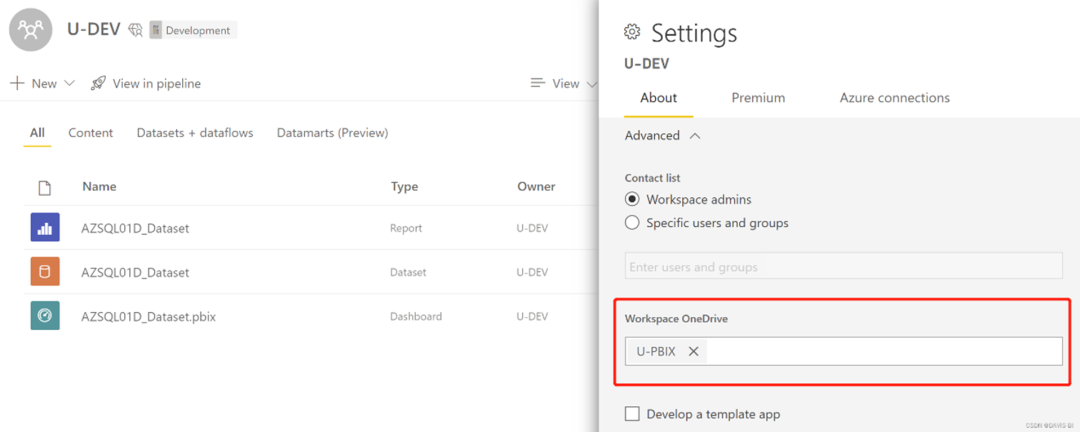
- Brief discussion on the implementation framework of enterprise power Bi CI /cd
- Record the range of data that MySQL update will lock
猜你喜欢
Left hand code, right hand open source, part of the open source road
Brief discussion on the implementation framework of enterprise power Bi CI /cd

为什么企业实施WMS仓储管理系统很容易失败

【我的OpenGL学习进阶之旅】OpenGL的坐标系的学习笔记

From pair to unordered_ Map, theory +leetcode topic practice

Stm32f1 and stm32cubeide programming examples -ws2812b full color LED driver (based on spi+dma)

Linux记录-4.22 MySQL5.37安装(补充)

How to generate assembly code using clang in Intel syntax- How to generate assembly code with clang in Intel syntax?

Mots clés pour la cartographie es; Ajouter une requête par mot - clé à la requête term; Changer le type de mot - clé de cartographie
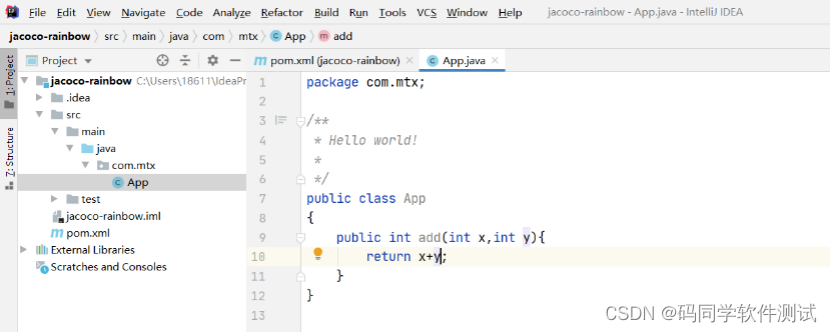
还在担心漏测吗?快来使用jacoco统计下代码覆盖率
随机推荐
Use tuples
东方财富哪个开户更安全,更好点
Universal file online preview project, open source!
Laravel8 uses faker to call factory to fill data
证券账户理财安全吗??
Do you really know the difference between H5 and applet?
Concurrent writing of maps in golang
Logstash introduction and simple case
Linux记录-4.22 MySQL5.37安装(补充)
Analysis of similarities and differences between redis and memcached in cache use
Design of CAN bus controller based on FPGA (Part 2)
Golang实现Biginteger大数计算
CVPR2022 | 可精簡域適應
3 ring kill 360 security guard process
FPGA based analog I ² C protocol system design (medium)
Is it safe to open a stock account by mobile phone
CVPR2022 | 可精简域适应
Two way combination of business and technology to build a bank data security management system
He is also a junior test engineer. Why is his salary high? The interview must be brilliant at these points
Arrays API