当前位置:网站首页>Source code migration from X86 platform to Kunpeng platform based on Kunpeng development kit [play with Huawei cloud]
Source code migration from X86 platform to Kunpeng platform based on Kunpeng development kit [play with Huawei cloud]
2022-06-29 13:50:00 【Hua Weiyun】
Preface
Kunpeng analysis scanning tool and code migration tool , Provide comprehensive application portability assessment and code migration guidance , Realization 90% Of C/C++ Code 、50% Assembly code and 80% Automatic migration of dependent libraries for , Reduce labor costs 50%, Accelerate code migration and optimization . And Kunpeng cloud has a strong ecosystem , The following pictures introduce some cloud services of kunpengyun , If you are interested, you can go to Kunpeng community to learn about it . Because I have received the training of Kunpeng series before , For a long time , So let's try Kunpeng's code migration development kit again .


Specific process
Premise of operation : Log in to Huawei cloud account And real name
Use your mobile number to register your Huawei cloud account : Click registration
Click here to finish Real name authentication , The account type is " personal ", The type of personal certification is recommended " Code scanning authentication ".


Experimental summary
- Premise of operation :
- 1. Installation tools xshell
- 2. To configure Visual Studio Code Environmental Science
- 3. Source code preparation
- 4. Source code migration
Installation tools xshell
Before connecting, you need to create a Huawei cloud ECs , I'm not going to do that here .
Use xshell The tool directly inputs the elastic public network you created IP Connect with the password ,xshell yes windows The system is often used ssh Connection tool , You can download and install by yourself , Download links are not available here , Smart, you will .

Prepare the tool source code package
stay xshell Execute the following command in the window to download the source package :
wget https://mirror.iscas.ac.cn/kunpeng/archive/Porting_Dependency/Packages/Porting-advisor_2.3.0_linux-Kunpeng.tar.gz
Download succeeded, as shown in the figure below :

Execute the following command to unzip the source package :
tar -zxvf Porting-advisor_2.3.0_linux-Kunpeng.tar.gz
install porting Tools
Execute the following command to enter the unzipped source package directory :

Perform the following installation porting Tools :
When the execution process requires input, just press enter .【 About waiting 2-3 minute 】 The installation is successful as shown in the figure below :
./install web

Install dependent tools cmake
Execute the following command to download cmake Tools :
cd ~ && wget https://sandbox-experiment-resource-east-1.obs.cn-east-3.myhuaweicloud.com/code-migration-cn-east-3/cmake-3.3.2.tar.gzThe successful download is as follows

Execute the following command to unzip cmake Installation package :
tar -xzvf cmake-3.3.2.tar.gzExecute the following command to compile cmake:
cd cmake-3.3.2 && ./configure【 About waiting 2-3 minute 】 The compilation is successful as shown in the figure below :

Execute the following commands in sequence to install cmak Tools :
gmakemake install【 About waiting 3-4 minute 】 The installation is successful as shown in the figure below :


To configure Visual Studio Code Environmental Science
Switch to xshell, Click on the open “Visual Studio Code”, After opening, click Kunpeng Porting Tool icon , Click on “Configure Server” Configure remote server connection , As shown in the figure below :

① “Ip Address”: Fill in 1.1 Step to view the public network IP;② “HTTPS Port”: Default (8084); explain : Elastic public network of cloud server IP Address , You can move the mouse to the left menu bar in the cloud desktop browser page , Click on “ List of services ”->“ Calculation ”->“ Elastic cloud server ECS” Enter server list , View and copy ;③“Service Certificate Settings”, Can choose “Trust the current service certificate”. Complete Click “Save”, After saving successfully, it is shown in the figure below :
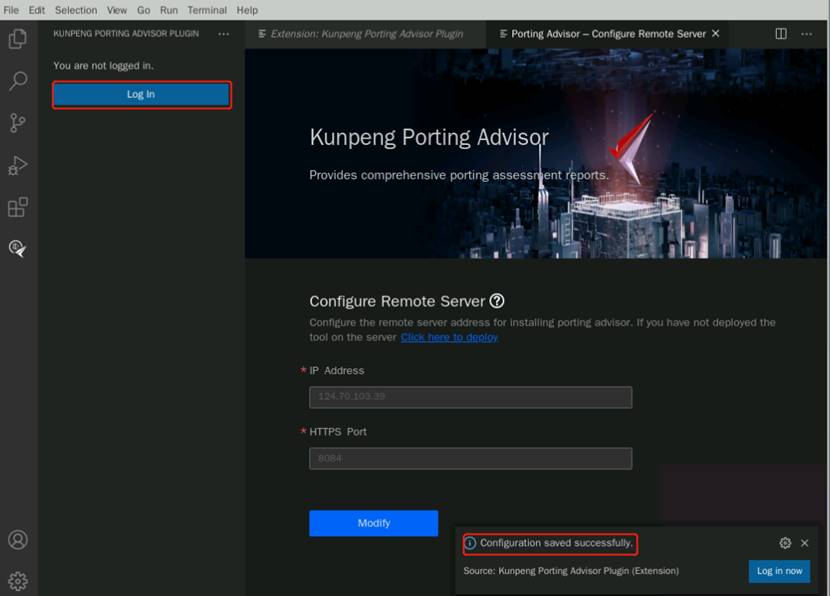
notes : If you click Save after , The following prompt appears :

You need to modify it manually VSCode Proxy server for , Click on settings->Application->proxy“Proxy Strict SSL” The option is unchecked ,“Proxy Support” Set item , Select... From the drop-down box “off”, Then click Save again on the configure server page , As shown in the figure below :


Click on “Log In”, Create user “portadmin”, Password customization , As shown in the figure below :


Setup complete click “OK” Complete the remote server connection configuration .
Source code preparation
The downloaded source code package to be scanned can be downloaded in x86 The platform can be compiled normally , adopt “ Kunpeng code migration tool ” After scanning , Identify the codes that need to be adapted and modified on the Kunpeng platform , By modifying the , To achieve the purpose of normal compilation and use on Kunpeng platform , So as to realize source code migration .
cd /opt/portadv/portadmin/sourcecode/Execute the following command to download Megahit Source code :
git clone https://codehub.devcloud.cn-north-4.huaweicloud.com/experiment00001/megahit.git
Execute the following command to merge the code :
cd megahit && git submodule update --initExecute the following command to create the build folder and enter :
mkdir build && cd buildExecute the following command to generate Makefile file :
cmake .. -DCMAKE_BUILD_TYPE=Release
Execute the following command to modify megahit Directory group : explain :porting The source directory group of the tool to be scanned must be porting To scan .
cd ../ && chown -R porting:porting /opt/portadv/portadmin/sourcecode/* && ll ./Source code migration
The code scanning tool scans the source code and migrates
choice “Source Code Porting”, Manual input selection “megahit/build” Source package path , Other parameters default , As shown in the figure below : explain : If there is a pop-up window when login is successful, click “OK” that will do

Click on “Analyze” The analysis is successful, as shown in the figure below

After analysis , Click on the file list , View the files in the file that need to be migrated , Click on “View Suggestion Code” Check the migration suggestions of specific files . Modify file “megahit_core_popcnt.dir/flags.make”, Drag the mouse to the place to be modified ( Drag right to the end of the current code to see ), You can see a point to be modified .
Delete the prompt to modify the code , Modified to complete “Ctrl+s” Save the file , as follows


Modify file “cpu_dispatch.h”, Hover the cursor over the code , You can see the modification suggestions
Separate the code that needs to be modified in each part , When the mouse hovers, the “Quick Fix…”, choice “Replace the code with the suggested code” Click... To make changes quickly , As shown in the figure below :
explain :“Quick Fix…” When it does not appear, the mouse wheel can be seen by sliding down .

When the modification is completed, remove the modified code comments ,“Ctrl+s” Save the file , Finally, as shown in the figure below :


Switch to xshell, Execution of the following command will “KunpengTrans.h” Add the header file to the directory /opt/portadv/portadmin/sourcecode/megahit/src/utils:
cp /opt/portadv/tools/inline_asm/config/KunpengTrans.h /opt/portadv/portadmin/sourcecode/megahit/src/utils/
Recompile and verify
stay xshell Command line execution make command
cd /opt/portadv/portadmin/sourcecode/megahit/build && make
Execute the following command to modify “/opt/portadv/portadmin/sourcecode/megahitkmlib/kmrns.h”:
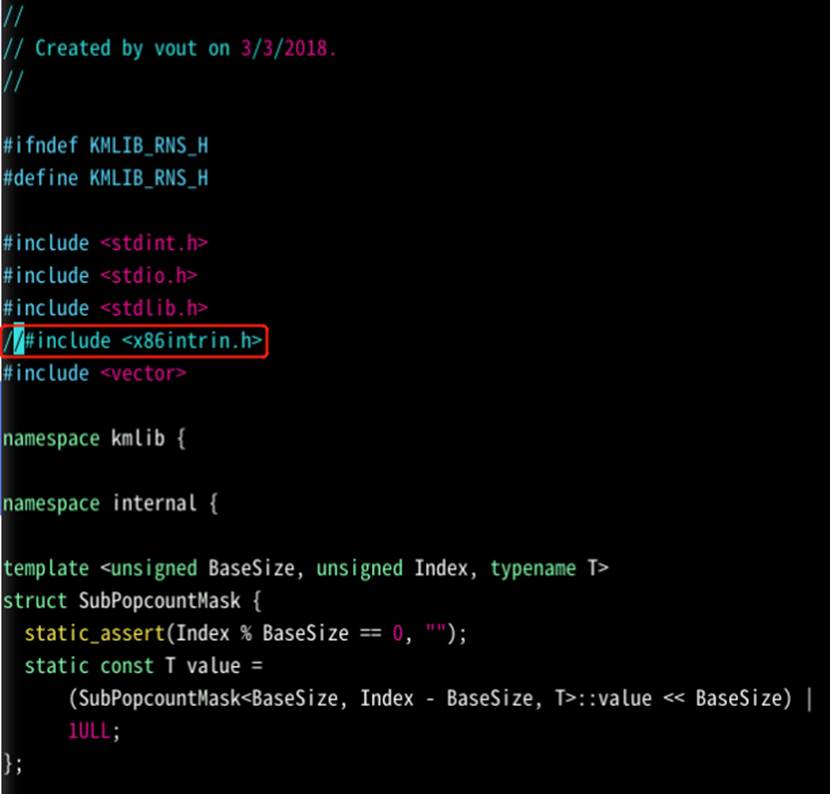
vim /opt/portadv/portadmin/sourcecode/megahit/src/kmlib/kmrns.h“<x86intrin.h>” by x86 System header file of the platform , stay arm This system header file does not exist on the platform . Click on the keyboard “i” The command enters text input mode , The comments are shown in the following figure :
explain :“#include <x86intrin.h>” Change it to “//#include <x86intrin.h>”.
Modified to complete , Click on the keyboard “ESC” Exit input mode , Input :wq Press enter after the command to save :
Re execution make command
【 About waiting 6 minute 】 The compilation passes, as shown in the figure below :

After compilation, execute the following command to verify : explain :Make simple_test Used in .fa File is github When you download the software package, it comes with you. There is no need to download it .
make simple_testRun successfully, as shown in the figure below :

summary
The elastic cloud server based on Huawei cloud can realize from x86 Platform to Kunpeng Source code migration of the platform . Through this process , I know the :
① The operation flow of the source code migration function in the Kunpeng code migration tool
② Megahit Project code tuning practice
The overall process of Kunpeng's development kit is very smooth , Scanning and migration functions are also very clear , Can quickly repair your code , Is worth to recommend .
边栏推荐
- Exploring the way of automated testing - Preparation
- Write it down once Net analysis of a property management background service stuck
- koa2+better-sqlite3实现增删改查
- 如何让 Dapper 支持 DateOnly 类型
- Horizon development board configuration network segment
- Another "provincial capital university", coming!
- 成功解决ValueError: Only TF native optimizers are supported in Eager mode
- mysql调优
- weserver发布地图服务
- System. Currenttimemillis() and system Nanotime() which is faster? Most people get the wrong answer!
猜你喜欢

Autonomous and controllable city! Release of the first domestic artiq architecture quantum computing measurement and control system

weserver发布地图服务

C language memory function

Pod security policy (PSP)

思科模拟器简单校园网设计,期末作业难度

System.currentTimeMillis() 和 System.nanoTime() 哪个更快?大部分人都会答错!

Exploring the way of automated testing - Preparation

打造一个 API 快速开发平台,牛逼!

#yyds干货盘点# 解决剑指offer:在二叉树中找到两个节点的最近公共祖先
自主可控再下一城!首套国产ARTIQ架构量子计算测控系统发布
随机推荐
在线文本过滤小于指定长度工具
Cisco simulator simple campus network design, final assignment difficulty
Learn from the official motor and BLDC control strategies, and make money as soon as you learn
Design of commodity search engine recommendation system
Use Gerrit + Zadig to realize trunk development and trunk publishing (including byte flying Book Practice)
iMile 利用 Zadig 多云环境周部署千次,跨云跨地域持续交付全球业务
LeCun用62页论文公布未来十年研究计划:AI自主智能
How to install MySQL 8.0 on rocky Linux and almalinux
C语言内存函数
Windbg调试工具介绍
自主可控再下一城!首套国产ARTIQ架构量子计算测控系统发布
College girls wear cheongsam to defend! Netizen: the tutor said it would be nice if the paper were as beautiful as the cheongsam
Hash hash game system development explanation technology -- hash game system development solution analysis
B+ tree | MySQL index usage principle
Package folders as ISO
机器学习 Out-of-Fold 折外预测详解 | 使用折外预测 OOF 评估模型的泛化性能和构建集成模型
System.currentTimeMillis() 和 System.nanoTime() 哪个更快?大部分人都会答错!
koa2+better-sqlite3实现增删改查
Five years after graduation, I asked all the leaders around me and summarized their learning methods
Review questions of project management