当前位置:网站首页>说说Flutter中的RepaintBoundary
说说Flutter中的RepaintBoundary
2022-07-22 20:17:00 【一叶飘舟】
一个懒洋洋的下午,偶然间看到了这篇Flutter 踩坑记录,作者的问题引起了我的好奇。作者的问题描述如下:
一个聊天对话页面,由于对话框形状需要自定义,因此采用了CustomPainter来自定义绘制对话框。测试过程中发现在ipad mini上不停地上下滚动对话框列表竟然出现了crash,进一步测试发现聊天过程中也会频繁出现crash。
在对作者的遭遇表示同情时,也让我联想到了自己使用CustomPainter的地方。
寻找问题
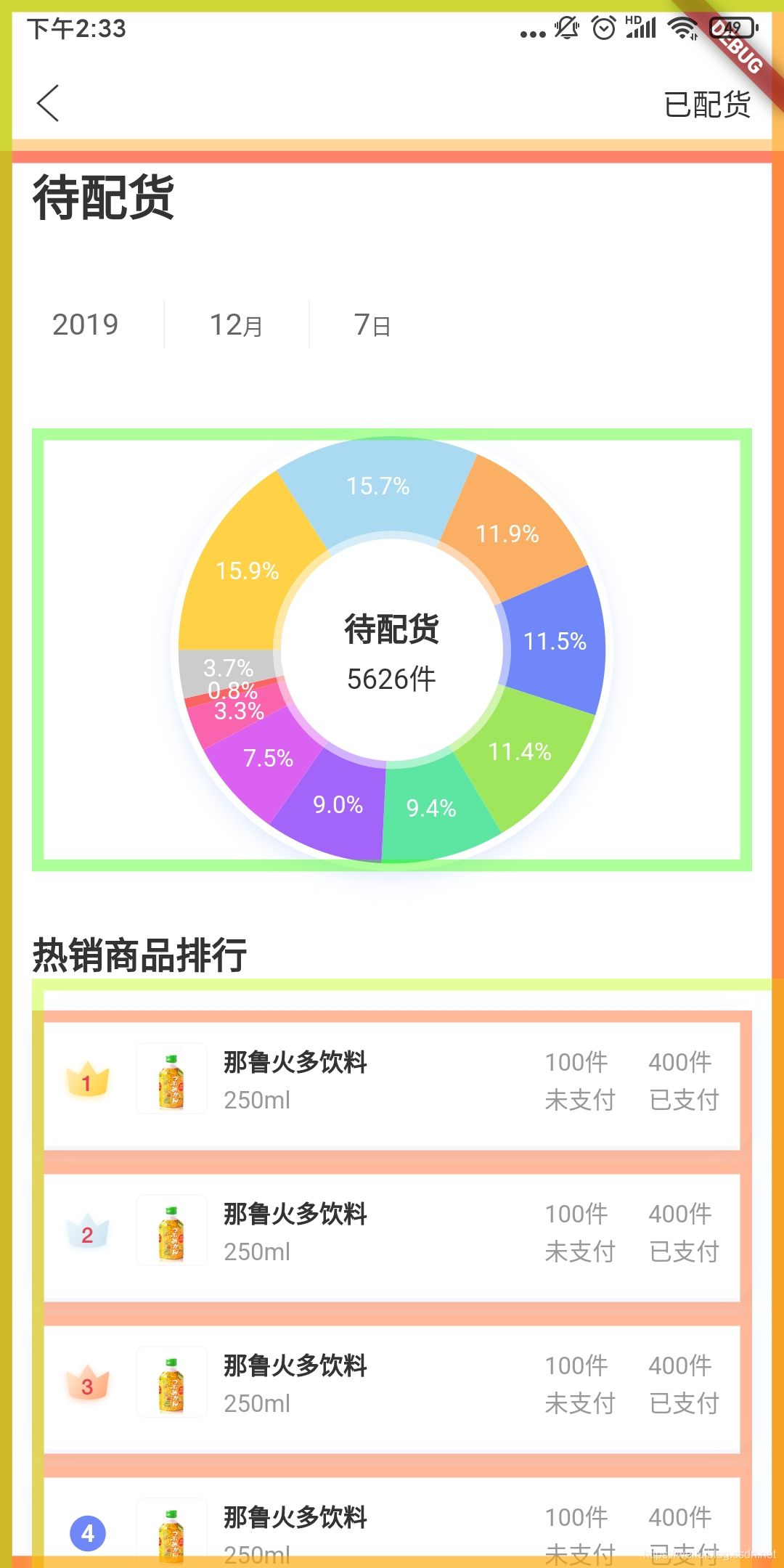
在flutter_deer中有这么一个页面:

页面最外层是个SingleChildScrollView,上方的环形图是一个自定义CustomPainter,下方是个ListView列表。
实现这个环形图并不复杂。继承CustomPainter,重写paint与shouldRepaint方法即可。paint方法负责绘制具体的图形,shouldRepaint方法负责告诉Flutter刷新布局时是否重绘。一般的策略是在shouldRepaint方法中,我们通过对比前后数据是否相同来判定是否需要重绘。
当我滑动页面时,发现自定义环形图中的paint方法不断在执行。???shouldRepaint方法失效了?其实注释文档写的很清楚了,只怪自己没有仔细阅读。(本篇源码基于Flutter SDK版本 v1.12.13+hotfix.3)
  /// If the method returns false, then the [paint] call might be optimized
  /// away.
  ///
  /// It's possible that the [paint] method will get called even if
  /// [shouldRepaint] returns false (e.g. if an ancestor or descendant needed to
  /// be repainted). It's also possible that the [paint] method will get called
  /// without [shouldRepaint] being called at all (e.g. if the box changes
  /// size).
  ///
  /// If a custom delegate has a particularly expensive paint function such that
  /// repaints should be avoided as much as possible, a [RepaintBoundary] or
  /// [RenderRepaintBoundary] (or other render object with
  /// [RenderObject.isRepaintBoundary] set to true) might be helpful.
  ///
  /// The `oldDelegate` argument will never be null.
  bool shouldRepaint(covariant CustomPainter oldDelegate);
注释中提到两点:
即使shouldRepaint返回false,也有可能调用paint方法(例如:如果组件的大小改变了)。
如果你的自定义View比较复杂,应该尽可能的避免重绘。使用RepaintBoundary或者RenderObject.isRepaintBoundary为true可能会有对你有所帮助。
显然我碰到的问题就是第一点。翻看SingleChildScrollView源码我们发现了问题:
  @override
  void paint(PaintingContext context, Offset offset) {
    if (child != null) {
      final Offset paintOffset = _paintOffset;

      void paintContents(PaintingContext context, Offset offset) {
        context.paintChild(child, offset + paintOffset); <----
      }

      if (_shouldClipAtPaintOffset(paintOffset)) {
        context.pushClipRect(needsCompositing, offset, Offset.zero & size, paintContents);
      } else {
        paintContents(context, offset);
      }
    }
  }
在SingleChildScrollView的滑动中必然需要绘制它的child,也就是最终执行到paintChild方法。
  void paintChild(RenderObject child, Offset offset) {

    if (child.isRepaintBoundary) {
      stopRecordingIfNeeded();
      _compositeChild(child, offset);
    } else {
      child._paintWithContext(this, offset);
    }

  }

  void _paintWithContext(PaintingContext context, Offset offset) {
  	...
    _needsPaint = false;
    try {
      paint(context, offset); //<-----
    } catch (e, stack) {
      _debugReportException('paint', e, stack);
    }

  }
在paintChild方法中,只要child.isRepaintBoundary为false,那么就会执行paint方法,这里就直接跳过了shouldRepaint。
解决问题
isRepaintBoundary在上面的注释中提到过,也就是说isRepaintBoundary为true时,我们可以直接合成视图,避免重绘。Flutter为我们提供了RepaintBoundary,它是对这一操作的封装,便于我们的使用。
class RepaintBoundary extends SingleChildRenderObjectWidget {

  const RepaintBoundary({ Key key, Widget child }) : super(key: key, child: child);

  @override
  RenderRepaintBoundary createRenderObject(BuildContext context) => RenderRepaintBoundary();
}


class RenderRepaintBoundary extends RenderProxyBox {

  RenderRepaintBoundary({ RenderBox child }) : super(child);

  @override
  bool get isRepaintBoundary => true; /// <-----

}
那么解决问题的方法很简单:在CustomPaint外层套一个RepaintBoundary。详细的源码点击这里。
性能对比
其实之前没有到发现这个问题,因为整个页面滑动流畅。
为了对比清楚的对比前后的性能,我在这一页面上重复添加十个这样的环形图来滑动测试。下图是timeline的结果:


优化前的滑动会有明显的不流畅感,实际每帧绘制需要近16ms,优化后只有1ms。在这个场景例子中,并没有达到大量的绘制,GPU完全没有压力。如果只是之前的一个环形图,这步优化其实可有可无,只是做到了更优,避免不必要的绘制。
在查找相关资料时,我在stackoverflow上发现了一个有趣的例子。
作者在屏幕上绘制了5000个彩色的圆来组成一个类似“万花筒”效果的背景图。
class ExpensivePainter extends CustomPainter {
  @override
  void paint(Canvas canvas, Size size) {
    print("Doing expensive paint job");
    Random rand = new Random(12345);
    List<Color> colors = [
      Colors.red,
      Colors.blue,
      Colors.yellow,
      Colors.green,
      Colors.white,
    ];
    for (int i = 0; i < 5000; i++) {
      canvas.drawCircle(
          new Offset(
              rand.nextDouble() * size.width, rand.nextDouble() * size.height),
          10 + rand.nextDouble() * 20,
          new Paint()
            ..color = colors[rand.nextInt(colors.length)].withOpacity(0.2));
    }
  }

  @override
  bool shouldRepaint(ExpensivePainter other) => false;
}
同时屏幕上有个小黑点会跟随着手指滑动。但是每次的滑动都会导致背景图的重绘。优化的方法和上面的一样,我测试了一下这个Demo,得到了下面的结果。

这个场景例子中,绘制5000个圆给GPU带来了不小的压力,随着RepaintBoundary的使用,优化的效果很明显。
一探究竟
那么RepaintBoundary到底是什么?RepaintBoundary就是重绘边界,用于重绘时独立于父布局的。
在Flutter SDK中有部分Widget做了这个处理,比如TextField、SingleChildScrollView、AndroidView、UiKitView等。最常用的ListView在item上默认也使用了RepaintBoundary:
大家可以思考一下为什么这些组件使用了RepaintBoundary。

接着上面的源码中child.isRepaintBoundary为true的地方,我们看到会调用_compositeChild方法;
  void _compositeChild(RenderObject child, Offset offset) {
    ...
    // Create a layer for our child, and paint the child into it.
    if (child._needsPaint) {
      repaintCompositedChild(child, debugAlsoPaintedParent: true); // <---- 1
    }

    final OffsetLayer childOffsetLayer = child._layer;
    childOffsetLayer.offset = offset;
    appendLayer(child._layer);
  }

  static void repaintCompositedChild(RenderObject child, { bool debugAlsoPaintedParent = false }) {
    _repaintCompositedChild( // <---- 2
      child,
      debugAlsoPaintedParent: debugAlsoPaintedParent,
    );
  }

  static void _repaintCompositedChild(
    RenderObject child, {
    bool debugAlsoPaintedParent = false,
    PaintingContext childContext,
  }) {
    ...
    OffsetLayer childLayer = child._layer;
    if (childLayer == null) {
      child._layer = childLayer = OffsetLayer(); // <---- 3
    } else {
      childLayer.removeAllChildren();
    }

    childContext ??= PaintingContext(child._layer, child.paintBounds);
    /// 创建完成,进行绘制
    child._paintWithContext(childContext, Offset.zero);
    childContext.stopRecordingIfNeeded();
  }
child._needsPaint为true时会最终通过_repaintCompositedChild方法在当前child创建一个图层(layer)。
这里说到的图层还是很抽象的,如何直观的观察到它呢?我们可以在程序的main方法中将debugRepaintRainbowEnabled变量置为true。它可以帮助我们可视化应用程序中渲染树的重绘。原理其实就是在执行上面的stopRecordingIfNeeded方法时,额外绘制了一个彩色矩形:
  @protected
  @mustCallSuper
  void stopRecordingIfNeeded() {
    if (!_isRecording)
      return;
    assert(() {
      if (debugRepaintRainbowEnabled) { // <-----
        final Paint paint = Paint()
          ..style = PaintingStyle.stroke
          ..strokeWidth = 6.0
          ..color = debugCurrentRepaintColor.toColor();
        canvas.drawRect(estimatedBounds.deflate(3.0), paint);
      }
      return true;
    }());
  }
效果如下:
不同的颜色代表不同的图层。当发生重绘时,对应的矩形框也会发生颜色变化。
在重绘前,需要markNeedsPaint方法标记重绘的节点。
  void markNeedsPaint() {
    if (_needsPaint)
      return;
    _needsPaint = true;
    if (isRepaintBoundary) {
      // If we always have our own layer, then we can just repaint
      // ourselves without involving any other nodes.
      assert(_layer is OffsetLayer);
      if (owner != null) {
        owner._nodesNeedingPaint.add(this);
        owner.requestVisualUpdate(); // 更新绘制
      }
    } else if (parent is RenderObject) {
      final RenderObject parent = this.parent;
      parent.markNeedsPaint();
      assert(parent == this.parent);
    } else {
      if (owner != null)
        owner.requestVisualUpdate();
    }
  }
markNeedsPaint方法中如果isRepaintBoundary为false,就会调用父节点的markNeedsPaint方法,直到isRepaintBoundary为 true时,才将当前RenderObject添加至_nodesNeedingPaint中。
在绘制每帧时,调用flushPaint方法更新视图。
  void flushPaint() {

    try {
      final List<RenderObject> dirtyNodes = _nodesNeedingPaint; <-- 获取需要绘制的脏节点
      _nodesNeedingPaint = <RenderObject>[];
      // Sort the dirty nodes in reverse order (deepest first).
      for (RenderObject node in dirtyNodes..sort((RenderObject a, RenderObject b) => b.depth - a.depth)) {
        assert(node._layer != null);
        if (node._needsPaint && node.owner == this) {
          if (node._layer.attached) {
            PaintingContext.repaintCompositedChild(node); <--- 这里重绘,深度优先
          } else {
            node._skippedPaintingOnLayer();
          }
        }
      }

    } finally {

      if (!kReleaseMode) {
        Timeline.finishSync();
      }
    }
  }
这样就实现了局部的重绘,将子节点与父节点的重绘分隔开。
tips:这里需要注意一点,通常我们点击按钮的水波纹效果会导致距离它上级最近的图层发生重绘。我们需要根据页面的具体情况去做处理。这一点在官方的项目flutter_gallery中就有做类似处理。
总结
其实总结起来就是一句话,根据场景合理使用RepaintBoundary,它可以帮你带来性能的提升。 其实优化方向不止RepaintBoundary,还有RelayoutBoundary。那这里就不介绍了,感兴趣的可以查看文末的链接。
如果本篇对你有所启发和帮助,多多点赞支持!最后也希望大家支持我的Flutter开源项目flutter_deer,我会将我关于Flutter的实践都放在其中。
参考
感兴趣的可以看看这个大佬关于RepaintBoundary的专栏文章:
Flutter 绘制探索 5 | 深入分析重绘范围 RepaintBoundary | 七日打卡
当然也可以看看大佬写的关于绘制方面的文章:
dFlutter 绘制探索专栏

边栏推荐
- Google cloud and Oracle cloud are "hot"? It is imperative to deploy cross cloud disaster recovery!
- -bash: wget: 未找到命令
- Q6ui布局操作
- 0day attack path prediction method based on network defense knowledge map
- Unity 笔记——Addressables的使用
- Shell脚本
- ES6解决异步问题
- 对比学习下的跨模态语义对齐是最优的吗?---自适应稀疏化注意力对齐机制 IEEE Trans. MultiMedia
- 【计网实验报告】Cisco局域网模拟组建、简单网络测试
- How to turn off the messy pop-up windows on the computer? A tutorial on setting up pop-up advertisements
猜你喜欢

深度学习模型的版权保护研究综述

postman “status“: 500, “error“: “Internal Server Error“, “message“: “The request was rejecte“

Image processing solution veimagex technology evolution Road

Shell script

千亿营收之后,阿里云生态有了新打法

直播预告 | openGauss的自治运维平台DBMind实践分享

0day attack path prediction method based on network defense knowledge map

ESP32:Arduino教程汇总

开源2周年,openGauss Developer Day 2022全程亮点回顾!

标签平滑(label smoothing)
随机推荐
Inside the hard core of LAN SDN technology - 15 MPLS implementation of user roaming in the three from thing to person Park
聪明人的游戏提高篇:第三章第二课:因子个数(factor)
Esphone's self-made infrared remote control is connected to ha to control lights, switches, etc. any remote control can be used
分享一个qt实现的登录界面模板
删除文件时需要system权限怎么办 你需要来自system的权限才能删除的解决办法
Computer prompts how to deal with insufficient memory. The solution of insufficient computer C disk
导出功能单独调用
How to get administrator permissions on the computer tutorial on setting administrator permissions on the computer
64注意力机制 10章
用于图像语义分割的GAU与PPM
LUR caching algorithm
Analyse de la stratégie de lecture et d'écriture du cache
再学电商项目之谷粒商城之ES6新特性
Unable to open the proxy server. What should I do if the proxy server is not set to full access?
基于以太坊状态数据库的攻击与防御方案
国泰君安证券股票开户怎么样安全吗
Shell script
telnet不是内部或外部命令怎么解决 telnet不是内部或外部命令解决办法
【ARC127F】±AB
CAN总线详解