当前位置:网站首页>【Xilinx AX7103 MicroBalze学习笔记6】MicroBlaze 自定义 IP 核封装实验
【Xilinx AX7103 MicroBalze学习笔记6】MicroBlaze 自定义 IP 核封装实验
2022-06-23 22:04:00 【Linest-5】
目录
实验任务
本节介绍基于 MicroBlaze 的自定义 IP 核封装实验,实验任务是通过自定义一个呼吸灯 IP 核,来控制 LED 呈现呼吸灯的效果,并且可以通过 AXI 接口来控制呼吸灯的开关和呼吸的频率。
实验框图
实验框图比较简单,框图中的 UART 用于打印信息, Breath LED IP 核为自定义的 IP 核, McroBlaze 处理器通过 AXI 接口为LED IP 模块发送配置数据,从而来控制 LED 灯

创建自定义 IP
创建一个新工程,添加呼吸灯代码文件

代码如下:
`timescale 1ns / 1ps
//
// Company:
// Engineer:

// Create Date: 2022/06/10 19:50:37
// Design Name:
// Module Name: breath_led_ip
// Project Name:


//


module breath_led_ip(
 	input 		sys_clk ,
 	input 		sys_rst_n ,
 	input 		sw_ctrl ,
 	input 		set_en ,
 	input [9:0] set_freq_step ,
 	output 		led
);

//*****************************************************
//** main code
//*****************************************************
//parameter define
parameter START_FREQ_STEP = 10'd100;

//reg define
reg [15:0] 	period_cnt ;
reg [9:0] 	freq_step ;
reg [15:0] 	duty_cycle ;
reg 		inc_dec_flag;
wire 		led_t ;

assign led_t = ( period_cnt <= duty_cycle ) ? 1'b1 : 1'b0 ;
assign led = led_t & sw_ctrl;

always @ (posedge sys_clk) begin
	if (!sys_rst_n)
		period_cnt <= 16'd0;
	else if(!sw_ctrl)
		period_cnt <= 16'd0;
	else if( period_cnt == 16'd50_000 )
		period_cnt <= 16'd0;
	else
		period_cnt <= period_cnt + 16'd1;
end

always @(posedge sys_clk) begin
	if(!sys_rst_n)
		freq_step <= START_FREQ_STEP;
	else if(set_en) begin
		if(set_freq_step == 0)
			freq_step <= 10'd1;
		else if(set_freq_step >= 10'd1_000)
		freq_step <= 10'd1_000;
		else
		freq_step <= set_freq_step;
	end
end

always @(posedge sys_clk) begin
	if (sys_rst_n == 1'b0) begin
		duty_cycle <= 16'd0;
		inc_dec_flag <= 1'b0;
	end
	else if(!sw_ctrl) begin
		duty_cycle <= 16'd0;
		inc_dec_flag <= 1'b0;
	end
	else if( period_cnt == 16'd50_000 ) begin
		if( inc_dec_flag ) begin
			if( duty_cycle == 16'd0 )
				inc_dec_flag <= 1'b0;
			else if(duty_cycle < freq_step)
				duty_cycle <= 16'd0;
			else
				duty_cycle <= duty_cycle - freq_step;
		end
		else begin
			if( duty_cycle >= 16'd50_000 )
				inc_dec_flag <= 1'b1;
			else
				duty_cycle <= duty_cycle + freq_step;
		end
	end
	else
		duty_cycle <= duty_cycle ;
	end

endmodule
封装 IP
点击菜单栏中的 Tools 的创建和封装新 IP,

选择创建带有 AXI4 接口的

下一个配置页中的一些命名以及文件存储地址可以自定义。

下一个的界面内容保持默认即可,可以根据自己的需要更改,这里保持默认,因为 MB 通过AXI总线配置此模块,因此作为从机slave。
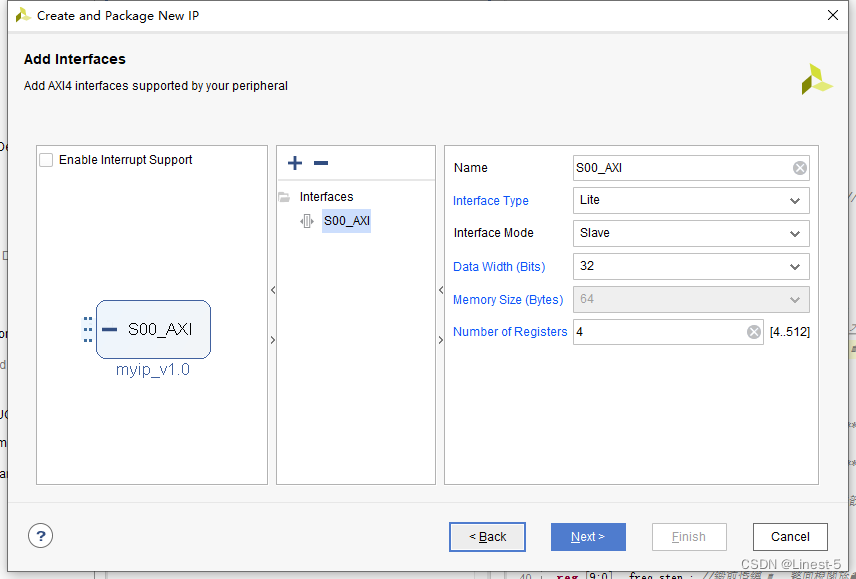
最后界面中的 Next Steps 中的选项可以根据需要选择,这里直接保持默认,最后点击finish即可。

接下来开始设置 IP 封装,将界面切换至 Package IP,如果不小心关闭的话,可以通过 IP-XACT 界面下的 component.xml 重新打开
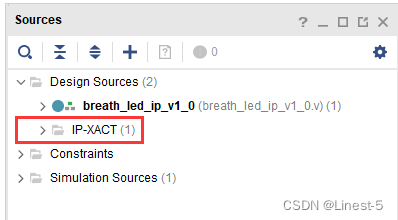
IP 封装界面配置
Identification 这一栏的选项直接保持默认,需要注意的是,我们可以点击图 Categories 选项下的“+”按钮来修改 IP 的分类,这里不做修改。

点击“Compatibility” ,修改该 IP 核支持的器件。点击“Family” 一栏下的“+”图标,选择“Add FamilyExplicitly…”,可以选择你所需要适配的器件型号,尽可能的选多一些的器件。
这里勾选“artix7(artix-7)”,表示该 IP 核支持 artix7 器件。而 Life-cycle 表明该 IP 核当前的产品生命周期,这里选择“Pre-Production”。

点击“File Groups” ,然后点击界面上的“Merge Changes from Gile Groups Wizard”,如图所示:
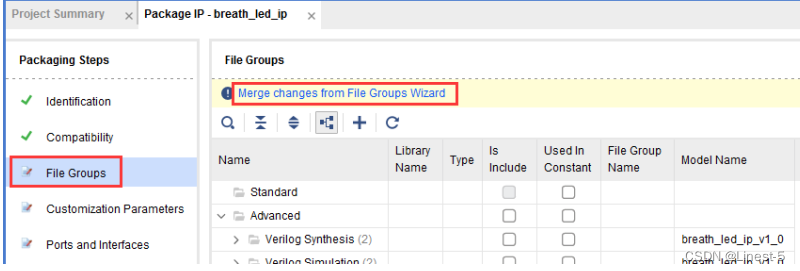
此时可以在 Verilog Synthesis 一栏中查看工程中的两个模块。

点击“Customization Parameters”,点击界面上的“Merge Changes from Customization Parameters Wizard”,如图所示:

此时多了 Hidden Parameters 一栏,展开这个界面,可以看到程序中自定义的参数 START_FREQ_STEP,右击这个参数,选择“Edit Parameter…”,弹出编辑参数的界面,如图所示:

在弹出的页面中勾选“Visible in Customization GUI”, 将此参数显示在 GUI 参数界面中;Format 格式改为“long”;勾选“Specify Range”来设定此参数的范围。将 Type 改为“Range of integers”, Minimum 的值改为“1”,Maximum 的值改为“1000” ,将 Default Value 的值改为“100” ,点击“OK”按钮,如图所示:

点击“Customization GUI”,可以在“Layout”界面拖动 Page 0 下的参数来调整参数在 GUI 显示的位置,如图所示:
最后点击re-package IP即可。

硬件设计(Vivado部分)
Block Design搭建
打开第一个 hello world 实验工程,将其另存为新的工程,命名为 breath_led 然后开始 BD 的搭建。
添加 IP 库
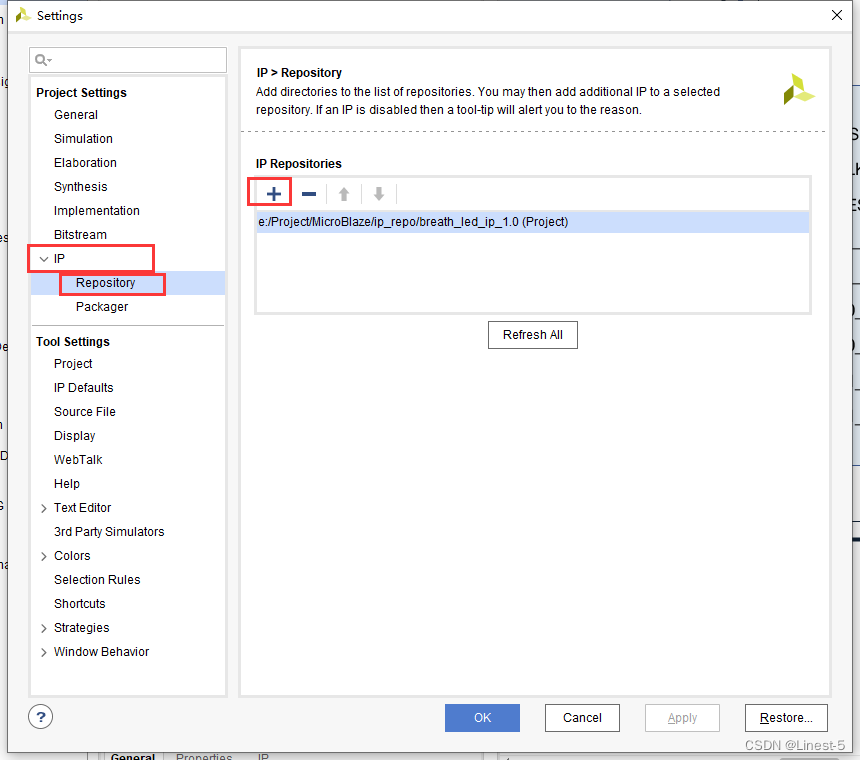
点击左侧菜单栏的 setting
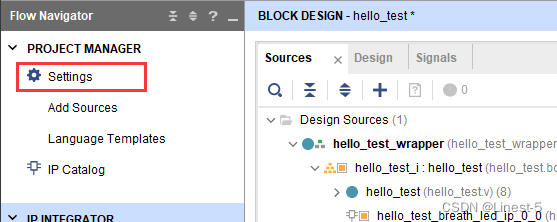
点击 IP 中的 repository 的加号提娜佳刚刚创建的 IP 至此 IP 库,点击 ok 即可。
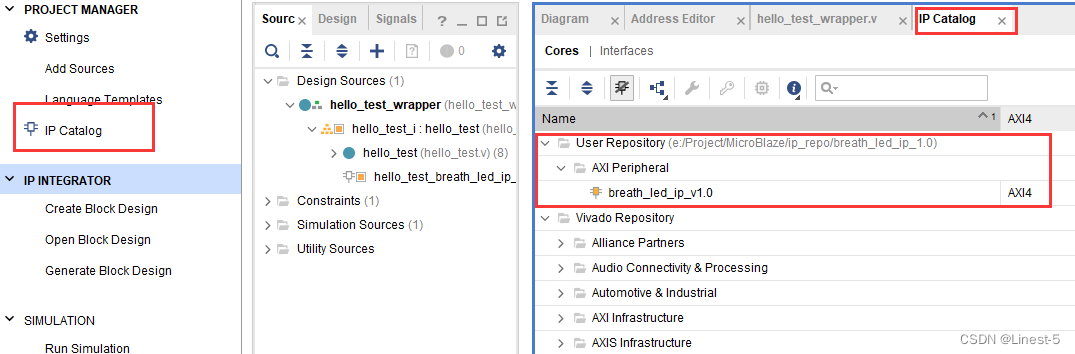
这是点击左侧菜单栏的 IP catalog ,在 User repository 中就可以看到刚刚添加用户自定义的 IP
打开 block design 添加搜索 IP 并添加,这时 IP 就成功显示在 BD 上了。

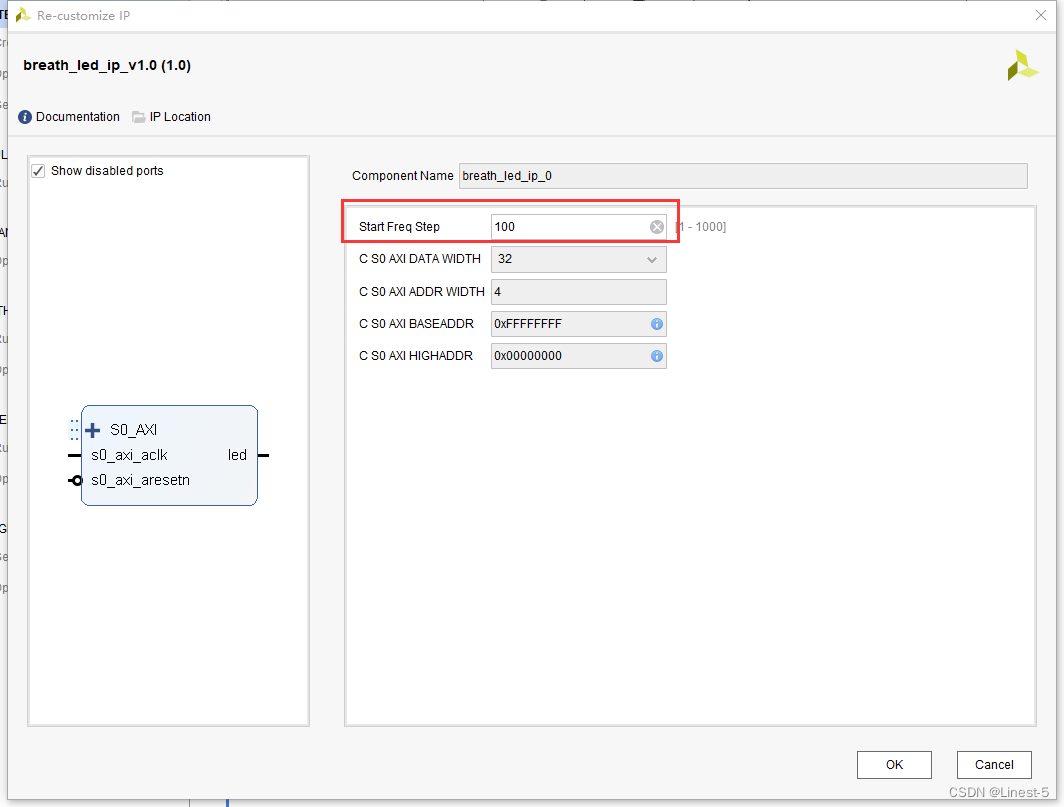
点开此 IP 就可以看到自定的参数是可以在配置界面中随意配置的。
最后点击自动连线并将输出 led 的管脚引出,效果图如下:

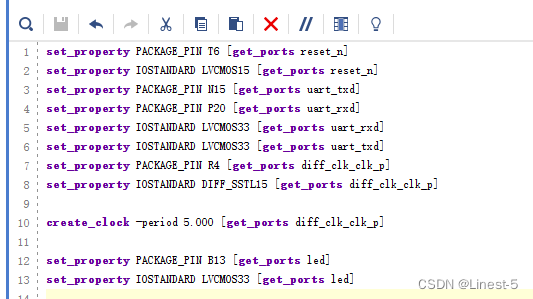
约束文件
添加约束文件最后直接生成比特流即可。
软件设计(SDK部分)
进入到 SDK 的开发界面中,新建一个工程文件,命名为 breath_led,并在工程中新建一个设计文件命名为main.c。
 #include "stdio.h"
 #include "xparameters.h"
 #include "xil_printf.h"
 #include "breath_led_ip.h"
 #include "xil_io.h"
 #include "sleep.h"
 #define LED_IP_BASEADDR XPAR_BREATH_LED_IP_0_S0_AXI_BASEADDR //LED IP 基地址
 #define LED_IP_REG0 BREATH_LED_IP_S0_AXI_SLV_REG0_OFFSET //LED IP 寄存器地址 0
 #define LED_IP_REG1 BREATH_LED_IP_S0_AXI_SLV_REG1_OFFSET //LED IP 寄存器地址 1

 //main 函数
 int main()
 {
 int freq_flag; //定义频率状态,用于循环改变呼吸灯的呼吸频率
 int led_state; //定义 LED 灯的状态

 xil_printf("LED User IP Test!\n");
 while(1){
 //根据 freq_flag 的标志位,切换呼吸灯的频率
 if(freq_flag == 0){
 BREATH_LED_IP_mWriteReg(LED_IP_BASEADDR,LED_IP_REG1,0x800000ef);
 freq_flag = 1;
 }
 else{
 BREATH_LED_IP_mWriteReg(LED_IP_BASEADDR,LED_IP_REG1,0x8000002f);
 freq_flag = 0;
 }
 //获取 LED 当前开关状态 1:打开 0:关闭
 led_state = BREATH_LED_IP_mReadReg(LED_IP_BASEADDR,LED_IP_REG0);
 //如果开关关闭,打开呼吸灯
 if(led_state == 0){
 BREATH_LED_IP_mWriteReg (LED_IP_BASEADDR, LED_IP_REG0, 1);
 xil_printf("Breath LED ON\n");
 }
 sleep(5);
 //获取 LED 当前开关状态 1:打开 0:关闭
 led_state = BREATH_LED_IP_mReadReg(LED_IP_BASEADDR,LED_IP_REG0);
 //如果开关打开,关闭呼吸灯
 if(led_state == 1){
 BREATH_LED_IP_mWriteReg (LED_IP_BASEADDR, LED_IP_REG0, 0);
 xil_printf("Breath LED OFF\n");
 }
 sleep(1);
 }
 }
//代码来自正点原子
最后点击 run,就可以看到板子的 led 等呈现呼吸灯的效果

同样的在串口助手上也可以成功看到 led 灯的实时状态

边栏推荐
- 微信视频号如何用 PC 电脑做直播?
- Talking about the knowledge of digital transformation
- SQL语句中EXISTS的详细用法大全
- Short video enters the hinterland of online music
- 巨头下场“摆摊”,大排档陷入“苦战”
- pyspark on hpc
- C# 读取内存条占用大小,硬盘占用大小
- Go language learning
- The fortress computer is connected to the server normally, but what's wrong with the black screen? What should I do?
- How to write and read ASM file system data
猜你喜欢
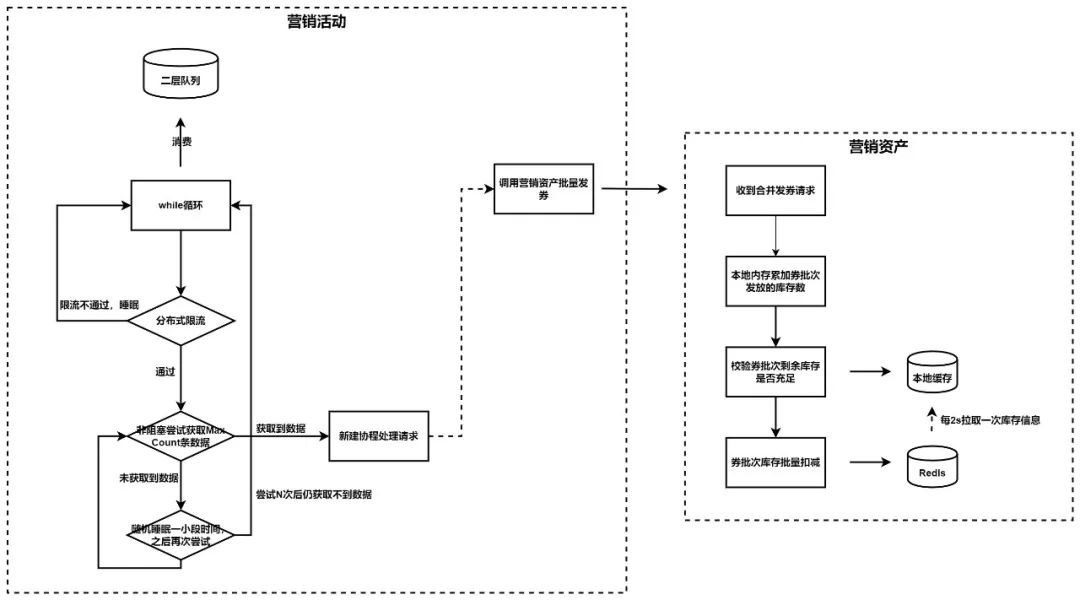
Practice of issuing vouchers for Tiktok payment of 100000 TPS traffic

【技术干货】蚂蚁办公零信任的技术建设路线与特点

Generate post order traversal according to pre order traversal and mid order traversal

短视频挺进在线音乐腹地
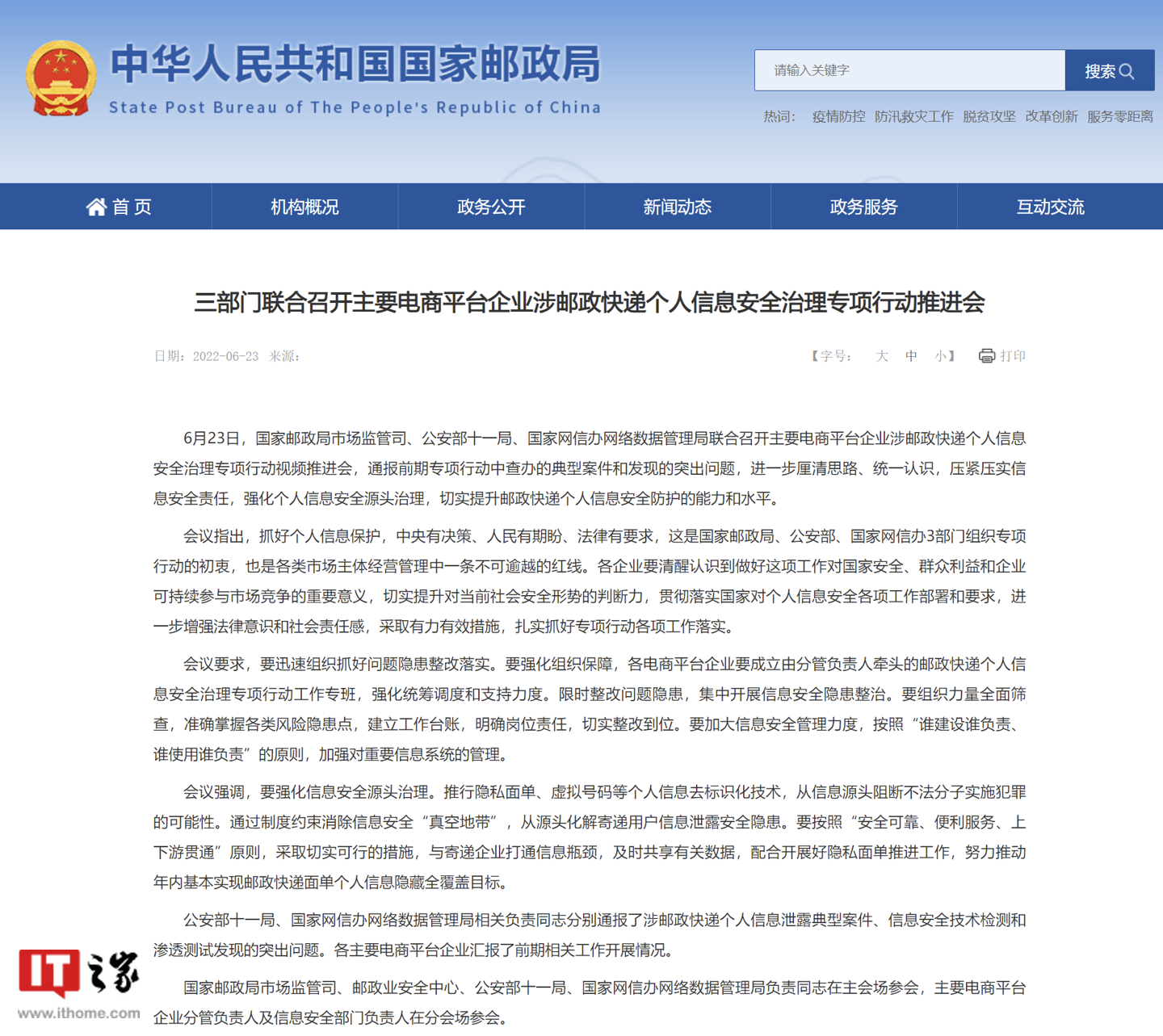
国家邮政局等三部门:加强涉邮政快递个人信息安全治理,推行隐私面单、虚拟号码等个人信息去标识化技术

SAVE: 软件分析验证和测试平台

数据解读!理想L9冲刺「月销过万」,从BBA手中抢份额

The sandbox week is coming!
Trigger definition and syntax introduction in MySQL

The technical design and practice of decrypting the red envelopes of Tiktok Spring Festival

随机推荐
短视频挺进在线音乐腹地
Go language learning
Recommended | January activity 2-core 4G lightweight application server, enterprise nationwide purchase 6.7 yuan / month!!!
Notes to nodejs (II)
评估和选择最佳学习模型的一些指标总结
2022云顾问技术系列之存储&CDN专场分享会
Talking about the knowledge of digital transformation
PostgreSQL怎么创建分区表详解
C # read the occupied size of memory module and hard disk
浩哥的博客之路
PHP时间戳
MySQL事务隔离
What to check for AIX system monthly maintenance (II)
AIX system monthly maintenance check (I)
Data interpretation! Ideal L9 sprints to "sell more than 10000 yuan a month" to grab share from BBA
What are the processes, levels, stages and key points of requirements analysis in software development
Zynq Ultrascale+ RF Data Coverter IP配置 - ADC
Aicon2021 | AI technology helps content security and promotes the healthy development of Internet Environment
Oracle turn off recycle bin
Cause analysis and Countermeasures for FANUC robot srvo-050 collision detection alarm (available for personal test)