当前位置:网站首页>QT当中的【QSetting和.ini配置文件】以及【创建Resources.qrc】
QT当中的【QSetting和.ini配置文件】以及【创建Resources.qrc】
2022-06-23 16:22:00 【红客白帽】
QT当中的【QSetting和.ini配置文件】以及【创建Resources.qrc】
【1】 创建QT下的.qrc
点击你的项目文件名,右键点击Add New …
选择这个
一般情况下,设置为/为根目录的形式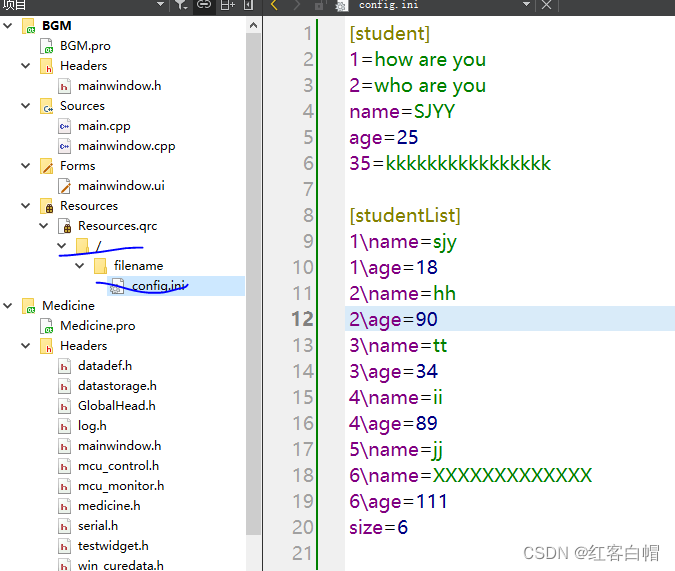
直接在项目文件下新建目录是不行的,要在.qrc下才可以
【第一步添加前缀】

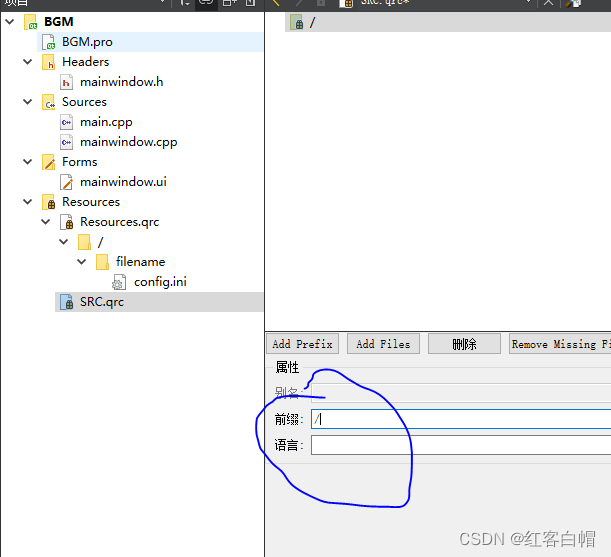
【第二步添加文件】
先在当前目录下创建几个文件夹,并在文件夹中添加相关文件,然后添加进当前.qrc的/目录下
显然可以创建多个这样的文件和目录

【2】QSetting+.qrc使用
首先在.ini里面添加配置文件的信息
配置文件里面的信息可以通过代码写入,也可以事先写入,具体看项目
【3】代码实现
废话不多说,代码里面见分晓
main.cpp
#include "mainwindow.h"
#include <QApplication>


int main(int argc, char *argv[])
{

    QApplication a(argc, argv);
    MainWindow w;
    return a.exec();
}
mainwindow.h
#ifndef MAINWINDOW_H
#define MAINWINDOW_H
#include <QMainWindow>
#include <QTextCodec>//解决字符编码乱码问题
#include<QSettings>//用于设置配置文件和注册表等
QT_BEGIN_NAMESPACE
namespace Ui {
     class MainWindow; }
QT_END_NAMESPACE

class MainWindow : public QMainWindow
{

    Q_OBJECT

public:
    MainWindow(QWidget *parent = nullptr);
    ~MainWindow();

public slots:


private:
    Ui::MainWindow *ui;
    QTextCodec *codec;
    QString Name;
    unsigned char Age;
};
#endif // MAINWINDOW_H
mainwindow.cpp
//=============================QSetting 和 .ini配置文件配合使用范例
#include "mainwindow.h"
#include "ui_mainwindow.h"
#include<QString>
#include<QDebug>//控制台输出
#include<QList>//数组
#include<QStringList>

struct Student {

    Student() {
    }//构造函数
    Student(QString name, int age) : name(name), age(age) {
    }//构造重载函数 且参数列表初始化

    QString name;
    int age;

    void print() {

        qDebug() << "name: " << name << ", age: " << age;
    }
};

MainWindow::MainWindow(QWidget *parent)
    : QMainWindow(parent)
    , ui(new Ui::MainWindow)
{

    ui->setupUi(this);

    this->show();
    codec = QTextCodec::codecForName("gbk");//设置字符编码
    codec->setCodecForLocale(codec);
    setWindowTitle(codec->toUnicode("UI学习笔记"));

    /* QSettings::NativeFormat 在windows平台可以读写windows注册表 QSettings::IniFormat 可以读写ini格式的配置文件 */
    //实现.ini配置文件
    QSettings settings(":/filename/config.ini",QSettings::IniFormat);
    QString name = QString("student")+"/"+"name";//student是.ini里面的模块名+换行符+name
    QString age = QString("student")+"/"+"age";//student是.ini里面的模块名+换行符+age
    //通过设置值的方式
   // settings.setValue(name,"SJY");
   // settings.setValue(age,"26");

    //直接获取ini里面的值的方式
    ui->textEdit->setFont(QFont("楷体",14));//设置字体,字号
    ui->textEdit->append(codec->toUnicode(settings.value("student/1").toString().toUtf8()));
    ui->textEdit->append(codec->toUnicode(settings.value("student/2").toString().toUtf8()));
    ui->textEdit->append(codec->toUnicode(settings.value("student/35").toString().toUtf8()));
    ui->textEdit->append(codec->toUnicode(settings.value(name).toString().toUtf8()));
    ui->textEdit->append(codec->toUnicode(settings.value(age).toString().toUtf8()));

    //数组方式设置配置文件ini内容和获取内容
    QList<Student> stu_list;//结构体链表
   //将数据压栈
    stu_list.push_back(Student("Billy", 1));
    stu_list.push_back(Student("Kitty", 2));
    stu_list.push_back(Student("Alice", 3));
    stu_list.push_back(Student("Ben", 4));
    stu_list.push_back(Student("Miss", 5));

    settings.beginWriteArray("studentList");//开始写,模块名studentList
    for ( int i = 0; i < stu_list.size(); ++i ) {

       settings.setArrayIndex(i);//设置数组索引
       settings.setValue("name", stu_list.at(i).name);//根据索引找到结构体里面的匹配数据
       settings.setValue("age", stu_list.at(i).age);
    }
    settings.endArray();//结束
    ui->textEdit->append("----------------------------------------------------------------------");
    //开始获取数据
    QList<Student> ret_list;
    int size = settings.beginReadArray("studentList");//开始读取数据
    ui->textEdit->append(QString("size=")+QString::number(size));
    //读取ini里面的数组
    for (int i = 0; i < size+1; ++i) {
    //本来设置值时大小只有5,但是我在ini文件里面增加了一个,所以改为size=6
        settings.setArrayIndex(i);//=======================设置索引【第一步】
        Student stu;//创建结构体变量
        stu.name = settings.value("name").toString();
        stu.age = settings.value("age").toInt();
        //【第二部:获取值并显示】
        ui->textEdit->append(codec->toUnicode(settings.value("name").toString().toUtf8()));
        ui->textEdit->append(codec->toUnicode(settings.value("age").toString().toUtf8()));
        ret_list.append(stu);//追加结构体
    }
    settings.endArray();

        for ( auto &temp : ret_list )//遍历结构体数组
        {

            temp.print();//打印
        }
  ui->textEdit->append("----------------------------------------------------------------------");
        //对ini的其他操作
    settings.setIniCodec("UTF-8");//设置字符编码
    QStringList list= settings.allKeys();//获取所有键
    for(int i=0;i<list.size();i++)
    {

        ui->textEdit->append(list.at(i));
    }

}

MainWindow::~MainWindow()
{

    /*QStringList QSettings::allKeys() const // 获取所有的key bool QSettings::contains(const QString &key) const // 判断key是否存在 void QSettings::remove(const QString &key) // 移除key void QSettings::setIniCodec(QTextCodec *codec) // 设置编码,处理中文乱码*/
    delete ui;
}
mainwidow.ui

【4】项目效果展示

程序员不可以放弃学习
边栏推荐
- The official Chinese course of zero foundation introduction jetpack compose is coming
- 数字经济加速落地,能为中小企业带来什么?
- Image saving: torchvision utils. save_ image(img, imgPath)
- Safe and comfortable, a new generation of Qijun carefully interprets the love of the old father
- 供求两端的对接将不再是依靠互联网时代的平台和中心来实现的
- Asemi ultrafast recovery diode es1j parameters, es1j package, es1j specification
- EasyPlayer移动端播放webrtc协议时长按播放页面无法关闭“关于我们”页面
- Implementation of network data transmission by golang Gob
- Six stone programming: the subtlety of application
- How to select an oscilloscope? These 10 points must be considered!
猜你喜欢
Apache基金会正式宣布Apache InLong成为顶级项目

JS common error reporting and exception capture

DataNode进入Stale状态问题排查

Focus: zk-snark Technology

Another breakthrough! Alibaba cloud enters the Gartner cloud AI developer service Challenger quadrant
The Google play academy team PK competition is in full swing!

Matlab: how to know from some data which data are added to get a known number

ASEMI肖特基二极管和超快恢复二极管在开关电源中的对比
Code implementation of golang binary search method
Here comes the official zero foundation introduction jetpack compose Chinese course!
随机推荐
走好数据中台最后一公里,为什么说数据服务 API 是数据中台的标配?
Code examples of golang goroutine, channel and time
TQ of R language using tidyquant package_ The transmute function calculates the daily, monthly and weekly returns of a stock. Ggplot2 uses the bar plot to visualize the monthly return data of the stoc
The company recruited a tester with five years' experience and saw the real test ceiling
Stick to five things to get you out of your confusion
Another breakthrough! Alibaba cloud enters the Gartner cloud AI developer service Challenger quadrant
【解决】npm WARN config global `--global`, `--local` are deprecated. Use `--location=global`
stylegan1: a style-based henerator architecture for gemerative adversarial networks
How to use SQL window functions
Is it cost-effective to buy a long-term financial product?
华为手机通过adb安装APK提示“签名不一致,该应用可能已被修改”
右腿驱动电路原理?心电采集必备,有仿真文件!
[untitled] Application of laser welding in medical treatment
NLP paper reading | improving semantic representation of intention recognition: isotropic regularization method in supervised pre training
Shushulang passed the listing hearing: the gross profit margin of the tablet business fell, and the profit in 2021 fell by 11% year-on-year
What can the accelerated implementation of digital economy bring to SMEs?
如何选择券商?手机开户安全么?
Six stone programming: the subtlety of application
你女朋友也能读懂的LAMP架构
leetcode:30. Concatenate substrings of all words [counter matching + pruning]