当前位置:网站首页>PMM (percona monitoring and management) installation record
PMM (percona monitoring and management) installation record
2022-07-26 09:49:00 【Color the sky】
Installation environment :centos7.2
- install docker:
yum install docker -ystart-up docker
service docker start - obtain PMM Server image :
docker pull percona/pmm-server:latest
- establish PMM Containers
docker create \
-v /opt/prometheus/data \
-v /opt/consul-data \
-v /var/lib/mysql \
-v /var/lib/grafana \
--name pmm-data \
percona/pmm-server:latest /bin/true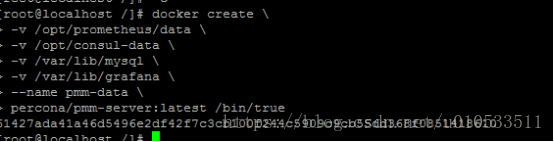
- Create and run PMM Server Container
docker run -d\
   -p 80:80 \
   --volumes-from pmm-data\
   --name pmm-server\
   --restart always\
   percona/pmm-server:latest
80:80 Corresponding port , It can be changed according to needs ( Such as 8089:80)
see docker Running state :
docker ps
PMM The server is installed successfully
pmm-client install
Make yum Source
rpm -ivh https://www.percona.com/redir/downloads/percona-release/redhat/0.1-4/percona-release-0.1-4.noarch.rpmIf the path cannot be found , Find the correct address on the official website to install :https://www.percona.com/redir/downloads/percona-release/redhat/
install pmm-client
yum install pmm-clientinstall percona Tools percona-toolkit
yum install percona-toolkit(vpn Lower installation is relatively fast )
Client connection pmm server
pmm-admin config --server 192.168.135.140
increase pmm-client Monitoring accounts
GRANT ALL PRIVILEGES ON  *.* TO 'pmm'@'%' IDENTIFIED BY '1qazXSW2-!';
flush privileges;
increase pmm Client monitoring mysql To pmm The server
pmm-admin add mysql --user pmm --password 1qazXSW2-! --host 192.168.135.140 --port 3306
see PMM All the monitoring services added by the client
pmm-admin list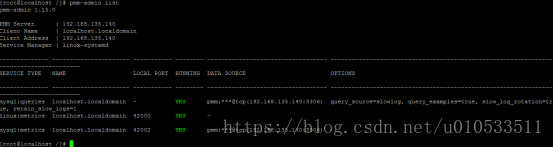
pmm-client installation is complete
Type in the browser ip see mysql Monitoring status :http://192.168.135.140/

docker Common commands :
# systemctl start docker  //  start-up docker
# systemctl stop docker   //  close docker
# docker restart xxx      //  Restart a container
# docker stop xxx     //  Stop a container
# docker rm xxx       //  Delete a container
# docker rm -f xxx        //  Force deletion of a container
# docker log xxx      //  View container log
# docker ps -a        //  View container information
# docker search xxx       //  see  hub Upper  xxxx  Mirror image
# docker pull xxx     //  Download package
边栏推荐
- matlab simulink实现模糊pid对中央空调时延温度控制系统控制
- How to add a PDB
- 2022 zhongkepan cloud - server internal information acquisition and analysis flag
- The combination of officially issued SSL certificate and self signed certificate realizes website two-way authentication
- 云原生(三十六) | Kubernetes篇之Harbor入门和安装
- Fiddler packet capturing tool for mobile packet capturing
- Fiddler download and installation
- matlab中的AR模型短时预测交通流
- 解释一下自动装箱和自动拆箱?
- 高斯消元求解异或线性方程组
猜你喜欢

Azkaban【基础知识 01】核心概念+特点+Web界面+架构+Job类型(一篇即可入门Azkaban工作流调度系统)

Redis sentinel mode setup under Windows
asp. Net using redis cache

spolicy请求案例
MQTT X CLI 正式发布:强大易用的 MQTT 5.0 命令行工具

【Datawhale】【机器学习】糖尿病遗传风险检测挑战赛

高斯消元求解矩阵的逆(gauss)

The problem of accessing certsrv after configuring ADCs

Apple dominates, Samsung revives, and domestic mobile phones fail in the high-end market

SSG框架Gatsby访问数据库,并显示到页面上
随机推荐
EOJ 2020 1月月赛 E数的变换
E. Two Small Strings
V-permission add permission
AR model in MATLAB for short-term traffic flow prediction
How to add a PDB
解释一下自动装箱和自动拆箱?
QT handy notes (II) edit control and float, qstring conversion
Sqoop【付诸实践 02】Sqoop1最新版 全库导入 + 数据过滤 + 字段类型支持 说明及举例代码(query参数及字段类型强制转换)
图解用户登录验证流程,写得太好了!
开发转测试:从0开始的6年自动化之路...
官方颁发的SSL证书与自签名证书结合实现网站双向认证
R语言ggpubr包ggsummarystats函数可视化分组箱图(自定义分组颜色)并在X轴标签下方添加分组对应的统计值(样本数N、中位数median、四分位数的间距iqr、统计值的色彩和分组图色匹配
Fiddler packet capturing tool for mobile packet capturing
The combination of officially issued SSL certificate and self signed certificate realizes website two-way authentication
After attaching to the process, the breakpoint displays "currently will not hit the breakpoint, and no symbols have been loaded for this document"
[datawhale] [machine learning] Diabetes genetic risk detection challenge
服务发现原理分析与源码解读
2022年中科磐云——服务器内部信息获取 解析flag
高斯消元求解异或线性方程组
copyTo