当前位置:网站首页>自定义标签——jsp标签基础
自定义标签——jsp标签基础
2022-06-23 08:40:00 【安离九歌】
目录
前言
上次我们分享了反射,今天分享的内容是自定义标签。
一、认识jsp标签及其特点
1、形式
<开始标签 属性="属性值">标签体</结束标签>
2、分类
- 空标签 例如:br,hr
- ui标签 例如:input,table
- 控制标签 例如:if.foreach (没有标签体但是有输出作用的标签)
- 数据标签 例如:out标签
二、自定义标签的开发及其使用步骤
1、认识tld文件
点击c标签我们可以跳转到c.tld文件中,而c.tld文件就是c标签库的定义配置文件。
所以我们要想自定义标签,首先我们需要自定义该标签的定义配置文件.tld
2、 .tld配置文件方法:
1)新建.tld文件
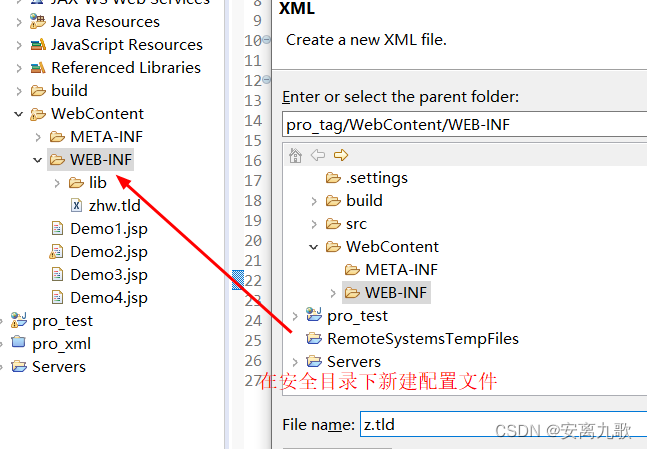
2)修改uri标签

3、jsp通过taglib指令导入标签库
找到自己定义的uri
<uri>http://jsp.zhwLouis</uri>

接下来就是自定义标签代码:
<%@ page language="java" contentType="text/html; charset=UTF-8"
    pageEncoding="UTF-8"%>
  <%@taglib prefix="z" uri="http://jsp.zhwLouis"%>
<!DOCTYPE html PUBLIC "-//W3C//DTD HTML 4.01 Transitional//EN" "http://www.w3.org/TR/html4/loose.dtd">
<html>
<head>
<meta http-equiv="Content-Type" content="text/html; charset=UTF-8">
<title>Insert title here</title>
</head>
<body>
	<!--
	1.自定义标签库与tld相关
	2.标签库中的标签与tld中的tag有关,跟tag元素对应的助手类有关
	 -->
<z:if test="true">true</z:if>
<z:if test="false">false</z:if>
<z:set var="name" value="李四"></z:set>
<z:out value="${name }"></z:out>
</body>
</html>
运行结果如下:

4、创建助手类
上文的自定义标签,我们只是更改了uri和short-name,现在开始才是定义自己的标签
1)必须继承bodytagSupport
package com.zhw.tag;

import javax.servlet.jsp.JspException;
import javax.servlet.jsp.tagext.BodyTagSupport;

/**
 * 助手类  必须继承bodytagSupport
 * @author zhw
 *
 */
public class Demo1Tag extends BodyTagSupport{
	@Override
	public int doStartTag() throws JspException {
		System.out.println("============doStartTag=============");
		return super.doStartTag();
	}

	@Override
	public int doAfterBody() throws JspException {
		System.out.println("============doAfterBody=============");
		return super.doAfterBody();
	}

	@Override
	public int doEndTag() throws JspException {
		System.out.println("============doEndTag=============");
		return super.doEndTag();
	}
}
5、更改tld文件中的tag
<?xml version="1.0" encoding="UTF-8" ?>

<taglib xmlns="http://java.sun.com/xml/ns/j2ee"
    xmlns:xsi="http://www.w3.org/2001/XMLSchema-instance"
    xsi:schemaLocation="http://java.sun.com/xml/ns/j2ee http://java.sun.com/xml/ns/j2ee/web-jsptaglibrary_2_0.xsd"
    version="2.0">

  <description>JSTL 1.1 core library</description>
  <display-name>JSTL core</display-name>
  <tlib-version>1.1</tlib-version>
  <short-name>zz</short-name>
  <uri>http://jsp.zhwLouis</uri>

  <validator>
    <validator-class>
        org.apache.taglibs.standard.tlv.JstlCoreTLV
    </validator-class>
  </validator>

  <tag>
    <name>demo</name>
    <tag-class>com.zhw.tag.Demo1Tag</tag-class>
    <body-content>JSP</body-content>
    <attribute>
        <name>var</name>
        <required>false</required>
        <rtexprvalue>false</rtexprvalue>
    </attribute>
  </tag>
</taglib>
我们来试用一下:

我们在zz里只定义了一个demo所以这里只会显示demo
三、标签生命周期

四、案例
1、z:if标签
助手类
package com.zhw.tag;

import javax.servlet.jsp.JspException;
import javax.servlet.jsp.tagext.BodyTagSupport;
/**
* if标签:
* 分析
	* 如果满足条件,就打印标签体--->doStartTag的返回值:EVAL_BODY_INCLUDE
	* 如果不满足条件,就不输出标签体--->doStartTag的返回值:SKIP_BODY
* 需要获取到是否满足条件的结果值,那么该标签就有一个属性,属性值是boolean
*/
public class IfTag extends BodyTagSupport{
	private boolean test;

	public boolean isTest() {
		return test;
	}

	public void setTest(boolean test) {
		this.test = test;
	}


	@Override
	public int doStartTag() throws JspException {
//		如果不满足条件,就不输出标签体->dostarttag的返回值skip_body
//		需要获取到是否满足条件的结果集,那么该标签就有一个属性,属性值是boolean
		return test?EVAL_BODY_INCLUDE:SKIP_BODY;
	}

}
.tld文件配置
<?xml version="1.0" encoding="UTF-8" ?>

<taglib xmlns="http://java.sun.com/xml/ns/j2ee"
    xmlns:xsi="http://www.w3.org/2001/XMLSchema-instance"
    xsi:schemaLocation="http://java.sun.com/xml/ns/j2ee http://java.sun.com/xml/ns/j2ee/web-jsptaglibrary_2_0.xsd"
    version="2.0">

  <description>JSTL 1.1 core library</description>
  <display-name>JSTL core</display-name>
  <tlib-version>1.1</tlib-version>
  <short-name>zz</short-name>
  <uri>http://jsp.zhwLouis</uri>

  <validator>
    <validator-class>
        org.apache.taglibs.standard.tlv.JstlCoreTLV
    </validator-class>
  </validator>

  <tag>
    <name>demo</name>
    <tag-class>com.zhw.tag.Demo1Tag</tag-class>
    <body-content>JSP</body-content>
    <attribute>
        <name>var</name>
        <required>false</required>
        <rtexprvalue>false</rtexprvalue>
    </attribute>
  </tag>

   <tag>
    <name>if</name>
    <tag-class>com.zhw.tag.IfTag</tag-class>
    <body-content>JSP</body-content>
    <attribute>
        <name>test</name>
        <required>true</required>
        <rtexprvalue>true</rtexprvalue>
    </attribute>
  </tag>
</taglib>
试用代码如下:
<%@ page language="java" contentType="text/html; charset=UTF-8"
    pageEncoding="UTF-8"%>
<%@ taglib uri="http://jsp.zhwLouis" prefix="zz" %>
<!DOCTYPE html PUBLIC "-//W3C//DTD HTML 4.01 Transitional//EN" "http://www.w3.org/TR/html4/loose.dtd">
<html>
<head>
<meta http-equiv="Content-Type" content="text/html; charset=UTF-8">
<title>Insert title here</title>
</head>
<body>
	<zz:if test="true">true</zz:if>
</body>
</html>
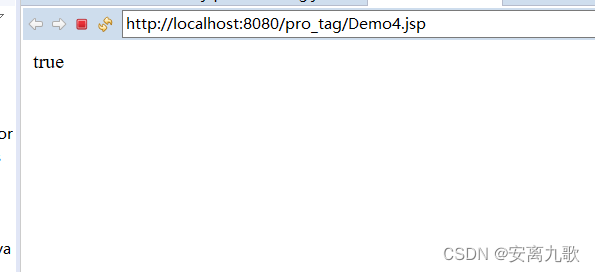
结果如下:
2、z:set标签 z:out标签
1、set
助手类:
package com.zhw.tag;

import javax.servlet.jsp.JspException;
import javax.servlet.jsp.tagext.BodyTagSupport;

public class SetTag extends BodyTagSupport{
	private String var;
	private Object value;

	public String getVar() {
		return var;
	}

	public void setVar(String var) {
		this.var = var;
	}

	public Object getValue() {
		return value;
	}

	public void setValue(Object value) {
		this.value = value;
	}


	@Override
	public int doStartTag() throws JspException {
//		要存储数据,一键值对的方式存储,分析得来,该标签有2个属性
		pageContext.setAttribute(var, value);
		return super.doStartTag();
	}
}
.tld文件:
<?xml version="1.0" encoding="UTF-8" ?>

<taglib xmlns="http://java.sun.com/xml/ns/j2ee"
    xmlns:xsi="http://www.w3.org/2001/XMLSchema-instance"
    xsi:schemaLocation="http://java.sun.com/xml/ns/j2ee http://java.sun.com/xml/ns/j2ee/web-jsptaglibrary_2_0.xsd"
    version="2.0">

  <description>JSTL 1.1 core library</description>
  <display-name>JSTL core</display-name>
  <tlib-version>1.1</tlib-version>
  <short-name>zz</short-name>
  <uri>http://jsp.zhwLouis</uri>

  <validator>
    <validator-class>
        org.apache.taglibs.standard.tlv.JstlCoreTLV
    </validator-class>
  </validator>

  <tag>
    <name>demo</name>
    <tag-class>com.zhw.tag.Demo1Tag</tag-class>
    <body-content>JSP</body-content>
    <attribute>
        <name>var</name>
        <required>false</required>
        <rtexprvalue>false</rtexprvalue>
    </attribute>
  </tag>

   <tag>
    <name>if</name>
    <tag-class>com.zhw.tag.IfTag</tag-class>
    <body-content>JSP</body-content>
    <attribute>
        <name>test</name>
        <required>true</required>
        <rtexprvalue>true</rtexprvalue>
    </attribute>
  </tag>

  <tag>
    <name>set</name>
    <tag-class>com.zhw.tag.SetTag</tag-class>
    <body-content>JSP</body-content>
    <attribute>
        <name>var</name>
        <required>false</required>
        <rtexprvalue>false</rtexprvalue>
    </attribute>
    <attribute>
        <name>value</name>
        <required>false</required>
        <rtexprvalue>true</rtexprvalue>
    </attribute>
  </tag>
</taglib>
2 、out
助手类:
package com.zhw.tag;

import java.io.IOException;

import javax.servlet.jsp.JspException;
import javax.servlet.jsp.JspWriter;
import javax.servlet.jsp.tagext.BodyTagSupport;

public class OutTag extends BodyTagSupport {
	private Object value;

	public Object getValue() {
		return value;
	}

	public void setValue(Object value) {
		this.value = value;
	}

	@Override
	public int doStartTag() throws JspException {
		JspWriter out = pageContext.getOut();
		try {
			out.print(value);
		} catch (IOException e) {
			e.printStackTrace();
		}
		return super.doStartTag();
	}


}
.tld文件:
<?xml version="1.0" encoding="UTF-8" ?>

<taglib xmlns="http://java.sun.com/xml/ns/j2ee"
    xmlns:xsi="http://www.w3.org/2001/XMLSchema-instance"
    xsi:schemaLocation="http://java.sun.com/xml/ns/j2ee http://java.sun.com/xml/ns/j2ee/web-jsptaglibrary_2_0.xsd"
    version="2.0">

  <description>JSTL 1.1 core library</description>
  <display-name>JSTL core</display-name>
  <tlib-version>1.1</tlib-version>
  <short-name>zz</short-name>
  <uri>http://jsp.zhwLouis</uri>

  <validator>
    <validator-class>
        org.apache.taglibs.standard.tlv.JstlCoreTLV
    </validator-class>
  </validator>

  <tag>
    <name>demo</name>
    <tag-class>com.zhw.tag.Demo1Tag</tag-class>
    <body-content>JSP</body-content>
    <attribute>
        <name>var</name>
        <required>false</required>
        <rtexprvalue>false</rtexprvalue>
    </attribute>
  </tag>

   <tag>
    <name>if</name>
    <tag-class>com.zhw.tag.IfTag</tag-class>
    <body-content>JSP</body-content>
    <attribute>
        <name>test</name>
        <required>true</required>
        <rtexprvalue>true</rtexprvalue>
    </attribute>
  </tag>

  <tag>
    <name>set</name>
    <tag-class>com.zhw.tag.SetTag</tag-class>
    <body-content>JSP</body-content>
    <attribute>
        <name>var</name>
        <required>false</required>
        <rtexprvalue>false</rtexprvalue>
    </attribute>
    <attribute>
        <name>value</name>
        <required>false</required>
        <rtexprvalue>true</rtexprvalue>
    </attribute>
  </tag>

   <tag>
    <name>out</name>
    <tag-class>com.zhw.tag.OutTag</tag-class>
    <body-content>JSP</body-content>
    <attribute>
        <name>value</name>
        <required>true</required>
        <rtexprvalue>true</rtexprvalue>
    </attribute>
  </tag>
</taglib>
试用代码:
<%@ page language="java" contentType="text/html; charset=UTF-8"
    pageEncoding="UTF-8"%>
<%@ taglib uri="http://jsp.zhwLouis" prefix="zz" %>
<!DOCTYPE html PUBLIC "-//W3C//DTD HTML 4.01 Transitional//EN" "http://www.w3.org/TR/html4/loose.dtd">
<html>
<head>
<meta http-equiv="Content-Type" content="text/html; charset=UTF-8">
<title>Insert title here</title>
</head>
<body>
	<zz:if test="true">true</zz:if>
	<zz:set var="name" value="张三"></zz:set>
	<zz:out value="${name }"></zz:out>
</body>
</html>
结果如下:

总结
这次分享的内容是自定义标签库基础,希望对你能有帮助,下期预告自定义标签库加强。
我是九歌,一个喜欢编程的程序员。
如有错误还望指正,谢谢啦。
边栏推荐
- 词性家族
- How to restore visualizations and dashboards after kibana rebuilds the index
- usb peripheral 驱动 - debug
- Paper reading [quovadis, action recognition? A new model and the dynamics dataset]
- Subsets of leetcode topic resolution
- kibana 重建index后,如何恢复Visualizations和 Dashboards
- 523. Continuous Subarray Sum
- TDesign update weekly report (the first week of January 2022)
- Single core driver module
- The first day of employment more than ten years ago
猜你喜欢






随机推荐
Lighthouse cloud desktop experience
670. Maximum Swap
kibana 重建index后,如何恢复Visualizations和 Dashboards
Leetcode topic analysis 3sum
MQTT+Flink实现实时消息的订阅与发布
Go data types (II) overview of data types supported by go and Boolean types
523. Continuous Subarray Sum
Qualcomm 9x07 two startup modes
Leetcode topic analysis set matrix zeroes
Leetcode topic analysis count primes
Can portals be the next decentraland?
Install a WGet for your win10
How to restore visualizations and dashboards after kibana rebuilds the index
6、 Web Architecture Design
【活动报名】SOFAStack × CSDN 联合举办开源系列 Meetup ,6 月 24 日火热开启
'教练,我想打篮球!' —— 给做系统的同学们准备的 AI 学习系列小册
The results of CDN node and source station are inconsistent
“教练,我想打篮球“ —— 给做系统的同学们准备的 AI 学习系列小册
Top 25 most popular articles on vivo Internet technology in 2021
3. Caller 服务调用 - dapr