当前位置:网站首页>lvgl使用demo及说明2
lvgl使用demo及说明2
2022-06-27 07:54:00 【路过的小熊~】
简介
本文继续延续上文未完成的lvgl,使用实例说明。
lvgl 画布使用介绍
常用API说明
//画布创建
lv_canvas_create(lv_obj_t * parent);

//给画布设置BUFF
lv_canvas_set_buffer(lv_obj_t * obj, void * buf, lv_coord_t w, lv_coord_t h, lv_img_cf_t cf);

//画板初始化
lv_canvas_set_palette(lv_obj_t * obj, uint8_t id, lv_color_t c);

//用画板为画布填充颜色
lv_canvas_fill_bg(lv_obj_t * canvas, lv_color_t color, lv_opa_t opa);

//在指定X,Y区域填充指定画板颜色
lv_canvas_set_px(lv_obj_t * obj, lv_coord_t x, lv_coord_t y, lv_color_t c);

//转换图像放置到画布上
void lv_canvas_transform(lv_obj_t *canvas, lv_img_dsc_t *img, int16_t angle, uint16_t zoom, lv_coord_t offset_x, lv_coord_t offset_y, int32_t pivot_x, int32_t pivot_y, bool antialias);

//在画布上画一个矩形
void lv_canvas_draw_rect(lv_obj_t *canvas, lv_coord_t x, lv_coord_t y, lv_coord_t w, lv_coord_t h, const lv_draw_rect_dsc_t *draw_dsc);

//在画布上画一个文本
void lv_canvas_draw_text(lv_obj_t *canvas, lv_coord_t x, lv_coord_t y, lv_coord_t max_w, lv_draw_label_dsc_t *draw_dsc, const char *txt);

//在画布上画一个图像
void lv_canvas_draw_img(lv_obj_t *canvas, lv_coord_t x, lv_coord_t y, const void *src, const lv_draw_img_dsc_t *draw_dsc);

//在画布上画一条线
void lv_canvas_draw_line(lv_obj_t *canvas, const lv_point_t points[], uint32_t point_cnt, const lv_draw_line_dsc_t *draw_dsc);

//在画布上画一个多边形
void lv_canvas_draw_polygon(lv_obj_t *canvas, const lv_point_t points[], uint32_t point_cnt, const lv_draw_rect_dsc_t *draw_dsc);
示例举例
#define CANVAS_WIDTH 50
#define CANVAS_HEIGHT 50
/*Create a buffer for the canvas*/
static lv_color_t cbuf[LV_CANVAS_BUF_SIZE_INDEXED_1BIT(CANVAS_WIDTH, CANVAS_HEIGHT)];

/*Create a canvas and initialize its palette*/
lv_obj_t * canvas = lv_canvas_create(lv_scr_act());
lv_canvas_set_buffer(canvas, cbuf, CANVAS_WIDTH, CANVAS_HEIGHT, LV_IMG_CF_INDEXED_1BIT);
lv_canvas_set_palette(canvas, 0, lv_palette_main(LV_PALETTE_YELLOW));
lv_canvas_set_palette(canvas, 1, lv_palette_main(LV_PALETTE_BLUE));

/*Create colors with the indices of the palette*/
lv_color_t c1;
lv_color_t c0;

c1.full = 1;
c0.full = 0;

/*Red background (There is no dedicated alpha channel in indexed images so LV_OPA_COVER is ignored)*/
lv_canvas_fill_bg(canvas, c1, LV_OPA_COVER);

/*Create hole on the canvas*/
uint32_t x;
uint32_t y;
for( y = 0; y < 25; y++)
{

    for( x = 0; x < 25; x++)
    {

        lv_canvas_set_px(canvas, x, y, c0);
    }
}
使用效果如下

lvgl image控件使用说明
常用API介绍
//创建image小部件
lv_obj_t * lv_img_create(lv_obj_t * parent);

//为显示对象设置图像数据
void lv_img_set_src(lv_obj_t * obj, const void * src);

//为图像设置X方向偏移
void lv_img_set_offset_x(lv_obj_t *obj, lv_coord_t x);

//为图像设置Y方向偏移
void lv_img_set_offset_y(lv_obj_t *obj, lv_coord_t y);

//图像旋转指定角度
void lv_img_set_angle(lv_obj_t *obj, int16_t angle);

//图片抗锯齿使能设置
void lv_img_set_antialias(lv_obj_t *obj, bool antialias);
使用举例
LV_IMG_DECLARE(img_cogwheel_argb);
lv_obj_t * img1 = lv_img_create(lv_scr_act());
lv_img_set_src(img1, &img_cogwheel_argb);
lv_obj_align(img1, LV_ALIGN_CENTER, 0, -20);
lv_obj_set_size(img1, 200, 200);
使用效果如下

LVGL 布局介绍
水平、垂直布局
常用API
//创建基础对象
lv_obj_create(lv_scr_act());

// 设置对象使用基于行的流失弹性布局flex
lv_obj_set_flex_flow(cont_row, LV_FLEX_FLOW_ROW);

// 设置对象使用基于列的流失弹性布局flex
lv_obj_set_flex_flow(cont_col, LV_FLEX_FLOW_COLUMN);

//在创建小部件对象的时候加入布局设置,使其在指定布局中
lv_btn_create(cont_row);
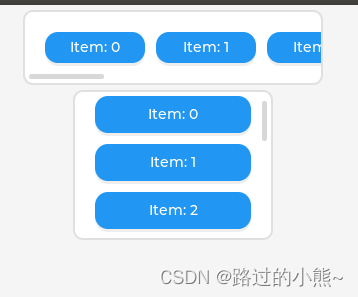
使用举例1
/*创建一个具有水平伸缩方向的容器*/
lv_obj_t * cont_row = lv_obj_create(lv_scr_act()); //创建基础对象
lv_obj_set_size(cont_row, 300, 75); //设置容器大小
lv_obj_align(cont_row, LV_ALIGN_TOP_MID, 0, 5); //设置对齐方式(屏幕中间顶部对齐)
lv_obj_set_flex_flow(cont_row, LV_FLEX_FLOW_ROW); // 设置对象使用基于行的流失弹性布局flex

/*创建一个具有垂直伸缩方向的容器*/
lv_obj_t * cont_col = lv_obj_create(lv_scr_act()); //创建基础对象
lv_obj_set_size(cont_col, 200, 150); //设置容器大小
lv_obj_align_to(cont_col, cont_row, LV_ALIGN_OUT_BOTTOM_MID, 0, 5); //设置对齐方式(列布局在行布局外面下方中央-即外部下方中间对齐)
lv_obj_set_flex_flow(cont_col, LV_FLEX_FLOW_COLUMN);  // 设置对象使用基于列的流失弹性布局flex

uint32_t i;
for(i = 0; i < 10; i++)
{

   lv_obj_t * obj;
   lv_obj_t * label;

   /*Add items to the row*/
   obj= lv_btn_create(cont_row); //把创建的按键添加到水平布局
   lv_obj_set_size(obj, 100, LV_PCT(100));

   label = lv_label_create(obj);
   lv_label_set_text_fmt(label, "Item: %u", i); //设置按键名
   lv_obj_center(label);

   /*Add items to the column*/
   obj = lv_btn_create(cont_col); //把创建的按键添加到垂直布局
   lv_obj_set_size(obj, LV_PCT(100), LV_SIZE_CONTENT);

   label = lv_label_create(obj);
   lv_label_set_text_fmt(label, "Item: %u", i); //设置按键名
   lv_obj_center(label);
}
使用效果如下
使用举例2
往水平布局中加入其它布局,例如:
lv_obj_t * cont = lv_obj_create(lv_scr_act());
lv_obj_set_size(cont, 300, 220);
lv_obj_center(cont);
lv_obj_set_flex_flow(cont, LV_FLEX_FLOW_ROW);

lv_obj_t * obj;
obj = lv_obj_create(cont);
lv_obj_set_size(obj, 40, 40);           /*Fix size*/

obj = lv_obj_create(cont);
lv_obj_set_height(obj, 40);
lv_obj_set_flex_grow(obj, 1);           /*1 portion from the free space*/

obj = lv_obj_create(cont);
lv_obj_set_height(obj, 40);
lv_obj_set_flex_grow(obj, 2);           /*2 portion from the free space*/

obj = lv_obj_create(cont);
lv_obj_set_size(obj, 40, 40);           /*Fix size. It is flushed to the right by the "grow" items*/
使用效果如下

边栏推荐
- How to add data to the back-end database in the form of Excel file on the web page
- Testing network connectivity with the blackbox exporter
- 【13. 二进制中1的个数、位运算】
- JDBC transaction commit case
- Speech synthesis: tacotron explains [end-to-end speech synthesis model] [compared with traditional speech synthesis, it does not have complex phonetics and acoustic feature modules, but only uses < te
- js输出形状
- Implementation principle of similarity method in Oracle
- The 6th Blue Bridge Cup
- 大厂工作十年,年薪40万突然被裁员,公司想抛弃你,一分情面都不会留
- No matter how good LCD and OLED display technologies are, they cannot replace this ancient display nixie tube
猜你喜欢

JS print 99 multiplication table

PayPal账户遭大规模冻结!跨境卖家如何自救?
JS to determine whether the result is qualified, the range is 0-100, otherwise re-enter
![log4j:WARN No such property [zipPermission] in org. apache. log4j. RollingFileAppender.](/img/2c/425993cef31dd4c786f9cc5ff081ef.png)
log4j:WARN No such property [zipPermission] in org. apache. log4j. RollingFileAppender.

Basic knowledge | JS Foundation

js求所有水仙花数
八大误区,逐个击破(终篇):云难以扩展、定制性差,还会让管理员失去控制权?
![[13. number and bit operation of 1 in binary]](/img/53/024f9742d1936fe6f96f4676cea00e.png)
[13. number and bit operation of 1 in binary]

c#的初步认识

Cookie encryption 7 fidder analysis phase
随机推荐
What is a magnetic separator?
Helix QAC更新至2022.1版本,将持续提供高标准合规覆盖率
【12. 最大连续不重复子序列】
盲測調查顯示女碼農比男碼農更優秀
Windows下mysql-8下载、安装、配置教程
js打印99乘法表
【批处理DOS-CMD命令-汇总和小结】-环境变量、路径变量、搜索文件位置相关指令——set、path、where,cmd命令的路径参数中有空格怎么办
What is a flotation machine?
R language calculates Spearman correlation coefficient in parallel to speed up the construction of co occurrence network
什么是浮选机?
1-4 decimal representation and conversion
All tutor information on one page
2022 love analysis · panoramic report of it operation and maintenance manufacturers
【批处理DOS-CMD命令-汇总和小结】-批处理命令中的参数%0、%1、%2、%[0-9]、%0-9和批处理命令参数位置切换命令shift,dos命令中操作符%用法
(笔记)Anaconda-Navigator闪退解决方法
How can the flower e-commerce 2.0 era go after the breakthrough from 0 to 1?
JS to determine whether the result is qualified, the range is 0-100, otherwise re-enter
No matter how good LCD and OLED display technologies are, they cannot replace this ancient display nixie tube
How to add data to the back-end database in the form of Excel file on the web page
The 6th Blue Bridge Cup