当前位置:网站首页>Huawei switch stack configuration
Huawei switch stack configuration
2022-06-25 21:35:00 【le_ happy】
Stack configuration 
It's private technology , The stacking technologies of various manufacturers are not compatible , Stacking requires that the member devices stacked must be of the same model ( Same as large version ), Please refer to Huawei's official instructions :
https://support.huawei.com/enterprise/zh/tool/product/enterprise-network

40.1 There are two types of Huawei stacking
istack For box switches
css Frame switch oriented
40.2 Stack configuration
Sw1(1、2 mouth )------------- Sw2(1、2 mouth )
There are four steps :1 Member number 2 Configure priorities 3 Configure the stack interconnect 4 Link aggregation
40.2.1 Member number ( member ID)
The default is 0,slot Slot numbers are also members ID Number , Such as g0/0/1 The front of 0 This is the slot , the second 0 Is a daughter card
[sw2]dis stack # View numbered commands
Stack mode: Service-port
Stack topology type: Link
Stack system MAC: f4b7-8dc4-d6be
MAC switch delay time: 10 min
Stack reserved VLAN: 4093
Slot of the active management port: --
Slot Role MAC Address Priority Device Type
0 Master f4b7-8dc4-d6be 100 S5720S-28P-LI-AC
[sw2]dis int bri # You can also view the slot number GigabitEthernet0/0/1
PHY: Physical
*down: administratively down
#down: LBDT down
(l): loopback
(s): spoofing
(b): BFD down
(e): ETHOAM down
(dl): DLDP down
(lb): LBDT block
(o): Observe-port forwarding down
InUti/OutUti: input utility/output utility
Interface PHY Protocol InUti OutUti inErrors outErrors
GigabitEthernet0/0/1 up up 0% 0% 0 0
GigabitEthernet0/0/2 up up 0% 0% 0 0
GigabitEthernet0/0/3 down down 0% 0% 0 0
[sw2]stack slot 0 renumber 1 # Change the slot tag number to 1
Warning: All the configurations related to the slot ID will be lost after the slot ID is modified.
Do not frequently modify the slot ID because it will make the stack split. Continue? [Y/N]:y...
Info: Stack configuration has been changed, and the device needs to restart to make the configuration effective.
<sw2>reboot # After completion, you need to restart
Info: The system is now comparing the configuration, please wait...........................
Warning: The configuration has been modified, and it will be saved to the next startup saved-configuration file . Continue? [Y/N]:y
Now saving the current configuration to the slot 0...........
Save the configuration successfully.
Info: If want to reboot with saving diagnostic information, input 'N' and then execute 'reboot save diagnostic-information'.
System will reboot! Continue?[Y/N]:y
View results
[sw2]dis stack
Stack mode: Service-port
Stack topology type: Link
Stack system MAC: f4b7-8dc4-d6be
MAC switch delay time: 10 min
Stack reserved VLAN: 4093
Slot of the active management port: --
Slot Role MAC Address Priority Device Type
1 Master f4b7-8dc4-d6be 105 S5720S-28P-LI-AC
[sw2]dis int bri
PHY: Physical
*down: administratively down
#down: LBDT down
(l): loopback
(s): spoofing
(b): BFD down
(e): ETHOAM down
(dl): DLDP down
(lb): LBDT block
(o): Observe-port forwarding down
InUti/OutUti: input utility/output utility
Interface HY Protocol InUti OutUti inErrors outErrors
GigabitEthernet1/0/1 up up 0% 0% 0 0
GigabitEthernet1/0/2 up up 0% 0% 0 0
GigabitEthernet1/0/3 down down 0% 0% 0 0
40.2.2 Configure priorities
First out main switch , One master, one standby and many slaves . The default priority is 100, The bigger the number, the better , If the priority is the same, see the motherboard mac,mac The smaller the better. .
Be careful : The equipment started first acts as the main equipment . It means priority 100 Start first , priority 105 Start after , That priority 100 The first thing to start is the master , No preemption principle .
Manual active / standby switchover is required if preemption is not required , The order is slave switchover ( Huawei 、 Hua three )
[sw1]slave ?
restart Restart slave board
switchover HA switch slave to master
[sw1]stack slot 0 priority 105 # The configuration priority is 105
Warning: Do not frequently modify the priority because it will make the stack split. Continue? [Y/N]:y....
[sw1]dis stack # Look at the priority
Stack mode: Service-port
Stack topology type: Link
Stack system MAC: f4b7-8dc4-d6be
MAC switch delay time: 10 min
Stack reserved VLAN: 4093
Slot of the active management port: --
Slot Role MAC Address Priority Device Type
0 Master f4b7-8dc4-d6ba 105 S5720S-28P-LI-AC
40.2.3 Configure the stack interconnect
Create a logical stack port , Must be cross connected 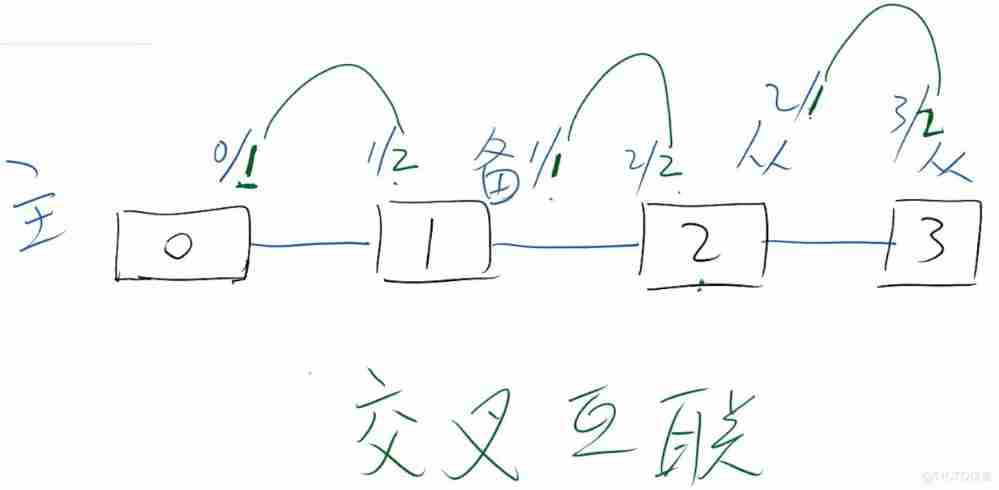
sw1
[sw1]int stack-port 0/? # 0/? Inside 0 yes slot Slot number
<1-2> Port number # Can only be created 2 individual
[sw1]int stack-port 0/1 # Create logical interfaces 0/1
[sw1-stack-port0/1]port int g0/0/1 enable # hold g0/0/1 Place on logical interface 0/1 Inside
Warning: Enabling stack function may cause configuration loss on the interface. Continue? [Y/N]:y
[sw1-stack-port0/1]port int g0/0/2 en # hold g0/0/2 Place on logical interface 0/1 Inside
Warning: Enabling stack function may cause configuration loss on the interface. Continue? [Y/N]:y
Check the configuration
[sw1]dis stack configuration
---------------Configuration on slot 0 Begin---------------
stack enable
stack slot 0 renumber 0
stack slot 0 priority 105
stack reserved-vlan 4093
stack timer mac-address switch-delay 10
interface stack-port 0/1
port interface GigabitEthernet0/0/1 enable
port interface GigabitEthernet0/0/2 enable
interface stack-port 0/2
---------------Configuration on slot 0 End-----------------
sw2
[sw2]int stack-port 1/2 # Create logical interfaces , Cross connect
[sw2-stack-port1/2]port int g1/0/3 to g1/0/4 enable # Multiple... Can be placed at the same time
notes : Operating time port int g1/0/1 to g1/0/2 enable Tips can't be used , Change it to 3 and 4 This is different from the topology above
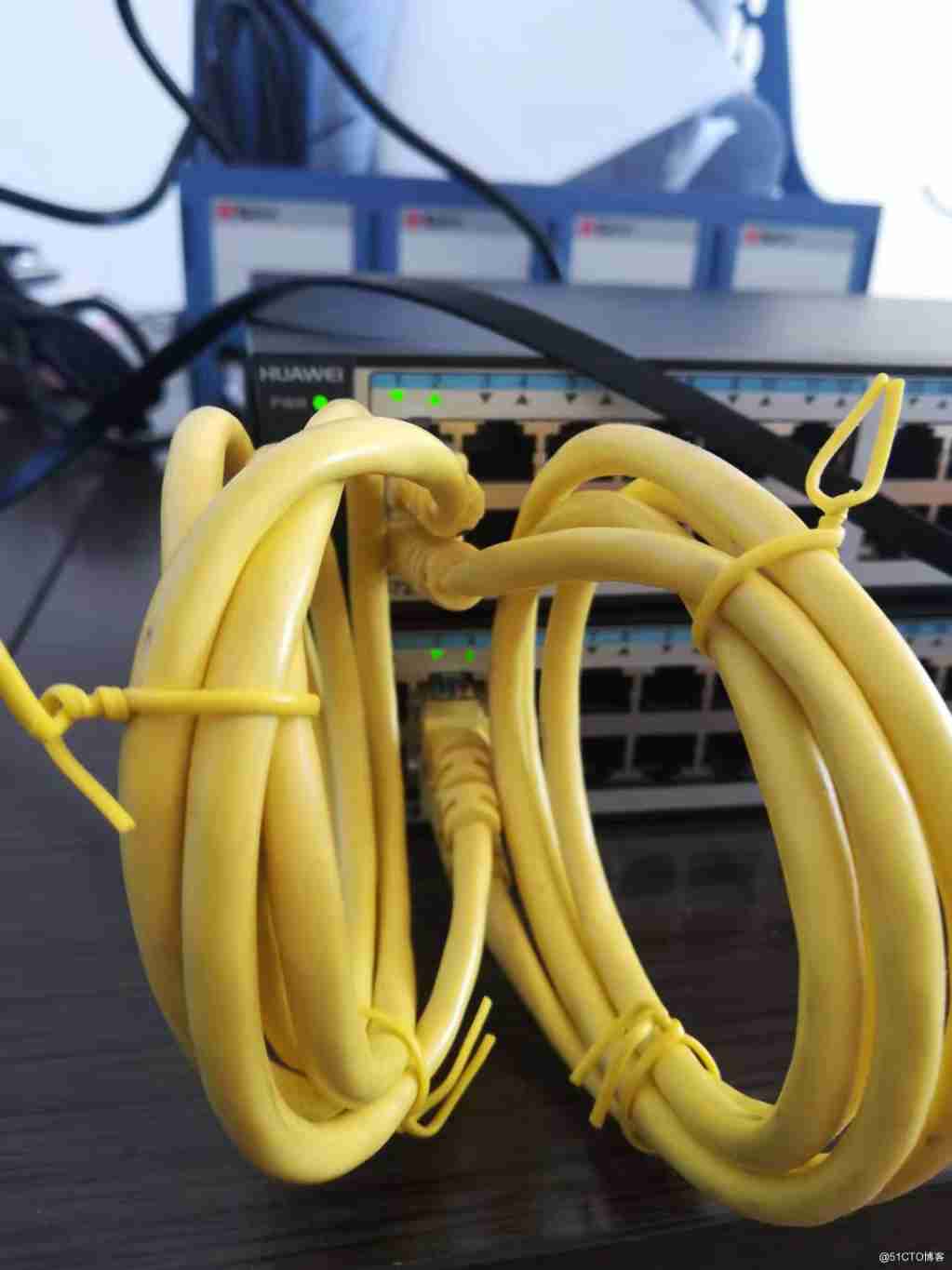
When the configuration is complete , The standby device automatically restarts
Check for success
[sw1]dis int br
PHY: Physical
InUti/OutUti: input utility/output utility
Interface PHY Protocol InUti OutUti inErrors outErrors
GigabitEthernet0/0/1 up up 0% 0% 0 0
GigabitEthernet0/0/2 up up 0% 0% 0 0
GigabitEthernet0/0/3 down down 0% 0% 0 0
GigabitEthernet1/0/1 down down 0% 0% 0 0
GigabitEthernet1/0/2 down down 0% 0% 0 0
GigabitEthernet1/0/3 up up 0% 0% 0 0
GigabitEthernet1/0/4 up up 0% 0% 0 0
40.2.4 Link aggregation
[sw1]int Eth-Trunk 1 # Create a logical aggregation interface
[sw1-Eth-Trunk1]mode lacp
[sw1]int g0/0/3 # Add the physical interface to the logical aggregation port
[sw1-GigabitEthernet0/0/3]eth 1
Info: This operation may take a few seconds. Please wait a moment.
Info: The operation is successful.
[sw1-GigabitEthernet1/0/5]eth-trunk 1 # Add the physical interface to the logical aggregation port
Info: This operation may take a few seconds. Please wait a moment.
Info: The operation is successful.
[sw1]int Eth-Trunk 1 # Mark the polymerization trunk
[sw1-Eth-Trunk1]port link-type tr
Info: This operation may take a few seconds. Please wait for a moment...done.
[sw1-Eth-Trunk1]port trunk allow-pass vlan all
Info: This operation may take a few seconds. Please wait a moment..done.
sw3
hold sw3 int g0/0/3 and int g0/0/4 Polymerization is marked with trunk
sw3 int g0/0/3 Corresponding sw1-GigabitEthernet0/0/3
sw3 int g0/0/4 Corresponding sw1-GigabitEthernet0/0/5
Manually restart the device individually , Because it has been stacked
<sw1>reset slot ?
<0-1> The present slot
<sw1>dis stack
Stack mode: Service-port
Stack topology type: Link
Stack system MAC: f4b7-8dc4-d6ba
MAC switch delay time: 10 min
Stack reserved VLAN: 4093
Slot of the active management port: --
Slot Role MAC Address Priority Device Type
0 Master f4b7-8dc4-d6ba 105 S5720S-28P-LI-AC
1 Standby f4b7-8dc4-d6be 105 S5720S-28P-LI-AC
<sw1>reset slot 0
Warning: Confirm to reset slot 0? [Y/N]:
reference : Xiao zongpeng
51CTO Huawei certified teaching director of the school Xiao zongpeng Xiao zongpeng
边栏推荐
- The latest (2022-2-16) vulnerability of WordPress plug-in bee collection (XSS, WordPress user name exposure, arbitrary article publishing) is repeated
- 数学分析_笔记_第4章:连续函数类和其他函数类
- Concept and understanding of variables
- 1.0-mq getting started and using
- On merging and sorting
- org. apache. ibatis. exceptions. PersistenceException:
- Canoe learning notes (1)
- Invalid bound statement (not found): com. qf. mapper. PassengerMapper. findByPassengerId
- Is Galaxy Securities reliable? Is it safe to open a securities account?
- “No bean named ‘UserController‘ available“
猜你喜欢

数字图像处理知识点总结概述

"Developer theory" multi system integrated development - rapid nailing of enterprise owned systems

js (1)

C language dynamic memory allocation

MySQL is slow to add indexes_ Why is your SQL so slow? Why is your MySQL index invalid?

Write a "standard" macro min, which inputs two parameters and returns the smaller one

XMIND to excel test case

How to write an infinite loop

Soft test intermediate simple notes

What is a server? (Powercert animated videos)
随机推荐
“No bean named ‘UserController‘ available“
[nailing scenario capability package] ranking of enterprise employees' points
OLED driven learning based on ssd1306 (II): addressing mode of ssd1306
ASC - DAY2
Order by keyword syntax problems encountered in SQL Server learning
multiplication table
Bing Bing Bing Bing Bing Bing Bing Bing Bing Bing Bing Bing Bing Bing Bing Bing Bing Bing Bing Bing Bing Bing Bing Bing Bing Bing Bing Bing Bing Bing Bing Bing Bing Bing Bing Bing Bing Bing Bing Bing
PHP Chinese word segmentation API, Harbin Institute of technology ltpcloud, naturallanguageprocessing, free, best practices!
IAAs, PAAS, SaaS, baas, FAAS differences
The user name and password will be automatically filled in when adding a form
Is it safe for Xiaobai to open a stock account online?
On merging and sorting
The SH runtime directly reported an error syntax error near unexpected token ` $'. \r‘
Using two stacks to realize the function of one queue?
Set eye color
Is flush app regular? Is it safe or not
Basic knowledge of software engineering required for soft test
Canoe learning notes (2)
Insert and update each database
InfiniBand& RDMA