当前位置:网站首页>v-bind指令的详细介绍
v-bind指令的详细介绍
2022-07-28 08:14:00 【探索前端究极秘法的小牛】
前言
在上篇文章 http://t.csdn.cn/YdkSQ
已经介绍了v-bind的指令相关内容了,本篇文章将详细介绍v-bind指令的 用法及其应用场景
一,属性绑定
1,v-bind指令的用法
<a v-bind:href='url'>跳转</a>简写:
<a :href='url'>跳转</a>注意:在工作的时候一般推荐使用简写方式
代码展示:
当点击默认情况下跳转百度,点击切换地址之后默认地址发生改变,再次点击百度时会跳转到腾讯官网
 <body>
    <div id="app">
        <a v-bind:href="url">百度</a>
        <button v-on:click="change">点击切换地址</button>
    </div>

    <script src="../Vue/vue.js"></script><!-- 引入vue.js文件 -->

    <script>
        const vm = new Vue({
            el: "#app",
            data() {
                return {
                    url: 'http://www.baidu.com'
                }
            },
            methods: {
                //修改URL地址
                change() {
                    this.url = "http://www.qq.com"
                }
            }
        })

    </script>
</body>
效果图

2,v-bind指令利用input事件实现双向绑定
第一种写法
<input type="text" :value="msg" v-on:input="changes">第二种写法
<input type="text" :value="msg" v-on:input="msg=$event.target.value">第三种写法 直接使用v-model指令写
<input type="text" v-model="msg">以上三种写法的实现效果都是一样的,前两中写法解释了v-model的基层运行原理
全部代码展示:
<!DOCTYPE html>
<html lang="en">

<head>
    <meta charset="UTF-8">
    <meta http-equiv="X-UA-Compatible" content="IE=edge">
    <meta name="viewport" content="width=device-width, initial-scale=1.0">
    <title>Document</title>
    <script src="../Vue/vue.js"></script>
</head>

<body>
    <div id="app">
        <div>{
   {msg}}</div>

        <input type="text" :value="msg" v-on:input="changes">
        <!-- 第二种写法 -->
        <input type="text" :value="msg" v-on:input="msg=$event.target.value">
        <!-- 或者直接用v-model指令也可以实现 -->
        <input type="text" v-model="msg">
    </div>
    <script>
        const vm = new Vue({
            el: '#app',
            data() {
                return {
                    msg: '你好,李焕英'
                }
            },
            methods: {
                changes: function (event) {
                    //使用输入域中最新的数据覆盖原来的数据
                    this.msg = event.target.value;
                }
            }
        })
    </script>
</body>

</html>
效果图

二,样式绑定
1,class样式绑定
①对象形式
对象一般由键值对组成,我们一般用带is前缀的表示属性 is前缀的用来控制类名是否显示 一般情况下is表示一个标记位有两种情况一个是 true另一个是 false
<div v-bind:class="{active:isActive}"></div>多个类名添加
在后面用逗号隔开添加就行
<div v-bind:class="{ active : isActive,active2:isActive2}"></div>代码展示
<!DOCTYPE html>
<html lang="en">

<head>
    <meta charset="UTF-8">
    <meta http-equiv="X-UA-Compatible" content="IE=edge">
    <meta name="viewport" content="width=device-width, initial-scale=1.0">
    <title>Document</title>
<script src="../Vue/vue.js"></script>
    <style>
        .active {
            background-color: brown;
            width: 100px;
            height: 100px;
        }
        /* 第二个类名 */
        .active2{
            border: 5px solid black;
            width: 100px;
            height: 100px;

        }
    </style>
</head>

<body>
    <div id="app">
        <!-- 第二个类名在后面用逗号隔开添加就行 -->
        <div v-bind:class="{ active : isActive,active2:isActive2}"></div>
        <button v-on:click="changes">切换</button>
    </div>

    <script>
        const vm = new Vue({
            el: '#app',
            data() {
                return {
                    isActive: true,
                    // isActive的值为true时页面展示class的效果
                    isActive2:true
                }
            },
            methods: {
                changes: function () {
                    // 控制isActive的值在true和false之间来回切换
                    this.isActive = !this.isActive
                    this.isActive2 = !this.isActive2
                }
            }
        })
    </script>
</body>

</html>
效果图
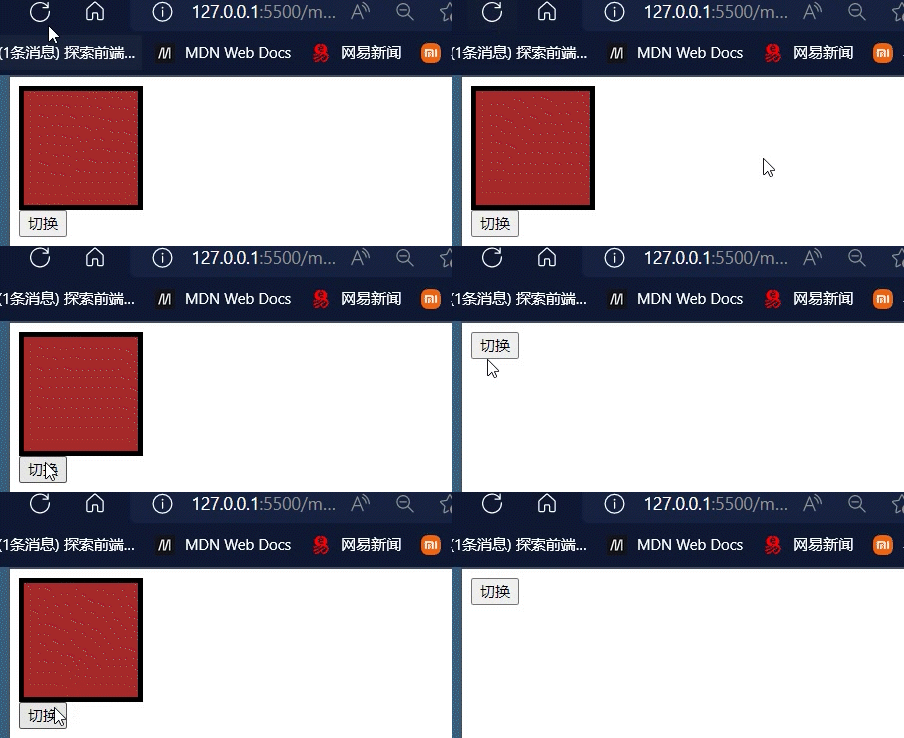
②数组形式
首先需要定义相关的属性名 属性的值表示的是实际的类名
如果想要添加多个类名,可以用逗号隔开在后面加
<div v-bind:class="[activeClass,active2Class]"></div>2,style样式绑定
①对象形式
对象中可以加许多属性
<div v-bind:style="{border:borderStyle,width:widthStyle,height:heightStyle}"></div>
简写可视模板阅读性强 ,且美观
<div v-bind:style="objStyle">简写</div>
全部代码
<!DOCTYPE html>
<html lang="en">

<head>
    <meta charset="UTF-8">
    <meta http-equiv="X-UA-Compatible" content="IE=edge">
    <meta name="viewport" content="width=device-width, initial-scale=1.0">
    <title>Document</title>
    <script src="../Vue/vue.js"></script>
</head>

<body>
    <div id="app">
        <div v-bind:style="{border:borderStyle,width:widthStyle,height:heightStyle}"></div>
        <button v-on:click="changes">切换</button>
        <!-- 简写可视模板阅读性强 -->
        <div v-bind:style="objStyle">简写</div>
    </div>
</body>
<script>
    var vm = new Vue({
        el: '#app',
        data() {
            return {
                borderStyle: '1px solid blue',
                widthStyle: '100px',
                heightStyle: '200px',
// 简写代码块-----------------------------------------
                objStyle: {
                    border: '1px solid blue',
                    width: '300px',
                    height: '300px'
                }
// -------------------------------------------
            }
        },
        methods: {
            changes: function () {
                this.heightStyle = '100px'
            }
        }
    })
</script>

</html>
效果图

②数组形式
通过简写的方法可以放多个 属性
<div v-bind:style="[objStyle,overrideStyles]"></div>全部代码
<!DOCTYPE html>
<html lang="en">

<head>
    <meta charset="UTF-8">
    <meta http-equiv="X-UA-Compatible" content="IE=edge">
    <meta name="viewport" content="width=device-width, initial-scale=1.0">
    <title>Document</title>
    <script src="../Vue/vue.js"></script>
</head>

<body>
    <div id="app">
        <!-- 对象的语法结构 -->
        <!-- <div v-bind:style="{border:borderStyle,width:widthStyle,height:heightStyle}"></div>
        <button v-on:click="changes">切换</button> -->
        <!-- 简写可视模板阅读性强 -->
        <!-- <div v-bind:style="objStyle">简写</div> -->
        <!-- 数组的语法结构 -->
        <div v-bind:style="[objStyle, overrideStyles]"></div>

    </div>
</body>
<script>
    var vm = new Vue({
        el: '#app',
        data() {
            return {
                // borderStyle: '1px solid blue',
                // widthStyle: '100px',
                // heightStyle: '200px',
                // 简写代码块-----------------------------------------
                objStyle: {
                    border: '1px solid blue',
                    width: '300px',
                    height: '300px'
                },
                // -------------------------------------------
                overrideStyles:{
                    border:'5px solid orange',
                    backgroundColor:'blue'

                }
            }
        },
        methods: {
            changes: function () {
                this.heightStyle = '100px';
                this.objStyle.width = '100px'
            }
        }
    })
</script>

</html>
边栏推荐
- IDC脚本文件运行
- 1w5 words to introduce those technical solutions of distributed system in detail
- XMIND Zen installation tutorial
- 台大林轩田《机器学习基石》习题解答和代码实现 | 【你值得拥有】
- linux初始化mysql时报错 FATAL ERROR: Could not find my-default.cnf
- CSV文件存储
- Marketing play is changeable, and understanding the rules is the key!
- Implementation principle of golang synergy
- NDK series (6): let's talk about the way and time to register JNI functions
- Centralized log management with sentry
猜你喜欢

You're not still using xshell, are you? This open source terminal tool is yyds!

Image batch processing | necessary skills

Chapter 2-14 sum integer segments
![[activity registration] User Group Xi'an - empowering enterprise growth with modern data architecture](/img/92/88be42faf0451cb19067672dab69c8.jpg)
[activity registration] User Group Xi'an - empowering enterprise growth with modern data architecture

Top all major platforms, 22 versions of interview core knowledge analysis notes, strong on the list

Introduction of functions in C language (blood Book 20000 words!!!)
![Vrrp+mstp configuration details [Huawei ENSP experiment]](/img/44/987e9ff87f5c8e2a2ab493e947f884.png)
Vrrp+mstp configuration details [Huawei ENSP experiment]

Different HR labels

View the dimensions of the list

c语言数组指针和指针数组辨析,浅析内存泄漏
随机推荐
Data fabric, next air outlet?
Sentinel
Different HR labels
Kubernetes cluster configuration dashboard service
What content does the new version of network security level protection evaluation report template contain? Where can I find it?
Mysql5.7.38 start keepalived in the container
MDM数据质量应用说明
象棋机器人夹伤7岁男孩手指,软件测试工程师的锅?我笑了。。。
剑指offer
Mongodb (compare relational database, cloud database, common command line, tutorial)
The chess robot pinched the finger of a 7-year-old boy, and the pot of a software testing engineer? I smiled.
Path and attribute labels of picture labels
Design for failure常见的12种设计思想
Chapter 2-14 sum integer segments
Flink Window&Time 原理
Baidu AI Cloud Jiuzhou district and county brain, depicting a new blueprint for urban and rural areas!
shell 实现harbor v1/v2的备份/恢复/迁移等功能
Let me teach you how to assemble a registration center?
Sentinel
Vrrp+mstp configuration details [Huawei ENSP experiment]