当前位置:网站首页>【小程序项目开发-- 京东商城】uni-app开发之配置tabBar & 窗口样式
【小程序项目开发-- 京东商城】uni-app开发之配置tabBar & 窗口样式
2022-06-22 15:06:00 【计算机魔术师】

前言
欢迎来到
魔术之家!!该文章收录专栏
— 2022微信小程序京东商城实战 —专栏内容(以下文章食用前强烈建议 先食用文章 )
— uni-app项目搭建 —
— 京东商城uni-app 配置tabBar & 窗口样式 —
— 京东商城uni-app开发之分包配置 —
新建tabBar分支(选读*)
之所以为了创建分支,也是养成良好的项目开发习惯,这样在开放项目井井有条
也可以跳过本节内容,不影响阅读观感
在根目录下,右键打开
bash
基于 master 分支在本地创建 tabBar 子分支,用来开发和 tabBar 相关的功能:
- 创建新分支tabbar且跳转到该分支
git checkout -b tabbar
查看分支(前面有*代表着当前分支)
git branch

创建 tabBar 页面
在HBuilderX 依次创建页面
home
cate
cart
my


在
pages.json文件可以看到页面配置, 然后删除index页面文件和相应配置,
- uni-app 与 微信小程序开发工具文件区别:
- 在pages中每个页面也没有 对应的四个文件 .wxss,.wxml,.json,.js
- 在这里则是以
vue中template代替.wxml ``style代替.wxss,script代替.js,.json配置则在page.json每个页面的style配置


配置tabbar效果
放入我们的
static(存放静态资源文件,如我们需要的图标)文件,替换源目录的static文件修改根目录的
pages.json配置文件,新增节点tabBar配置如下:
"tabBar": {

    "list": [{

        "pagePath": "pages/home/home",
        "text": "home",
        "iconPath": "./static/tab_icons/home.png",
        "selectedIconPath": "./static/tab_icons/home-active.png"
      },
      {

        "pagePath": "pages/cate/cate",
        "text": "cate",
        "iconPath": "./static/tab_icons/cate.png",
        "selectedIconPath": "./static/tab_icons/cate-active.png"
      },
      {

        "pagePath": "pages/cart/cart",
        "text": "cart",
        "iconPath": "./static/tab_icons/cart.png",
        "selectedIconPath": "./static/tab_icons/cart-active.png"
      },
      {

        "pagePath": "pages/my/my",
        "text": "my",
        "iconPath": "./static/tab_icons/my.png",
        "selectedIconPath": "./static/tab_icons/my-active.png"
      }
    ]
  }
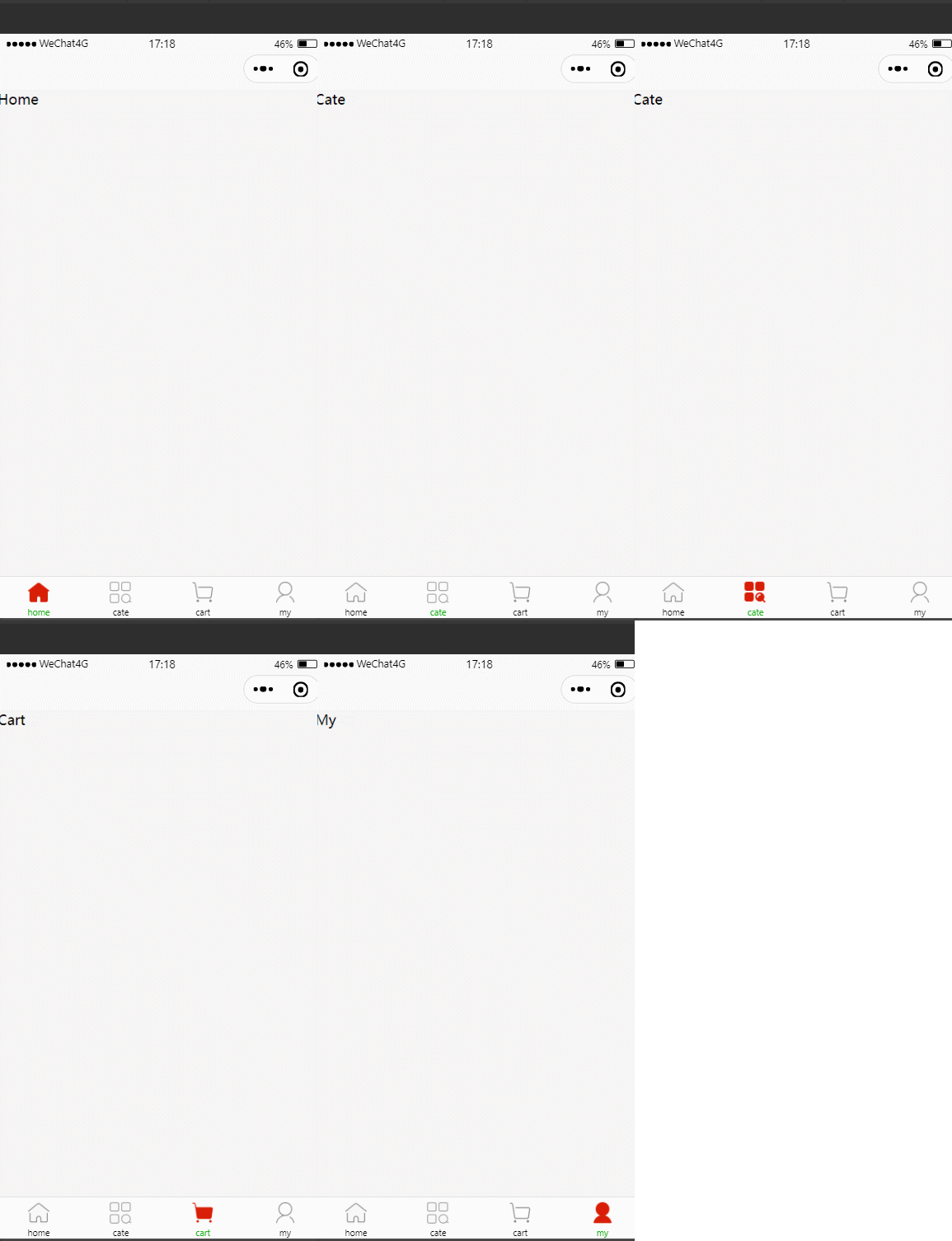
效果(这是图标素材,自己配置,只需要放自己的图片即可):
- 图标素材库:https://icons8.com/icons/set/find-job
配置选中颜色和未选中颜色
只需要在page.json中的tabbar节点 设置两个属性即可
 "tabBar": {

    "selectedColor": "#ff3007",
    "color": "#efefef"

     "list": [{

         ......
      },

    }
且非常好用的可以看到对应的颜色
效果: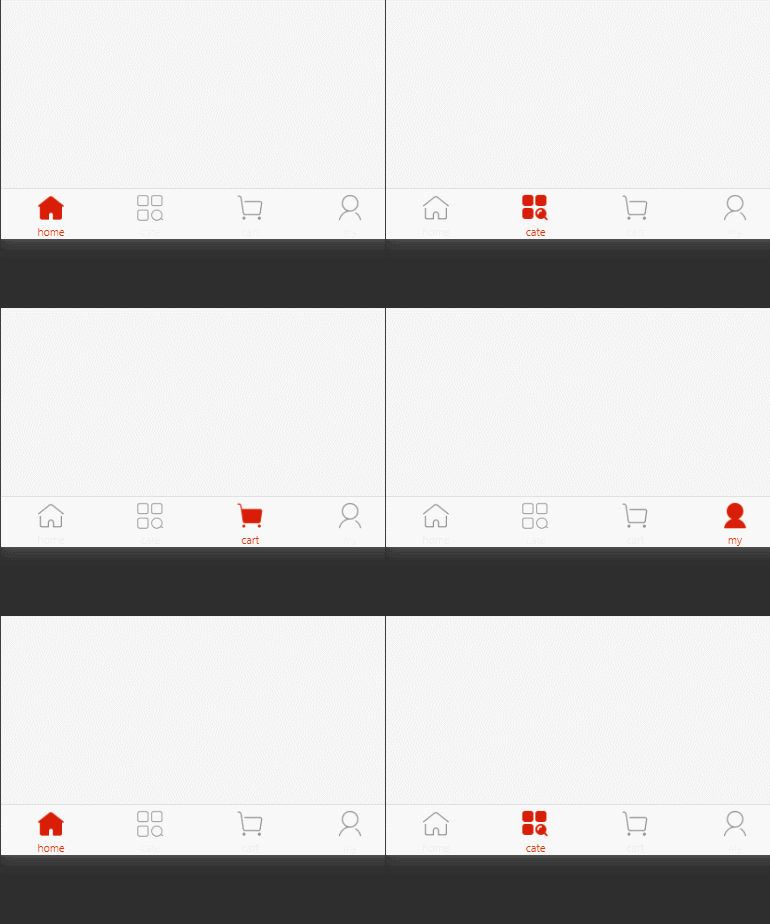
修改窗口顶部样式效果
在上文也已看到,小程序开发工具开发 与 uni-app开发的区别,
- 每个页面的
json配置都在pages.json的页面节点的style配置,这是局部配置(页面配置) ,
2.全局配置(应用配置),在小程序开发工具中在app.json中配置windows节点即可,而在uni-app则需要在pages.json文件中globalStyle节点配置即可(全局风格)
其修改样式属性没有变化,只是配置的方式不同

可以讲鼠标停留在属性上,uni-app非常实用的提醒你用法和作用
如:

如果此时设置的主题样式没有效果
"navigationBarTitleText": "窗口主题",
则是因为你在页面配置中覆盖了, 局部配置会覆盖全局配置
效果

tabbar分支的提交与合并(同第一节内容,选读*)
在项目根目录下打开bash
分别运行
- 添加到缓存区
git add .
- 添加到仓库
git commit -m "tabbar 分支"
- 查看状态
git status
- 推送到码云gitee 仓库 ( 由于是第一次提交 加上
-u)
git push -u origin tabbar
成功上传
可以看到修改过文件会显示 tabbar分支完成
- 将本地的tabbar分支 合并到主分支 master (注意:要切换到主分支)
git checkout master   注释: 切换到主分支,不切换就是合并到tabbar分支了
git merge tabbar  注释: merge 合并分支
合并之后本地仓库的master 已经更新, 此时需要上传更新的master分支 (默认上传到origin master
git push
成功
删除本地的tabbar,此时tabbar已经完成使命,对其进行删除内存释放(需要看代码可以去远程仓库去看)。
删除某个分支,应该先跳出被删除的分支 (delete)
git branch -d tabbar
删除成功
谢谢你的阅读,您的点赞和收藏就是我创造的最大动力!

边栏推荐
- String的模拟实现
- [single chip microcomputer] [make buzzer sound] know the buzzer and let it make the sound you want
- Deploy odoo to the server and configure it as a service
- 3. abstract class (shape)
- 【华为云至简致远】征文获奖名单出炉!
- 十九、Xv6上下文切换(上下文切换的实现;状态机的封装与恢复)
- SAP ABAP 对话框编程教程:中的模块池-09
- 19、 Xv6 context switching (implementation of context switching; encapsulation and recovery of state machine)
- Batch export excel zip using zipfile, openpyxl and flask
- SAP ABAP 中的 Smart Forms-014
猜你喜欢



随机推荐
Rosbag use command
SAP 脚本教程:SE71、SE78、SCC1、VF03、SO10-013
SAP ABAP 中的 Smart Forms-014
各位学弟学妹,别再看教材了,时间复杂度看这篇就好了
Google Chrome small details
Maze problem (BFS record path)
[single chip microcomputer] [make buzzer sound] know the buzzer and let it make the sound you want
音视频基础知识|ANS 噪声抑制原理解析
Binary search (integer binary)
转:杰克·韦尔奇:战略就是要少点沉思,敏于行动
School enterprise alliance is on the way! Huawei cloud gaussdb has come to universities again
华为云HCDEZ专场暨分布式技术峰会:华为云分布式云原生技术与实践之路
Cross border integration, creativity and innovation to help improve the influence of cultural tourism night tour
默认函数控制 =default 与 =delete
解决mysql远程登录报权限问题
Runtime——探索类,对象,分类本质
CMake教程系列-00-简介
vector的模拟实现
odoo本地文档功能开发记录
知识管理在业务中的价值如何体现