当前位置:网站首页>Code layered management of interface testing based on RF framework
Code layered management of interface testing based on RF framework
2022-07-28 12:56:00 【Nine life cat】
Catalog
>>> stay RF Import custom library
3、 ... and 、 Code layered management
>>> encapsulation http request
>>> Others are RF Custom libraries used in
The second floor : Request layer
The third level : Use case layer
One 、 Test environment
| Python | 3.7.2 |
| jsonpath | 0.82 |
| jsonschema | 3.2.0 |
| numpy | 1.21.6 |
| Pillow | 9.1.1 |
| PyMySQL | 1.0.2 |
| PyYAML | 6.0 |
| requests | 2.26.0 |
| robotframework | 4.1 |
| robotframework-requests | 0.9.3 |
| robotframework-ride | 1.7.4.2 |
| sqlparse | 0.4.2 |
| urllib3 | 1.26.9 |
| wxPython | 4.0.7 |
Two 、 Basic operation
>>> stay RF Import custom library
To be in RF You need to import the gadgets written by yourself in Library, As shown in the figure below .
Mytools.py,AssertByDataBase.py Are custom libraries

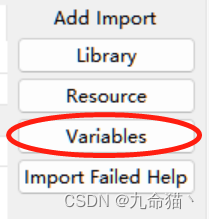
Of course, you can also import variables , Select import Variables, And then choose .py The file path is just .
Variables can be written in classes or defined directly
# Variables.py
class BaseConfig:
    """ Basic environment variable """
    baseurl = "http://10.168.2.204:9095/api"
    #  Used to get Token, And the login user name used in the whole process of testing 、 password , The password needs to go through Base64 Encryption processing
    login_username = "admin"
    login_password = "e10adc3949ba59abbe56e057f20f883e"
    #  Default request header
    headers = {
        "Content-Type": "application/json",
        "User-Agent": "Mozilla/5.0 (Windows NT 10.0; Win64; x64) AppleWebKit/537.36 (KHTML, like Gecko) "
                      "Chrome/95.0.4638.69 Safari/537.36"}

login_api = "/login"
stay RF Using variables in
comment     Use BaseConfig Variables in class baseurl
log    ${BaseConfig.baseurl}

comment     Using variables login_api
log    ${login_api}
3、 ... and 、 Code layered management
Here is the hierarchical management method I used in my work , Friends have better ways to share with me in the comment area to learn .( At present, data-driven is not implemented, so only 3 layer , Wait for me to study RF How to realize data-driven re update )
first floor : Public level
Use at this level RobotFrameWork-requests The keywords provided by the module are encapsulated , Encapsulate the methods according to the methods required by the project .

>>> encapsulation http request
HttpRequest.txt Encapsulated get,post,delete,put Method is used to send the corresponding http request ( Add after method name u It's to prevent contact with RobotFrameWork-requests The provided original keywords conflict ), When encapsulating, you can directly assert the response status code according to the project requirements .
getu
    [Arguments]    ${interface}    ${data}=
    ${token}    get_token
    &{headers}    MyTools.Get Headers    ${token}
    Create Session    addr    ${BaseConfig.baseurl}    headers=${headers}    timeout=5000
    ${url}    Catenate    SEPARATOR=    ${interface}    ?    ${data}
    ${res}    GET On Session    addr    ${url}
    Return From Keyword    ${res}
>>> management token
get_headers Function returns a headers be used for http request , First, in the Variables.BaseConfig Define a default request header , Can contain Contain-type,User-Agent Etc , When the user provides Token Data will be Token Join request header , Otherwise, a default request header is returned ( According to the design of different projects , Some login interfaces generally do not need Token value )
get_token Keyword direct use post Method requests the login interface to get token value , Acquired token Values can be passed as parameters to get_headers So that Token Add to the request header
def get_headers(token=False):
    """
    HTTP Request header , Included by default Content-Type、User-Agent, If the project has other needs, you can edit it yourself headers The content in .
    :param token: The type is String or bool, if  String Then take its value as HTTP The request header Token value , Otherwise, the default request header content is returned .
    :return:  User defined request header content .
    """
    #  default HTTP Request header
    headers = Variables.BaseConfig.headers
    #  Judge whether the user provides Token
    if token:
        #  Will be provided by the user Token Join in HTTP Request header
        headers["Token"] = token
    #  Return to the final HTTP Request header
    return headers

get_token
    log     Try to get TOKEN
    ${data}    Create Dictionary    username=${BaseConfig.login_username}    password=${BaseConfig.login_password}
    ${headers}    MyTools.Get Headers
    Create Session    addr    ${BaseConfig.baseurl}
    ${res}    POST On Session    addr    ${UserApi.apilogin}    json=${data}    headers=${headers}
    ${res_data}    Get From Dictionary    ${res.json()}    data
    ${token}    Get From Dictionary    ${res_data}    token
    Return From Keyword    ${token}
>>> Others are RF Custom libraries used in
RF Frame pair For Circulation is really unfriendly , Therefore, I am still used to some complex logic python Encapsulated into keywords , Go again RF Call in , I will store these keywords in common/Mytools.py in , For example, database operations and some data operations .
The second floor : Request layer
Send according to the characteristics of different interfaces in this level HTTP request , The purpose of its encapsulation is to call , After entering the test case parameters, the request results are returned and used in the third layer for assertion .( At present, there are a lot of repetitive code in this layer , Considering how to further package )

The third level : Use case layer
In this level, we mainly achieve the following goals :
>>> Initialize test case data
Most interfaces need to input certain parameters , Initialize test case data here
 Log in with the correct user name and password
    [Documentation]     user name  = admin
    ...     password  = 123456 \ (base64 After transcoding, it is  :e10adc3949ba59abbe56e057f20f883e)
    comment    ***** Initialize the test case ******
    ${username}    Set Variable    admin
    ${password}    Set Variable    e10adc3949ba59abbe56e057f20f883e
>>> Execute test case
Input test data is performed through the keywords encapsulated in the request layer 、 Execute the test case and get the return result
comment    ***** Execute test case ********
${res}    login    ${username}    ${password}
>>> Test results assert
Execute the return result according to the test case And Compare the expected results To assert that
Comment    ***** Test results assert ********
${res_data}    Get From Dictionary    ${res}    data
${res_data_user}    Get From Dictionary    ${res_data}    user
${req_username}    Get From Dictionary    ${res_data_user}    username
${name}    Get From Dictionary    ${res_data_user}    name
Should Be Equal    ${req_username}    ${username}
Should Be Equal    ${name}     Administrators
Common assertion keywords are :
| Should Be Equal | Parameters 1 == Parameters 2 |
| Should Be Equal As String | str( Parameters 1) == str( Parameters 2) |
| Should Contain | Parameters 1 in Parameters 2 |
You can use it, of course python Write keyword setting assertion logic by yourself , Use assert To assert that , If the assertion fails, it returns AssertionError.
边栏推荐
- stm32 回环结构接收串口数据并处理
- 力扣315计算右侧小于当前元素的个数
- Cloud native - runtime environment
- LeetCode206 反转链表
- How to add PDF virtual printer in win11
- Review the IO stream again, and have an in-depth understanding of serialization and deserialization
- 十三. 实战——常用依赖的作用
- 机器学习实战-神经网络-21
- SuperMap iclient3d for webgl to realize floating thermal map
- leetcode 376. Wiggle Subsequence
猜你喜欢

Cloud native - runtime environment

VS code更新后不在原来位置

MMA8452Q几种模式的初始化实例

非标自动化设备企业如何借助ERP系统,做好产品质量管理?

Hongjiu fruit passed the hearing: five month operating profit of 900million Ali and China agricultural reclamation are shareholders

Design a thread pool

Science heavyweight: AI design protein has made another breakthrough, and it can design specific functional proteins

How to add PDF virtual printer in win11
Vs code is not in its original position after being updated

快速读入
随机推荐
stm32 回环结构接收串口数据并处理
How to add PDF virtual printer in win11
Cloud native - runtime environment
Quick read in
机器学习基础-支持向量机 SVM-17
20220728 common methods of object class
Aopmai biological has passed the registration: the half year revenue is 147million, and Guoshou Chengda and Dachen are shareholders
New progress in the implementation of the industry | the openatom openharmony sub forum of the 2022 open atom global open source summit was successfully held
The input string contains an array of numbers and non characters, such as a123x456. Take the consecutive numbers as an integer, store them in an array in turn, such as 123 in a[0], 456 in a[1], and ou
How to open the power saving mode of win11 system computer
Application and download of dart 3D radiative transfer model
A brief introduction to the for loop. Some of the code involves arrays
Unity loads GLB model
MMA8452Q几种模式的初始化实例
Sliding Window
AI制药的数据之困,分子建模能解吗?
快速读入
SuperMap game engine license module division
机器学习实战-集成学习-23
Science 重磅:AI设计蛋白质再获突破,可设计特定功能性蛋白质